If you’re searching for a USB hardware token with FIDO2 support, the practical choice comes down to connector type, NFC capability, and how many devices you need to cover. My top pick is the Yubico YubiKey 5 NFC, which pairs the broadest platform compatibility in the lineup with dual USB-A and NFC connectivity and proven firmware reliability. The Thetis Pro FIDO2 with USB-A, USB-C, and NFC is the strongest alternative if you want one key that physically fits every port without adapters, and the Thetis 2-Pack is the value play for setting up a primary key plus a backup. The main tradeoffs in this category are versatility versus pocketability — multi-connector keys are bulkier — and price versus features like FIPS certification or biometrics. Keep reading for the full breakdown of all 15 keys and who each one suits best.

Get privacy and security gear delivered free with Prime
- Fast, free delivery on millions of items
- Prime Video, Amazon Music and more included
- Member-only deals all year
Key Takeaways
- Connector strategy was the single biggest differentiator: keys offering both USB-A and USB-C (Thetis Pro, TrustKey T120) ranked higher because a single key covering every port avoids replacement costs when you change laptops.
- Yubico and TrustKey separated themselves on ecosystem breadth — their keys work reliably across password managers, enterprise identity providers, and Windows Hello, while some budget keys had spotty support on less common services.
- NFC turned out to be more future-relevant than expected: even desktop-only buyers benefited because NFC keys double as tap-to-authenticate tokens for phones and tablets, extending a key’s useful life.
- The Kensington VeriMark NFC+ was the only biometric option reviewed, and its fingerprint requirement makes it a niche pick — stronger physical security, but poor fit as a shared or backup key.
- Ultra-compact models like the Thetis Nano-A and Nano-C sacrifice grip and durability for flush fitting; they’re ideal for permanent laptop-dongle use but frustrating as everyday carry keys.
- Buying a 2-pack (Thetis 2-Pack) consistently beat buying a single premium key for most users, since losing your only FIDO2 key without a registered backup can lock you out of accounts entirely.
| FEITIAN K9 USB-A NFC FIDO2 Security Key |  | Best for USB-A and NFC Flexibility | Authentication standards: FIDO2, FIDO U2F | Connections: USB-A, NFC | Driver installation: Not required | VIEW ON AMAZON | See Our Full Breakdown |
| Thetis FIDO2 Security Keys, USB-A, 2-Pack |  | Best Spare-Key Set | Quantity: 2 keys | Connector: USB-A | Authentication: FIDO2, passkeys | VIEW ON AMAZON | See Our Full Breakdown |
| K39 USB-C Security Key with FIDO2 and U2F |  | Best for USB-C-Only Devices | Connector: USB-C | Authentication standards: FIDO2, FIDO U2F | Supported operating systems: Android, Chrome OS, Windows, macOS, Linux | VIEW ON AMAZON | See Our Full Breakdown |
| Thetis Pro FIDO2 Security Key with USB-A, USB-C, and NFC |  | Best for Mixed Ports | Authentication: FIDO2, HOTP | Connectors: USB-A, USB-C | Wireless connection: NFC for mobile authentication | VIEW ON AMAZON | See Our Full Breakdown |
| Yubico YubiKey 5C NFC Security Key |  | Best for Broad Protocol Support | Connectivity: USB-C, NFC | Supported protocols: FIDO2/WebAuthn, FIDO U2F, Yubico OTP, OATH-TOTP/HOTP, PIV, OpenPGP | Passkey slots: 100 | VIEW ON AMAZON | See Our Full Breakdown |
| K28e USB-C Security Key – FIDO2 Two-Factor Authenticator |  | Best for PIV Support | Connector: USB-C | Certifications: FIDO2, FIDO U2F | Additional authentication: PIV credential support | VIEW ON AMAZON | See Our Full Breakdown |
| Yubico YubiKey 5 NFC Security Key |  | Best for Protocol Flexibility | Connection: USB-A, NFC | Protocols: FIDO2/WebAuthn, FIDO U2F, Yubico OTP, OATH-TOTP/HOTP, PIV, OpenPGP | Firmware: 5.7 | VIEW ON AMAZON | See Our Full Breakdown |
| Idaxis SecureWave USB-C NFC FIDO2 Security Key |  | Best for USB-C and NFC | Authentication protocol: FIDO2 | Connectivity: USB-C, NFC | Hardware interface: USB | VIEW ON AMAZON | See Our Full Breakdown |
| TrustKey T120 FIDO2 and U2F USB-C Security Key with PIN and Touch |  | Best for Simple USB-C Sign-In | Authentication standards: FIDO2, U2F | Connection: USB-C | Authentication method: PIN and touch; non-biometric | VIEW ON AMAZON | See Our Full Breakdown |
| HID Global uTrust FIDO2 FIPS Card (Hirsch Secure) |  | Best Wallet-Carry FIPS Option | Authentication protocol: FIDO2 | Certification: FIPS | Form factor: Credit card; wallet-sized | VIEW ON AMAZON | See Our Full Breakdown |
| Thetis Pro FIDO2 Security Key with PinPlex | 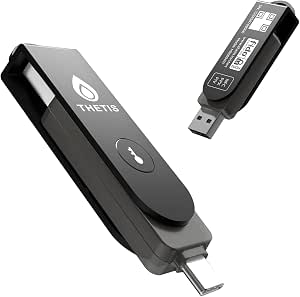 | Best Multi-Protocol Workhorse | Connectors: USB-A and USB-C | Wireless connectivity: NFC | Authentication standards: FIDO2, FIDO U2F, WebAuthn, CTAP2 | VIEW ON AMAZON | See Our Full Breakdown |
| Thetis FIDO2 Security Key with Folding USB-A Design |  | Best Rugged Everyday Carry | Authentication: FIDO2, U2F, HOTP | Interface: USB Type-A | Operating system compatibility: Windows, macOS, Linux, Chrome OS | VIEW ON AMAZON | See Our Full Breakdown |
| Thetis Nano-C FIDO2 USB-C Security Key |  | Best for Modern Laptops and Phones | Connector: USB-C | Standards: FIDO and FIDO2 | Passkey slots: 200 | VIEW ON AMAZON | See Our Full Breakdown |
| Thetis Nano-A FIDO2 USB-A Security Key |  | Best Value for Desktop Users | Interface: USB 2.0 | Connector: USB Type-A | FIDO2 passkey slots: 200 | VIEW ON AMAZON | See Our Full Breakdown |
| Kensington VeriMark NFC+ USB-A Biometric Fingerprint Security Key |  | Best Biometric Pick | Model: K64738WW | Authentication: Biometric fingerprint | Connectivity: USB-A and NFC | VIEW ON AMAZON | See Our Full Breakdown |
More Details on Our Top Picks
FEITIAN K9 USB-A NFC FIDO2 Security Key
The FEITIAN K9 makes sense for someone who moves between a laptop with USB-A and an NFC-enabled phone: it supports both connection methods while covering FIDO2 and U2F sign-in. Driver-free setup also keeps it practical across compatible browsers and services. Compared with the K39 USB-C Security Key, the K9 trades newer USB-C compatibility and an IP67 rating for NFC access and a familiar USB-A plug. The Thetis Pro offers USB-A, USB-C, and NFC, so it is more adaptable across ports, but its feature set includes extra HOTP support that some buyers may not need. The K9’s main limit is clear: it cannot plug directly into USB-C-only devices. Its stated water and crush resistance adds reassurance for everyday carrying, though the listing gives no specific rating.
Pros:- Combines USB-A and NFC authentication
- Supports FIDO2 and FIDO U2F
- Works without driver installation
- Designed to resist water and crushing
Cons:- USB connection is limited to USB-A
- Water resistance is listed without a specific rating
Best for: People who use a USB-A computer and an NFC-enabled Android or Apple phone for account sign-ins
Not ideal for: Owners of USB-C-only laptops or phones who want one key that plugs in without an adapter
- Authentication standards:FIDO2, FIDO U2F
- Connections:USB-A, NFC
- Driver installation:Not required
- Phone compatibility:NFC-enabled Android and Apple phones
- Listed features:Crush resistant, lightweight, water resistant
- Dimensions:0.12 × 1.73 × 0.83 inches (D × W × H)
- Color:Black
Our verdict“Choose the K9 if USB-A and NFC cover your devices; pick the Thetis Pro if you also need a USB-C connector.”
Thetis FIDO2 Security Keys, USB-A, 2-Pack
This set’s strongest case is having two USB-A keys ready for a primary account credential and a separately stored backup. That can reduce the chance that a lost key leaves you without access, while the fold-out connector and rotating metal cover suit keychain carry. Both keys support FIDO2 and passkeys with compatible services, and setup uses the Thetis Manager App to configure a hardware PIN. Compared with the FEITIAN K9, this set adds a spare and a protective cover but drops NFC, so it cannot authenticate by tap on a phone. It also lacks the Thetis Pro‘s USB-C option. Skip it if your devices rely on USB-C, if you need NFC, or if your workflow depends on ID Austria; Windows Hello use also has a specific enterprise requirement.
Pros:- Includes two FIDO2 security keys for primary and backup use
- Fold-out USB-A connector is protected by a rotating metal cover
- Supports passkeys on compatible services
- Requires no batteries or network connection
Cons:- No NFC support
- Does not support ID Austria
- Windows Hello requires a compatible Windows Enterprise edition with Entra ID
Best for: USB-A users who want a second FIDO2 key to store as a backup or assign to another account
Not ideal for: People who authenticate by NFC, use USB-C-only devices, or require ID Austria support
- Quantity:2 keys
- Connector:USB-A
- Authentication:FIDO2, passkeys
- PIN setup:Thetis Manager App
- Power:No batteries required
- Network connection:Not required
- Durability:Water, crush, and tamper resistant
- Known limitations:No NFC or ID Austria; Windows Hello requires compatible enterprise setup
Our verdict“Pick this two-pack if you need a USB-A spare key; the FEITIAN K9 is a better fit if NFC phone sign-in matters.”
K39 USB-C Security Key with FIDO2 and U2F
The K39 is a focused pick for buyers whose computers and phones already have USB-C ports. It supports FIDO2 and U2F, works across Android, Chrome OS, Windows, macOS, and Linux, and needs no driver downloads. Its IP67 water resistance gives it a stated protection level that the FEITIAN K9 does not specify, making the K39 easier to assess for exposure to water. The tradeoff is that it has no listed NFC connection: unlike the FEITIAN K9 or Thetis Pro, it cannot tap to authenticate on compatible phones. It also depends on USB-C being available wherever you sign in. This is a straightforward option for cross-platform USB-C use, but buyers with mixed older ports or a phone-first workflow may prefer a key with more connection choices.
Pros:- Supports FIDO2 and FIDO U2F
- Works with Android, Chrome OS, Windows, macOS, and Linux
- Requires no driver installation
- IP67 water-resistant design
Cons:- Requires a device with a USB-C port
- No NFC connection is listed
Best for: People with USB-C-equipped devices across multiple operating systems who want a simple FIDO2/U2F key
Not ideal for: Buyers who need NFC phone authentication or regularly use computers without USB-C ports
- Connector:USB-C
- Authentication standards:FIDO2, FIDO U2F
- Supported operating systems:Android, Chrome OS, Windows, macOS, Linux
- Water resistance:IP67
- Driver installation:Not required
- NFC:Not listed
Our verdict“Choose the K39 for a direct USB-C connection and rated water resistance; choose the FEITIAN K9 if NFC is part of your routine.”
Thetis Pro FIDO2 Security Key with USB-A, USB-C, and NFC
With USB-A, USB-C, and NFC on one key, the Thetis Pro suits people who switch between older computers, newer laptops, and mobile devices. That flexibility gives it an advantage over the K39, which is USB-C-only, and the FEITIAN K9, which lacks USB-C. A rotating metal cover helps shield the connectors in a bag or on a keychain, and no battery or network connection is needed. Its tradeoff is that NFC is for mobile authentication and does not work on Mac or Windows, so desktop users still need a compatible USB port. The key supports FIDO2 and HOTP, but Windows Hello requires a supported Enterprise edition, and ID Austria is not supported. It is the broadest port match in this group, with some platform-specific boundaries.
Pros:- Offers USB-A, USB-C, and NFC connections
- Supports FIDO2 and HOTP
- Needs no battery or network connection
- Rotating metal cover supports keychain carry
Cons:- NFC does not work on Mac or Windows
- Windows Hello requires a compatible Windows Enterprise edition
- ID Austria is not supported
Best for: People who alternate among USB-A computers, USB-C devices, and NFC-capable phones
Not ideal for: Buyers who need NFC on Mac or Windows, ID Austria, or Windows Hello on a non-Enterprise setup
- Authentication:FIDO2, HOTP
- Connectors:USB-A, USB-C
- Wireless connection:NFC for mobile authentication
- Compatible operating systems:Windows, macOS, Linux, Chrome OS
- Power:No battery required
- Dimensions:2.9 × 0.72 × 0.5 inches
- Color:Black
- Known limitations:NFC unavailable on Mac or Windows; ID Austria unsupported; Windows Hello requires supported Enterprise edition
Our verdict“Choose the Thetis Pro if you need one key for mixed USB ports and mobile NFC, provided its platform limits fit your setup.”
Yubico YubiKey 5C NFC Security Key
The YubiKey 5C NFC is the most versatile protocol choice here: alongside FIDO2/WebAuthn and U2F, it supports OTP, OATH, PIV smart card, and OpenPGP. That range makes it better suited than the K39 for buyers who need one physical key across several authentication workflows, while USB-C and NFC cover compatible computers and phones. Yubico lists support for more than 1,000 services, and the key needs no battery or internet connection. This breadth brings a setup tradeoff: buyers who only want a basic FIDO2 passkey key may find the extra protocols unnecessary. USB-C also rules out direct use on devices without that port, while a spare key is sensible for anyone relying on it for account access. Its water- and crush-resistant build supports everyday carry.
Pros:- Supports FIDO2/WebAuthn, U2F, OTP, OATH, PIV, and OpenPGP
- Connects by USB-C or NFC
- Works with more than 1,000 services
- Water resistant, crush resistant, and designed for keychain carry
Cons:- USB-C may not fit devices without a compatible port
- Its broad protocol support may be unnecessary for basic FIDO2 sign-in
- A spare key is recommended to reduce account lockout risk
Best for: Security-conscious users who want USB-C and NFC plus FIDO2, OTP, smart card, and OpenPGP support
Not ideal for: People seeking a basic, USB-A-compatible key or those who do not need its broader protocol set
- Connectivity:USB-C, NFC
- Supported protocols:FIDO2/WebAuthn, FIDO U2F, Yubico OTP, OATH-TOTP/HOTP, PIV, OpenPGP
- Passkey slots:100
- Service compatibility:More than 1,000 services
- Water resistance:Yes
- Crush resistance:Yes
- Dimensions:0.15 × 0.7 × 1.77 inches
- Color:Black
Our verdict“Choose the YubiKey 5C NFC if you need broad protocol support alongside USB-C and NFC; simpler FIDO2 needs can be met by the K39.”
K28e USB-C Security Key – FIDO2 Two-Factor Authenticator
The K28e combines FIDO2 and U2F sign-in with PIV credential support, giving it a broader authentication role than the TrustKey T120, which focuses on PIN and touch for account sign-in. Its low-profile USB-C shape is suited to a laptop that stays plugged into a port, while driver-free browser support keeps setup simple across compatible devices. That small footprint comes with a firm limitation: it has no NFC, so phones and tablets without USB-C cannot use it as conveniently as the Idaxis SecureWave. I’d choose this model for a USB-C desktop or laptop user who wants PIV alongside web authentication; buyers who need tap-to-authenticate or USB-A support should look elsewhere.
Pros:- FIDO2 and U2F certification supports phishing-resistant account authentication
- PIV credential support adds use beyond ordinary web sign-in
- Low-profile design stays unobtrusive while plugged in
- Driver-free operation works across browsers on compatible devices
Cons:- USB-C connector may require an adapter for USB-A devices
- No NFC option for tap-based phone authentication
Best for: USB-C laptop and desktop users who need FIDO2 sign-in plus PIV credential authentication.
Not ideal for: People who regularly authenticate by tapping a phone or use devices with USB-A ports, since this key has no NFC and may need an adapter.
- Connector:USB-C
- Certifications:FIDO2, FIDO U2F
- Additional authentication:PIV credential support
- Design:Low-profile
- Drivers:None required
- Compatibility:Desktops, laptops, tablets, Android devices
Our verdict“Choose the K28e if you want a low-profile USB-C key with PIV support and do not need NFC.”
Yubico YubiKey 5 NFC Security Key
The YubiKey 5 NFC is the most protocol-diverse pick in this group: alongside FIDO2/WebAuthn and U2F, it supports Yubico OTP, OATH-TOTP/HOTP, PIV, and OpenPGP. That range makes it a stronger fit for someone consolidating several authentication methods than the FIDO2-focused Idaxis SecureWave. Its USB-A and NFC connections also cover older computers and NFC-capable phones, though it is less convenient for USB-C-only laptops than the K28e. The breadth brings a learning curve, and losing the sole key can lock a user out of accounts, so a spare is recommended. I’d favor it when protocol coverage and device flexibility matter more than a minimal, single-purpose key.
Pros:- Supports FIDO2/WebAuthn and U2F alongside OTP, OATH, PIV, and OpenPGP
- USB-A and NFC cover computers and compatible mobile devices
- Requires no batteries or internet connection
- Works with a broad range of supported accounts
Cons:- USB-A may require an adapter on USB-C-only computers
- A lost key can interrupt account access unless a backup key is enrolled
- Multiple protocols may be more than buyers seeking basic FIDO2 sign-in need
Best for: People who manage accounts and workflows using several authentication protocols and need USB-A plus NFC access.
Not ideal for: USB-C-only device owners who want a key that plugs in directly without an adapter.
- Connection:USB-A, NFC
- Protocols:FIDO2/WebAuthn, FIDO U2F, Yubico OTP, OATH-TOTP/HOTP, PIV, OpenPGP
- Firmware:5.7
- Power:No batteries required
- Internet connection:Not required
Our verdict“Pick the YubiKey 5 NFC if you need broad protocol support across USB-A computers and NFC-capable phones.”
Idaxis SecureWave USB-C NFC FIDO2 Security Key
The Idaxis SecureWave pairs USB-C with NFC, so it can serve a laptop directly and a compatible phone by tap. That combination gives it a mobility advantage over the USB-C-only TrustKey T120, while the YubiKey 5 NFC offers more authentication protocols for users who need OTP, PIV, or OpenPGP. The SecureWave keeps its stated scope to FIDO2 authentication, which suits buyers who want a straightforward standards-based key but limits use to services that support FIDO2. Its compact, translucent blue casing is easy to carry, though the listed storage and read/write figures do not explain a buyer-facing function. I’d choose it for a portable USB-C and NFC setup, not for broader credential or data-storage needs.
Pros:- USB-C and NFC offer wired and tap-based authentication
- Compact form is designed for a keychain or pocket
- FIDO2 support targets phishing-resistant sign-in on compatible services
- Translucent casing makes device status visible
Cons:- Authentication is limited to services that support FIDO2
- Listed storage and read/write specifications have no clear stated use
- Does not list the broader protocol range found on the YubiKey 5 NFC
Best for: Mobile-first users with USB-C computers and NFC-capable phones who want one portable FIDO2 key.
Not ideal for: People who need legacy OTP, PIV, or OpenPGP functions, or who use services without FIDO2 support.
- Authentication protocol:FIDO2
- Connectivity:USB-C, NFC
- Hardware interface:USB
- Form factor:Portable keychain token
- Color:Translucent blue
- Listed storage capacity:5 MB
- Listed read/write speeds:5 MB/s read; 3 MB/s write
Our verdict“Choose the SecureWave for portable FIDO2 sign-in across USB-C devices and NFC-capable phones.”
TrustKey T120 FIDO2 and U2F USB-C Security Key with PIN and Touch
The TrustKey T120 keeps its job clear: FIDO2 and U2F authentication through USB-C, with PIN and touch confirmation. That makes it a straightforward account key for Windows, macOS, and Linux users, without the extra protocol set of the YubiKey 5 NFC or the PIV support of the K28e. The touch step gives users an explicit physical action during sign-in, while the PIN adds a local check; neither is biometric, so buyers wanting fingerprint login should consider another type of key. USB-C makes it a natural match for newer computers, but there is no listed NFC for phone tap-in and USB-A devices may need an adapter. It suits buyers who value simple FIDO sign-in over wider connectivity.
Pros:- Supports FIDO2 and U2F for compatible account sign-in
- PIN and touch provide two non-biometric authentication steps
- Works with Windows, macOS, and Linux
- Compatible with major browsers including Chrome, Firefox, and Edge
Cons:- USB-C connection may require an adapter for USB-A devices
- No NFC support is listed for tap-based phone authentication
- Does not provide biometric authentication or the YubiKey’s wider protocol set
Best for: People using USB-C computers on Windows, macOS, or Linux who want PIN and touch authentication for compatible accounts.
Not ideal for: Users who need NFC phone authentication, biometric login, or broad legacy protocol support.
- Authentication standards:FIDO2, U2F
- Connection:USB-C
- Authentication method:PIN and touch; non-biometric
- Operating systems:Windows, macOS, Linux
- Compatible browsers:Chrome, Firefox, Edge, and other major browsers
Our verdict“Pick the T120 for uncomplicated PIN-and-touch FIDO2 sign-in on USB-C computers.”
HID Global uTrust FIDO2 FIPS Card (Hirsch Secure)
The HID Global uTrust FIDO2 FIPS Card takes a different form from the plug-in keys here: its wallet-sized card is designed to stay with everyday cards rather than protrude from a computer port. FIPS certification may make it a better fit for buyers with compliance requirements than the Idaxis SecureWave, whose supplied details specify FIDO2 but no FIPS certification. The tradeoff is connectivity: phone and tablet use requires NFC-capable devices, and the listing does not describe USB connectivity for computers. Its stated protocol is FIDO2, so it is a narrower choice than the YubiKey 5 NFC for people who rely on OTP, PIV, or OpenPGP. I’d select it when wallet carry and FIPS credentials matter more than plug-in versatility.
Pros:- FIPS certification suits buyers with security compliance requirements
- Credit-card form factor fits in a wallet
- FIDO2 authentication supports compatible services
- Listed compatibility spans phones, tablets, laptops, and desktops
Cons:- Phone and tablet authentication requires NFC-capable devices
- USB connectivity is not specified in the supplied product data
- FIDO2-only protocol listing is narrower than the YubiKey 5 NFC
Best for: Compliance-minded users who want a wallet-carried FIDO2 credential for NFC-capable mobile devices and compatible computers.
Not ideal for: Buyers who need a USB plug-in key, broad legacy protocol support, or authentication with services outside FIDO2.
- Authentication protocol:FIDO2
- Certification:FIPS
- Form factor:Credit card; wallet-sized
- Compatibility:Phones, tablets, laptops, desktops
- Supported services:Gmail, Facebook, Salesforce, LinkedIn, and more
- Mobile connection requirement:NFC-capable devices required for phone and tablet authentication
Our verdict“Choose the uTrust card if FIPS certification and wallet carry matter more than a conventional USB key.”
Thetis Pro FIDO2 Security Key with PinPlex
This is the most versatile token in the Thetis lineup. Where the Thetis Nano-C sticks to FIDO2 and TOTP, the Pro layers on PIV certificate support, HOTP, and PinPlex PIN protection, making it a legitimate option for enterprise environments that need smart-card-style authentication alongside passkeys. The triple connectivity — USB-A, USB-C, and NFC — means one key covers every device a buyer is likely to own, something only the Yubico 5 NFC and FEITIAN K9 also offer here.
The tradeoff is complexity. PIV and TOTP setup is not plug-and-play, and Windows Hello passwordless login only works with Enterprise edition and Entra ID, so home users gain little from the extras. Compared with a simpler key like the Thetis folding USB-A model, this one asks more of the buyer but returns far more capability.
Pros:- USB-A, USB-C, and NFC connectivity covers virtually every device
- PIV, TOTP, and HOTP support beyond standard FIDO2/U2F
- PinPlex PIN protection adds a defense layer for high-security accounts
- FIDO2 passkey support for passwordless sign-in on compatible services
Cons:- Windows Hello login requires Enterprise edition with Entra ID
- Feature compatibility varies widely by platform and service
- Advanced modes require more setup knowledge than basic FIDO2 keys
Best for: IT professionals and enterprise users who need PIV certificates, TOTP codes, and FIDO2 passkeys on a single key across USB-A, USB-C, and NFC devices
Not ideal for: Home users on standard Windows editions — the advanced authentication features are locked behind Enterprise and Entra ID requirements
- Connectors:USB-A and USB-C
- Wireless connectivity:NFC
- Authentication standards:FIDO2, FIDO U2F, WebAuthn, CTAP2
- Additional authentication:PIV certificates, TOTP, HOTP
- PIN protection:PinPlex
- Platform limitations:Windows Hello requires Enterprise edition with Entra ID; ID Austria not supported
Our verdict“Buy this if you manage credentials across mixed fleets and protocols; skip it if you just need simple passkey login at home.”
Thetis FIDO2 Security Key with Folding USB-A Design
Most security keys in this roundup are bare circuit boards with a keyring hole; this one wraps its USB-A connector in a rotating aluminum alloy cover that shields it from pocket lint, keys, and drops. For anyone who carries a token loose on a keychain, that physical durability matters more than extra protocol support. Compared with the Thetis Nano-A, which is smaller but exposed, this model trades compactness for protection.
Its feature set is deliberately lean: FIDO2, U2F, and HOTP, no PIV, no NFC, no TOTP slots. Buyers who want to tap-to-authenticate on a phone should look at the Thetis Pro instead. Also note that FIDO2 cannot unlock a Mac, and Windows Hello passwordless sign-in needs an enterprise Azure AD account — limitations shared by much of the Thetis family.
Pros:- Rotating aluminum alloy cover protects the connector in pockets and bags
- FIDO2 passwordless sign-in plus U2F two-factor support
- Works across Windows, macOS, Linux, and Chrome OS
- Compact and lightweight for everyday carry
Cons:- FIDO2 does not support Mac login
- Windows Hello passwordless login requires an enterprise Azure AD account
- No NFC and no USB-C — limited to USB-A ports
Best for: Keychain carriers and travelers who want a protected connector that survives daily pocket abuse
Not ideal for: Mobile-first users — there is no NFC or USB-C, so phone authentication needs an adapter
- Authentication:FIDO2, U2F, HOTP
- Interface:USB Type-A
- Operating system compatibility:Windows, macOS, Linux, Chrome OS
- Connector protection:Rotating aluminum alloy cover
- Dimensions:0.39 × 0.59 × 1.73 in
- Color:Black
Our verdict“This pick makes the most sense for buyers whose key will live on a keyring and take physical abuse rather than those chasing protocol breadth.”
Thetis Nano-C FIDO2 USB-C Security Key
At 0.73 × 0.60 × 0.30 inches, this is one of the smallest tokens in the entire roundup, small enough to leave semi-permanently plugged into a laptop USB-C port or dangle from a keychain. Where the Yubico YubiKey 5C NFC charges a premium for similar portability, the Nano-C delivers the core FIDO2 passkey experience with a surprisingly generous 200 passkey slots and 50 OATH-TOTP slots — more credential capacity than many full-size keys offer.
The compromises are predictable for something this tiny. There is no USB-A fallback, no NFC, and no touch surface confirmation, so authentication relies on browser prompts alone. Passkey support also depends on each website cooperating, and Windows Hello passwordless login still demands Enterprise edition with Entra ID — a recurring Thetis limitation worth checking against your own setup before buying.
Pros:- Extremely compact — fits a keychain or stays plugged into a laptop
- 200 FIDO2 passkey slots plus 50 OATH-TOTP slots
- Works with PC, Mac, Android, and USB-C iPhones
- Supports passwordless WebAuthn and CTAP2 login
Cons:- USB-C only — no USB-A or NFC fallback
- Windows Hello login requires Enterprise edition with Entra ID
- Passkey support depends on individual website compatibility
Best for: Owners of USB-C-only laptops and Android or USB-C iPhone users who want a nearly invisible always-with-you token
Not ideal for: Buyers with older USB-A desktops or who want NFC tap authentication on phones without cable fuss
- Connector:USB-C
- Standards:FIDO and FIDO2
- Passkey slots:200
- OATH-TOTP slots:50
- Item size:0.73 × 0.60 × 0.30 inches
- Compatible devices:PC, Mac, Android, and USB-C iPhones
- Known limitations:Windows Hello requires Enterprise edition with Entra ID; ID Austria not supported
Our verdict“This model is better suited to modern USB-C device owners who value near-invisibility over connector flexibility.”
Thetis Nano-A FIDO2 USB-A Security Key
Think of this as the Nano-C’s twin for the USB-A world: the same 200 passkey slots and 50 OATH-TOTP slots, the same tiny footprint, but shaped for the classic rectangular port still found on most desktops, docking stations, and Windows laptops. For buyers whose machines are all USB-A, paying more for the Thetis Pro’s dual connectors and PIV support buys features they will never touch — this stripped-down sibling covers the FIDO2 essentials at the entry point of the lineup.
The spec sheet is honest about its limits: no NFC for phones, and passkey login depends entirely on service compatibility. iOS and Android are listed as compatible, but using them means carrying an adapter, which undermines the portability story. As a leave-it-in-the-desktop token, though, its flush profile means it barely protrudes from the port.
Pros:- Tiny flush profile sits nearly invisible in a USB-A port
- 200 FIDO2 passkey slots and 50 OATH-TOTP slots
- Broad OS support including Windows, macOS, Linux, Chrome OS, iOS, and Android
- Simple plug-in setup with no drivers
Cons:- Requires a USB-A port — adapters needed on most phones and newer laptops
- Passkey login depends on service compatibility
- No NFC or wireless option of any kind
Best for: Desktop and docking-station users who want a low-cost, low-profile FIDO2 token that stays plugged in
Not ideal for: Phone-first authenticators — USB-A only means adapters everywhere on modern mobile hardware
- Interface:USB 2.0
- Connector:USB Type-A
- FIDO2 passkey slots:200
- OATH-TOTP slots:50
- Dimensions:0.25 × 0.74 × 0.25 in
- Color:Black
- Compatible operating systems:Windows, macOS, iOS, Android, Linux, Chrome OS
Our verdict“The sensible pick if your authentication happens at a desktop with USB-A ports and you want capacity without paying for connectors you lack.”
Kensington VeriMark NFC+ USB-A Biometric Fingerprint Security Key
This is the only token in the batch that replaces PIN entry with a fingerprint reader, and that changes the daily experience: instead of typing a code or PIN during verification, a touch authenticates. Kensington pairs the sensor with FIDO2 and WebAuthn for phishing-resistant login to Microsoft, Google, GitHub, and Facebook accounts, plus NFC for tap-authentication on phones — a combination closest to the Yubico YubiKey 5 NFC, but with biometrics instead of a touch button.
The tradeoffs are structural. It is USB-A only, so USB-C laptops need an adapter, and NFC requires a compatible reader on the receiving device. There is also no PIV or TOTP support, so compared with the Thetis Pro this is a narrower tool — but a more convenient one for buyers whose priority is fast, single-touch sign-in rather than protocol flexibility.
Pros:- Biometric fingerprint authentication replaces PIN entry
- Phishing-resistant FIDO2/WebAuthn support for major services
- USB-A plus NFC covers desktops and tap-to-authenticate phones
- No drivers required; works across Chrome, Edge, Firefox, and Safari
Cons:- USB-A only — newer laptops need an adapter
- NFC authentication depends on a compatible device or reader
- No PIV, TOTP, or smart-card features for enterprise credential scenarios
Best for: Buyers who sign in frequently throughout the day and prefer fingerprint verification over PINs or codes
Not ideal for: Mixed-fleet users needing PIV certificates or TOTP — the feature set stops at FIDO2/WebAuthn
- Model:K64738WW
- Authentication:Biometric fingerprint
- Connectivity:USB-A and NFC
- Supported standards:FIDO2 and WebAuthn
- Compatible operating systems:Windows, macOS, ChromeOS
- Compatible browsers:Chrome, Edge, Firefox, Safari
- Drivers required:No
Our verdict“Choose this if biometric convenience at high-frequency login points matters more than multi-protocol depth; skip it for enterprise smart-card use.”

How We Picked
I ranked these 15 FIDO2 keys against the criteria that actually determine long-term satisfaction: connector coverage (USB-A, USB-C, NFC), protocol support beyond basic FIDO2 (U2F, smart card/PIV, OpenPGP where offered), build quality and durability, platform compatibility across Windows, macOS, Linux, Android, and iOS, and physical design for the intended use case. Security posture mattered too — keys with rising, attestation, and FIPS certification scored higher for enterprise buyers, while tamper-resistant hardware separated the premium tier from budget clones.
The ranking logic favors versatility per dollar: a key that works in every port you own ranks above a cheaper key you’ll have to replace. That’s why the Yubico 5-series and the Thetis Pro multi-connector models sit near the top, while single-connector, single-protocol keys fill the value and specialty slots. Backup-friendliness also influenced placement — keys sold in multipacks or with simple enrollment flows scored better for first-time FIDO2 adopters, because account lockout from a lost key is the most common and painful mistake in this category.
Factors to Consider When Choosing Usb Hardware Token Fido2
Before picking a specific key, it helps to understand the decisions that shape whether a FIDO2 token serves you well for years or ends up in a drawer. These are the factors I weighed during this comparison, explained from the buyer’s side.Match the Connector to Your Real Device Fleet
The most common mistake buyers make is purchasing for the laptop they own today rather than the devices they’ll use over the key’s lifespan. A USB-A key is useless the day you switch to a USB-C-only ultrabook, and vice versa. Audit every device you authenticate from — desktop, laptop, phone, tablet — before choosing, and remember NFC covers most modern phones regardless of the USB connector. Multi-connector designs solve this permanently but cost more and protrude from the port. If you only ever authenticate on one machine, a single-connector flush-fit key like a nano form factor is actually the smarter buy, not a compromise.
Register Two Keys or Risk Lockout
FIDO2 keys are phishing-resistant precisely because they can’t be cloned — which also means a lost key with no backup can permanently lock you out of accounts. Every major service supports registering multiple security keys, yet most people register only one. This is why 2-pack options dominate the value conversation: your second key should be enrolled, tested, and stored somewhere safe (not next to your primary key in the same bag). Before finalizing any purchase, check whether your critical services — especially banking and email — support FIDO2 at all, and whether they allow multiple registered keys. Some services cap registrations or only support the older U2F protocol, which changes which key features matter.
Protocol Support Beyond FIDO2
Not every key labeled FIDO2 supports the same secondary protocols, and this is where budget and premium keys genuinely diverge. Smart card (PIV) and OpenPGP support turns a security key into a full credential device for SSH, certificate-based login, and code signing — capabilities developers and IT professionals use daily but casual buyers never touch. Rising support matters for enterprise identity providers, and attestation lets IT departments verify keys are genuine. If you’re buying for personal account protection only, paying extra for these protocols is wasted money. But if there’s any chance you’ll use the key for work or development, protocol breadth is the feature most worth paying up for.
Form Factor Is a Daily Ergonomics Decision
You’ll touch this key every time you log in, sometimes multiple times an hour, and physical design affects that experience more than buyers expect. Flush-fit nano keys sit permanently in a laptop port without snagging — great as a leave-in dongle, miserable to remove and reinsert on multiple machines. Standard-size keys with grip ridges handle better for daily carry but add bulk to a keyring. Biometric options trade universality for convenience: a fingerprint-locked key is excellent for a single user but a poor choice for shared workstations or as an emergency backup someone else might need. Choose based on where the key lives, not how it looks in product photos.
Certification and Compliance for Business Buyers
Personal buyers can ignore FIPS certification, but anyone purchasing under a compliance mandate cannot. FIPS-validated keys like the HID uTrust card cost substantially more because their cryptographic modules went through formal government validation — that certification, not better hardware, drives the price. Similarly, organizations managing fleets of keys should prioritize vendors with management tools, serial tracking, and enterprise attestation support over retail-friendly brands. The mistake to avoid here is over-buying: a solo consultant doesn’t need FIPS, and an agency subject to federal requirements can’t substitute consumer-grade keys regardless of how good their reviews are. Match the certification tier to the actual compliance obligation.
Frequently Asked Questions
What happens if I lose my only FIDO2 security key?
Because FIDO2 keys are deliberately non-clonable, a lost key with no backup means recovering accounts through each service’s fallback method — usually email codes, SMS, or support tickets, which can take days for high-security accounts. Some services with strict policies may require identity verification before removing a lost key. The standard practice is to register at least two keys on every important account and store the second in a separate location, which is why 2-pack options like the Thetis pair are popular among first-time buyers. Also print and save the one-time recovery codes most services offer during key enrollment, since those bypass the key entirely. Treat the backup key’s enrollment as part of setup, not an optional later step.
Do I need NFC on a security key if I only use a desktop computer?
Strictly for desktop use, NFC adds nothing today — but it future-proofs the purchase cheaply. Most phones and tablets from recent years support NFC authentication, and many services (Google, for example) work well when you tap a key against your phone. If you ever migrate two-factor to mobile, or want to use the same key for a tablet or a family member’s phone, NFC saves you from buying a second device. The price gap between NFC and non-NFC versions is usually small enough that I’d recommend NFC for anyone not choosing an ultra-budget single key. The exception is flush-fit nano keys, where adding NFC would compromise the compact form factor — those are legitimately desktop-only tools.
Are cheap FIDO2 keys as secure as YubiKeys?
For the core FIDO2 protocol itself, certification requires meeting the same functional standard, so a $15 key provides the same phishing-resistant login as a premium one on supported services. The differences are in secondary protocols (PIV, OpenPGP, rising), ecosystem compatibility testing, firmware quality, and long-term vendor support — areas where Yubico and TrustKey clearly lead. Budget keys occasionally lag on less common services or newer FIDO2 features, and some smaller vendors have limited update and warranty histories. My guidance: casual users protecting personal accounts get excellent value from budget brands, while professionals using keys for SSH, enterprise login, or certification-based workflows get real returns from the premium tier. Buy the tier that matches your actual protocol needs, not brand prestige.
Can one FIDO2 key be used across multiple accounts and services?
Yes — a single FIDO2 key holds separate cryptographic credentials for every service you register it with, and there’s no practical limit for personal use. Most keys support 25 to 100+ resident credentials (passkeys stored on the key itself), which matters only if you plan to store many discoverable passkeys rather than just second-factor logins. Registering the same key on your Google, Microsoft, GitHub, and banking accounts is standard practice and how most people use these devices. What you can’t do is share one key’s identity across services or merge credentials — each registration is independent by design. If you plan to carry passkeys for dozens of accounts on the key itself, check the resident key capacity in the spec sheet before buying.
Should I choose a biometric key like the Kensington VeriMark over a touch-button key?
Biometric keys add a second factor — your fingerprint — on top of possession of the device, which is genuinely stronger protection if the key might be stolen or borrowed. The tradeoffs are real, though: fingerprint enrollment ties the key to specific people, making it a poor backup key that a spouse or colleague might need in an emergency, and the sensor adds a failure point in cold, wet, or gloved conditions. Touch-button keys work for anyone holding them and never fail enrollment. I’d recommend biometric for a single-user workstation where the key stays put, and touch-button for anything that travels, gets shared, or serves as a backup. Also verify the biometric model still meets FIDO2 certification, since some fingerprint keys implement proprietary flows instead.
Conclusion
For best overall, the Yubico YubiKey 5 NFC stands out for unmatched ecosystem compatibility, NFC flexibility, and full protocol support — the safest single purchase for most buyers. The Thetis Pro multi-connector key (USB-A/USB-C/NFC) is my value-versus-versatility pick, covering every port for less than premium brands, while the Thetis 2-Pack is the outright best value for setting up a primary and backup key together. Best for beginners goes to the K39 or K28e USB-C keys — simple, affordable, and enough for basic FIDO2 protection without confusing extras. For premium and enterprise buyers, the YubiKey 5C NFC and the FIPS-certified HID uTrust card justify their cost through certification and protocol depth. Specialty needs round out the lineup: the Thetis Nano models for leave-in laptop use, the TrustKey T120 for NFC-capable USB-C versatility, and the Kensington VeriMark NFC+ for single-user biometric protection. Whatever you choose, register at least two keys on your critical accounts before relying on any of them.