
TL;DR
Signal says its latest mobile app versions block screenshots by default on iPhones running iOS 27 and activate Android screen security when an AI assistant tries to read the app. The controls address screen access on a user’s own phone, but do not cover every way messages can be captured or shared.
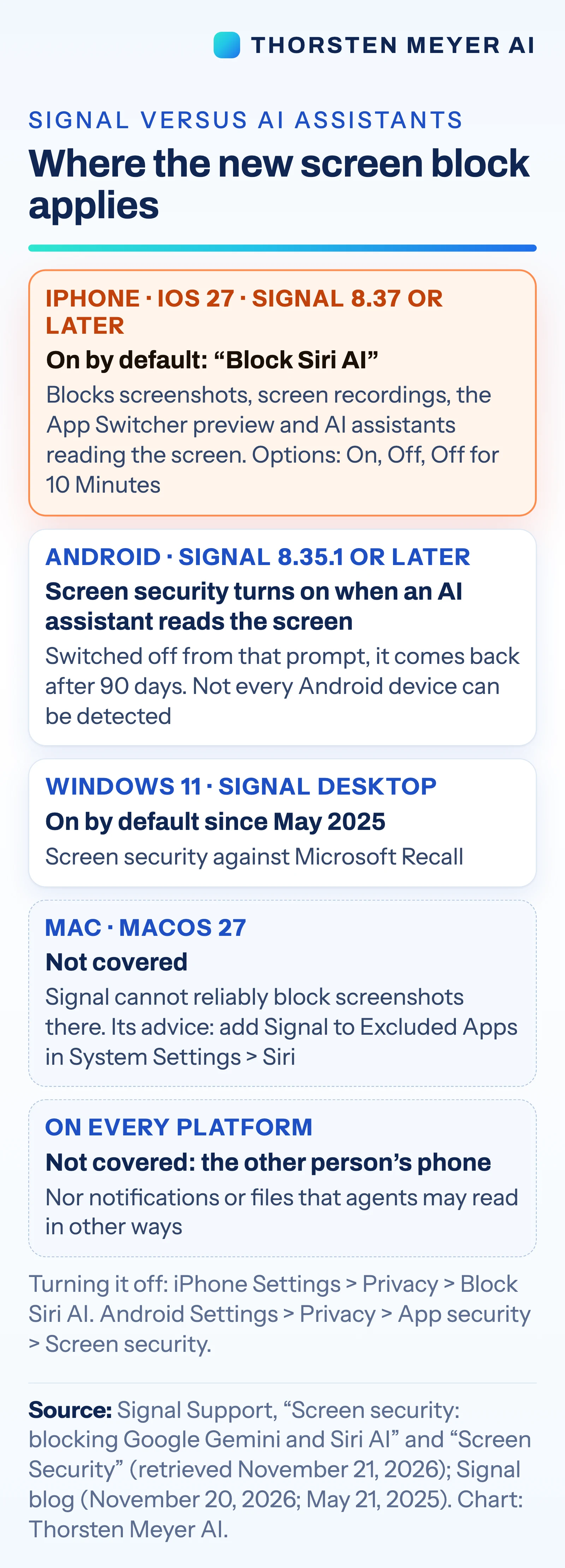
In a November 20 blog post, Signal said it was restricting mobile operating system AI agents from potentially capturing and storing Signal data. On compatible iPhones, the new “Block Siri AI” setting blocks screenshots and screen recordings within Signal, hides chats in the App Switcher and prevents on-device assistants from reading the app screen, the company says. Signal 8.37 and iOS 27 are required.

Get privacy and security gear delivered free with Prime
- Fast, free delivery on millions of items
- Prime Video, Amazon Music and more included
- Member-only deals all year
On Android, “Screen security” is available in Signal 8.35.1 or later. Signal says the setting turns on automatically the first time an AI assistant tries to read Signal’s screen. Users can turn it off through Settings, Privacy, App security, then Screen security. On iPhone, the control is under Settings, Privacy, Block Siri AI; the options are On, Off and “Off for 10 Minutes.” Signal warns that disabling the controls may allow assistants to access chats and contacts’ messages.
The company says these protections have limits. They do not cover Mac computers, where Signal says it cannot reliably block screenshots, or Android devices where it cannot detect the assistant. Notifications, files and the other person’s phone also fall outside the protection described. The settings apply to the device on which they are enabled.
The Privacy Gap on Screen
End-to-end encryption protects messages as they travel between devices. To display a message, however, a phone decrypts it and renders it on screen. An assistant with permission to inspect screen content may then access information that Signal’s encryption cannot shield at that point.
Signal says captured data can leave the app’s control and be stored in a local database or on a remote server used by an assistant. That is the company’s account of the risk; the available material does not establish that every assistant stores every message it can read. For users, the change adds a barrier at the point where encrypted content becomes visible. For businesses deploying agents, it signals that apps may restrict agents’ access to screen content.
The controls can also affect people who rely on accessibility tools or other features that interact with screen content. The source material does not detail how those tools behave when Signal’s protections are active, so users may need to weigh screen privacy against their particular device setup.
Products Worth Considering

Ledger Nano X Crypto Hardware Wallet – Bluetooth (Black + Billfodl)

LG 27G610A-B 27-inch UltraGear QHD (2560 x 1440) IPS Gaming Monitor, 200Hz, 1ms, AMD FreeSync Premium, VESA DisplayHDR 400, HDMI, DisplayPor

LG 27G810A-B 27-inch UltraGear 4K UHD IPS Gaming Monitor
As an affiliate, we earn on qualifying purchases.
Signal’s Earlier Screen Controls
Signal has previously used screen protections to limit capture by another system feature. On May 21, 2025, it enabled its Screen security setting by default in Signal Desktop on Windows 11 to prevent Microsoft Recall from capturing chats. Signal’s account says Recall takes screenshots every few seconds, extracts text with optical character recognition and stores it in a searchable database on the device.
The November update targets AI assistants built into mobile operating systems. Apple announced Siri AI on September 14, 2026, describing an assistant with “onscreen awareness” that can answer questions or take actions related to screen content. Google announced Gemini Intelligence on May 12, 2026, according to the source material. Signal president Meredith Whittaker described operating-system AI agents as “an existential threat to Signal, and our ability to responsibly uphold our mission,” while also calling Signal’s fix “incomplete.”
Other companies have also set boundaries for AI agents. The source says United Airlines announced restrictions on third-party agents booking flights nine days before Signal’s post. Reuters separately reported that Meta’s Muse agent read Signal messages through permissions granted during setup. These examples concern different services and access routes; they do not establish that Signal’s new screen controls address those cases.
Limits and Open Questions
Signal’s published material describes the supported versions and some limits, but it does not establish how reliably the Android control detects every assistant across devices. The protections also do not cover Mac screenshots, notifications, files or another participant’s phone, according to Signal.
The source material does not specify how the controls interact with accessibility features, nor does it provide independent evidence about how captured content is handled by each assistant. Signal said it wants Apple, Google and Microsoft to provide a simple, documented way for apps to opt out of AI data access. Whether those companies will offer such a mechanism, and on what terms, remains unclear.
Pressure for Platform Controls
Signal says it is asking Apple, Google and Microsoft for a documented opt-out mechanism that would let apps restrict AI access to their data. The source material does not give a timetable for a response or describe a planned platform change.
Users can check whether their app and operating system meet Signal’s version requirements, then review the relevant privacy setting. The next practical questions are whether platform makers provide app-level controls and how the protections work across more devices and accessibility setups.
Key Questions
Does Signal now block every screenshot?
No. Signal says its iPhone setting blocks screenshots and screen recordings within the app on iOS 27 or later, but it says it cannot reliably block screenshots on Mac. The controls do not cover every device or capture route.
When does Android Screen security turn on?
Signal says the setting activates automatically the first time an AI assistant tries to read the app screen on supported Android versions, starting with Signal 8.35.1 or later.
Can I turn the protections off?
Yes. On iPhone, “Block Siri AI” offers On, Off and “Off for 10 Minutes.” On Android, Screen security is in Settings, Privacy, App security. Signal warns that turning it off may expose chats and contacts’ messages to assistants.
Does the setting protect messages on the other person’s phone?
No. Signal’s description says the block works only on the device where it is enabled. It does not control what can capture or access the message on another participant’s phone.
Why does encryption not prevent AI screen access?
Encryption protects a message while it travels between devices. The receiving phone decrypts it to display it, and an assistant permitted to read screen content may access it at that stage, according to Signal.
Source: Thorsten Meyer AI