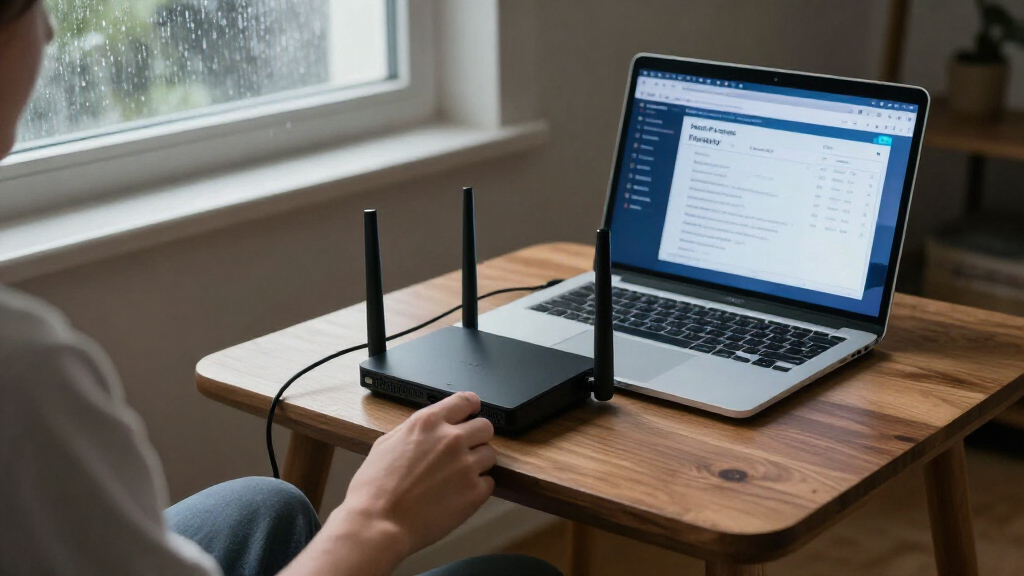

VPN routers route connected devices through a VPN, but the right choice depends on whether you need whole-home coverage, travel portability, or wired network control. My best overall pick is the GL.iNet Flint 3, which pairs Wi-Fi 7 with VPN-focused features and multiple 2.5G ports. The GL.iNet Beryl AX is a standout travel option, while the TP-Link Omada ER707-M2 suits buyers who want a wired multi-gigabit gateway. The main tradeoffs are wireless speed versus VPN throughput, simple setup versus advanced controls, and a compact form versus broader coverage. Read on for the full breakdown of all 15 options and how I’d match them to different networks.

Get privacy and security gear delivered free with Prime
- Fast, free delivery on millions of items
- Prime Video, Amazon Music and more included
- Member-only deals all year
Key Takeaways
- The Flint 3 is the strongest all-around fit in this lineup for buyers who want a home Wi-Fi 7 router with VPN features and several 2.5G ports; its bigger footprint and feature set are more than some small households need.
- Travel routers fill a different job than home routers. The Beryl AX, Slate AX, Slate 7, Opal, and TP-Link Roam models prioritize portability and flexible connections over whole-home coverage.
- Wired VPN gateways are better suited to network control than wireless convenience. The ER605 and ER707-M2 can fit managed or multi-gigabit wired setups, but they need a separate access point for Wi-Fi.
- Wi-Fi 7 does not guarantee the fastest VPN connection. VPN throughput, the VPN provider, server distance, and the router’s processing capacity can limit speeds even when the wireless standard is newer.
- There are several routes to value. The Archer AX21 and ASUS RT-AX1800S offer straightforward home Wi-Fi 6, while the GL.iNet Opal keeps costs and luggage space down for basic travel use.
| ASUS RT-AX1800S Dual-Band WiFi 6 Router |  | Best for Home VPN Access | Wi-Fi standard: Wi-Fi 6 (802.11ax) | Frequency bands: Dual-band | Maximum wireless data rate: Up to 1800 Mbps | VIEW LATEST PRICE | See Our Full Breakdown |
| TP-Link Archer AX21 AX1800 Wi-Fi 6 Dual-Band Router |  | Best Value VPN Server Pick | Wi-Fi generation: Wi-Fi 6 (802.11ax) | Wireless bands: Dual-band, 2.4 GHz and 5 GHz | Combined bandwidth: Up to 1.8 Gbps | VIEW LATEST PRICE | See Our Full Breakdown |
| GL.iNet GL-BE3600 Slate 7 Wi-Fi 7 Travel Router with Touchscreen |  | Best Premium Travel VPN Router | Wi-Fi generation: Wi-Fi 7 | Frequency bands: Dual-band, 2.4 GHz and 5 GHz | Wireless speed: 688 Mbps (2.4 GHz) + 2882 Mbps (5 GHz) | VIEW LATEST PRICE | See Our Full Breakdown |
| GL.iNet GL-AXT1800 Slate AX Pocket-Sized Wi-Fi 6 Travel Router with VPN |  | Best Compact Travel VPN Router | Wi-Fi generation: Wi-Fi 6 | Frequency bands: Dual-band | Maximum combined Wi-Fi speed: 1800 Mbps | VIEW LATEST PRICE | See Our Full Breakdown |
| TP-Link ER605 Wired Gigabit VPN Router |  | Best for Multi-WAN VPN Routing | Router type: Wired Gigabit VPN router | Ethernet ports: 5 Gigabit: 1 WAN, 2 WAN/LAN, 2 LAN | Maximum WAN ports: 3 | VIEW LATEST PRICE | See Our Full Breakdown |
| GL.iNet GL-SFT1200 Opal AC1200 Dual-Band Travel Router | 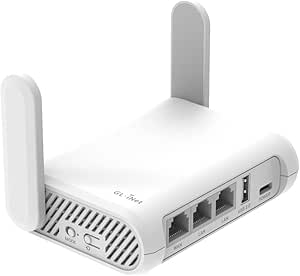 | Best Compact VPN Travel Router | Wi-Fi standard: Wi-Fi 5 (802.11a/b/g/n/ac) | Wi-Fi bands: Dual-band, 2.4 GHz and 5 GHz | Maximum Wi-Fi data rate: Up to 1200 Mbps | VIEW LATEST PRICE | See Our Full Breakdown |
| GL.iNet Flint 3 Tri-Band Wi-Fi 7 Router with Five 2.5G Ports |  | Best Premium Wi-Fi 7 VPN Router | Wi-Fi standard: Wi-Fi 7 (802.11be) | Frequency bands: Tri-band, including 6 GHz | Maximum wireless speed: Up to 9 Gbps | VIEW LATEST PRICE | See Our Full Breakdown |
| TP-Link Archer BE230 Dual-Band Wi-Fi 7 Router (BE3600) |  | Best Mainstream Wi-Fi 7 Pick | Wi-Fi standard: Wi-Fi 7 (802.11be) | Frequency bands: Dual-band, 2.4 GHz and 5 GHz | Maximum advertised speed: Up to 3.6 Gbps combined | VIEW LATEST PRICE | See Our Full Breakdown |
| GL.iNet GL-MT6000 Flint 2 Wi-Fi 6 Gaming Router |  | Best for High VPN Throughput | Wi-Fi standard: Wi-Fi 6 (802.11ax) | Wireless bands: Dual-band | Maximum advertised Wi-Fi speed: Up to 6 Gbps | VIEW LATEST PRICE | See Our Full Breakdown |
| TP-Link Roam 6 AX1500 Portable Dual-Band Wi-Fi 6 Travel Router |  | Best App-Managed VPN Travel Router | Wi-Fi standard: Wi-Fi 6 (802.11ax) | Frequency bands: Dual-band, 2.4 GHz and 5 GHz | Maximum wireless speed: Up to 1,201 Mbps on 5 GHz and 300 Mbps on 2.4 GHz | VIEW LATEST PRICE | See Our Full Breakdown |
| GL.iNet GL-MT3000 Beryl AX Wi-Fi 6 Travel Router with 2.5G WAN and VPN | 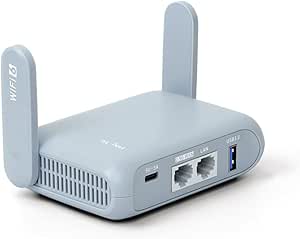 | Best Compact VPN Travel Router | Wi-Fi: Dual-band Wi-Fi 6; up to 574 Mbps on 2.4 GHz and 2402 Mbps on 5 GHz | WAN: 2.5G multi-gigabit | LAN: 1 Gbps | VIEW LATEST PRICE | See Our Full Breakdown |
| TP-Link Roam 7 BE3600 Wi-Fi 7 Portable Dual-Band Travel Router |  | Best for Flexible Travel Connections | Wi-Fi: Dual-band Wi-Fi 7; up to 2882 Mbps on 5 GHz and 688 Mbps on 2.4 GHz | Maximum connected devices: 90 | Ports: 1 × 2.5 Gbps WAN, 1 × 1 Gbps LAN, USB 3.0, USB-C power | VIEW LATEST PRICE | See Our Full Breakdown |
| TP-Link Omada ER707-M2 Multi-Gigabit VPN Router |  | Best Wired VPN Router for Managed Networks | Ports: 1 × 2.5-Gigabit WAN, 1 × 2.5-Gigabit WAN/LAN, 4 × Gigabit WAN/LAN, 1 × Gigabit SFP WAN/LAN, 1 × USB 2.0 | Maximum concurrent sessions: 500,000 | Maximum clients: 1,000+ | VIEW LATEST PRICE | See Our Full Breakdown |
| TP-Link Archer AXE75 AXE5400 Tri-Band Wi-Fi 6E Router |  | Best Tri-Band VPN Home Router | Wi-Fi: Wi-Fi 6E, tri-band | Band speeds: 574 Mbps on 2.4 GHz; 2402 Mbps on 5 GHz; 2402 Mbps on 6 GHz | Maximum data rate: 5400 Mbps | VIEW LATEST PRICE | See Our Full Breakdown |
| GL.iNet Flint 3e BE6500 Wi-Fi 7 Router with VPN |  | Best High-Speed VPN Router | Wi-Fi: Wi-Fi 7 (802.11be), described as dual-band | Maximum data rate: 6.5 Gbps | VPN protocols: WireGuard and OpenVPN | VIEW LATEST PRICE | See Our Full Breakdown |
More Details on Our Top Picks
ASUS RT-AX1800S Dual-Band WiFi 6 Router
The ASUS RT-AX1800S suits buyers who want a conventional Wi-Fi 6 home router with a way to connect back to their home network through ASUS Instant Guard. Its dual-band Wi-Fi, MU-MIMO and OFDMA help share capacity among household devices, while four Gigabit LAN ports give consoles, TVs or desktops wired connections. Compared with the TP-Link Archer AX21, this model lists Instant Guard rather than OpenVPN and PPTP VPN server support, so the choice depends on the VPN approach you need; the supplied data does not establish equivalent protocol options. AiProtection Classic adds network security features, and AiMesh compatibility leaves room to expand coverage with compatible ASUS gear. The tradeoff is that its 1800 Mbps rating is a theoretical maximum, and the listed VPN feature is less explicit about protocol flexibility than the AX21.
Pros:- Wi-Fi 6 MU-MIMO and OFDMA support simultaneous device activity.
- Four Gigabit LAN ports provide wired connections for home devices.
- Includes ASUS Instant Guard VPN access and AiProtection Classic.
- AiMesh compatibility supports expansion with compatible ASUS routers.
Cons:- VPN support is listed as Instant Guard, without the protocol detail provided for the Archer AX21 or GL.iNet models.
- The 1800 Mbps figure is a maximum; actual wireless performance depends on the network and building.
- No multi-WAN capability is listed.
Best for: Households wanting Wi-Fi 6, wired LAN ports and ASUS Instant Guard access to their home network.
Not ideal for: Buyers who need clearly specified OpenVPN or WireGuard client and server support, or multi-WAN routing.
- Wi-Fi standard:Wi-Fi 6 (802.11ax)
- Frequency bands:Dual-band
- Maximum wireless data rate:Up to 1800 Mbps
- Ethernet:1 Gigabit WAN, 4 Gigabit LAN
- Antennas:4 external antennas
- VPN:ASUS Instant Guard
- Security:AiProtection Classic; WPA-Enterprise; WPA2-Enterprise
Our verdict“Choose the RT-AX1800S if you want a Wi-Fi 6 home router with ASUS Instant Guard and do not need clearly specified OpenVPN or WireGuard options.”
TP-Link Archer AX21 AX1800 Wi-Fi 6 Dual-Band Router
The Archer AX21 is a practical fit for a home network that needs Wi-Fi 6 and an explicitly listed VPN server, without moving to a more specialized wired appliance. Its OpenVPN and PPTP server support is the clearest differentiator against the ASUS RT-AX1800S, whose supplied specifications name Instant Guard instead. Four high-gain antennas, beamforming and OFDMA are intended to help serve devices around the home, while five Ethernet ports cover wired equipment. The tradeoffs are worth matching to your setup: the AX21 is dual-band, not 6 GHz, and a separate modem may be required. It is also a VPN server option, not a listed WireGuard solution; buyers wanting portable VPN use or WireGuard client-and-server functions should look at the GL.iNet Slate 7 instead.
Pros:- Lists OpenVPN and PPTP VPN server support.
- Wi-Fi 6 OFDMA helps manage multiple connected devices.
- Four high-gain antennas and beamforming support broader coverage.
- Five Gigabit Ethernet ports and WPA3 support.
Cons:- No 6 GHz band is supported.
- A separate modem may be required.
- The listed VPN server options do not include WireGuard.
Best for: Home users seeking a Wi-Fi 6 router with named OpenVPN server support and wired ports for everyday devices.
Not ideal for: Buyers who need WireGuard, 6 GHz Wi-Fi, or an all-in-one modem-router setup.
- Wi-Fi generation:Wi-Fi 6 (802.11ax)
- Wireless bands:Dual-band, 2.4 GHz and 5 GHz
- Combined bandwidth:Up to 1.8 Gbps
- Antennas:4 fixed, high-gain antennas
- Ethernet ports:5 Gigabit ports
- VPN server support:OpenVPN and PPTP
- Security protocols:WPA/WPA2, WPA/WPA2-Enterprise (802.1x), WPA3
- Control methods:App and voice
Our verdict“Pick the Archer AX21 for a straightforward Wi-Fi 6 home router with explicit OpenVPN server support, but skip it if you need WireGuard or 6 GHz.”
GL.iNet GL-BE3600 Slate 7 Wi-Fi 7 Travel Router with Touchscreen
The GL.iNet Slate 7 stands apart from the home-focused Archer AX21 by combining a travel-router format with Wi-Fi 7, a touchscreen and OpenVPN/WireGuard client and server support. That mix suits travelers who want on-device network controls and a VPN-capable gateway they can carry between locations. Two 2.5G Ethernet ports and USB 3.0 add useful connection options, while OpenWrt 23.05 supports software customization. Its VPN figures also make the tradeoff clear: the listed maximum is 540 Mbps for WireGuard and 100 Mbps for OpenVPN, so protocol choice can affect throughput. The screen and newer Wi-Fi generation set it apart from the older Slate AX, but buyers who only need compact travel VPN basics may not need those extras. VPN services also require an active subscription.
Pros:- Supports OpenVPN and WireGuard in both client and server roles.
- Touchscreen provides network monitoring and controls for configured features.
- Two 2.5G Ethernet ports and USB 3.0 broaden wired and peripheral options.
- OpenWrt 23.05 supports customization and plugin installation.
Cons:- Maximum listed VPN speeds are 100 Mbps for OpenVPN and 540 Mbps for WireGuard.
- The touchscreen shortcut button requires configuration before it has a function.
- VPN services require an active subscription.
Best for: Frequent travelers and network enthusiasts who want a touchscreen travel router with WireGuard and OpenVPN client-and-server functions.
Not ideal for: Buyers seeking the simplest low-complexity travel router, or those whose VPN throughput needs exceed the listed protocol limits.
- Wi-Fi generation:Wi-Fi 7
- Frequency bands:Dual-band, 2.4 GHz and 5 GHz
- Wireless speed:688 Mbps (2.4 GHz) + 2882 Mbps (5 GHz)
- Ethernet ports:2 × 2.5G (1 WAN, 1 LAN)
- VPN support:OpenVPN and WireGuard client and server
- Maximum VPN speed:100 Mbps (OpenVPN); 540 Mbps (WireGuard)
- Operating system:OpenWrt 23.05 (Kernel 5.4.213)
- Memory and storage:2 GB RAM; 512 MB storage
- Other connections:USB 3.0
Our verdict“Choose the Slate 7 if you want a highly configurable travel router with touchscreen controls and both WireGuard and OpenVPN, and can accept its stated VPN speed limits.”
GL.iNet GL-AXT1800 Slate AX Pocket-Sized Wi-Fi 6 Travel Router with VPN
The Slate AX makes sense for travelers who want a pocket-sized VPN router with public Wi-Fi repeater functionality, rather than the Slate 7’s touchscreen and Wi-Fi 7 features. It supports OpenVPN and WireGuard, and its listed VPN speeds—up to 500 Mbps and 550 Mbps respectively—make it a capable travel-focused option on paper. Repeater mode can connect the router to hotel or public Wi-Fi, while USB file sharing adds a way to access storage across a private network. Compared with the newer Slate 7, it uses Wi-Fi 6 and OpenWrt 21.02, but the supplied figures give it higher listed OpenVPN speed. Its fixed physical switch needs configuration before use, and time-limited public Wi-Fi sessions can force a reconnection. Choose it for portability and practical VPN features, not the latest wireless generation.
Pros:- Compact travel-router design with Wi-Fi 6 and dual-band wireless.
- Supports OpenVPN and WireGuard with listed speeds up to 500 Mbps and 550 Mbps.
- Repeater functionality can connect to public or hotel Wi-Fi.
- USB storage can be shared over a private network through SAMBA and WebDAV.
Cons:- The physical toggle has no function until configured in the admin panel.
- Public Wi-Fi session limits may require reconnecting the router.
- Uses Wi-Fi 6 and OpenWrt 21.02 rather than the Slate 7’s Wi-Fi 7 and OpenWrt 23.05.
Best for: Travelers who want a compact Wi-Fi 6 router for VPN connections, hotel Wi-Fi repeating and USB file sharing.
Not ideal for: Buyers who want Wi-Fi 7, a touchscreen, 2.5G Ethernet, or a physical switch that works without setup.
- Wi-Fi generation:Wi-Fi 6
- Frequency bands:Dual-band
- Maximum combined Wi-Fi speed:1800 Mbps
- Maximum connected devices:Up to 120
- VPN support:OpenVPN and WireGuard
- Maximum VPN speeds:Up to 500 Mbps (OpenVPN); up to 550 Mbps (WireGuard)
- Operating system:OpenWrt 21.02
- File-sharing protocols:SAMBA and WebDAV
Our verdict“Pick the Slate AX for portable Wi-Fi 6 and capable listed VPN speeds; choose the Slate 7 instead if you want Wi-Fi 7 and touchscreen controls.”
TP-Link ER605 Wired Gigabit VPN Router
The TP-Link ER605 is the specialist in this group: unlike the wireless ASUS RT-AX1800S or TP-Link Archer AX21, it is a wired-only VPN router built around WAN flexibility and network management. Up to three configurable WAN ports allow load balancing, and a USB-connected 4G/3G modem can provide WAN backup when compatible. Its stated connection capacities cover IPsec, OpenVPN, L2TP and PPTP, while SPI firewall and DoS defense add network controls. Omada SDN integration suits buyers managing a broader compatible setup. The obvious compromise is that it provides no wireless networking, so it needs a separate access point for Wi-Fi. Its Gigabit transfer rate also makes it less suited to buyers seeking multi-gigabit routing than a router with 2.5G ports, such as the Slate 7.
Pros:- Five Gigabit ports, with up to three configurable as WAN connections.
- Supports IPsec, OpenVPN, L2TP and PPTP connections.
- USB-connected 4G/3G modem support enables WAN backup with compatible modems.
- Omada SDN integration plus SPI firewall and DoS defense.
Cons:- Wired-only design means a separate access point is needed for Wi-Fi.
- Gigabit ports do not match the Slate 7’s 2.5G Ethernet options.
- USB modem backup depends on compatibility with the supported modem list.
Best for: Small offices and technically confident home users who need wired VPN routing, multiple WAN options and Omada management.
Not ideal for: Buyers who need built-in Wi-Fi or multi-gigabit Ethernet and do not want to add a separate wireless access point.
- Router type:Wired Gigabit VPN router
- Ethernet ports:5 Gigabit: 1 WAN, 2 WAN/LAN, 2 LAN
- Maximum WAN ports:3
- VPN connection capacity:Up to 20 IPsec, 16 OpenVPN, 16 L2TP and 16 PPTP connections
- USB WAN:Supports 4G/3G modem WAN backup
- Security features:SPI firewall, DoS defense, IP/MAC/URL filtering, VPN pass-through
- Data transfer rate:1 Gbps
- Dimensions:6.22 × 3.98 × 0.98 in
Our verdict“Choose the ER605 for wired multi-WAN VPN management and Omada integration, but not if you want a single device to provide Wi-Fi.”
GL.iNet GL-SFT1200 Opal AC1200 Dual-Band Travel Router
The GL.iNet Opal is the most travel-focused choice in this group: it can turn hotel or other public Wi-Fi into a private network for your own devices, with OpenVPN and WireGuard support built in. Its 145 g body, retractable antennas, and three gigabit Ethernet ports make it useful when you need a small router that can also connect wired gear. Compared with the TP-Link Roam 6, it runs OpenWrt, which gives buyers more scope for configuration, but it uses Wi-Fi 5 rather than Wi-Fi 6. The physical feature toggle also needs to be assigned a function in the admin panel before it does anything. I’d choose it for compactness and configurable VPN use, not for the newest wireless standard or plug-and-play controls.
Pros:- Lightweight 145 g design with retractable antennas
- OpenVPN and WireGuard support with OpenWrt
- Three gigabit Ethernet ports for wired devices
- Can repeat public Wi-Fi as a private network
Cons:- Wi-Fi 5 is an older standard than the TP-Link Roam 6’s Wi-Fi 6
- The physical feature toggle must be configured before use
- Does not support easytethering
Best for: Travelers who want a lightweight router for sharing public Wi-Fi privately and value OpenWrt configuration.
Not ideal for: Buyers who want Wi-Fi 6 or expect the physical toggle to work without setup.
- Wi-Fi standard:Wi-Fi 5 (802.11a/b/g/n/ac)
- Wi-Fi bands:Dual-band, 2.4 GHz and 5 GHz
- Maximum Wi-Fi data rate:Up to 1200 Mbps
- Ethernet ports:2 Gigabit LAN, 1 Gigabit WAN
- VPN support:OpenVPN and WireGuard
- Operating system:OpenWrt
- Weight:145 g
- Special features:Public Wi-Fi repeater, Access Point Mode, physical feature toggle
Our verdict“Choose the Opal if a compact OpenWrt travel router with built-in VPN support matters more than Wi-Fi 6 speeds.”
GL.iNet Flint 3 Tri-Band Wi-Fi 7 Router with Five 2.5G Ports
The Flint 3 is the premium home-network pick here for buyers who want Wi-Fi 7, a 6 GHz band, and VPN support in one router. Its advertised VPN throughput reaches 680 Mbps for OpenVPN and WireGuard, while five 2.5G ports give wired devices more headroom than the Flint 2 and its two 2.5G ports. The tri-band radio and stated capacity for more than 100 devices suit busy homes, and AdGuard Home plus Bark parental controls add network-level tools. The tradeoff is that the Flint 2 lists higher VPN speeds, so VPN throughput is not the Flint 3’s strongest comparative argument. Buyers should also plan to update firmware during initial setup; performance will vary with the VPN server and network conditions.
Pros:- Tri-band Wi-Fi 7 includes the 6 GHz band and MLO
- Five 2.5G Ethernet ports provide plentiful multi-gig wired connectivity
- OpenVPN and WireGuard support with stated speeds up to 680 Mbps
- AdGuard Home and Bark parental controls add network management options
Cons:- The Flint 2 lists higher maximum VPN speeds
- Initial firmware updating is recommended
- Advertised wireless and VPN speeds depend on network conditions and VPN servers
Best for: Households with many connected devices that want Wi-Fi 7, multiple multi-gig wired connections, and built-in VPN protocol support.
Not ideal for: VPN-first buyers focused on the highest stated VPN throughput, or households that do not need Wi-Fi 7 and five 2.5G ports.
- Wi-Fi standard:Wi-Fi 7 (802.11be)
- Frequency bands:Tri-band, including 6 GHz
- Maximum wireless speed:Up to 9 Gbps
- VPN speed:Up to 680 Mbps for OpenVPN and WireGuard
- Ethernet ports:5 x 2.5G
- Coverage:Up to 2,000 square feet
- Device capacity:Over 100 devices
- Memory and storage:1 GB DDR4 RAM, 8 GB eMMC
- Features:MLO, AdGuard Home support, Bark parental controls, remote access
Our verdict“Pick the Flint 3 for a feature-rich Wi-Fi 7 home network with five multi-gig ports, rather than for maximum stated VPN throughput.”
TP-Link Archer BE230 Dual-Band Wi-Fi 7 Router (BE3600)
The Archer BE230 suits buyers who want a current-generation Wi-Fi router with familiar app management, but it is a less direct VPN choice than the GL.iNet models in this roundup. Its product data highlights Wi-Fi 7, HomeShield controls, and the Tether app, but does not list OpenVPN or WireGuard support. That distinction matters if you want the router itself to connect to a VPN provider rather than rely on VPN apps on individual devices. Compared with the tri-band GL.iNet Flint 3, the Archer is dual-band and has no 6 GHz band, though it still offers two 2.5 Gbps ports and EasyMesh compatibility. It also needs a separate modem. I’d shortlist it for app-led home networking, not as a confirmed VPN-client router.
Pros:- Wi-Fi 7 features include Multi-Link Operation and 4K-QAM
- Two 2.5 Gbps ports plus three 1 Gbps LAN ports
- Tether app provides setup and management
- EasyMesh compatibility can extend a compatible network
Cons:- Product data does not specify OpenVPN or WireGuard support
- Dual-band design lacks a 6 GHz band
- Requires a separate modem
Best for: Buyers who prioritize app-based setup, Wi-Fi 7, HomeShield controls, and EasyMesh expansion over router-level VPN configuration.
Not ideal for: Anyone who needs documented OpenVPN or WireGuard client support on the router itself.
- Wi-Fi standard:Wi-Fi 7 (802.11be)
- Frequency bands:Dual-band, 2.4 GHz and 5 GHz
- Maximum advertised speed:Up to 3.6 Gbps combined
- Coverage:Up to 2,000 sq. ft.
- Maximum devices:Up to 60
- Ports:1 x 2.5 Gbps WAN/LAN, 1 x 2.5 Gbps LAN, 3 x 1 Gbps LAN
- Mesh compatibility:EasyMesh
- Setup and management:TP-Link Tether app
- Modem requirement:Separate modem required
Our verdict“Choose the Archer BE230 for app-managed Wi-Fi 7 and mesh expansion, but skip it if router-level VPN support is a requirement.”
GL.iNet GL-MT6000 Flint 2 Wi-Fi 6 Gaming Router
The Flint 2 is the clearest fit here for a home where the VPN connection itself needs to keep pace with a fast internet plan. Its listed VPN throughput reaches 880 Mbps on OpenVPN and 900 Mbps on WireGuard, higher than the Flint 3’s stated 680 Mbps. OpenWrt and AdGuard Home also give technically inclined buyers more control than the app-led TP-Link Archer BE230, whose supplied data does not specify router-level VPN protocols. The Flint 2 pairs that flexibility with two 2.5G ports, four gigabit ports, and support for over 100 devices. Its tradeoffs are Wi-Fi 6 rather than Wi-Fi 7 and a recommended firmware update at setup. Stated VPN speeds are not guarantees; the server and network path affect actual results.
Pros:- Listed VPN speeds reach 880 Mbps on OpenVPN and 900 Mbps on WireGuard
- OpenWrt and plugin support allow network customization
- Two 2.5G and four 1G Ethernet ports
- AdGuard Home support and capacity for over 100 devices
Cons:- Wi-Fi 6 is older than the Wi-Fi 7 standard on the Flint 3
- Firmware updating is recommended during initial setup
- Actual VPN speeds depend on the provider, server, and network conditions
Best for: VPN users with fast home internet who want OpenWrt controls, high stated WireGuard throughput, and multi-gig wired connections.
Not ideal for: Buyers who want Wi-Fi 7 or prefer a simple app-led router without firmware setup.
- Wi-Fi standard:Wi-Fi 6 (802.11ax)
- Wireless bands:Dual-band
- Maximum advertised Wi-Fi speed:Up to 6 Gbps
- VPN support and speeds:OpenVPN up to 880 Mbps; WireGuard up to 900 Mbps
- Ethernet ports:2 x 2.5G, 4 x 1G
- Operating system:Linux with OpenWrt pre-installed
- Memory and storage:1 GB DDR4 RAM, 8 GB eMMC
- Device capacity:Over 100 devices
- Additional features:Access point mode, guest mode, QoS, AdGuard Home support
Our verdict“Choose the Flint 2 if high stated VPN throughput and OpenWrt flexibility matter more than having Wi-Fi 7.”
TP-Link Roam 6 AX1500 Portable Dual-Band Wi-Fi 6 Travel Router
The TP-Link Roam 6 is a portable VPN option for travelers who want Wi-Fi 6 and a straightforward Tether app or web interface. It supports OpenVPN and WireGuard, can create a private network from public or wired internet, and offers router, access point, repeater, and client modes. Compared with the GL.iNet Opal, it brings Wi-Fi 6 and USB-C power, while the Opal offers OpenWrt and a lighter listed weight. The Roam 6 also supports up to 60 devices, but it is not a cellular hotspot: it cannot use a SIM or eSIM and needs an external internet source. Its lack of OpenWrt may limit buyers who want deeper firmware customization. This is a better match for app-led travel setup than for advanced tinkering.
Pros:- Wi-Fi 6 with OpenVPN and WireGuard support
- USB-C power suits travel setups
- Router, Access Point, Repeater, and Client modes
- Two gigabit Ethernet ports and support for up to 60 devices
Cons:- Requires an external internet source and has no SIM or eSIM support
- Does not support OpenWrt, unlike the GL.iNet Opal
- The 1,500 sq. ft. coverage figure is dependent on the surrounding environment
Best for: Travelers who want a compact Wi-Fi 6 router with VPN protocols, USB-C power, and app or web-based management.
Not ideal for: Travelers needing built-in cellular data, OpenWrt customization, or a SIM-based connection.
- Wi-Fi standard:Wi-Fi 6 (802.11ax)
- Frequency bands:Dual-band, 2.4 GHz and 5 GHz
- Maximum wireless speed:Up to 1,201 Mbps on 5 GHz and 300 Mbps on 2.4 GHz
- VPN protocols:OpenVPN and WireGuard
- Ethernet ports:1 Gbps WAN/LAN and 1 Gbps LAN
- Power input:USB-C, 5V/3A
- Operating modes:Router, Access Point, Repeater, Client
- Maximum connected devices:Up to 60
- OpenWrt and SIM support:OpenWrt not supported; not compatible with SIM or eSIM
Our verdict“Pick the Roam 6 for app-managed Wi-Fi 6 travel networking with VPN support, provided you already have an internet source.”
GL.iNet GL-MT3000 Beryl AX Wi-Fi 6 Travel Router with 2.5G WAN and VPN
The GL.iNet Beryl AX is the pick I’d make for travelers who want more control over VPN settings than a basic hotspot router usually offers. It supports WireGuard and OpenVPN as both client and server, while OpenWrt gives technically minded owners room to customize network behavior. Its 2.5G WAN port is unusually capable for a compact travel model, and USB 3.0 adds flexibility when setting up a network on the road.
Compared with the TP-Link Roam 7, the Beryl AX offers OpenWrt customization, but the Roam 7 has newer Wi-Fi 7 and more connection modes. The tradeoff here is modest VPN throughput—up to 300 Mbps with WireGuard—and some setup work: the physical toggle must be configured in the admin panel before it works as intended. I’d choose it for portability and control, not maximum VPN speed.
Pros:- Compact, travel-friendly design with dual-band Wi-Fi 6.
- 2.5G WAN, gigabit LAN, and USB 3.0 provide useful wired flexibility.
- Supports WireGuard and OpenVPN client and server functions.
- OpenWrt 21.02 allows network customization and plug-in support.
Cons:- Maximum VPN speeds are listed as 300 Mbps for WireGuard and 150 Mbps for OpenVPN.
- The physical toggle switch must be configured in the admin panel before use.
- Using a commercial VPN service may require a separate subscription.
Best for: Travelers and remote workers who want a compact router with configurable OpenWrt features and WireGuard or OpenVPN support.
Not ideal for: Buyers who want the simplest plug-and-play setup or need the highest listed VPN throughput; its toggle needs configuration and WireGuard is rated up to 300 Mbps.
- Wi-Fi:Dual-band Wi-Fi 6; up to 574 Mbps on 2.4 GHz and 2402 Mbps on 5 GHz
- WAN:2.5G multi-gigabit
- LAN:1 Gbps
- USB:USB 3.0
- VPN protocols:WireGuard and OpenVPN, client and server
- Maximum VPN speed:Up to 300 Mbps WireGuard; up to 150 Mbps OpenVPN
- Firmware:OpenWrt 21.02
- Security:WPA2-PSK, WPA3, DNS over HTTPS, and DNS over TLS
Our verdict“Choose the Beryl AX if you want a portable, customizable VPN router and can accept some setup work and moderate VPN throughput.”
TP-Link Roam 7 BE3600 Wi-Fi 7 Portable Dual-Band Travel Router
The TP-Link Roam 7 is built around connection flexibility: it can share public Wi-Fi, Ethernet, or USB tethering through a private network, then switch among router, hotspot, access point, range extender, and client modes. That makes it a strong fit for travelers who frequently change how they get online. Its Wi-Fi 7 support and capacity for up to 90 devices also give it more headroom than a simple single-user travel setup.
Compared with the GL.iNet Beryl AX, the Roam 7 lists more operating modes and a larger device capacity, while Beryl AX offers OpenWrt support for deeper customization. The Roam 7’s main limitation is that it needs an existing internet connection: it has no SIM or eSIM support. It also lacks 6 GHz Wi-Fi and OpenWrt, so buyers seeking those capabilities should look elsewhere. VPN is supported, but the supplied details don’t specify VPN throughput.
Pros:- Can create a private network from public Wi-Fi, Ethernet, or USB tethering.
- Offers router, hotspot, access point, range extender, and client modes.
- Wi-Fi 7 and support for up to 90 connected devices suit busy travel setups.
- USB-C power and 2.5 Gbps WAN add connection and power flexibility.
Cons:- No SIM or eSIM support, so it depends on an external internet source.
- Wi-Fi 7 is dual-band and does not include 6 GHz.
- Does not support OpenWrt, limiting firmware customization compared with the Beryl AX.
Best for: Frequent travelers who connect through hotel Wi-Fi, Ethernet, or phone tethering and want one router for several network modes.
Not ideal for: People who need cellular service built into the router, 6 GHz Wi-Fi, or OpenWrt-based customization.
- Wi-Fi:Dual-band Wi-Fi 7; up to 2882 Mbps on 5 GHz and 688 Mbps on 2.4 GHz
- Maximum connected devices:90
- Ports:1 × 2.5 Gbps WAN, 1 × 1 Gbps LAN, USB 3.0, USB-C power
- Operating modes:Router, hotspot, access point, range extender, and client
- VPN protocols:OpenVPN, WireGuard, PPTP, and L2TP
- Power:USB-C; adapter or 5V PD power source
- Coverage:Up to 2,000 sq. ft.
- Cellular support:No SIM or eSIM support
Our verdict“Pick the Roam 7 if your travel internet sources change often and you value flexible connection modes over OpenWrt customization or built-in cellular.”
TP-Link Omada ER707-M2 Multi-Gigabit VPN Router
The Omada ER707-M2 is the most purpose-built wired VPN choice in this group. Rather than adding Wi-Fi, it concentrates on multi-gigabit routing, flexible WAN connections, and centralized management through the Omada app and cloud access. Its dual 2.5-Gigabit ports, four Gigabit WAN/LAN ports, and SFP interface give small offices and multi-device setups more ways to arrange internet and local-network links than the compact travel routers provide.
Compared with the TP-Link ER605, the ER707-M2 brings 2.5-Gigabit connectivity and an SFP port, making it the better match for faster or more varied wired networks. Its listed capacity of up to 1,000 clients and 500,000 concurrent sessions is also aimed at heavier network management. The tradeoff is clear: there’s no built-in Wi-Fi, and LTE backup requires a separate dongle. I’d pair it with access points rather than buy it as an all-in-one home router.
Pros:- Dual 2.5-Gigabit ports and an SFP port support flexible multi-gigabit wired layouts.
- Omada cloud and app management help administer a larger network.
- Supports a broad set of VPN protocols, including OpenVPN, IPsec, and L2TP.
- High listed session and client capacity suits busy office networks.
Cons:- Provides no built-in Wi-Fi, so wireless access requires separate access points.
- LTE backup requires a compatible, separately purchased dongle.
- Its wired management features are more than a simple home network may need.
Best for: Small offices and technically managed homes that need multi-gigabit wired routing, multiple WAN options, and centralized Omada management.
Not ideal for: Buyers who want a single device with built-in Wi-Fi or cellular backup without purchasing a compatible LTE dongle.
- Ports:1 × 2.5-Gigabit WAN, 1 × 2.5-Gigabit WAN/LAN, 4 × Gigabit WAN/LAN, 1 × Gigabit SFP WAN/LAN, 1 × USB 2.0
- Maximum concurrent sessions:500,000
- Maximum clients:1,000+
- VPN connection capacity:Up to 100 IPsec, 66 OpenVPN, 60 L2TP, and 60 PPTP connections
- Management:Omada cloud access and app
- VPN and security protocols:SSL, IPsec, GRE, SSH, IKEv1/v2, PPTP, L2TP, and OpenVPN
- Data transfer rate:2,500 Mbps
- Dimensions and weight:12.9 × 9.5 × 3.1 in; 1.1 kg
Our verdict“Choose the ER707-M2 for a managed wired network with multi-gigabit links, and skip it if you need Wi-Fi in the router itself.”
TP-Link Archer AXE75 AXE5400 Tri-Band Wi-Fi 6E Router
The TP-Link Archer AXE75 suits households that want VPN client and server functions alongside a dedicated 6 GHz Wi-Fi band. That extra band can give compatible nearby devices another wireless lane, while tri-band operation helps separate traffic across 2.4, 5, and 6 GHz. It is a more conventional home-network choice than the GL.iNet Beryl AX: the Archer offers broad Wi-Fi coverage features and EasyMesh compatibility, while Beryl AX is smaller and built around travel portability and OpenWrt customization.
The Archer’s VPN protocols include OpenVPN, PPTP, and L2TP, but the supplied information does not list WireGuard. Its five ports have Gigabit LAN bandwidth, so the 6 GHz wireless capability is not matched by multi-gigabit LAN ports. A separate modem is also generally needed, and EasyMesh compatibility does not extend to Deco systems. I’d choose it for home Wi-Fi breadth, not for the most flexible VPN protocol selection.
Pros:- Tri-band Wi-Fi 6E includes 2.4, 5, and 6 GHz bands.
- Supports OpenVPN, PPTP, and L2TP as VPN client and server.
- OFDMA, QoS, and beamforming support busy home networks.
- EasyMesh compatibility allows expansion with compatible routers.
Cons:- The supplied VPN details do not list WireGuard.
- LAN bandwidth is Gigabit rather than multi-gigabit.
- Usually requires a separate modem and does not work with Deco mesh systems.
Best for: Households with compatible Wi-Fi 6E devices that want tri-band home networking and VPN client or server support in one router.
Not ideal for: Buyers who need WireGuard, multi-gigabit LAN, or a router that includes a modem; Deco mesh owners should also check compatibility.
- Wi-Fi:Wi-Fi 6E, tri-band
- Band speeds:574 Mbps on 2.4 GHz; 2402 Mbps on 5 GHz; 2402 Mbps on 6 GHz
- Maximum data rate:5400 Mbps
- Processor and memory:1.0 GHz dual-core CPU; 512 MB RAM
- Ports:5; Gigabit LAN bandwidth
- VPN support:OpenVPN, PPTP, and L2TP; client and server
- Security:WPA2, WPA2-Enterprise, and WPA3
- Mesh compatibility:EasyMesh-compatible; not compatible with Deco mesh systems
Our verdict“Choose the Archer AXE75 for tri-band Wi-Fi 6E and listed VPN options at home, but look elsewhere if WireGuard or multi-gigabit LAN is a requirement.”
GL.iNet Flint 3e BE6500 Wi-Fi 7 Router with VPN
The GL.iNet Flint 3e is the performance-focused choice for buyers who want VPN capability on a larger home network rather than a portable travel router. Its listed WireGuard and OpenVPN speeds reach up to 1,100 Mbps, well above the Beryl AX’s stated VPN ceilings, while support for more than 100 devices and coverage up to 2,500 square feet targets a broader household setup. One gigabyte of DDR4 RAM, AdGuard Home support, and parental controls add useful network-management options.
The tradeoff is less clarity in the supplied wireless-band details: the frequency information names 2.4 GHz but does not specify the other band, even though the router is described as dual-band Wi-Fi 7. That makes it harder to compare its wireless configuration directly with the clearly documented tri-band Archer AXE75. VPN speeds are also maximum listed figures, not a guarantee across every connection. I’d prioritize this model for VPN throughput and device capacity, while checking band details before buying.
Pros:- Listed WireGuard and OpenVPN VPN speeds reach up to 1,100 Mbps.
- Wi-Fi 7 includes MLO and 4K-QAM features.
- Designed for coverage up to 2,500 square feet and more than 100 devices.
- Includes AdGuard Home support and parental controls.
Cons:- The supplied frequency-band information names 2.4 GHz but does not detail the other band.
- Actual VPN performance can vary with the internet provider, network conditions, and VPN server.
- Its home-router size and capacity are less useful for buyers seeking a pocketable travel model like the Beryl AX.
Best for: Large households and remote workers who want high listed VPN throughput, Wi-Fi 7 features, and capacity for more than 100 devices.
Not ideal for: Buyers who need fully documented frequency-band specifications before choosing, or who only need a compact travel router.
- Wi-Fi:Wi-Fi 7 (802.11be), described as dual-band
- Maximum data rate:6.5 Gbps
- VPN protocols:WireGuard and OpenVPN
- Maximum VPN speed:Up to 1,100 Mbps
- Coverage:Up to 2,500 square feet
- Device capacity:Over 100 devices
- Memory:1 GB DDR4 RAM
- Ports and LAN bandwidth:5 ports; 2,500 Mbps LAN bandwidth
- Additional features:MLO, 4K-QAM, AdGuard Home support, and parental controls
Our verdict“Choose the Flint 3e when high listed VPN throughput and household device capacity matter more than portability or complete band documentation.”
How We Picked
I ranked these VPN routers by how well each model’s form, network role, and VPN-oriented features match a real buyer’s setup. I weighed wireless generation and band configuration, wired port capacity, travel practicality, setup demands, and the flexibility to manage VPN connections across devices. I also separated routers with built-in Wi-Fi from wired gateways, since they solve different problems and should not be judged as direct substitutes.
The ranking favors useful VPN capability over headline Wi-Fi specifications alone. Models with a strong balance of wireless performance, ports, and practical VPN use rank ahead of devices that are compelling only for a narrower job. A compact travel router can still be a leading pick for frequent travelers, but it ranks below a home router when the goal is dependable coverage for many rooms. I treat performance claims as product specifications, not a promise of VPN speed: actual results depend on the VPN service, encryption, server location, and internet connection.
Factors to Consider When Choosing VPN Routers
Before choosing a model, I’d start with the network job it needs to do. A travel router, a home Wi-Fi router, and a wired VPN gateway can all connect to VPN services, but they differ in coverage, setup, and the equipment they require around them.
Choose the router’s job before its Wi-Fi generation
Decide whether the router will serve a whole home, a hotel room, or a wired office network before comparing Wi-Fi labels. A home router needs suitable coverage and enough capacity for the number of active devices, while a travel model is built to be packed and connected to unfamiliar networks. A wired gateway such as the ER605 or ER707-M2 does not replace a Wi-Fi access point, so factor in that extra device and its placement. A common mistake is buying a pocket router to cover several rooms or expecting a wired gateway to broadcast wireless signal. If the router has to do two jobs, check that it can support both the required VPN setup and the physical layout. Matching the form factor to the job prevents paying for features that cannot help your setup.
Look beyond Wi-Fi speed for VPN performance
A fast Wi-Fi standard describes the wireless link, not the speed you will get while traffic passes through a VPN. VPN throughput depends on several parts of the chain, including the router’s processing capacity, encryption protocol, internet plan, VPN server, and distance to that server. A newer Wi-Fi 7 model may make sense for a fast local network, but it does not automatically outperform an older router on a VPN connection. Ask whether you need high VPN speeds for every device or only a few work and streaming connections. If your internet service is modest, extra wireless capacity may bring little practical benefit. Leave room between advertised wireless rates and your expected VPN speed when making a choice.
Check how VPN connections are managed
VPN routers differ in how easily they let you connect a provider, choose a server, or control which devices use the tunnel. Per-device routing and clear connection controls can be more useful than a long list of advanced settings if you need only a few devices protected. Some buyers want all traffic routed through one VPN; others need selected devices to use a VPN while local services remain on the regular connection. Check the router’s supported protocols and confirm that they match your VPN provider before buying. Also consider what happens if the VPN connection drops: a kill switch or equivalent traffic control can matter when exposure would be a problem. A feature-rich interface is helpful only if you can maintain the configuration you choose.
Plan for coverage, wired ports, and upgrades
Think about room layout and wired equipment as carefully as headline wireless speed. Port count and port speed matter if you connect a NAS, desktop, console, or multi-gigabit internet service by cable. A router with multiple 2.5G ports can reduce bottlenecks in a faster local network, but it will not improve a slower internet connection on its own. Large homes may need a mesh system or additional access points, and a single powerful router is not always the best coverage answer. Check whether the router supports the way you plan to extend coverage, including any compatible mesh features. Buying more ports than you need is less useful than placing access points where your devices actually connect.
Treat travel routers as connection tools, not tiny home routers
Portable models can connect your devices to hotel, public, or wired networks through one small router, which can simplify repeated trips. Portability brings limits: smaller devices typically have fewer ports and are not designed to blanket a house with Wi-Fi. Before travel, check the available connection methods at your destination, such as Ethernet, a captive portal, or an existing wireless network. Confirm that the router can handle the power and setup routine you expect, and allow time to configure it before relying on it away from home. Travelers who want a stable setup for several personal devices may value a larger model than someone who needs only a compact connection for a laptop and phone. Do not assume that portability alone makes a device easier to set up on every guest network.
Balance simplicity against ongoing maintenance
A VPN router needs more than a one-time setup: firmware updates, VPN credentials, provider changes, and troubleshooting all shape its long-term fit. Beginners may prefer a clear setup flow, while technically confident buyers can benefit from more control over routing and network settings. Consider how often you are willing to manage the router and whether other people in the home need to use it without help. A complex configuration can be worthwhile for a small office or privacy-focused household, but it can create avoidable support work in a simple home network. Check the manufacturer’s update and support resources before settling on a model. The best choice is the one whose controls you can maintain, not simply the one with the longest feature list.
Frequently Asked Questions
Will a VPN router protect every device on my Wi-Fi automatically?
It can route traffic from connected devices through a VPN, but that depends on how the router is configured. Some setups send all network traffic through the tunnel, while others let you choose which devices use it. Devices connected through a separate access point or guest network may follow different rules. Check the router’s routing controls and test the setup with the devices you care about. A router-level VPN also does not replace account security or device updates.
Should I buy a VPN router with Wi-Fi 7 if my internet plan is slower?
Not necessarily. Wi-Fi 7 can help with compatible devices and fast local connections, but it does not raise the speed of your internet plan or remove VPN overhead. A Wi-Fi 6 router may be a better fit if your current devices and connection do not benefit from the newer wireless standard. Consider Wi-Fi 7 when you expect to add compatible devices, use multi-gigabit networking, or keep the router through several upgrade cycles. Prioritize VPN performance and coverage if those are your current bottlenecks.
Can a wired VPN router provide Wi-Fi by itself?
Models such as the TP-Link ER605 and ER707-M2 are wired gateways, so you should plan on adding a separate wireless access point if you need Wi-Fi. That arrangement can be useful when you want to choose the access point independently or manage a wired network. It also adds equipment, setup, and another device to maintain. Before buying, confirm that the gateway supports your desired VPN configuration and that the access point can be connected and managed as planned. For a simpler home setup, an all-in-one wireless router may be a better match.
Is a travel VPN router a good substitute for a home router?
A travel router can serve a small or temporary network, but it is not a direct substitute for a full-size home model when you need broad coverage or many wired connections. Its compact design is useful for connecting a few devices to a hotel or other external network. At home, limited ports and coverage may become inconvenient as more rooms and devices are added. If you want one device for both roles, compare its coverage and connection capacity with your home’s needs rather than judging it by portability alone. Frequent travelers may still find it valuable as a separate companion device.
What should I check before choosing a router for my VPN provider?
Confirm that the router supports a VPN protocol your provider offers and that the provider supplies setup instructions for router use. Check whether you can select servers and control which devices use the VPN, since those options vary by router and software. Ask the provider whether router connections count toward any device or session limits on your plan. Also check whether the router can handle the speed you need with your chosen protocol; wireless speed claims do not answer that question. If you rely on a VPN for sensitive traffic, review the router’s drop-protection and update options before committing.
Conclusion
For most buyers seeking a home VPN router, I’d start with the GL.iNet Flint 3 for its mix of Wi-Fi 7, VPN-focused features, and multi-gigabit ports. The best value depends on the job: the Archer AX21 is a straightforward home Wi-Fi 6 choice, while the Opal is a compact, simpler travel pick. For beginners, I’d favor an all-in-one wireless router over a wired gateway that requires a separate access point. Buyers who want a premium multi-gigabit wired setup should compare the Omada ER707-M2 with the ER605 and budget for Wi-Fi hardware if needed. For travel, the Beryl AX is a strong fit for flexible portable networking; choose the Slate 7 or a TP-Link Roam model if their specific size and wireless-generation mix better suits your trip. The clearest way to decide is to match the router to where it will operate, then check that its VPN controls and connection capacity fit your provider and devices.