To get started with MFA for your SMB, focus on choosing the right methods like authenticator apps, hardware tokens, or SMS codes that suit your needs. Educate your employees on MFA’s importance, proper setup, and recognizing security threats. Establish clear access controls and review permissions regularly. Building a security-aware culture will make MFA more effective. If you want practical tips and best practices, you’re about to discover how to strengthen your defenses further.
Key Takeaways
- Educate employees on MFA benefits and proper setup to foster a security-conscious culture.
- Clearly define access policies and implement role-based controls with MFA for sensitive systems.
- Choose appropriate MFA methods like authenticator apps or hardware tokens based on business needs.
- Regularly review and update access permissions and MFA practices to adapt to organizational changes.
- Promote ongoing training, support, and awareness to ensure consistent MFA adoption and security improvements.

Implementing Multi-Factor Authentication (MFA) is one of the most effective ways for small and medium businesses to enhance their security. It adds an extra layer of protection beyond just a username and password, making it considerably harder for cybercriminals to access sensitive data. To make the most of MFA, you need to focus on employee training and access controls. Educating your team about the importance of MFA and how to use it correctly is essential. Employees should understand that MFA isn’t just a technical feature; it’s a critical security practice that safeguards your business. Training sessions can demonstrate how to set up MFA on various platforms, recognize potential phishing attempts, and report suspicious activity. When your staff is well-informed, they’re more likely to adopt MFA consistently and effectively, reducing the risk of security breaches caused by human error.
Access controls are another fundamental aspect of implementing MFA successfully. You should establish clear policies defining who has access to what within your organization. Not every employee needs access to all systems or data, so implementing role-based access controls ensures that users only access information necessary for their job. MFA enhances these controls by verifying identities during login attempts, even if passwords are compromised. It’s essential to integrate MFA with your existing access control systems to create a seamless security environment. Regularly reviewing access permissions is also paramount—revoking or adjusting access when employees change roles or leave the company helps prevent unauthorized entry. Combining strong access controls with MFA creates a layered defense that’s much harder for cybercriminals to bypass. Additionally, choosing reliable MFA methods that fit your infrastructure can improve user experience and security effectiveness.
Furthermore, you should choose MFA methods that suit your business’s needs and infrastructure. Popular options include authenticator apps, hardware tokens, or SMS verification codes. Each method has its advantages and considerations, so evaluate your team’s workflow and security requirements before deciding. Once you’ve selected your methods, ensure that employees are trained on how to use them properly, and provide ongoing support to troubleshoot any issues that arise. A consistent approach to employee training and access controls not only enhances your security posture but also fosters a security-conscious culture within your organization. This proactive stance minimizes vulnerabilities and prepares your team to respond swiftly to potential threats.

Thetis Pro-C FIDO2 Security Key Passkey Device with USB C & NFC, TOTP/HOTP Authenticator APP, FIDO 2.0 Two Factor Authentication 2FA MFA, Works with Windows/macOS/Linux/Gmail/Facebook/Dropbox/GitHub
FIDO2/Passkey Authentication – Secure, passwordless login with supported platforms. Check if your intended service supports hardware keys before…
As an affiliate, we earn on qualifying purchases.
As an affiliate, we earn on qualifying purchases.
Frequently Asked Questions
How Do I Choose the Right MFA Method for My Business?
To select the right MFA method for your business, consider your user authentication needs and risk management priorities. Opt for methods like biometric or hardware tokens if you handle sensitive data, as they offer stronger security. For less critical access, SMS or authenticator apps might suffice. Assess your team’s technical skills and convenience, balancing security with user experience to guarantee effective and seamless MFA implementation.
What Are the Costs Associated With Implementing MFA?
Implementing MFA involves costs like software licenses, hardware tokens, or authentication apps, but these vary based on your chosen method. Conduct a cost analysis to weigh expenses against the security benefits, which substantially reduce the risk of data breaches. While initial costs might seem high, the long-term protection and peace of mind for your business make MFA a worthwhile investment.
How Can I Train Employees on MFA Best Practices?
Imagine securing your business while keeping employees engaged. To train them effectively on MFA best practices, use engaging training resources like interactive modules, videos, and real-world scenarios. Encourage open dialogue and regular updates to reinforce the importance of MFA. Foster a culture of cybersecurity awareness through ongoing communication, making employees feel involved and responsible. This approach boosts employee engagement and guarantees they understand, remember, and follow MFA protocols confidently.
What Are Common Challenges When Adopting MFA?
You might face challenges with user access and user compliance when adopting MFA. Some employees may resist change or find MFA processes inconvenient, leading to lower compliance. You need to clearly communicate the benefits and provide easy-to-follow instructions to encourage adoption. Ensuring seamless access, addressing concerns promptly, and offering support can help improve user compliance, making MFA implementation smoother and more effective for your business.
How Does MFA Integrate With Existing Business Systems?
Think of MFA as a sturdy bridge connecting your business’s security gates. It seamlessly integrates with existing systems, ensuring user access remains smooth while adding a fortified layer. By embedding MFA into your workflows, you create a unified fortress that guards sensitive data without disrupting operations. System integration becomes an invisible thread, weaving enhanced security into the fabric of your business, making your digital environment both resilient and accessible.
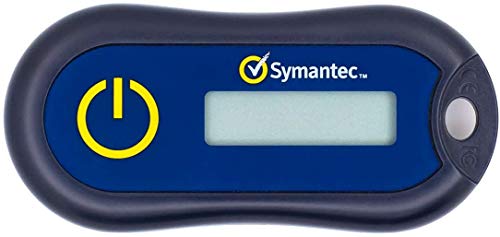
Symantec VIP Hardware Authenticator – OTP One Time Password Display Token – Two Factor Authentication – Time Based TOTP – Key Chain Size
Standard OATH compliant TOTP token (time based)
As an affiliate, we earn on qualifying purchases.
As an affiliate, we earn on qualifying purchases.
Conclusion
Now that you’re set with MFA, you’re like the knight guarding your business castle against cyber dragons. Implementing these steps keeps your data safe and customer trust intact—think of it as having a secret handshake that only you and your trusted allies know. Don’t wait for a cyber-Black Plague to hit; act now and future-proof your business. Remember, in today’s digital age, MFA isn’t just a tool—it’s your digital Excalibur.

Prox PRD – Phone Separation Alert Device | Stop Forgetting or Leaving Phone Behind at Home, Work, Restaurant, or Car | Proximity Alert Notification Approx 50-150ft | Stay Connected | No Subscription
☑️ STOP FORGETTING YOUR PHONE – GET A RELIABLE PHONE SEPARATION ALERT BEFORE YOU LEAVE YOUR PHONE BEHIND…
As an affiliate, we earn on qualifying purchases.
As an affiliate, we earn on qualifying purchases.

Yubico – YubiKey 5C NFC – Multi-Factor authentication (MFA) Security Key and passkey, Connect via USB-C or NFC, FIDO Certified – Protect Your Online Accounts
POWERFUL SECURITY KEY: The YubiKey 5C NFC is the most versatile physical passkey, protecting your digital life from…
As an affiliate, we earn on qualifying purchases.
As an affiliate, we earn on qualifying purchases.