A rackmount KVM console combines a sliding LCD monitor, keyboard, and touchpad into a single 1U drawer, letting you manage multiple servers without a permanent monitor station. For most buyers, the MT-VIKI 15.6″ Rack Mount Console with 8-Port HDMI switching is the strongest overall pick because it handles modern Full HD video sources and keeps the drawer compact enough for shallow racks. If you run older VGA-only servers, the Yinker 1U 15.6″ 8-Port VGA console delivers the same convenience at a friendlier budget, while the Tripp Lite NetDirector stands out for brand-name support and long-term reliability in enterprise closets. The main tradeoff you will face in this category is between video standard (HDMI versus VGA), port count (single-port up to 16), and drawer depth relative to your rack. Keep reading for the full breakdown of all 15 options.

Get privacy and security gear delivered free with Prime
- Fast, free delivery on millions of items
- Prime Video, Amazon Music and more included
- Member-only deals all year
Key Takeaways
- Video standard was the biggest dividing line in this roundup: HDMI models like the MT-VIKI 15.6″ and the 17.3″ 8-port HDMI switch future-proof modern servers, while VGA models only make sense for legacy hardware.
- Port count should match your server count with room to grow — the 16-port VGA console and the dual 8-port HDMI models earned top spots for scalability, while single-port consoles are strictly for occasional troubleshooting access.
- Drawer depth is a hidden dealbreaker: the MT-Viki 17″ model explicitly fits 23.6″–31.8″ deep racks, but several other consoles need deeper racks than buyers expect, so measure before ordering.
- Included accessories separated good value from false economy — models bundled with KVM cables (Yinker 8-pack, MT-VIKI 19″ VGA) save a meaningful per-connection cost that adds up at 8 or 16 ports.
- Brand support matters more here than price suggests: the two Tripp Lite entries cost a premium but back their hardware with real warranties and documentation, which most budget brands in this lineup do not provide.



| rackmount kvm console | Ports | Resolution | Screen Size |
|---|---|---|---|
| Yinker 1U 15.6" Rack Mount KVM | 8 (VGA/USB) | — | 15.6 inches |
| MT-VIKI 15.6" Rack Mount KVM C | 8 HDMI | 1920×1080 @ 60Hz | 15.6 inches |
| 1U Rack-Mount 16-Port VGA KVM | 16-port VGA KVM switch | 1280 x 1024 at 60 Hz | — |
| 8-Port Rack Mount HDMI KVM Swi | 8 HDMI | 1920×1080 @ 60Hz | 17.3 inches |
| 1U Rack Mount KVM Console with | Single-port VGA KVM, 1 USB/VGA cable | 1280×1024 @ 60Hz | — |
| MT-VIKI 19" LCD Rack Console w | 8 (VGA) | 1280×1024 | 19 inches |
| MT-Viki 17" 8-Port Rack Mount | 8 (VGA) | — | — |
| MT-VIKI 8-Port Rackmount KVM C | 8 | 1920×1080 at 60 Hz | — |
| UPtyma 17.3-Inch Full HD 1U Ra | — | — | — |
| MT-VIKI 15.6" LCD Rack Mount K | 8 VGA | 1920×1080 at 60Hz | 15.6 inches |
| Yinker 17" LCD KVM Console wit | 8 (VGA) | — | 17 inches |
| 1U Rack Mount KVM Console | Single HDMI port | 1280×1024 @ 60Hz | 19 inches |
| Tripp Lite NetDirector 8-Port | 8 | — | — |
| Tripp Lite B021-000-19 1U Rack | — | — | — |
| 1U Rack Mount KVM Console with | 8 (HDMI) | 1280×1024 @ 60Hz | 19 inches |
More Details on Our Top Picks
Yinker 1U 15.6″ Rack Mount KVM Console with 8-Port VGA, Keyboard, Touchpad, and 8-Pack KVM Cables
This pick makes the most sense for most server rooms because it nails the fundamentals without overreaching. The 15.6″ 1080p screen is the sweet spot in this category — large enough for OSD menus and terminal work, smaller and lighter than the 19-inch models like the 16-port VGA console, which makes the sliding mechanism smoother and less strained. Where it pulls ahead is daisy-chain expansion up to 64 servers, giving it headroom the single-port 19″ console simply can’t offer, and the included adjustable rails fit a genuinely wide 480–800mm depth range. Compare that to the 17.3″ HDMI model, which demands at least 600mm of depth. The tradeoff is real: VGA-only connectivity means modern HDMI or DisplayPort-only servers need adapters, and buyers with legacy-free fleets should look elsewhere.
Pros:- Daisy-chain support scales from 8 up to 64 servers
- Adjustable rails fit shallow 480mm racks through standard 800mm cabinets
- 8 KVM cables included so it works out of the box
- 1080p at 60Hz on a space-efficient 15.6″ panel
Cons:- VGA only — no HDMI, DisplayPort, or USB-C video
- Drawer assembly can feel bulky in very shallow cabinets despite rail adjustability
Best for: Small-to-midsize server rooms with mostly VGA-equipped servers that may grow past 8 machines
Not ideal for: Environments running modern HDMI/DisplayPort-only servers — the VGA limitation forces adapters everywhere
- Screen Size:15.6 inches
- Rack Height:1U
- Ports:8 (VGA/USB)
- Max Resolution:1920×1080@60Hz
- Rack Depth Compatibility:480-800mm (extended rails included)
- Cascade Support:Up to 64 servers
- OS Compatibility:Windows, DOS, Linux, Mac OS 8.6/9/10
- Certifications:CE, ROHS, REACH, PSE
- Includes:LCD KVM console, 8x VGA KVM cables, 2x rail sets, power adapter, user manual
Our verdict“The most balanced choice for growing racks of VGA servers, provided your hardware predates the HDMI-only era.”
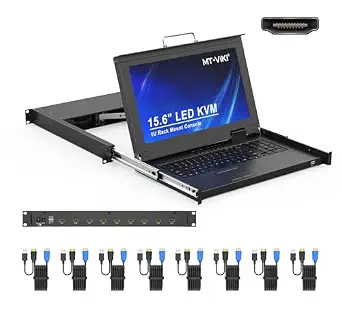
MT-VIKI 15.6″ Rack Mount KVM Console with 8-Port HDMI KVM Switch, 1920×1080@60Hz 1U LCD Monitor Keyboard Drawer
Among HDMI consoles, this MT-VIKI stands out for pairing full 1080p HDMI switching with the same compact 15.6″ footprint as the Yinker VGA model, while adding security features most budget consoles skip. The 2-level password system supporting up to 8 authorized users plus an administrator makes it better suited to shared colo cabinets or MSP environments than the Yinker, which has no comparable access control. Build quality is also deliberate: a lightweight aluminum interior inside a rugged steel drawer with a locking handle — a thoughtful mix that keeps the slide mechanism from flexing. The compromises are logistical rather than functional. Rack depth must be measured carefully, with cable clearance concerns under 600mm, and the bundled 5ft cables force a separate purchase for any server beyond arm’s reach.
Pros:- HDMI switching at full 1080p/60Hz with 8 ports
- 2-level password security for up to 8 users plus admin
- Aluminum interior with locking steel drawer shell
- OSD, hot-key, and push-button switching all included
Cons:- Included cables are only 5ft, so longer runs cost extra
- Cable clearance issues in racks shallower than 600mm
Best for: MSPs and shared IT rooms that need HDMI switching plus multi-user access control on a budget
Not ideal for: Buyers with shallow racks under 600mm deep or servers spaced far apart — the short included cables and clearance demands will bite
- Screen Size:15.6 inches
- Resolution:1920×1080 @ 60Hz
- Ports:8 HDMI
- Form Factor:1U rackmount
- Rack Depth Compatibility:18.9″–31.5″ (480-800mm)
- Switching Methods:OSD menu, hot-key, push button
- Security:2-level password (admin/user), up to 8 users
- Compatibility:Windows/DOS, Linux, Mac OS 8.6/9/10
- Included Cables:8x 5ft USB HDMI KVM cables
Our verdict“The smart pick if you need HDMI and user-level security without paying premium-console prices — just measure your rack first.”
1U Rack-Mount 16-Port VGA KVM Console with 19-Inch Monitor, Keyboard, and Touchpad
Doubling port count is the entire reason to choose this console over the 8-port Yinker or the MT-VIKI HDMI drawer: it controls 16 computers from a single 1U slot, eliminating a second switch and the hotkey gymnastics of cascading. The 19-inch panel makes sense here — with sixteen servers in an OSD list, the extra screen real estate genuinely helps. But there’s a catch buyers should weigh honestly: the display is 1280×1024 at a 5:4 aspect ratio, a dated resolution that makes modern web-based admin consoles feel cramped compared to the 1080p panels on the 15.6″ and 17.3″ models here. It’s also the most demanding on physical space, requiring a mount depth of 28.2–32.5 inches, which rules out compact cabinets entirely. For dense legacy VGA fleets, that tradeoff lands in its favor; for anything else, it doesn’t.
Pros:- 16 ports in a single 1U unit — no cascading needed
- 19-inch panel gives room for large OSD server lists
- Three switching methods: front panel, hotkeys, and OSD
- Broad OS compatibility across Windows, Linux, and macOS
Cons:- 1280×1024 at 5:4 is a dated, squarish resolution compared to 1080p rivals
- Requires deep racks (28.2–32.5 inches)
- VGA only, like most high-port-count consoles
Best for: IT admins managing 10-16 VGA servers in one deep, standard-size cabinet who want one console for everything
Not ideal for: Shallow or compact racks — the 28.2-inch minimum depth requirement is unforgiving
- Ports:16-port VGA KVM switch
- Monitor:19-inch LCD
- Resolution:1280 x 1024 at 60 Hz
- Aspect Ratio:5:4
- Switching Methods:Front-panel buttons, hotkeys, OSD
- Mount Depth:28.2–32.5 inches
- Dimensions:17.6 x 23.8 x 1.67 inches (W x D x H)
- Power:23 watts, 120 volts
Our verdict“Choose it only when port count is your priority — 16 servers on one drawer beats anything else in this lineup.”
8-Port Rack Mount HDMI KVM Switch with 17.3″ LCD Monitor, Keyboard & Touchpad (1U, 1920×1080)
If your admin work involves GUIs, dashboards, or configuration wizards rather than pure terminal sessions, the 17.3-inch Full HD panel here is the most comfortable viewing experience in this batch — noticeably more generous than the 15.6″ MT-VIKI while staying sharper than the 19-inch 16-port unit’s 1280×1024. This model also differentiates itself with an external monitor output, letting you mirror the console to a larger desk display, something none of the other picks offer. Like the Yinker, it supports cascading for expansion, so 8 ports isn’t a hard ceiling. The tradeoffs mirror its strengths: the bigger drawer needs a minimum 600mm rack depth, and HDMI-only connectivity means no DisplayPort or USB-C — modern mini PCs and NUCs may need adapters. It sits at the premium end of this lineup, and that price is only justified if screen size matters to your daily workflow.
Pros:- Largest 1080p panel in this group at 17.3 inches
- External monitor output for mirroring to a desk display
- Cascading support for scaling beyond 8 servers
- 8 USB HDMI KVM cables and rail kit included
Cons:- Requires at least 600mm rack depth
- No DisplayPort or USB-C support — HDMI only
Best for: Administrators who live in GUI-heavy management tools and want the largest, sharpest practical console display
Not ideal for: Shallow racks under 600mm deep, or buyers who mainly run terminal sessions and don’t need the big panel
- Screen Size:17.3 inches
- Resolution:1920×1080 @ 60Hz
- Ports:8 HDMI
- Form Factor:1U rack mount, 19-inch rack
- Rack Depth Support:600-810mm (23.6-31.8 inches)
- Controls:Front panel buttons, touchpad, hotkeys, OSD menu
- Compatible Systems:Windows/DOS, Linux, Mac OS 8.6/9/10
- Certifications:CE, ROHS, REACH, PSE
- Included:LCD KVM, 8 USB HDMI KVM cables, rail set, power adapter, user manual
Our verdict“The best viewing experience here, worth it only if GUI work justifies the premium and your rack is deep enough.”
1U Rack Mount KVM Console with 19″ Monitor, Keyboard, and Single-Port VGA
Not everyone needs a switch — sometimes you just need a permanent crash cart inside the rack. That’s this console’s role: a 19″ LCD, full 99-key keyboard with number pad, and touchpad in a 1U drawer, with a single VGA connection for whichever machine needs hands-on attention. Compared with the 16-port console, it trades switching capability for reliability pedigree: a 50,000-hour MTBF, a wide OS list including Solaris, Unix, Red Hat, and Ubuntu, and one of the thickest certification stacks in this roundup (UL, FCC, CE, CB, UKCA, PSE, SAA). It also supports unusually shallow racks down to 19.7 inches, where most rivals need 23 inches or more. The obvious limitation: one VGA port means no multi-server management and no digital video. If you already have IP-based KVM or remote management, that’s fine — this is the physical fallback, not the primary tool.
Pros:- Fits shallow racks down to 19.7 inches deep
- 50,000-hour MTBF and extensive UL/FCC/CE certifications
- Full 99-key keyboard with number pad for BIOS and CLI work
- Broad OS support including Solaris, Unix, and Red Hat
Cons:- Single-port VGA only — no switching, no HDMI or DisplayPort
- Fits only two narrow depth ranges (19.7″–20.7″ or 27.6″–28.2″)
- 1280×1024 resolution is behind the 1080p competition
Best for: Data centers with out-of-band remote management that still want a durable physical console for emergencies
Not ideal for: Anyone who needs to switch between multiple machines — the single VGA port makes it a one-server-at-a-time tool
- Display Size:19 inches
- Resolution:1280×1024 @ 60Hz
- Ports:Single-port VGA KVM, 1 USB/VGA cable
- Keyboard:Full-size 99-key with number pad
- Rack Compatibility:1U, 19″ rack; depths 27.6″-28.2″ and 19.7″-20.7″
- MTBF:50,000 hours
- OS Compatibility:Windows, Linux, Unix, macOS, Solaris, Red Hat, Ubuntu, Sun
- Certifications:UL, FCC, CE, CB, UKCA, PSE, SAA, RoHS2.0
- Includes:1 power cord, 4 brackets, rack mounting kit
Our verdict“A rugged single-server crash cart for shops that manage machines remotely and need occasional physical access.”
MT-VIKI 19″ LCD Rack Console with 8-Port VGA KVM Switch, Keyboard & Touchpad, 1U Rackmount (Includes 8 KVM Cables)
Among the 8-port options in this lineup, the MT-1908UL stands out for pairing the largest screen in the group — a 19-inch adjustable LCD tilting up to 110° — with a complete switching feature set. Compared with the 15.6-inch MT-VIKI 1568UL, the extra screen real estate makes OSD menus and server dashboards easier to read, which matters during long troubleshooting sessions. Switching works three ways (OSD, hotkey, front button), and the 2-level password security with up to 8 authorized users gives small teams access control that cheaper consoles skip entirely. Eight KVM cables come in the box, so there is no hidden accessory cost. The tradeoff is straightforward: this is a VGA-only design, so modern DisplayPort or HDMI servers need adapters, and the 23.6-inch minimum mounting depth rules out shallow racks.
Pros:- Largest display in this batch at 19 inches with 110° tilt adjustment
- Three switching methods plus 2-level password security for up to 8 users
- Eight KVM cables included, covering every port out of the box
- Broad OS compatibility from DOS and Windows through Linux, Unix, and Mac
Cons:- VGA only — no HDMI or DisplayPort support
- Requires a rack depth of 23.6 to 31.8 inches, excluding shallow cabinets
Best for: IT admins managing up to 8 legacy VGA servers who want the biggest readable display in a single 1U drawer
Not ideal for: Shops standardizing on HDMI or DisplayPort — the analog-only video path means adapters everywhere
- Model:MT-1908UL
- Ports:8 (VGA)
- Screen Size:19 inches
- Resolution:1280×1024
- Rack Size:1U
- Mount Depth:23.6″ to 31.8″
- Switching Methods:OSD menu, keyboard hotkey, front button
- Security:2-level password, up to 8 authorized users
- Included:Console, 8 USB VGA KVM cables, power adapter, manual
Our verdict“The pick for VGA-based server rooms where a large screen, multi-user security, and bundled cables justify the space.”
MT-Viki 17″ 8-Port Rack Mount KVM Switch with LCD Monitor, Keyboard & Touchpad (1U, 19″ Rack, 23.6″-31.8″ Depth)
Where most 8-port consoles in this roundup stop at eight machines, the 1708UL is built to scale: daisy-chain support for up to 64 computers means this drawer can remain your control point long after the initial eight servers fill up. That headroom is what separates it from the similarly sized Yinker 17-inch console, which locks you at eight ports. The build also feels more considered than budget rivals — an aluminum interior inside a rugged steel drawer shell, with a lockable drawer for physical security. Rack rails and a full set of eight VGA cables ship in the box. The compromises mirror the 19-inch MT-1908UL: VGA-only video, and expanding past eight machines means buying additional KVM switches, which adds cost and cabling complexity over time.
Pros:- Daisy-chain expansion up to 64 computers from one drawer
- Durable aluminum-and-steel construction with lockable drawer
- All-in-one design saves up to 85% of cabinet space
- Includes 8 KVM cables, power adapter, and rack rails
Cons:- VGA only — no HDMI or DisplayPort connectivity
- Requires minimum 23.6-inch rack depth
- Reaching 64 computers requires purchasing additional KVM switches
Best for: Data center operators who expect to grow past 8 servers and want one console that scales to 64 machines
Not ideal for: Buyers with fewer than 8 servers — the expansion features go unused while the depth requirement stays the same
- Ports:8 (VGA)
- Display:17-inch VGA LCD
- Rack Size:1U, 19-inch rack
- Mount Depth:23.6″ to 31.8″
- Power Consumption:24 watts (12V)
- Expansion:Daisy chain up to 64 computers
- Switching Methods:OSD menu, keyboard hotkey, push button
- Included Cables:8 KVM VGA cables (4x 5ft, 4x 6ft)
Our verdict“A scalable choice when eight ports are just the starting point for your rack.”
MT-VIKI 8-Port Rackmount KVM Console with 17.3-Inch HDMI LCD Monitor
This model answers the biggest complaint about the MT-1908UL and 1708UL: it swaps VGA for HDMI connectivity with 1080p at 60 Hz, making it the better fit for racks full of modern servers that no longer ship with analog video outputs. The 17.3-inch screen lands between the 17-inch and 19-inch VGA models in size but delivers sharper full-HD clarity, and the touchpad supports an external USB mouse for those who prefer one. The same three-way switching (OSD, hotkey, button) carries over, and eight KVM cables are bundled. Two things hold it back from a top ranking: the included cables run short for racks where servers sit far from the console, and like its siblings it demands a 19-inch rack with 23.6 to 31.8 inches of depth — no shallow-cabinet installs.
Pros:- Native HDMI support at 1080p/60Hz — no adapters on modern servers
- Sharp 17.3-inch full-HD display with 110° adjustment
- Three switching methods plus external USB mouse support
- Eight KVM cables included
Cons:- Included cables may be too short for some rack layouts
- Restricted to 19-inch racks with 23.6–31.8 inch mounting depth
Best for: Admins whose servers output HDMI natively and want 1080p clarity without adapters
Not ideal for: Setups with widely spaced servers — the bundled short cables may force a repurchase
- Ports:8
- Display:17.3-inch LCD
- Resolution:1920×1080 at 60 Hz
- Connectivity:HDMI, USB 2.0
- Rack Size:1U, 19-inch rack
- Mount Depth:23.6–31.8 inches
- Switching Methods:OSD menu, keyboard hotkey, button
- Power:12V, 24W
Our verdict“The right pick when your servers speak HDMI and you want a crisp 1080p console in one drawer.”
UPtyma 17.3-Inch Full HD 1U Rackmount KVM Console
The UP100A solves a problem none of the MT-VIKI consoles in this roundup can touch: depth. At just 17.17 inches deep and 11.4 pounds, it fits shallow racks where the 23.6-inch-minimum MT-VIKI units simply cannot go, and its shorter chassis leaves room to mount a KVM switch behind the console in the same rack space. Installation is deliberately painless — tool-free and manageable by one person — and the spec sheet reads like a government procurement checklist, with TAA compliance, US manufacture, and a 1-year parts-and-labor warranty. Unlike the all-in-one MT-VIKI models, though, this is a console only: you supply your own switch, and operation is manual rather than OSD-driven. Two front USB 3.0 pass-through ports and a 1080p display over VGA or DisplayPort round out a lean, focused design.
Pros:- Short-depth chassis fits racks the deeper MT-VIKI consoles cannot
- Tool-free, single-person installation at just 11.4 lbs
- TAA compliant and made in USA with 1-year parts and labor warranty
- Dual video inputs (VGA and DisplayPort) plus two USB 3.0 pass-through ports
Cons:- No built-in KVM switching — a separate switch must be purchased and installed
- Manual operation mode lacks the OSD convenience of integrated rivals
Best for: Buyers with shallow racks or government/TAA procurement requirements who already own or will choose their own KVM switch
Not ideal for: Anyone wanting a complete switch-and-console package — this is a display and keyboard drawer only
- Model:UP100A
- Display:17.3-inch LCD
- Maximum Resolution:1920 x 1080 (60/75 Hz)
- Form Factor:1U rackmount
- Dimensions:17.05 x 17.17 x 1.66 inches
- Weight:11.4 lbs
- USB Ports:2 front-access USB 3.0 pass-through
- Video Inputs:VGA and DisplayPort
- Warranty:1 year parts and labor, TAA compliant
Our verdict“The shallow-rack and compliance-friendly console for buyers who prefer to pick their own switch.”
MT-VIKI 15.6″ LCD Rack Mount KVM Switch, 8-Port VGA, 1U Console with Keyboard and Touchpad
The 1568UL proves a smaller screen does not mean a stripped-down feature list. Despite the 15.6-inch panel, it delivers full 1920×1080 resolution — sharper than the 19-inch MT-1908UL’s 1280×1024 — and keeps the 2-level password security, three switching methods, and 64-computer daisy chaining of its larger siblings. Its smartest trick is the two sets of adjustable rack rails fitting depths from 18.9 to 31.5 inches, meaning it mounts in shallow racks that reject every other MT-VIKI model here except the UPtyma console. A front USB 2.0 port, eight bundled KVM cables, and the power adapter complete the package. The smaller display does demand more squinting at dense server interfaces, VGA remains the only video option, and buyers with racks under 600mm deep should verify cable clearance before committing.
Pros:- Full 1080p resolution on a compact 15.6-inch panel
- Two sets of rack rails support shallow 18.9-inch to 31.5-inch depths
- 2-level password security and daisy-chain support up to 64 computers
- Complete bundle with 8 KVM cables and power adapter
Cons:- VGA only — no HDMI or DisplayPort support
- Smaller screen is cramped for dense dashboards
- Cable clearance issues reported in racks under 600mm deep
Best for: Budget-conscious admins who want the full feature set — security, daisy chaining, bundled cables — without paying for a bigger panel
Not ideal for: Users who spend long sessions in OSD menus or monitoring dashboards — the 15.6-inch panel is tight for that
- Model:1568UL
- Screen Size:15.6 inches
- Resolution:1920×1080 at 60Hz
- Ports:8 VGA
- Form Factor:1U rackmount drawer
- Rack Depth Support:18.9″ to 31.5″
- Expansion:Daisy chain up to 64 computers
- Security:2-level password, up to 8 users
- Included:8x 5ft USB VGA KVM cables, 12V 2A adapter, rack rails, manual
Our verdict“The most feature-complete value in the lineup, provided the smaller display suits your workflow.”
Yinker 17″ LCD KVM Console with 8-Port VGA Switch, 1U Rackmount, Keyboard + Touchpad
This option stands out for value and flexibility in older server rooms, pairing a 17-inch LCD with an 8-port VGA switch and throwing in all eight KVM cables plus the power supply — a package that competing units like the Tripp Lite B021-000-19 leave you to assemble separately. The rack depth range of 23.6 to 31.8 inches is wider than most, so it fits shallow cabinets that reject the 28-inch-plus units elsewhere in this lineup. Daisy-chaining to 64 computers gives it headroom beyond the eight front-panel ports. The tradeoff is video: VGA-only connectivity with a 1280×1024 @ 30Hz ceiling means modern DisplayPort or HDMI servers are off the table, and the 30Hz refresh is noticeably less smooth than the 60Hz panels on the HDMI models here.
Pros:- Complete package includes all 8 KVM cables and power supply
- Wide rack depth compatibility from 23.6 to 31.8 inches
- Cascading support for up to 64 computers
- Three switching methods: OSD, hotkey, and panel button
Cons:- VGA only — no HDMI, DVI, or DisplayPort support
- 1280×1024 at 30Hz refresh looks dated and less smooth than 60Hz rivals
Best for: Budget-conscious IT managers running older VGA-only servers in shallow or mixed-depth racks
Not ideal for: Shops with modern HDMI or DisplayPort servers, or anyone wanting a crisp widescreen display
- Screen Size:17 inches
- Ports:8 (VGA)
- Rack Size:1U, 19-inch rack
- Rack Depth Compatibility:23.6″ – 31.8″
- Max Resolution:1280×1024 @ 30Hz
- Cascade Support:Up to 64 computers via daisy chain
- Switching Methods:OSD menu, hotkey, panel button
- Included Cables:8 KVM cables (4x 5ft, 4x 6ft)
Our verdict“A cost-effective all-in-one for legacy VGA server racks, as long as analog video is all you need.”
1U Rack Mount KVM Console – 19″ Rackmount Monitor with Keyboard, Touchpad, and Single Port HDMI KVM
Not every rack needs eight ports. This model makes the most sense for the buyer who wants a clean, modern console for one server or one KVM-connected machine, and it does that job well: a 19-inch panel at 1280×1024 @ 60Hz, a full-size 99-key keyboard with number pad, and HDMI connectivity that VGA-only units like the Yinker 17-inch console can’t match. The 1000:1 contrast and wide viewing angles make long troubleshooting sessions easier on the eyes than smaller 15.6-inch drawer units. The obvious limitation is that single HDMI port — no switching, no cascading — so multi-server environments should look at the 8-port HDMI console (B0F3225JF4) instead. Also note the two fairly narrow mounting depth ranges; measure your rack before committing.
Pros:- HDMI input supports modern servers without adapters
- Full-size 99-key keyboard with dedicated number pad
- 60Hz refresh and 1000:1 contrast for comfortable viewing
- Broad OS compatibility including macOS, Unix, and Solaris
Cons:- Single port only — no switching between computers
- Mounting depth limited to two narrow ranges, so precise rack measurement is required
Best for: Admins who need occasional local access to one modern HDMI server and want a full-size typing experience
Not ideal for: Multi-server environments — the single port means you’ll be swapping cables or buying a separate switch
- Screen Size:19 inches
- Resolution:1280×1024 @ 60Hz
- Ports:Single HDMI port
- Rack Size:1U, 19-inch rack
- Mounting Depth Options:27.6″-28.2″ and 19.7″-20.7″
- Keyboard:Full-size 99-key with number pad
- Compatibility:Windows, Linux, Unix, macOS, Solaris, Red Hat, Ubuntu
- Included Accessories:1 USB HDMI cable, 1 power cord, 4 mounting brackets
Our verdict“The right pick when you only need to reach one HDMI server but still want a proper keyboard and display in the rack.”
Tripp Lite NetDirector 8-Port Console KVM Switch with 19-Inch LCD
Where this unit separates itself is scale: daisy-chain additional switches and the NetDirector can manage up to 504 computers, a figure that dwarfs the 64-computer ceiling of the Yinker 17-inch console. The inclusion of eight USB/PS/2 combo cable kits covers mixed-vintage servers without extra purchases, and the option to attach an external console or a compatible IP remote access unit means you’re not locked into the built-in drawer forever. Tripp Lite’s brand support and channel presence also matter in enterprise procurement, where an established vendor simplifies purchasing and RMA processes. The tradeoffs are real, though: beyond eight computers you’re buying more switches, the unit’s physical footprint is larger than competing 1U drawers, and the listed specs contain an apparent voltage error — worth confirming details before a bulk deployment.
Pros:- Daisy-chain support for up to 504 computers
- Eight USB/PS/2 combo cable kits included for mixed server fleets
- Supports external console and optional IP remote access
- Multiple switching methods including push buttons and OSD
Cons:- Scaling past 8 computers requires purchasing additional daisy-chained switches
- Larger physical footprint than comparable 1U consoles
- Listed product specs contain an inconsistent voltage figure worth verifying
Best for: Enterprise IT teams planning large multi-rack deployments with growth toward hundreds of managed systems
Not ideal for: Small setups with a handful of servers — the scalability you’re paying for goes unused and the unit is physically bulkier
- Brand:Tripp Lite
- Model:B020-U08-19-K
- Ports:8
- Display:19-inch LCD
- Mounting:1U rack mount
- Included Cables:8 USB/PS/2 combo KVM cable kits
- Maximum Computers:504 with daisy-chained switches
- Control Methods:Push buttons, on-screen display, keyboard hotkeys
- Warranty:1-year limited
Our verdict“The pick for large-scale deployments where 500-plus computer capacity and vendor support outweigh the bulk and added switch costs.”
Tripp Lite B021-000-19 1U Rackmount KVM Console with 19-Inch LCD
This model takes the opposite approach from the NetDirector B020-U08-19-K: instead of bundling a switch, it’s a pure console drawer designed to sit in front of whatever PS/2 or USB KVM switch you already own. That makes it a smart upgrade path — if your switch works but your aging monitor-and-keyboard setup doesn’t, this replaces it in one 1U slot without re-architecting anything. The USB 2.0 pass-through port is a practical touch for firmware updates from a flash drive, and the folding design keeps the rack face clean between uses. Compared with all-in-one units like the Yinker 8-port console, you avoid paying for switching hardware you don’t need — but if you’re building a rack from scratch, buying console and switch separately usually costs more and adds cabling.
Pros:- Works with most existing PS/2 and USB KVM switches
- USB 2.0 pass-through for flash drives and peripherals
- Folds flat when not in use to preserve rack space
- Established vendor with 1-year warranty
Cons:- No built-in switching — requires a separate KVM switch to control multiple servers
- 1280 x 1024 maximum resolution is behind modern widescreen consoles
Best for: IT teams with a working PS/2 or USB KVM switch who only need to replace the console drawer
Not ideal for: New rack builds with no existing switch — a bundled all-in-one console will cost less and cable up faster
- Model:B021-000-19
- Mounting:1U rack mount
- Display:19-inch LCD
- Maximum Resolution:1280 x 1024
- Keyboard:88-key
- Pointing Device:Touchpad
- USB Pass-Through:USB 2.0
- Compatibility:Most PS/2 and USB KVM switches
- Warranty:1 year
Our verdict“A clean console-only replacement for racks where the switch is staying and only the drawer needs updating.”
1U Rack Mount KVM Console with 19″ Monitor, Keyboard, Touchpad, and 8-Port HDMI KVM Switch
This unit hits a sweet spot the VGA-heavy entries can’t: eight HDMI ports for modern servers plus a 19-inch panel running at a smooth 1280×1024 @ 60Hz. Compared with the Yinker 17-inch VGA console, the digital connection and doubled refresh rate make a visible difference in text clarity and cursor responsiveness, and Auto Scan plus BRC mode add convenience the single-port HDMI drawer (B0CMCSVH1N) simply doesn’t offer. The 2-year warranty is the longest in this batch, which signals confidence the one-year units don’t. Two things hold it back: the mounting depth window of 28.2 to 32.5 inches is strict, so shallow racks are out, and the 5:4 aspect ratio feels dated next to the 1080p widescreen 17.3-inch consoles elsewhere in this roundup.
Pros:- 8 HDMI ports for modern digital-video servers
- 60Hz refresh for smoother display than 30Hz VGA rivals
- Auto Scan and BRC mode plus three switching methods
- 2-year warranty — the longest coverage in this lineup
Cons:- Requires cabinet depth between 28.2″ and 32.5″, excluding many racks
- 5:4 aspect ratio and 1280×1024 resolution lag behind widescreen 1080p alternatives
Best for: Growing server rooms with modern HDMI machines that need multi-server control from one drawer
Not ideal for: Racks shallower than 28.2 inches, or buyers wanting a widescreen 1080p display for detailed work
- Ports:8 (HDMI)
- Screen Size:19 inches
- Resolution:1280×1024 @ 60Hz
- Rack Size:1U
- Mount Depth:28.2″ to 32.5″
- Switching Methods:Front panel buttons, hotkeys, OSD
- OS Compatibility:Windows, Linux, Mac, Sun
- Certifications:UL, FCC, CE, CB, UKCA, PSE, SAA, RoHS2.0
- Warranty:2 years
Our verdict“The strongest choice for multi-server HDMI environments, provided your rack is deep enough and you can live with a square screen.”

How We Picked
I evaluated each console against the factors that actually decide whether a drawer works in a real rack: video compatibility and resolution (VGA versus HDMI, and whether 1920×1080 is truly supported), port count and switching flexibility, physical fit including 1U height, drawer depth, and rail quality, and completeness of the bundle — whether KVM cables are included or a hidden extra cost. Because these consoles live in server rooms for years, I also weighed build quality of the sliding mechanism and latch, keyboard and touchpad usability, and the level of vendor support behind the product.
Ranking followed a simple logic: consoles that pair modern HDMI switching with solid build rose to the top, VGA models were ranked on port density and included cables, and single-port consoles were placed according to their value as access-only troubleshooting tools. Premium brand-name options like the Tripp Lite units were credited for warranty coverage and documentation even where their raw specs matched cheaper rivals. The result is an ordered list where each position reflects a real difference in who the product serves, not a reshuffling of near-identical descriptions.
Factors to Consider When Choosing Rackmount Kvm Console
Before settling on a specific model, step back and think about your rack as a system. The console drawer is only one part of the equation — your server video outputs, rack dimensions, and how often you will actually open the drawer all shape which model makes sense.Match the Video Standard to Your Servers, Not the Market
The single most common mistake in this category is buying an HDMI console for a rack full of servers with VGA outputs, or vice versa. Walk your server room and physically check the video ports before ordering — adapters exist, but they add cost, points of failure, and sometimes resolution limits at every connection. If your fleet is mixed, plan for either a hybrid approach or budget a quality adapter per server. Also verify the console supports the resolution your servers actually output; a console rated below 1920×1080 will downgrade modern displays and make small UI text hard to read. Remember that console panels are small (15.6″ to 19″), so even at Full HD, dense server management interfaces benefit from larger panel sizes if your budget allows.
Measure Your Rack Depth Before Anything Else
Drawer depth kills more installs than any other spec. A 1U console slides out on rails mounted to the front and rear of your rack, and if your rack is too shallow, the rails simply will not attach — or the drawer will not close flush. Most consoles in this class need roughly 23 to 32 inches of usable depth, and some need the full range. Check whether your rack has threaded mounting holes compatible with the included rails, and confirm the clearance in front of the rack for the drawer to slide fully open. If you are working with a shallow wall-mount or compact rack, a 15.6″ panel model is usually safer than a 19″ one. This is a five-minute measurement that prevents a complete return-and-reorder cycle.
Port Count: Buy for Growth, Not for Today
Count your servers, then add headroom. An 8-port switch that is full on day one forces you into daisy-chaining or a second console later, which costs more than buying a 16-port unit upfront. That said, oversized switches waste money and rack cabling space if you manage only three machines. A useful rule: if you are within two ports of capacity today, step up to the next tier. Single-port consoles deserve honest consideration too — many server rooms keep one console purely for emergency console access while relying on remote management (IPMI, iDRAC, iLO) day to day. If that describes your setup, a single-port drawer plus remote management may beat any multi-port switch on both cost and reliability.
Cables Are Not Always Included — Do the Math
Several consoles in this category ship without KVM cables, and specialty combined KVM cables are not cheap — often a meaningful fraction of the console price each, multiplied by your port count. A budget console that looks like a bargain can end up costing more than a bundled kit once you buy eight cables separately. Bundled packages (like the 8-pack kits included with some Yinker and MT-VIKI models) also guarantee cable compatibility, which matters because proprietary connector pinouts are common in this market. When comparing prices across brands, always check the “what’s in the box” list first. Cable length matters too: shorter cables reduce rack clutter but limit how far a server can sit from the switch.
Build Quality and Brand Support: The Long Game
These drawers get opened, slammed, and slid thousands of times over their life, and the failure points are predictable: the rail bearings, the latch, and the hinge. Budget brands vary widely in rail smoothness and latch security, and a drawer that droops or rattles loose is a daily annoyance. Established vendors like Tripp Lite back their consoles with real warranties, printed documentation, and reachable support — a genuine advantage when a unit fails in a production rack three years in. Many budget brands offer effectively no support path beyond return windows. If your console serves a business-critical closet, weigh the premium for brand support as insurance rather than as markup.
Panel Size Versus Rack Space
Panel size in this lineup runs from 15.6″ to 19″, and the tradeoff is straightforward: larger panels make multi-window server work and small-text configuration screens far easier to read, but they tend to need deeper racks and can cost more. A 15.6″ panel is fine for occasional console access and basic BIOS-level work. A 17.3″ or 19″ panel earns its space if you spend real time at the rack doing installs or troubleshooting. All of these are 1U, so height is not the constraint — depth and budget are. Think honestly about how often you will be physically standing at the rack versus managing remotely; that answer usually dictates the right panel size better than any spec sheet.
Frequently Asked Questions
Can I use an HDMI console with VGA-only servers (or the reverse)?
Yes, but with caveats. Passive VGA-to-HDMI adapters rarely work for KVM use because VGA is analog and HDMI is digital — you need an active powered converter, one per server, which adds cost and another component that can fail inside your rack. Resolution also matters: cheap active converters sometimes cap out below 1080p or introduce lag on the console screen. If most of your servers are VGA, buying a VGA-native console like the 16-port or 8-port VGA models in this lineup is almost always the better path. Only mix standards when you have one or two odd servers to accommodate, not as a general architecture.
Do I even need a multi-port KVM console if my servers have IPMI or iDRAC?
For day-to-day management, probably not — remote management controllers handle OS-level and even out-of-band access from your desk. But there is a class of problem where remote tools fail you completely: BIOS changes before an OS is loaded, boot failures that knock out the management agent, network misconfigurations that cut off remote access, and hardware reinstallation scenarios. A single-port console drawer covers exactly those emergencies at a lower cost than an 8- or 16-port switch. Multi-port consoles make sense when you either lack remote management licensing on your servers or you routinely work on several machines physically at the rack. Match the port count to your worst realistic day, not your average one.
How deep does my rack need to be for a 1U console drawer?
Most consoles in this category require between roughly 23.6 and 32 inches of usable internal depth, and the range varies by model even within the same brand — the MT-Viki 17″ unit in this lineup explicitly fits 23.6″ to 31.8″ racks, while some 19″ models need the deeper end of that range. Measure the distance between your front and rear mounting rails, not the external rack depth, since the difference can be an inch or more. Also confirm the rails can attach at multiple depths, because some racks have limited rear mounting positions. If your rack is on the shallow side, prioritize 15.6″ panel models, which generally have shorter drawer assemblies than 19″ units.
Are the budget consoles actually reliable, or should I pay more for a brand name?
Budget consoles from brands like Yinker and MT-VIKI are generally fine for homelabs, small server rooms, and low-frequency use — the core electronics are simple and the failure stories mostly involve rails and latches rather than the LCD or switch logic. The real gap is post-sale support: budget brands typically offer a return window and nothing beyond it, while a vendor like Tripp Lite provides an actual warranty and reachable support channel. My honest framing is this: if the console failing means you drive to a site and lose an afternoon, the premium for brand support is justified. If it means you swap in a spare from a shelf, the budget options deliver better value.
What resolution do these consoles actually support, and does it matter?
Most current models support 1920×1080 at 60Hz, but older and cheaper VGA-native units often top out at 1280×1024, and some consoles accept 1080p input but display it scaled on a lower-native panel. Resolution matters most when you are reading configuration screens, editing BIOS settings, or working in terminal-heavy interfaces where small text is the norm. On a 15.6″ or 17.3″ panel, the difference between native 1080p and a scaled image is noticeable but not crippling; on a 19″ panel it becomes more obvious. Check both the input support and the panel’s native resolution in the specs — the input rating alone does not tell you what the screen can truly show.
Conclusion
For best overall, the MT-VIKI 15.6″ 8-Port HDMI console balances modern video support, reasonable rack-depth needs, and everyday usability better than anything else in this lineup. The best value pick is the Yinker 1U 15.6″ 8-Port VGA console with included cable pack — it is the most complete out-of-the-box package for legacy VGA racks, with the MT-VIKI 19″ VGA console close behind when you want a bigger panel. On the premium side, the Tripp Lite NetDirector 8-Port earns its price through warranty coverage and support that budget brands simply do not match, making it the right call for production environments. For beginners and homelab builders, the MT-VIKI 15.6″ 8-Port VGA switch is forgiving on budget and simple to set up. Specific needs round out the list: the 16-port VGA console for large legacy fleets, the single-port VGA and HDMI consoles for emergency-access-only racks, and the 17.3″ Full HD UPtyma for anyone who wants maximum screen clarity in a compact drawer. Measure your rack depth, count your ports with growth in mind, and the right choice from this list becomes obvious.
Evergreen bestsellers Picks

LG 85-Inch QNED84B Mini LED 4K Smart TV (2026)

LG 85-Inch QNED73B Mini LED 4K Smart TV (2026)

Philips 2200 Series Fully Automatic Espresso Machine with Classic Milk Frother
As an affiliate, we earn on qualifying purchases.