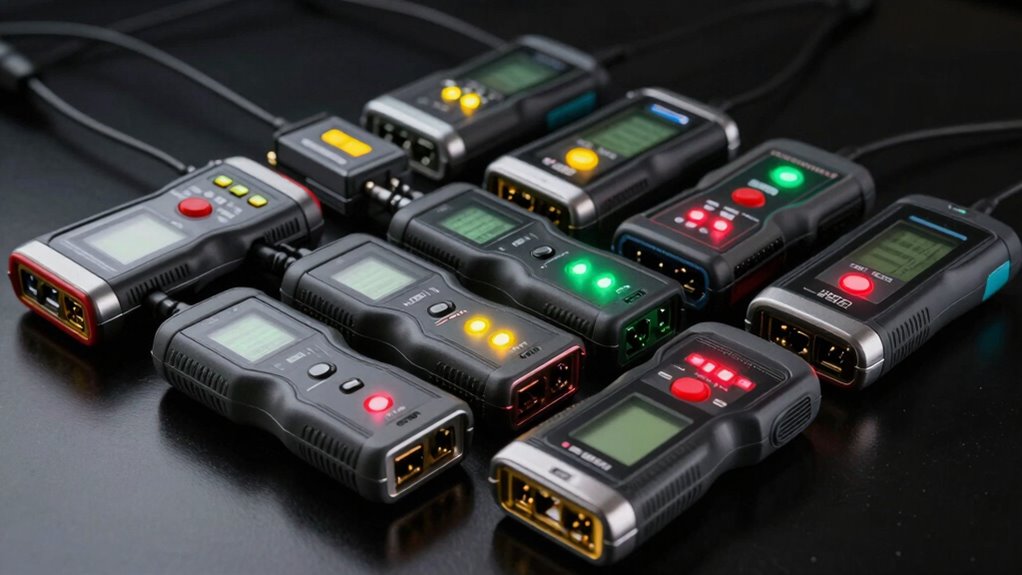
For most technicians who need a handheld PoE tester that also checks copper cabling, the Fluke Networks MicroScanner PoE is my best overall pick; it brings cable verification together with PoE testing. The Jonard Tools POE-1 is a better fit when measuring voltage and current is the priority, while the PoE Texas GEN2.5 focuses on inline power readings. The main tradeoff is between a compact, focused tester and a larger camera installation tool with features such as a touchscreen and TDR. I also compare simpler detectors and cable testers for occasional checks. Continue reading for the full breakdown and help matching a tester to your work.

Get privacy and security gear delivered free with Prime
- Fast, free delivery on millions of items
- Prime Video, Amazon Music and more included
- Member-only deals all year
Key Takeaways
- Fluke Networks MicroScanner PoE ranks first for buyers who want PoE checks alongside copper cable verification, rather than a detector alone.
- Jonard Tools POE-1 stands out for technicians who need voltage, amperage, and resistance readings in one handheld tool.
- PoE Texas GEN2.5 is a more focused choice for inline voltage and current checks than broad cable fault finding.
- The WANLUTECH E88 and RAINLEOTI 7-inch tester offer a different class of tool: larger CCTV installation platforms with displays and cable diagnostics.
- Basic detectors and cable testers can suit occasional identification work, but they cannot replace a meter or a tester with the specific diagnostics a network fault requires.
| Fluke Networks 5018508 MicroScanner PoE Copper Cable Verifier and PoE Tester |  | Best Overall for Cable Troubleshooting | Model: 5018508 | Cable compatibility: RJ-45 Category 5–6A Ethernet cables | PoE support: Classes 1–8; active 802.3at/af/bt and passive sources | VIEW ON AMAZON | See Our Full Breakdown |
| PoE Texas Power Over Ethernet Voltage & Current Tester GEN2.5 |  | Best for Live Power Readings | Model: POE-Tester-GEN2.5 | Power source: Network powered by PoE | Voltage range: 3.5–56 V | VIEW ON AMAZON | See Our Full Breakdown |
| Rocky Mars PoE Cable Tester (Model 8504) |  | Best for Long Cable Runs | Model: 8504 | PoE standards: IEEE 802.3af/at/bt | Load detection: 2–80 W | VIEW ON AMAZON | See Our Full Breakdown |
| PoE Texas Power Over Ethernet Detector & Tester Kit | 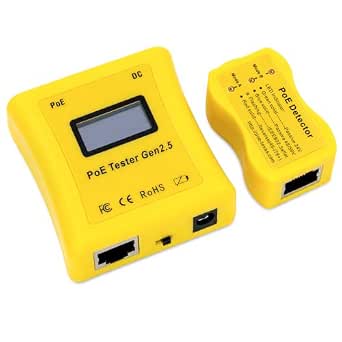 | Best Two-Tool Kit | Model: POE-DETECTOR kit | Power source: PoE powered; no batteries | Voltage range: 3.5–56 V | VIEW ON AMAZON | See Our Full Breakdown |
| NOYAFA NF-488 POE Cable Tester |  | Best for Basic Cable Fault Checks | Model: NF-488 | Power source: Battery powered | Voltage test range: 0–60 V | VIEW ON AMAZON | See Our Full Breakdown |
| PoE Texas PoE Detector – 802.3af/802.3at/24V/56V Passive PoE Detection |  | Best for Quick Field Checks | Supported standards: IEEE 802.3af, IEEE 802.3at, 24V passive, 48/56V passive | Power source: PoE line; no batteries required | Polarity detection: Reverse polarity (Mode B) | VIEW ON AMAZON | See Our Full Breakdown |
| Jonard Tools POE-1 PoE & Cable Testing Tool – Supports Passive, 802.3af/at/bt Standards, Measures Voltage, Amperage, Resistance |  | Best for Combined PoE and Cable Checks | Supported standards: Passive, IEEE 802.3af, 802.3at, 802.3bt | Power source: PoE or AA battery | Cable types: Cat5, Cat5e, Cat6, Cat6a | VIEW ON AMAZON | See Our Full Breakdown |
| OONO F-1075 PoE Detector and Tester |  | Best for Simple Device-Safety Checks | Model: F-1075 | Supported standards: IEEE 802.3af, IEEE 802.3at, passive 24V/48V/56V | Power source: PoE powered | VIEW ON AMAZON | See Our Full Breakdown |
| WANLUTECH E88 4K 12MP IP Camera Tester with 8″ Touchscreen, 90W PoE, SFP Fiber Port, and RJ45 TDR Cable Tester |  | Best for CCTV Commissioning | Model: E88 | Screen: 8-inch touchscreen | Resolution support: 4K / 12MP | VIEW ON AMAZON | See Our Full Breakdown |
| NOYAFA NF-8209 Network Cable Tester with PoE and NCV |  | Best for Cable Tracing and Mapping | Compatible cables: CAT5, CAT6, RJ45, telephone | Measurements: Continuity, length, voltage, wire mapping | Cable length range: 2.5–200 m | VIEW ON AMAZON | See Our Full Breakdown |
| RAINLEOTI 7″ IPS Touch Screen CCTV Camera Tester with IP Discovery, POE, and RJ45 TDR |  | Best for CCTV Installers | Screen: 7-inch IPS touch screen, 1920 × 1200 | Maximum IP camera support: 6K 32MP | Battery: 7.4V 7000mAh | VIEW ON AMAZON | See Our Full Breakdown |
| RTN Systems PoE-T100 Inline DC & PoE Tester |  | Best for Electrical Readings | Model: PoE-T100 | Power source: Self-powered by PoE or DC | Voltage range: 12–57V DC | VIEW ON AMAZON | See Our Full Breakdown |
| TRENDnet TC-NTP1 Inline PoE Tester |  | Best for Standard PoE Checks | Ports: 1 × Gigabit PSE, 1 × Gigabit PD | Power source: Battery-free; powered by PoE | Compatibility: IEEE 802.3af/at/bt up to 100W; passive PoE 11V–60V | VIEW ON AMAZON | See Our Full Breakdown |
| Brileine Network Cable Tester and Ethernet Tester with POE Detection | 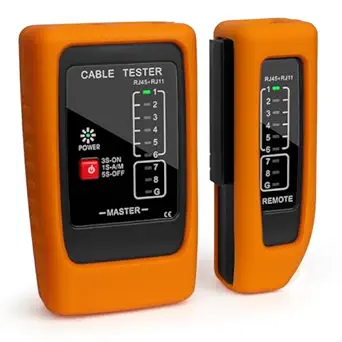 | Best for Long Cable Runs | Compatible connectors: RJ11, RJ12, RJ45 | Compatible cables: Cat5, Cat5e, Cat6 | Maximum test distance: 300 meters | VIEW ON AMAZON | See Our Full Breakdown |
| poe tester handheld | Power source | Model |
|---|---|---|
| Fluke Networks 5018508 MicroSc | Alkaline batteries | 5018508 |
| PoE Texas Power Over Ethernet | Network powered by PoE | POE-Tester-GEN2.5 |
| Rocky Mars PoE Cable Tester | Battery powered | 8504 |
| PoE Texas Power Over Ethernet | PoE powered; no batteries | POE-DETECTOR kit |
| NOYAFA NF-488 POE Cable Tester | Battery powered | NF-488 |
| PoE Texas PoE Detector | PoE line; no batteries required | — |
| Jonard Tools POE-1 PoE & Cable | PoE or AA battery | — |
| OONO F-1075 PoE Detector and T | PoE powered | F-1075 |
| WANLUTECH E88 4K 12MP IP Camer | — | E88 |
| NOYAFA NF-8209 Network Cable T | — | — |
| RAINLEOTI 7" IPS Touch Screen | — | — |
| RTN Systems PoE-T100 Inline DC | Self-powered by PoE or DC | PoE-T100 |
| TRENDnet TC-NTP1 Inline PoE Te | Battery-free; powered by PoE | — |
| Brileine Network Cable Tester | 9V DC battery, not included | — |
More Details on Our Top Picks
Fluke Networks 5018508 MicroScanner PoE Copper Cable Verifier and PoE Tester
The MicroScanner PoE is the most complete handheld choice here for technicians who need to diagnose both power and the copper run. It checks active and passive PoE through 90 W, identifies network services up to 10G, and combines wire maps, cable length, cable IDs, and distance to faults on a backlit display. Compared with the PoE Texas GEN2.5, which focuses on live voltage, current, and power readings, this Fluke gives more cable fault information; the tradeoff is a broader, less power-focused workflow. Its 460 m length limit may also fall short for unusually long runs, and probe and remote ID locators are sold separately. I’d choose it when one handheld needs to cover installation checks and fault finding, rather than just confirm PoE output.
Pros:- Checks active and passive PoE, including classes 1–8 and power up to 90 W
- Combines wire mapping, cable length, cable IDs, and distance-to-fault measurements
- Detects network services up to 10G Ethernet
- Backlit display supports work in varied lighting
Cons:- Probe and remote ID locators are sold separately
- Cable-length measurement is limited to 460 m
Best for: Network technicians who need PoE checks plus cable mapping, length measurement, and fault location in one handheld.
Not ideal for: Installers who mainly need live voltage and current readings or who need cable-length measurements beyond 460 m.
- Model:5018508
- Cable compatibility:RJ-45 Category 5–6A Ethernet cables
- PoE support:Classes 1–8; active 802.3at/af/bt and passive sources
- Maximum PoE power:Up to 90 W
- Network speed detection:Up to 10G Ethernet
- Maximum cable length:460 m (1,500 ft)
- Measurement types:Voltage, cable length, wire map, cable ID, and distance to fault
- Power source:Alkaline batteries
Our verdict“Choose the MicroScanner PoE if you want one capable handheld for PoE verification and copper cable fault diagnosis.”
PoE Texas Power Over Ethernet Voltage & Current Tester GEN2.5
When the main question is whether a powered device is receiving the expected electrical supply, the GEN2.5 keeps the job focused. It displays voltage, current, and power in real time while preserving Gigabit data flow, and its Simulate PoE Device mode gives installers a way to check managed-switch behavior. Unlike the Fluke Networks MicroScanner PoE, it does not provide cable mapping or distance-to-fault tools; it trades that breadth for a compact, battery-free inline check. The 56 V ceiling suits the listed IEEE PoE standards, but rules it out for higher-voltage industrial supplies. I’d pick this model for checking cameras, phones, and access points on active PoE lines, not for general cable certification or mains testing.
Pros:- Shows voltage, current, and power simultaneously
- Runs from the Ethernet line without batteries
- Simulate PoE Device mode helps check managed switches
- Supports IEEE 802.3af/at/bt while maintaining Gigabit data flow
Cons:- Does not provide the cable mapping and fault-location functions of the Fluke MicroScanner PoE
- Voltage range ends at 56 V
- Designed for PoE and low-voltage DC, not mains testing
Best for: IT installers diagnosing live IEEE PoE voltage, current, and power at cameras, VoIP phones, or wireless access points.
Not ideal for: Cable technicians who need wire maps, cable-length measurements, fault location, or testing above 56 V.
- Model:POE-Tester-GEN2.5
- Power source:Network powered by PoE
- Voltage range:3.5–56 V
- Current and power measurement:Up to 280 W at 56 V
- Compatible standards:IEEE 802.3af, 802.3at, 802.3bt
- Display:LCD
- Dimensions:4 × 4 × 1.5 in
- Weight:0.06 kg
Our verdict“Pick the GEN2.5 when live PoE power readings and switch simulation matter more than cable diagnostics.”
Rocky Mars PoE Cable Tester (Model 8504)
The Rocky Mars 8504 earns its place for technicians who need cable checks across longer field runs as well as PoE load detection. It measures CAT5/CAT6 length up to 300 m and offers continuity testing up to 600 m, with port flash detection to help identify a live switch port. Its 802.3af/at/bt support and stated 2–80 W load detection cover a useful range of PoE checks. Compared with the NOYAFA NF-488, whose listed details emphasize voltage and wire faults but give no cable-length range, Rocky Mars supplies clearer distance limits. The tradeoff is a narrower stated PoE ceiling than the Fluke MicroScanner PoE’s 90 W maximum, and proprietary non-standard PoE compatibility may vary. Its rechargeable battery also needs charging between jobs.
Pros:- Measures CAT5/CAT6 cable length up to 300 m
- Continuity testing reaches up to 600 m
- Detects PoE loads from 2–80 W and supports IEEE 802.3af/at/bt
- Port flash detection helps locate an active switch port
Cons:- Maximum stated load detection is 80 W, below the Fluke MicroScanner PoE’s 90 W maximum
- Compatibility with proprietary non-standard PoE devices may vary
- Rechargeable battery requires charging
Best for: Field technicians checking CAT5/CAT6 runs and continuity over long distances while diagnosing standard and some non-standard PoE.
Not ideal for: Users who need a stated PoE load range above 80 W or confirmed compatibility with a specific proprietary PoE system.
- Model:8504
- PoE standards:IEEE 802.3af/at/bt
- Load detection:2–80 W
- Cable length measurement:5–300 m for CAT5/CAT6
- Continuity test range:Up to 600 m
- Battery:1500 mAh rechargeable
- Additional function:Port flash detection
- Power source:Battery powered
Our verdict“Choose the 8504 if long-run continuity checks and PoE load detection are central to your field work.”
PoE Texas Power Over Ethernet Detector & Tester Kit
This kit separates two useful checks into a PoE detector and a tester for voltage, current, and power. That division helps installers identify PoE type and voltage before connecting equipment, then inspect consumption on an active line. Both tools draw power from PoE, so there are no batteries to manage on a ladder or in a cramped cabinet. Compared with the single-unit PoE Texas GEN2.5, the kit adds dedicated PoE type detection, but it still depends on an active PoE source and does not test ordinary Ethernet data or dead lines. Its 3.5–56 V range covers the listed 802.3af/at/bt standards, while the Fluke MicroScanner PoE is a better fit for cable mapping and fault finding. I’d choose this kit for PoE installation checks, not full cable diagnostics.
Pros:- Includes a detector for PoE type and voltage plus a tester for electrical readings
- Both tools are powered by the PoE line, with no batteries required
- Measures voltage, current, and power on active lines
- Compact design suits tight spaces and ladder work
Cons:- Requires an active PoE source to operate
- Does not test standard non-PoE Ethernet data signals
- Lacks the cable length and fault-location functions of the Fluke MicroScanner PoE
Best for: Installers who want separate handheld tools to identify PoE type and measure live power on cameras, access points, or IP phones.
Not ideal for: Technicians who need to test unpowered or dead lines, verify non-PoE Ethernet data, or map cable faults.
- Model:POE-DETECTOR kit
- Power source:PoE powered; no batteries
- Voltage range:3.5–56 V
- Maximum power measurement:280 W
- Standards supported:IEEE 802.3af/at/bt
- Item weight:0.06 kg
- Compatible devices:Cameras, WiFi access points, tablets, and IP phones
- Included tools:PoE detector and tester
Our verdict“Choose this kit for dedicated PoE detection and live power measurements when cable mapping is not part of the job.”
NOYAFA NF-488 POE Cable Tester
The NOYAFA NF-488 combines PoE detection with practical continuity checks for open circuits, shorts, crossovers, and shielded wires. Automatic readings for PoE standards, voltage, and polarity help reduce guesswork when checking a switch or cable, while the large backlit LCD is useful in dim equipment spaces. Compared with the Rocky Mars 8504, the NF-488 lists a broader set of wire fault checks but gives no cable-length or continuity distance range, so it is harder to judge its reach for long runs. Its stated 0–60 V test range is clearly defined; however, the supplied weight of 0.27 g appears implausible for a handheld unit, making that spec unreliable. I’d consider it for basic fault and PoE checks, but choose Fluke or Rocky Mars when distance diagnostics are a priority.
Pros:- Automatically identifies PoE information, voltage standards, and polarity
- Checks for open circuits, shorts, crossovers, and shielded-wire faults
- Large backlit LCD aids visibility in dark work areas
- Anti-slip casing and adjustable backlight and shutdown timers
Cons:- No cable-length or continuity distance range is provided
- Listed weight of 0.27 g appears unreliable for a handheld device
- Offers less distance diagnosis than the Rocky Mars 8504
Best for: Installers who need a handheld for basic Ethernet wire faults and PoE identification, especially in dim work areas.
Not ideal for: Technicians who need documented cable-length range, long-run continuity limits, or dependable physical specifications.
- Model:NF-488
- Power source:Battery powered
- Voltage test range:0–60 V
- PoE detection:Standard and non-standard PoE information, voltage, and polarity
- Cable checks:Open circuits, shorts, crossovers, and shielded wires
- Display:Large backlit LCD
- Compatible devices:PoE switches, network switches, and Ethernet cables
- Listed weight:0.27 g (listed; appears implausible)
Our verdict“Choose the NF-488 for basic PoE and wire fault checks when cable distance measurement is not required.”
PoE Texas PoE Detector – 802.3af/802.3at/24V/56V Passive PoE Detection
The PoE Texas detector suits technicians who need a fast answer about whether a cable carries power and which supported PoE type it uses. It recognizes 802.3af, 802.3at, and 24V or 48/56V passive PoE, with reverse-polarity detection for Mode B. Because it draws power from the line, there are no batteries to keep charged or replace during a site visit. Its pocket-sized form and printed reference chart also make it easier to use in tight spaces than the larger WANLUTECH E88 camera tester. The tradeoff is limited diagnostic depth: it detects rather than reports detailed voltage readings or cable faults. Compared with the Jonard Tools POE-1, this is a simpler carry-along for identifying PoE, while the Jonard adds measurements and continuity testing.
Pros:- Runs from the PoE line without batteries
- Identifies 802.3af, 802.3at, and supported passive voltages
- Detects reverse polarity in Mode B
- Pocket-sized body includes a printed reference chart
Cons:- Does not provide detailed voltage readings
- Detection-only design cannot diagnose cable continuity or wiring faults
- Its indicators may be less intuitive for first-time users
Best for: Field technicians who need a compact, battery-free way to identify common PoE standards and polarity at installation sites
Not ideal for: Network troubleshooters who need numerical voltage readings, cable continuity results, or broader diagnostics
- Supported standards:IEEE 802.3af, IEEE 802.3at, 24V passive, 48/56V passive
- Power source:PoE line; no batteries required
- Polarity detection:Reverse polarity (Mode B)
- Design:Compact, ergonomic, pocket-sized
- Detection type:PoE standard and polarity detection
- Reference:Printed chart on device
Our verdict“Choose this pocket-sized detector for quick PoE and polarity identification when detailed cable diagnostics are unnecessary.”
Jonard Tools POE-1 PoE & Cable Testing Tool – Supports Passive, 802.3af/at/bt Standards, Measures Voltage, Amperage, Resistance
The Jonard Tools POE-1 is the more versatile handheld choice for installers who want PoE readings and basic cable checks in one kit. It supports passive PoE and 802.3af, at, and bt, and reports voltage, amperage, and resistance while checking continuity across Cat5 through Cat6a. That broader coverage makes it more useful for fault-finding than the PoE Texas detector, which focuses on identifying PoE types and polarity. The POE-1 can run from powered Ethernet, but testing an unpowered cable requires AA batteries; that makes its field readiness depend on carrying spares. Its included remote, adapter, and belt clip suit mobile work. It still lacks a display for detailed waveform analysis, so it is not a substitute for advanced network instrumentation.
Pros:- Measures PoE voltage and amperage as well as resistance
- Supports passive PoE and 802.3af, at, and bt
- Checks continuity on Cat5, Cat5e, Cat6, and Cat6a
- Includes a cable remote, RJ45 adapter, and belt clip
Cons:- Needs AA batteries to test unpowered cables
- Does not provide detailed waveform analysis
- Its broader functions make it less of a simple, instant detector than the PoE Texas model
Best for: Installers maintaining mixed Cat5 through Cat6a networks who need PoE measurements and basic continuity checks in one portable tool
Not ideal for: Technicians who need advanced signal or waveform analysis, or who want to test unpowered cables without carrying batteries
- Supported standards:Passive, IEEE 802.3af, 802.3at, 802.3bt
- Power source:PoE or AA battery
- Cable types:Cat5, Cat5e, Cat6, Cat6a
- Measurements:Voltage, amperage, resistance
- Cable testing:Continuity
- Included accessories:Cable remote, female-female RJ45 adapter, instruction manual, 2 AA batteries
- Color:Blue
Our verdict“Pick the POE-1 if your routine calls for PoE measurements and basic cable testing in the same field kit.”
OONO F-1075 PoE Detector and Tester
The OONO F-1075 focuses on a common installation question: what kind of PoE is present before connecting a camera, phone, or access point? It detects 802.3af, 802.3at, and passive 24V, 48V, or 56V through an RJ45 port and takes its power from the network cable. That makes it a straightforward, battery-free check for installers who do not need a full cable tester. Its purpose overlaps with the PoE Texas detector, which also recognizes passive voltages and PoE standards; the OONO listing emphasizes checking compatibility with connected devices, while the Texas model specifies reverse-polarity detection and includes a printed reference chart. Neither replaces the Jonard POE-1 for voltage and amperage measurements or continuity checks. The OONO’s narrow feature set keeps the task simple but limits its usefulness for diagnosing faults.
Pros:- Detects 802.3af, 802.3at, and passive 24V, 48V, and 56V
- Draws power from the PoE cable
- Uses an RJ45 connector for direct network-cable checks
- Designed for common devices such as cameras, IP phones, and Wi-Fi access points
Cons:- Does not offer advanced cable testing
- Provides no detailed voltage or amperage measurements
- Listed voltage detection may vary with device compatibility
Best for: Camera, IP phone, and access-point installers who want a basic PoE compatibility check before connecting equipment
Not ideal for: Technicians who need numerical readings, polarity diagnosis, cable continuity tests, or fault tracing
- Model:F-1075
- Supported standards:IEEE 802.3af, IEEE 802.3at, passive 24V/48V/56V
- Power source:PoE powered
- Connector:RJ45
- Compatible devices:Cameras, tablets, IP phones, Wi-Fi access points
- Color:Black-yellow
Our verdict“Choose the F-1075 for a basic battery-free PoE compatibility check when cable diagnostics are outside the job.”
WANLUTECH E88 4K 12MP IP Camera Tester with 8″ Touchscreen, 90W PoE, SFP Fiber Port, and RJ45 TDR Cable Tester
The WANLUTECH E88 is a camera commissioning platform with PoE testing and output built in, rather than a pocket detector for quick checks. Its 90W PoE output can power compatible high-demand PTZ cameras while its 8-inch Android touchscreen handles 4K/12MP IP camera viewing and configuration. The RJ45 TDR function, SFP port, and support for analog inputs give installers more ways to track faults and verify a surveillance system than either the Jonard POE-1 or the PoE Texas detector. That breadth comes with a different field profile: this is a larger, powered workstation, not a simple tool to keep in a pocket. Its stated TDR range is up to 180 meters, and attenuation testing applies only to network cables longer than 10 meters. Buyers focused solely on PoE identification would be carrying far more capability than they need.
Pros:- Provides up to 90W PoE output for compatible high-power cameras
- 8-inch touchscreen supports 4K/12MP IP camera work
- Combines RJ45 TDR diagnostics with an SFP fiber port
- Supports batch activation and IP modification for Hikvision and Dahua cameras
Cons:- Much larger and more involved than a pocket PoE detector
- Attenuation testing applies only to network cables longer than 10 meters
- Requires removal of battery isolation paper before first use
Best for: CCTV installers commissioning IP and analog cameras, especially PTZ systems that need high PoE output and on-site network diagnostics
Not ideal for: Network technicians seeking a compact handheld detector for quick PoE checks or routine Ethernet cable verification
- Model:E88
- Screen:8-inch touchscreen
- Resolution support:4K / 12MP
- PoE output:90W; IEEE 802.3af/at/bt
- Operating system:Android
- TDR test length:Up to 180 meters
- Cable test length:Up to 3000 meters (BNC/RJ45/RJ11)
- Ports:SFP optical fiber, RJ45, HDMI input, VGA input
Our verdict“Choose the E88 for full CCTV commissioning with camera power and diagnostics, not for a simple handheld PoE check.”
NOYAFA NF-8209 Network Cable Tester with PoE and NCV
The NOYAFA NF-8209 suits technicians whose PoE checks are one part of a broader cable-finding job. It combines PoE voltage detection with continuity, wire mapping, cable length measurement, network-link checks, and NCV detection. Its live tracing range reaches up to 600 meters, which gives it a different advantage from the Jonard Tools POE-1: the Jonard measures PoE voltage, amperage, and resistance, while the NOYAFA is better set up to locate and map runs. The NF-8209 handles CAT5 and CAT6 and measures cable lengths from 2.5 to 200 meters, so it is less suited to longer-run length measurement than its tracing range might suggest. It also comes as a transmitter and receiver kit, with different battery needs for each; the receiver requires a 9V battery.
Pros:- Combines continuity, wire mapping, cable length, voltage, and PoE checks
- Live cable tracing range reaches up to 600 meters
- Includes NCV detection and network-port link testing
- Rechargeable transmitter and carrying bag are included
Cons:- Receiver requires a separate 9V battery
- Cable length measurement is limited to 2.5–200 meters
- Its separate transmitter and receiver kit is less convenient for a quick one-piece PoE check
Best for: Installers and network maintenance technicians who need to trace, map, and check CAT5/CAT6 runs alongside PoE
Not ideal for: Buyers who want a compact PoE-only detector, advanced PoE amperage readings, or cable length measurements beyond 200 meters
- Compatible cables:CAT5, CAT6, RJ45, telephone
- Measurements:Continuity, length, voltage, wire mapping
- Cable length range:2.5–200 m
- Live cable tracing range:Up to 600 m
- PoE voltage:5–60 V
- Batteries:3.7 V 950 mAh rechargeable transmitter battery; 9 V receiver battery
- Weight:420 g
- Dimensions:5 × 3.5 × 9 inches
Our verdict“Choose the NF-8209 if locating and mapping cable runs matters as much as checking PoE.”
RAINLEOTI 7″ IPS Touch Screen CCTV Camera Tester with IP Discovery, POE, and RJ45 TDR
The RAINLEOTI fits installers who need a handheld PoE tester and camera service screen in one unit. Its 7-inch, 1920 × 1200 touch display and support for IP cameras up to 6K 32MP make it easier to inspect a camera feed on site than with the compact RTN Systems PoE-T100, which focuses on electrical readings. The 195-meter RJ45 TDR can help locate cable faults on longer runs, while 48V PoE and 12V, 24V, and USB outputs let the tester power several kinds of equipment. That breadth comes with a larger, nearly 2-pound body and more setup than a simple inline tester. Its analog mode is limited to CVBS, so installers working with AHD, TVI, or CVI coax cameras should look elsewhere.
Pros:- Supports IP camera testing up to 6K 32MP
- 195-meter RJ45 TDR helps investigate longer cable runs
- Multiple outputs can power PoE, 12V, 24V, and USB devices
- Large, high-resolution IPS touch screen supports on-site viewing
Cons:- At 0.9 kg, it is substantially heavier than compact inline testers
- CVBS mode does not support AHD, TVI, or CVI cameras
- Analog CVBS use requires specific setup steps
Best for: CCTV installers who need to view high-resolution IP camera feeds, trace Ethernet faults, and power equipment from one handheld unit
Not ideal for: Technicians who mainly want quick inline PoE readings, or who service AHD, TVI, or CVI coaxial HD cameras
- Screen:7-inch IPS touch screen, 1920 × 1200
- Maximum IP camera support:6K 32MP
- Battery:7.4V 7000mAh
- Network speed:10/100/1000Mbps
- RJ45 TDR range:195 meters
- Power outputs:PoE 48V, 24V/1A, 12V/3A, USB 5V/2A
- Connectivity:WiFi, HDMI output, Ethernet, RS485
- Weight:0.9 kg (1.98 lbs)
Our verdict“Choose the RAINLEOTI if camera-feed inspection and broad field-service functions matter more than a light, simple PoE meter.”
RTN Systems PoE-T100 Inline DC & PoE Tester
The PoE-T100 is the most direct fit here for technicians diagnosing power delivery on a live PoE or DC connection. Its OLED reports voltage, current, power, and polarity, while self-powered operation avoids the battery requirement found in the Brileine cable tester. Support for 802.3af/at/bt, PoE++, passive PoE, and 12–57V DC covers a broad range of common power checks. That focus also defines its limit: unlike the RAINLEOTI, it does not provide camera-feed viewing or cable-length fault location, and the listing does not describe data-transmission tests. The 2-ounce form is easy to carry between jobs, but buyers who need wiring diagnostics or a richer network toolkit will need another instrument alongside it.
Pros:- Self-powered from PoE or DC, with no external battery needed
- OLED shows voltage, current, power, and polarity in real time
- Supports 802.3af/at/bt, PoE++, and passive PoE
- Compact 2-ounce body is easy to carry
Cons:- DC measurement range ends at 57V
- No data-transmission or cable-fault testing is specified
- Does not offer the camera viewing and field power functions of the RAINLEOTI
Best for: Network technicians who need portable, real-time voltage, current, power, and polarity readings across standard and passive PoE links
Not ideal for: Installers who need cable continuity or distance testing, camera-feed inspection, or measurements above 57V DC
- Model:PoE-T100
- Power source:Self-powered by PoE or DC
- Voltage range:12–57V DC
- Supported standards:802.3af/at/bt, PoE++, passive PoE
- Display:OLED
- Readings:Voltage, current, power, and polarity
- Dimensions:2 × 3.2 × 0.9 inches
- Weight:2 ounces
Our verdict“Pick the PoE-T100 for a pocketable power diagnostic tool when electrical readings matter more than cable or camera testing.”
TRENDnet TC-NTP1 Inline PoE Tester
The TC-NTP1 makes sense for network professionals who want a battery-free inline check for standards-based and passive PoE. It supports IEEE 802.3af/at/bt up to 100W and offers T-mode, N-mode, and I-mode to show voltage, amperage, and wattage. Compared with the RTN Systems PoE-T100, its stated compatibility includes passive PoE from 11V to 60V and a 100W standards-based ceiling, while the RTN specifies a 12–57V DC range and lists polarity readings. The TRENDnet’s Gigabit PSE and PD ports make its inline role clear, but the product data does not describe cable tracing or data fault diagnosis. It is a focused PoE checker, not a substitute for the RAINLEOTI’s camera and TDR toolkit.
Pros:- Runs from PoE power without batteries
- Supports IEEE 802.3af/at/bt up to 100W and passive PoE
- Three modes display voltage, amperage, and wattage
- Gigabit PSE and PD ports support inline use
Cons:- Does not include the cable-distance testing offered by the RAINLEOTI
- No data transmission diagnostics are specified
- NDAA compliance is limited to U.S. and Canada customers
Best for: Network professionals who need a battery-free inline tester for standards-based PoE and passive links up to 100W
Not ideal for: Field technicians who need cable mapping, distance-to-fault results, camera viewing, or support beyond the listed PoE checks
- Ports:1 × Gigabit PSE, 1 × Gigabit PD
- Power source:Battery-free; powered by PoE
- Compatibility:IEEE 802.3af/at/bt up to 100W; passive PoE 11V–60V
- Testing modes:T-mode, N-mode, I-mode
- Measurements:Voltage, amperage, and wattage
- Dimensions:3.9 × 1.4 × 1 inches
- Weight:0.08 kg
- Warranty:2 years
Our verdict“Choose the TC-NTP1 for straightforward, battery-free PoE readings across standard and passive links up to 100W.”
Brileine Network Cable Tester and Ethernet Tester with POE Detection
The Brileine is a cable-first option for installers who need to check RJ11, RJ12, and RJ45 wiring and detect PoE on site. Its remote unit supports tests up to 300 meters, exceeding the RAINLEOTI’s stated 195-meter TDR range, which may suit larger premises where cable runs stretch across buildings. Automatic checks for continuity, opens, shorts, and crossover faults give it a broader wiring role than the RTN Systems PoE-T100, which concentrates on electrical readings. The tradeoff is a simpler result interface: LED indicators replace a digital display, and the required 9V battery is not included. It can help locate basic wiring problems, but it does not provide the detailed PoE voltage, current, and power readings offered by inline meters.
Pros:- Remote testing supports cable runs up to 300 meters
- Checks continuity, open, short, and crossover faults
- Supports RJ11, RJ12, and RJ45 connectors with PoE detection
- Protective silicone sleeve helps shield the compact units
Cons:- Requires a 9V battery, which is not included
- LED indicators provide less detailed feedback than the RTN OLED display
- Does not specify voltage, current, or wattage measurement
Best for: Installers tracing RJ11, RJ12, or RJ45 runs across large sites who want basic wiring checks and PoE detection
Not ideal for: Technicians who need detailed digital PoE power measurements, a battery-ready kit, or camera-feed testing
- Compatible connectors:RJ11, RJ12, RJ45
- Compatible cables:Cat5, Cat5e, Cat6
- Maximum test distance:300 meters
- Fault checks:Continuity, open, short, crossover
- Power source:9V DC battery, not included
- Test modes:Fast and slow
- Feedback:LED indicators
- Included protection:Shock protection silicone sleeve
Our verdict“Choose the Brileine for long-distance wiring checks with PoE detection, but pick an inline meter if you need detailed power readings.”

How We Picked
I ranked these options by how clearly they answer the needs behind a handheld PoE tester search: identifying PoE, checking cable condition, and diagnosing power delivery in the field. I gave more weight to tools that pair useful PoE information with practical cable or electrical measurements, while accounting for how easy they are to carry and operate. That puts the Fluke Networks MicroScanner PoE first as a broad copper and PoE tool, with the Jonard POE-1 and PoE Texas GEN2.5 next for more measurement-focused work.
I also considered how specialized each product is. The WANLUTECH and RAINLEOTI units are large camera testers, so they make sense for CCTV installers who benefit from a screen and multiple network functions, but they are less portable than compact testers. Simpler detectors and entry-level cable tools rank lower for buyers seeking detailed diagnosis, though their narrower scope may suit basic checks. I treat advertised standards and measurement functions as selection criteria; buyers should confirm compatibility with their equipment and intended use.
Factors to Consider When Choosing Poe Tester Handheld
A handheld PoE tester can mean anything from a small detector to a full camera commissioning console. Before choosing, decide what question you need the tool to answer on a typical job, then check whether it measures, identifies, or merely indicates the condition you care about.
Match the tool to the diagnosis
Start with the fault you are trying to isolate most often. If you need to check whether a port supplies power, a detector may be enough, but it will not explain every cable or power problem. For voltage or current readings, choose a tester that explicitly provides those measurements. Cable mapping and fault location call for different functions, such as wire-pair testing or TDR. A common mistake is buying by the word “PoE” on the listing without checking what the tool actually reports. Write down the last few faults you encountered and select around those tasks.
Check standards, voltage, and passive PoE support
Active PoE standards negotiate power between compatible equipment, while passive PoE can present voltage without that negotiation. A tester that detects 802.3af or 802.3at may not cover every passive voltage used in a site. Check the tester’s stated support against both the switch or injector and the device under test. Also confirm whether the tester handles the power level and voltage range you expect. Do not assume that a connector fitting the port means the source is safe for the connected device. When working across mixed equipment, broad compatibility can matter more than a long list of secondary functions.
Separate voltage checks from load testing
A voltage reading tells you what is present under the conditions of that measurement, but it may not show how a source behaves when a device draws power. Current measurement and load testing answer different questions, and not every handheld tester offers both. If diagnosing a camera reboot or a long cable run, consider whether you need a reading under load rather than a simple presence indication. Check the product documentation for how the measurement is taken and what limits apply. Avoid treating a detector light as proof that the link can sustain the intended device. This distinction can prevent a second trip caused by a tester that confirms power but does not reveal a delivery problem.
Balance portability against a larger feature set
Compact testers are easier to carry for routine patch-panel and endpoint checks, while touchscreen camera testers can combine several commissioning tasks in one unit. The larger format may save time on CCTV jobs where camera viewing, discovery, and cable diagnostics are part of the same workflow. For general network maintenance, that screen and extra capability can add bulk without helping with the usual task. Think about where you will store the tester and whether you can comfortably use it at a ceiling camera or in a crowded cabinet. Compare the functions you will use weekly with those you may use rarely. A focused pocket tool can be a better everyday choice even when a larger unit does more.
Choose cable diagnostics for the faults you see
“Cable tester” covers a wide range of checks, from basic continuity to pair mapping and distance-to-fault analysis. Continuity can catch an open conductor, but it may not locate the problem or identify every wiring issue. TDR can help estimate a fault’s distance, while more advanced verification may provide additional information about cable performance. Consider whether your work requires a quick pass/fail check or fault isolation across installed runs. Remote units, display clarity, and the connector types supported also affect how useful the tool is in the field. Choose the diagnostic depth your jobs demand instead of assuming every cable tester provides the same results.
Account for repeat use and field handling
For daily service work, controls, display readability, battery arrangements, and connector protection affect how quickly a tester can be used between jobs. A simpler interface may be easier for occasional users, while technicians who interpret several measurements may value a clearer display and more direct controls. Check whether the package includes the leads or accessories needed for your workflow rather than assuming they are included. Consider the cable types and adapters you already carry, since a tester’s usefulness depends on connecting it safely to the equipment at hand. For a shared team tool, straightforward operation can reduce handoff errors. These practical details can matter more than extra modes that seldom leave the menu.
Frequently Asked Questions
Is a PoE detector enough to diagnose a camera that keeps disconnecting?
A detector can confirm that PoE is present, but that alone may not explain intermittent disconnects. The issue could involve cable faults, voltage drop, a power source that struggles under load, or a network problem. For repeated camera failures, look for a tester that pairs PoE checks with relevant cable diagnostics and, where needed, electrical measurements. A detector is a sensible basic tool when the question is simply whether power appears at a port. It is less useful when you need to isolate why the camera is unstable.
Do I need a tester that supports 802.3bt?
That depends on the switches, injectors, and powered devices you service. If your work includes higher-power endpoints or newer 802.3bt equipment, verify that the tester explicitly supports the standard and the power range involved. A tester limited to earlier standards may still work for many cameras and access points, but it can leave gaps on newer installations. Check the manufacturer’s specifications rather than inferring support from a generic PoE label. If your sites use mixed equipment, broader standard support can reduce the number of tools you need to carry.
Can I use one handheld tester for PoE and Ethernet cable faults?
Some products combine PoE detection with cable verification, but the depth of cable diagnosis varies. Basic continuity testing can identify certain wiring breaks, while pair mapping or TDR can provide more useful fault information. Confirm which cable functions are included and whether the tool reports a fault location or only a pass/fail result. If cable faults are a routine part of your work, prioritize those capabilities alongside PoE support. A multifunction label by itself does not tell you how detailed the diagnostics are.
When does a touchscreen camera tester make sense over a compact PoE tester?
A touchscreen camera tester is more appealing when CCTV installation is your main work and you need camera-oriented functions as well as network checks. Its larger display and broader toolset can support commissioning tasks that a compact tester is not designed to handle. For general network troubleshooting, those features may mean extra size and complexity without improving common PoE checks. Consider how often you need camera discovery, viewing, or advanced cable diagnostics on the job. If those tasks are occasional, a smaller focused tool may be easier to keep at hand.
What should I check before connecting a tester to passive PoE?
First identify the injector’s output voltage and polarity, then confirm the tester supports that passive PoE arrangement. Passive sources may provide power without the negotiation used by active standards, so a generic PoE indicator is not enough to establish compatibility. Read the tester’s connection instructions and voltage limits before attaching it. If the setup is unfamiliar, measure or verify the source with a suitable method before connecting a powered device. These checks help prevent an incompatible voltage from damaging equipment.
Conclusion
For a broad handheld tool that combines copper cable verification and PoE checks, I recommend the Fluke Networks MicroScanner PoE as best overall. The PoE Texas GEN2.5 is my value-oriented pick for buyers whose main need is inline voltage and current readings, while the Jonard Tools POE-1 suits technicians who want several electrical measurements in one compact tool. Beginners with occasional identification needs can start with a simpler detector, provided its standards match their equipment. For camera installers who need a large display and a wider commissioning toolkit, the WANLUTECH E88 is the premium-style choice; the RAINLEOTI is another camera-focused option. Choose by the diagnosis you perform most often, then confirm the tester’s standards and measurement limits before buying.
Halloween Picks

HOPOCO Halloween Pumpkin Fog Machine with 12 LED Colors and 4 Light Modes

JOYIN 5-Foot Halloween Animatronic Drinking Skeleton

10 ft Halloween Inflatable Archway with Built-in LEDs
As an affiliate, we earn on qualifying purchases.