
Passkeys are a secure, passwordless way to log in by replacing traditional passwords with biometric cues like fingerprints or facial recognition stored on your devices. They use cryptographic keys that stay on your device, making hacking or phishing much harder. Passkeys sync across all your devices for seamless access without needing multiple passwords or setups. If you want to explore how this technology works and why it’s considered the future of online security, keep going.
Key Takeaways
- Passkeys offer a secure, passwordless login method using biometric data like fingerprints or facial recognition.
- They rely on cryptographic keys stored locally on devices, reducing risks of interception and hacking.
- Passkeys can be synchronized across multiple devices, enabling seamless access and eliminating multiple setup processes.
- They enhance security by preventing phishing scams and eliminating vulnerabilities associated with traditional passwords.
- Widespread adoption simplifies authentication, making online access faster, safer, and more user-friendly.
In an era where online security is more important than ever, passkeys offer a simpler and safer way to sign into your accounts. Unlike traditional passwords, which can be forgotten, stolen, or guessed, passkeys rely on biometric authentication to verify your identity. This means you don’t have to remember complex strings of characters or worry about phishing scams. Instead, your device uses biometric data—like your fingerprint or facial recognition—to authenticate you quickly and securely. This method considerably reduces the risk of unauthorized access since biometric data is unique to you and stored securely on your device.
One of the key advantages of passkeys is how seamlessly they work across devices thanks to device synchronization. When you set up a passkey on one device, it can be securely transferred and synced to your other devices, such as your smartphone, tablet, or laptop. This synchronization ensures you don’t have to go through the setup process multiple times or remember different credentials for each device. It also means you can access your accounts easily from any device authorized with your biometric authentication. As long as your devices are synchronized and support passkeys, logging in becomes a smooth, effortless experience.
Passkeys sync across devices, making login seamless and hassle-free.
Using biometric authentication with passkeys is both faster and more secure than traditional passwords. Instead of typing in a complex password, you simply verify your identity with a fingerprint or face scan. This biometric check is processed locally on your device, making it difficult for hackers to intercept or manipulate. Plus, since passkeys are based on cryptographic keys stored securely on your device, they aren’t transmitted over the internet during login, further reducing vulnerability to hacking attempts. This combination of biometric authentication and cryptographic security creates a robust barrier against cyber threats. Additionally, understanding vertical storage solutions can help in managing the security of stored biometric data more effectively.
Device synchronization plays an essential role in making passkeys practical for everyday use. It ensures that your biometric credentials and cryptographic keys are consistently available across all your devices. This means you don’t have to set up passkeys individually on each device or worry about losing access if one device becomes unavailable. Instead, your passkeys are kept in sync through secure protocols, allowing you to authenticate effortlessly no matter which device you’re using. This convenience encourages you to adopt passkeys more widely, helping you avoid the pitfalls of traditional passwords and enhancing your overall online security.

Fingerprint Reader Biometric Authentication – DigitalPersona URU4500 USB – Fingerprint Scanner – Original HID Brand
New replacement old Red Logo Digital persona URU4500, HID , USB reader. Original HID Brand
As an affiliate, we earn on qualifying purchases.
As an affiliate, we earn on qualifying purchases.
Frequently Asked Questions
How Do Passkeys Enhance Overall Cybersecurity?
Passkeys enhance your cybersecurity by providing a secure method of user authentication that relies on encryption practices. They eliminate the need for passwords, reducing risks like phishing and credential theft. When you use passkeys, your device creates a unique cryptographic key that’s stored securely, making it nearly impossible for hackers to intercept or misuse. This seamless, encrypted authentication process considerably boosts your overall online safety and privacy.
Are Passkeys Compatible With All Devices and Platforms?
Passkeys provide promising prospects for cross-platform compatibility and seamless device integration. While they are designed to work across many devices and platforms, some limitations exist due to differing standards and hardware. You’ll find that newer devices and updated operating systems tend to support passkeys more fully, but older or less common platforms may face compatibility challenges. Staying updated with device and platform developments helps make certain you can leverage passkeys effectively.
What Are the Potential Risks or Vulnerabilities of Passkeys?
You might worry about hardware vulnerabilities, but passkeys are designed with strong security. They’re resistant to phishing because they don’t transmit passwords that attackers can steal. However, be aware that hardware vulnerabilities could pose risks if your device’s security is compromised. Overall, passkeys substantially reduce common attack vectors, offering a safer login method, but staying vigilant about device security remains essential.
How Do Passkeys Compare to Biometric Authentication?
Imagine your security as a fortress, and passkeys as the key that fits perfectly, while biometric authentication is like a fingerprint or eye scan unveiling it. Passkeys offer strong protection with less risk of theft, but biometric integration can simplify access. However, privacy concerns arise if biometric data gets compromised. Both methods boost security, but passkeys provide a more privacy-conscious, resilient layer compared to biometric methods.
Will Passkeys Replace Traditional Passwords Entirely?
Passkeys are likely to replace traditional passwords entirely because they enhance password management and user convenience. You won’t need to remember complex codes or repeatedly reset passwords, reducing frustration. Instead, passkeys use secure, passwordless authentication methods that are easier to use and more secure. As adoption grows, you’ll find logging in quicker, safer, and more seamless, making traditional passwords increasingly obsolete in everyday digital interactions.

ITEFDTUTNE Access Control Time Attendance Machine, Visible Dynamic Facial Recognition with 2000 User Capacity and Networked Devices, for Office Factory Hotel School Restaurant
[Multifunctional Verification Methods] This attendance machine offers flexible verification options including facial recognition id card swiping password entry…
As an affiliate, we earn on qualifying purchases.
As an affiliate, we earn on qualifying purchases.
Conclusion
While some worry passkeys might be hard to adopt, think of them like upgrading from a key to a smart lock—more secure and easier to use. Imagine opening your phone with a fingerprint instead of typing a password; that’s what passkeys offer. They simplify login without sacrificing security. Embracing passkeys means fewer forgotten passwords and less frustration, making your online experience smoother and safer. Moving is easier than you think—it’s the future of effortless, secure access.
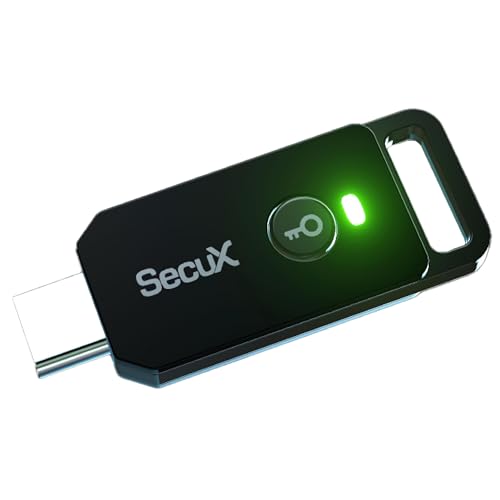
SecuX PUFido USB-C Security Key with PUF Technology, FIDO2/U2F Certified, Hardware-Rooted Unclonable Security for Passwordless Login and 2FA Authentication
A FIDO security key with PUF technology provides a unique, hardware-rooted trust anchor that resists tampering and cyber…
As an affiliate, we earn on qualifying purchases.
As an affiliate, we earn on qualifying purchases.
device synchronization passkeys
As an affiliate, we earn on qualifying purchases.
As an affiliate, we earn on qualifying purchases.