For virtualization storage, my best overall pick is the QNAP TS-855X, whose eight bays and 10GbE networking suit growing labs that need room for multiple virtual machines. The TerraMaster F8 SSD Plus stands out for an all-flash setup, while the Synology DS1825+ offers eight-bay capacity for larger storage pools. The main tradeoffs are drive-bay capacity, network speed, storage latency, and how much setup and maintenance you want to handle. A two-bay NAS can work for a small lab, but it leaves less room for growth and redundancy choices. Read on for how these 11 options compare and which one fits your virtualization workload.

Get privacy and security gear delivered free with Prime
- Fast, free delivery on millions of items
- Prime Video, Amazon Music and more included
- Member-only deals all year
Key Takeaways
- Eight bays create more room for VM storage growth: The QNAP TS-855X, Synology DS1825+, and TerraMaster F8 SSD Plus offer more drive flexibility than the four-bay and two-bay models.
- Flash storage targets latency-sensitive workloads: The TerraMaster F8 SSD Plus is the lineup’s dedicated eight-bay all-SSD option, while most other picks depend on hard drives or mixed configurations.
- Networking can bottleneck a capable NAS: The QNAP TS-855X’s 10GbE connection is a distinct advantage when the host, switch, and cabling can use it.
- Synology appears in both diskless and bundled form: The DS925+ bundle includes four 12TB drives; its diskless counterpart lets buyers choose their own drives and capacity.
- Two-bay and preconfigured models trade flexibility for simplicity: The UGREEN DXP2800 and Synology DS225+ suit smaller setups, while the Buffalo TeraStation bundle reduces drive-selection work but offers less scope for expansion than larger-bay choices.
| UGREEN NAS DH4300 Plus 4-Bay Network Attached Storage |  | Best for Docker-Based Home Labs | Drive bays: 4 | Maximum capacity: 128TB | Memory: 8GB LPDDR4X | VIEW ON AMAZON | See Our Full Breakdown |
| TerraMaster F8 SSD Plus 8-Bay NAS with Intel Core i3-N305, 16GB DDR5, Diskless |  | Best for Quiet, High-Speed VM Storage | Processor: Intel Core i3-N305, 8 cores and 8 threads, up to 3.4GHz | Memory: 16GB DDR5 4800MHz | Drive slots: 8 M.2 2280 NVMe SSD slots | VIEW ON AMAZON | See Our Full Breakdown |
| UGREEN NAS DXP4800 GT 4-Bay for Creators, Tech Enthusiasts, and Office Teams |  | Best for Expandable 10GbE Workloads | Processor: AMD Ryzen Embedded R2514, 4 cores and 8 threads, up to 3.70GHz | Memory: 8GB DDR4, expandable to 64GB; ECC upgrade supported | Drive bays and slots: 4 SATA bays, 2 U.2 NVMe compatible, 2 M.2 SSD slots | VIEW ON AMAZON | See Our Full Breakdown |
| Synology DS925+ 4-Bay NAS Bundle with 4 × 12TB Seagate IronWolf HDDs |  | Best Ready-to-Load Storage Bundle | Processor: AMD Ryzen V1500B quad-core | Memory: 4GB DDR4 ECC, expandable up to 32GB | Drive bays: 4 hot-swappable 2.5-inch/3.5-inch bays | VIEW ON AMAZON | See Our Full Breakdown |
| UGREEN NAS DXP2800 2-Bay for Advanced Home Users, Remote Workers & Creators |  | Best Compact Virtualization Starter | CPU: Intel N100 quad-core | Memory: 8GB DDR5 | Drive bays: 2 × 3.5-inch HDD bays | VIEW ON AMAZON | See Our Full Breakdown |
| QNAP TS-855X-8G-US 8 Bay NAS |  | Best for Expandable Virtualization | Processor: Intel Atom C5125, 8-core, 2.8 GHz | Memory: 8GB DDR4 U-DIMM; expandable to 128GB ECC | Drive bays: 8 x 3.5-inch/2.5-inch SATA | VIEW ON AMAZON | See Our Full Breakdown |
| Synology DS1825+ Enterprise Video Production & Storage (8-Bay Diskless NAS) |  | Best for Large Virtualization Storage Pools | Drive bays: 8 | Configuration: Diskless | Maximum stated capacity: 360TB with expansion units | VIEW ON AMAZON | See Our Full Breakdown |
| UGREEN NASync DXP4800 Plus 4-Bay NAS |  | Best Entry Point for NAS-Hosted VMs | Drive bays: 4 | Processor: Intel 5-core CPU | Memory: 8GB DDR5 | VIEW ON AMAZON | See Our Full Breakdown |
| Synology 4-Bay DiskStation DS925+ (Diskless) |  | Best for Compact, Managed VM Storage | Drive bays: 4 | Network ports: 2 x 2.5GbE | M.2 NVMe slots: 2 | VIEW ON AMAZON | See Our Full Breakdown |
| BUFFALO TeraStation Essentials 2025 4-Bay Desktop NAS (32TB, 4x8TB) | 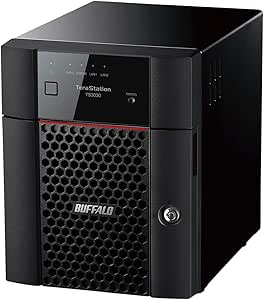 | Best Ready-to-Use Storage for Small Virtualization Setups | Drive bays: 4 | Included drives: 4 x 8TB | Raw capacity: 32TB | VIEW ON AMAZON | See Our Full Breakdown |
| Synology DS225+ Private Cloud Media Server (2-Bay Diskless NAS) |  | Best Compact NAS for Light Virtualization | Processor: Intel (specific model not provided) | Drive bays: 2 | Drive configuration: Diskless | VIEW ON AMAZON | See Our Full Breakdown |
| nas for virtualization storage | Drive bays | Memory | Processor |
|---|---|---|---|
| UGREEN NAS DH4300 Plus 4-Bay N | 4 | 8GB LPDDR4X | — |
| TerraMaster F8 SSD Plus 8-Bay | — | 16GB DDR5 4800MHz | Intel Core i3-N305, 8 cores and 8 threads, up to 3.4GHz |
| UGREEN NAS DXP4800 GT 4-Bay fo | — | 8GB DDR4, expandable to 64GB; ECC upgrade supported | AMD Ryzen Embedded R2514, 4 cores and 8 threads, up to 3.70GHz |
| Synology DS925+ 4-Bay NAS Bund | 4 hot-swappable 2.5-inch/3.5-inch bays | 4GB DDR4 ECC, expandable up to 32GB | AMD Ryzen V1500B quad-core |
| UGREEN NAS DXP2800 2-Bay for A | 2 × 3.5-inch HDD bays | 8GB DDR5 | — |
| QNAP TS-855X-8G-US 8 Bay NAS | 8 x 3.5-inch/2.5-inch SATA | 8GB DDR4 U-DIMM; expandable to 128GB ECC | Intel Atom C5125, 8-core, 2.8 GHz |
| Synology DS1825+ Enterprise Vi | 8 | — | — |
| UGREEN NASync DXP4800 Plus 4-B | 4 | 8GB DDR5 | Intel 5-core CPU |
| Synology 4-Bay DiskStation DS9 | 4 | — | — |
| BUFFALO TeraStation Essentials | 4 | — | — |
| Synology DS225+ Private Cloud | 2 | — | Intel (specific model not provided) |
More Details on Our Top Picks
UGREEN NAS DH4300 Plus 4-Bay Network Attached Storage
The DH4300 Plus fits buyers who want shared storage and a small Docker-based home lab in one four-bay box. Its 8GB of memory and 2.5GbE connection give it more room for container workloads than a basic file server, while automatic phone backups add a practical everyday use. Compared with the UGREEN DXP2800, it offers four drive bays for more room to grow, but the DXP2800 explicitly supports virtual machines; this model does not. That distinction matters if your lab depends on running full guest operating systems. The DH4300 Plus also lacks Wi-Fi and requires separately purchased drives, so plan on wired placement and a separate storage setup. I’d choose it for containers alongside backups, not as a virtualization host.
Pros:- Four bays provide more drive capacity and flexibility than the two-bay DXP2800
- Docker support allows container workloads alongside file storage
- Automatic phone photo and video backups with AI-powered album organization
- Remote access works across computers, phones, browsers, and smart TVs
Cons:- Does not support virtual machines, limiting its use as a virtualization host
- Drives are sold separately
- Requires wired Ethernet and has no Wi-Fi
Best for: Home users who want a four-drive shared-storage pool, phone backups, and Docker containers on a wired network
Not ideal for: Buyers who need virtual machines, built-in drives, or a NAS that can connect over Wi-Fi
- Drive bays:4
- Maximum capacity:128TB
- Memory:8GB LPDDR4X
- Network:2.5GbE wired Ethernet; no Wi-Fi
- Video output:4K HDMI
- Docker support:Yes
- Virtual machine support:No
- Drives included:No
Our verdict“Choose the DH4300 Plus for four-bay storage and Docker containers, but pick the DXP2800 if running virtual machines is a requirement.”
TerraMaster F8 SSD Plus 8-Bay NAS with Intel Core i3-N305, 16GB DDR5, Diskless
For a virtualization setup where fast storage and a compact footprint matter more than a large hard-drive pool, the F8 SSD Plus takes a distinct path: eight NVMe slots, an Intel Core i3-N305, and 16GB DDR5. Its 10Gbps Ethernet can move data faster across a compatible network than the 2.5GbE connection on the UGREEN DXP2800, which makes it a better fit for several clients or storage-heavy workloads. SSD-only storage also supports a compact design and quiet standby operation. The tradeoff is that all eight drives must be M.2 2280 NVMe SSDs, and the NAS ships diskless, so there is no lower-cost HDD tier for bulk capacity. I’d shortlist it for an SSD-focused lab, while checking that its virtualization software meets your needs before buying.
Pros:- Eight M.2 NVMe slots support an all-SSD storage pool
- 10Gbps Ethernet offers more network bandwidth than 2.5GbE models such as the DXP2800
- Intel Core i3-N305 and 16GB DDR5 provide a capable hardware base for storage workloads
- Tool-free SSD installation and standby noise below 19dB
Cons:- NVMe-only design rules out SATA HDDs and SSDs
- Diskless configuration means drives must be sourced separately
- Maximum listed capacity is 64TB, which may constrain large archives
Best for: Home lab operators and small teams building a quiet, SSD-only virtualization or storage setup with 10GbE
Not ideal for: Buyers who want large-capacity HDD storage, included drives, or a mix of drive formats
- Processor:Intel Core i3-N305, 8 cores and 8 threads, up to 3.4GHz
- Memory:16GB DDR5 4800MHz
- Drive slots:8 M.2 2280 NVMe SSD slots
- Maximum capacity:64TB total; up to 8TB per SSD
- Ethernet:10Gbps
- Transfer speed:Up to 1024MB/s
- Standby noise:Below 19dB
- Storage included:No; diskless
Our verdict“Pick the F8 SSD Plus when quiet NVMe storage and 10GbE suit your virtualization lab better than HDD capacity or drive flexibility.”
UGREEN NAS DXP4800 GT 4-Bay for Creators, Tech Enthusiasts, and Office Teams
The DXP4800 GT is the most network-forward option here for buyers who want virtualization storage alongside demanding shared workflows. Dual 10GbE ports and an AMD Ryzen Embedded R2514 give it a stronger foundation for fast transfers and concurrent tasks than the four-bay Synology DS925+, whose listed network ports are dual 2.5GbE. Its RAM can expand from 8GB to 64GB, and the mix of SATA bays, U.2 compatibility, and M.2 slots offers several ways to shape storage. That flexibility brings setup choices and extra component decisions: drives are not included, ECC memory upgrades require compatible parts, and some apps may need manual configuration. I’d favor it for technically confident users with 10GbE infrastructure; buyers seeking a simpler bundle may prefer the DS925+ package.
Pros:- Dual 10GbE ports support high-bandwidth transfers, with link aggregation listed up to 20Gbps
- Memory can expand from 8GB to 64GB
- Four SATA bays plus U.2 and M.2 compatibility allow mixed storage configurations
- Ryzen processor and Docker, Plex, and Home Assistant app support suit varied workloads
Cons:- Drives are sold separately, unlike the DS925+ bundle with four HDDs
- ECC memory is an upgrade rather than a preinstalled feature
- Some apps and advanced features may require manual setup
Best for: Tech enthusiasts and small office teams with 10GbE networks who need expandable memory and mixed SATA/NVMe storage
Not ideal for: Beginners who want an included-drive bundle or a simple, ready-to-run virtualization setup
- Processor:AMD Ryzen Embedded R2514, 4 cores and 8 threads, up to 3.70GHz
- Memory:8GB DDR4, expandable to 64GB; ECC upgrade supported
- Drive bays and slots:4 SATA bays, 2 U.2 NVMe compatible, 2 M.2 SSD slots
- Maximum storage capacity:144TB
- Network:Dual 10GbE; link aggregation up to 20Gbps
- USB:USB-A 10Gbps, USB-C 10Gbps, USB 2.0
- Video output:4K HDMI
- Operating system:UGOS Pro
Our verdict“Choose the DXP4800 GT for flexible storage and dual 10GbE when you are ready to supply and configure the components yourself.”
Synology DS925+ 4-Bay NAS Bundle with 4 × 12TB Seagate IronWolf HDDs
This DS925+ bundle makes the storage side of a virtualization project more straightforward: it includes four 12TB Seagate IronWolf drives, so buyers start with a populated four-bay unit instead of sourcing disks as they would for the UGREEN DXP4800 GT. The 4GB ECC memory is expandable to 32GB, and dual 2.5GbE ports plus two M.2 slots give it options for networking and cache. Those listed network ports are a narrower pipe than the DXP4800 GT’s dual 10GbE, so this bundle suits storage and backup workloads better than bandwidth-intensive shared environments. Its four internal bays also set the initial drive limit; adding more requires a DX525 expansion unit. I’d choose it when a supplied HDD pool and upgrade path matter more than 10GbE throughput.
Pros:- Includes four 12TB Seagate IronWolf HDDs
- ECC memory can expand from 4GB to 32GB
- Dual 2.5GbE ports and two M.2 NVMe slots offer networking and storage options
- Supports storage, backup, virtualization, and surveillance workloads
Cons:- Dual 2.5GbE is slower on paper than the DXP4800 GT’s dual 10GbE
- More than four internal drives requires a DX525 expansion unit
Best for: Small businesses and home lab builders who want a four-drive HDD pool supplied with the NAS and plan moderate network workloads
Not ideal for: Teams that need dual 10GbE throughput or expect to expand beyond four bays without an external unit
- Processor:AMD Ryzen V1500B quad-core
- Memory:4GB DDR4 ECC, expandable up to 32GB
- Drive bays:4 hot-swappable 2.5-inch/3.5-inch bays
- Included drives:4 × 12TB Seagate IronWolf HDDs
- Network:Dual 2.5GbE LAN ports
- M.2 slots:2 NVMe slots
- Expansion:Up to 9 drives with a DX525 expansion unit
- Warranty:3-year manufacturer warranty
Our verdict“Choose this bundle for supplied HDD capacity and expandable ECC memory if 2.5GbE is enough for your virtualization storage traffic.”
UGREEN NAS DXP2800 2-Bay for Advanced Home Users, Remote Workers & Creators
The DXP2800 is the most approachable fit in this group for an advanced home user who wants to start small with virtual machines and Docker. Its Intel N100, 8GB DDR5, and 2.5GbE provide a useful base for a few home lab services, while two HDD bays and two NVMe slots let buyers separate bulk storage from faster SSD workloads. Compared with the four-bay DH4300 Plus, it gives up two HDD bays but adds virtual machine support; compared with the eight-slot TerraMaster F8 SSD Plus, it accepts HDDs and avoids an NVMe-only design. It ships without drives, and its 2.5GbE networking is more modest than the F8’s 10GbE. I’d pick it for a modest lab, not a growing multi-user virtualization cluster.
Pros:- Supports virtual machines and Docker
- Two HDD bays and two NVMe slots allow separate bulk and SSD storage
- Intel N100 quad-core CPU and 8GB DDR5 suit modest home workloads
- AI photo management and home surveillance add uses beyond virtualization
Cons:- Only two HDD bays, fewer than the four-bay DH4300 Plus and DS925+
- 2.5GbE offers less network bandwidth than the TerraMaster F8 SSD Plus
- Diskless setup requires separate HDD and SSD purchases
Best for: Advanced home users and remote workers running a few virtual machines or containers alongside media and file storage
Not ideal for: Teams needing many drive bays, 10GbE networking, or a larger shared virtualization datastore
- CPU:Intel N100 quad-core
- Memory:8GB DDR5
- Drive bays:2 × 3.5-inch HDD bays
- M.2 slots:2 × NVMe SSD slots
- Maximum storage capacity:80TB
- Network:2.5GbE Ethernet
- Supported apps:Docker, virtual machines, Plex Media Server, AI photo management, home surveillance
- Drives included:No; diskless
Our verdict“Choose the DXP2800 for a compact home lab that needs virtual machines and mixed HDD/NVMe storage, while accepting its two-bay and 2.5GbE limits.”
QNAP TS-855X-8G-US 8 Bay NAS
The QNAP TS-855X-8G-US has the most room in this group to grow a virtualization storage setup: its eight drive bays, two NVMe slots, and two PCIe slots let an administrator add capacity, SSD pools, or faster networking as needs change. The 8-core Atom and 10GbE port also give it a stronger starting point for shared VM storage than the four-bay Synology DS925+, which is limited to 2.5GbE. Its 8GB of memory is modest for running multiple virtual machines, but the stated upgrade path to 128GB ECC gives this model a clear expansion advantage. The tradeoff is that buyers may need to budget for memory and network upgrades, and the Atom is not aimed at the heaviest compute workloads. I would choose it for storage-led virtualization where flexibility matters more than onboard CPU power.
Pros:- Eight SATA bays offer more room for VM datastores than four-bay options
- 10GbE plus dual 2.5GbE supports faster links and flexible network layouts
- Memory can expand to 128GB ECC
- Two M.2 slots and two PCIe slots allow storage and connectivity upgrades
Cons:- Ships with 8GB RAM, which may constrain multiple virtual machines until upgraded
- Intel Atom processing is a weaker fit for compute-heavy virtualization
- Drives and potential upgrades add setup complexity
Best for: IT teams building shared VM storage who want eight bays, 10GbE, and room to expand memory and network cards
Not ideal for: Users planning to run many compute-heavy VMs directly on the NAS or seeking a ready-to-deploy system with drives included
- Processor:Intel Atom C5125, 8-core, 2.8 GHz
- Memory:8GB DDR4 U-DIMM; expandable to 128GB ECC
- Drive bays:8 x 3.5-inch/2.5-inch SATA
- 10GbE:1 x 10Gbase-T with auto-negotiation
- Additional Ethernet:2 x 2.5GbE
- M.2 slots:2 x PCIe Gen3 x4
- PCIe expansion:2 x PCIe Gen3 x4 slots
Our verdict“Choose the TS-855X if you need expandable, high-speed shared storage for VMs and can handle memory and drive planning.”
Synology DS1825+ Enterprise Video Production & Storage (8-Bay Diskless NAS)
For virtualization environments where capacity and shared access take priority, the eight-bay Synology DS1825+ offers a broader storage base than the four-bay DS925+. The supplied product data cites expansion to 360TB, throughput of 2,239 MB/s, and high-availability features such as clustering and automated failover. Those capabilities suit teams consolidating data for many users or building a storage layer for multiple hosts; they do not establish how many VMs the NAS itself can run. Network options include 10GbE or 25GbE, giving it more headroom than the 2.5GbE DS925+, though the listing does not specify processor or memory details for judging direct VM hosting. It is diskless, and the clustering setup calls for experienced IT staff. I would rank it for larger shared storage needs, not as a proven all-in-one VM server.
Pros:- Eight bays and stated expansion capacity support larger storage pools
- 10GbE or 25GbE options offer more network headroom than the DS925+
- High-availability clustering and automated failover are suited to resilient shared storage
- Listed throughput of 2,239 MB/s targets demanding concurrent workloads
Cons:- Diskless configuration requires separate drive selection and installation
- Clustering and failover can require advanced IT expertise
- Product data does not specify processor or memory for evaluating NAS-hosted VMs
Best for: Organizations supporting several virtualization hosts that need scalable shared storage and have staff to configure failover
Not ideal for: Small offices seeking a simple, low-complexity NAS or buyers who need verified CPU and RAM details for running VMs on the device
- Drive bays:8
- Configuration:Diskless
- Maximum stated capacity:360TB with expansion units
- Base stated capacity:160TB
- Throughput:2,239 MB/s
- Network options:10GbE or 25GbE
- Data protection:High-availability clustering, automated failover, and backup
- Warranty:3 years
Our verdict“Pick the DS1825+ when your priority is expandable, resilient storage for multiple virtualization hosts and you have the expertise to configure it.”
UGREEN NASync DXP4800 Plus 4-Bay NAS
The UGREEN NASync DXP4800 Plus is a practical entry point for buyers who want to experiment with Docker and virtual machines on a four-bay NAS. Its Intel 5-core CPU, 8GB DDR5, and included 128GB SSD give it a more capable starting point for small workloads than the storage-focused BUFFALO TeraStation Essentials 2025, whose supplied details emphasize RAID and file security rather than VM support. A 10GbE port can also speed transfers to a capable host or network, while 2.5GbE offers a second connection. The four-bay limit and 8GB memory make this better suited to a few lightweight services or lab VMs than a busy production cluster. Its advertised 144TB maximum assumes RAID 0, so that figure does not describe a fault-tolerant VM datastore. Drives are sold separately.
Pros:- Explicit Docker and virtual machine support suits small labs
- 10GbE provides faster connectivity than the DS925+’s dual 2.5GbE
- Included 128GB SSD can serve as built-in storage for system functions
- 8GB DDR5 and a 5-core Intel CPU offer a capable entry configuration
Cons:- Four bays limit capacity growth compared with the eight-bay QNAP TS-855X
- 8GB memory may constrain heavier VM workloads
- 144TB maximum is stated for RAID 0, which does not provide drive redundancy
- No drives are included
Best for: Home lab builders and small teams running a few lightweight VMs or Docker services alongside shared files
Not ideal for: Production virtualization teams needing high availability, large memory capacity, or protected capacity matching the advertised RAID 0 maximum
- Drive bays:4
- Processor:Intel 5-core CPU
- Memory:8GB DDR5
- Network ports:1 x 10GbE, 1 x 2.5GbE
- Built-in storage:128GB SSD
- Maximum stated capacity:144TB in RAID 0 with compatible drives
- Maximum transfer rate:1,250 MB/s
- Included drives:None
Our verdict“Choose the DXP4800 Plus for a small home lab that needs NAS storage plus a few lightweight VMs and Docker workloads.”
Synology 4-Bay DiskStation DS925+ (Diskless)
The Synology DS925+ is the compact choice for buyers who want a managed storage platform for virtualization without stepping up to an eight-bay chassis. Synology DSM includes virtualization and backup capabilities, and the two M.2 slots can accelerate cache workloads; expansion support can take the system to nine drives. Those features make it a more storage-focused option than the UGREEN NASync DXP4800 Plus, which explicitly lists Docker and VM support plus a 10GbE port. The DS925+ instead offers a defined sequential speed of 522 MB/s read and 565 MB/s write, with dual 2.5GbE connections. That network ceiling and official drive compatibility requirements narrow its appeal for high-bandwidth multi-host setups. It is also diskless, so drive selection is part of the initial build. I would favor it for modest VM storage managed through DSM, rather than heavy VM execution on the NAS.
Pros:- DSM provides virtualization, sharing, and backup capabilities in one platform
- Two M.2 NVMe slots support cache acceleration
- Expansion unit can extend the system from four bays to nine drives
- Specified read and write speeds help set expectations for file transfers
Cons:- Dual 2.5GbE lacks the 10GbE connectivity of the QNAP TS-855X and UGREEN DXP4800 Plus
- Diskless configuration requires separate drive purchases
- Drive compatibility is limited to Synology’s official compatibility list
Best for: Small offices already comfortable with Synology DSM that need compact shared storage and backup features for a modest virtualization setup
Not ideal for: Teams needing native 10GbE, high-density storage, or a NAS with specified CPU and memory for hosting heavier VMs
- Drive bays:4
- Network ports:2 x 2.5GbE
- M.2 NVMe slots:2
- Sequential read speed:Up to 522 MB/s
- Sequential write speed:Up to 565 MB/s
- Expansion:Up to 9 drives with expansion unit
- Drive configuration:Diskless; supports drives on official compatibility list
- Warranty:3-year limited hardware warranty
Our verdict“Choose the DS925+ for compact, DSM-managed storage supporting a modest virtualization setup when 2.5GbE is sufficient.”
BUFFALO TeraStation Essentials 2025 4-Bay Desktop NAS (32TB, 4x8TB)
The BUFFALO TeraStation Essentials 2025 arrives with four pre-tested 8TB drives and RAID 5 configured, so a small office can start with a protected shared storage pool without sourcing disks. Its stated usable capacity is 24TB in RAID 5, and 2.5GbE is a sensible fit for a modest office network. Compared with the diskless Synology DS925+, Buffalo reduces initial setup work, but the DS925+ provides M.2 cache slots, expansion to nine drives, and listed virtualization capabilities. The supplied Buffalo details do not mention VM hosting, so I would treat it as a NAS datastore for compatible external virtualization hosts, not assume it can run VMs itself. RAID 5 also leaves less usable space than the raw 32TB total, and the desktop form factor may not suit a rack installation.
Pros:- Four included, pre-tested 8TB drives reduce sourcing and setup work
- Pre-configured RAID 5 provides drive redundancy from initial deployment
- 2.5GbE fits many small office networks
- 256-bit drive encryption and cloud integration support data protection workflows
Cons:- RAID 5 reduces usable capacity from 32TB raw to 24TB
- Supplied product data does not specify VM hosting support
- 2.5GbE is a lower bandwidth ceiling than the 10GbE options in this lineup
- Desktop chassis may not fit rack-mounted environments without adapters
Best for: Small offices that want an included-drive RAID 5 storage pool for a modest virtualization host and prefer simpler deployment
Not ideal for: Virtualization teams needing NAS-hosted VMs, 10GbE, substantial expansion, or a rack-ready chassis
- Drive bays:4
- Included drives:4 x 8TB
- Raw capacity:32TB
- Usable capacity:24TB in RAID 5
- Network:2.5GbE
- Encryption:256-bit drive encryption
- RAID:Pre-configured RAID 5
- Warranty:3 years
Our verdict“Choose the TeraStation Essentials if you need included-drive, modest-speed shared storage for a separate virtualization host and value a simpler setup.”
Synology DS225+ Private Cloud Media Server (2-Bay Diskless NAS)
The DS225+ is the compact choice for a small virtualization setup that also needs shared storage, backups, and media streaming. Its listed 282 MB/s transfer speed, RAID support, snapshots, and backup options can serve a modest lab or a few workloads, while the two-bay design keeps drive and capacity planning simple. Compared with the UGREEN NAS DXP2800, it is positioned around Synology’s private cloud and data-protection features; the product data does not specify memory, virtual machine support, or network interfaces, so I would not assume it can host demanding virtual machines. Its main tradeoff is capacity and expansion: the larger Synology DS925+ has four bays and is a better fit for growing storage needs. The DS225+ is diskless, and its advanced features may take time for beginners to configure.
Pros:- Two bays make a small storage setup straightforward to size and manage.
- RAID and snapshot support add options for protecting stored data.
- Cloud, external-drive, and remote-NAS backup options support multiple backup destinations.
- Listed 282 MB/s transfer speed suits media and file-serving duties.
Cons:- Diskless design requires a separate drive purchase before use.
- Two bays limit capacity and growth compared with four- and eight-bay models in the roundup.
- The supplied product data does not specify memory, network interfaces, or virtual machine support.
Best for: Home lab owners who want a compact two-drive NAS for shared storage, snapshots, backups, and light virtualization workloads.
Not ideal for: IT teams hosting several resource-intensive virtual machines or buyers who need room to expand, since this is a diskless two-bay unit and the supplied data does not list memory or VM-specific capabilities.
- Processor:Intel (specific model not provided)
- Drive bays:2
- Drive configuration:Diskless
- Transfer speed:282 MB/s
- RAID:Supported
- Backup options:Cloud services, external drives, remote NAS
- Camera support:Up to 30 IP cameras with AI detection
- Warranty:3 years
Our verdict“Choose the DS225+ for a compact home lab centered on shared storage and backups, but choose a larger, better-documented model for heavier virtualization.”

How We Picked
I ranked these NAS devices by how well their listed hardware and configuration options map to virtualization storage: bay count, potential for SSD or HDD configurations, network connectivity, and room to expand. VM workloads can involve frequent small reads and writes, so I gave weight to storage latency and to whether a buyer can build a pool around workload needs rather than simply maximize capacity. I also considered the practical burden of selecting drives, configuring storage, and maintaining a system.
The ranking favors models with a clearer path to higher capacity, faster networking, or flash-based storage, while recognizing that those capabilities matter only when the rest of the lab can use them. The QNAP TS-855X leads for its combination of eight bays and 10GbE; the TerraMaster F8 SSD Plus earns a distinct place for all-flash use. Compact two-bay units and prefilled bundles rank lower for virtualization because they offer less flexibility over time, though they can be sensible for smaller or simpler setups.
| nas for virtualization storage | Processor |
|---|---|
| UGREEN NAS DH4300 Plus 4-Bay N | — |
| TerraMaster F8 SSD Plus 8-Bay | Intel Core i3-N305, 8 cores and 8 threads, up to 3.4GHz |
| UGREEN NAS DXP4800 GT 4-Bay fo | AMD Ryzen Embedded R2514, 4 cores and 8 threads, up to 3.70GHz |
| Synology DS925+ 4-Bay NAS Bund | AMD Ryzen V1500B quad-core |
| UGREEN NAS DXP2800 2-Bay for A | — |
| QNAP TS-855X-8G-US 8 Bay NAS | Intel Atom C5125, 8-core, 2.8 GHz |
| Synology DS1825+ Enterprise Vi | — |
| UGREEN NASync DXP4800 Plus 4-B | Intel 5-core CPU |
| Synology 4-Bay DiskStation DS9 | — |
| BUFFALO TeraStation Essentials | — |
| Synology DS225+ Private Cloud | Intel (specific model not provided) |
Factors to Consider When Choosing Nas For Virtualization Storage
Choosing a NAS for virtualization starts with the workload around it: the number of VMs, their storage demands, and the host connection. I would plan the storage pool and network together, then check what maintenance the system will require after setup.
Match drive type to VM activity
Virtual machines often generate many small, concurrent reads and writes, which can expose hard-drive latency sooner than a media archive would. SSDs can make a noticeable difference for busy VM datastores, but they cost usable capacity in drive bays and may require more careful capacity planning. A mixed pool can balance speed and space, though support and performance depend on the NAS and storage configuration. Avoid assuming that adding a single SSD automatically accelerates every workload; cache behavior and datastore layout matter. If the lab runs only a few lightly used VMs, capacity-oriented disks may be a reasonable starting point. For databases or several active VMs, prioritize sustained storage performance over headline capacity.
Size bays for capacity and redundancy
Count the bays you can use after setting aside space for the redundancy level you need, rather than treating every installed drive as usable capacity. More bays provide options to balance capacity, redundancy, and future growth, but they also mean more drives to buy and monitor. A two-bay enclosure can serve a modest lab, yet replacing or expanding its pool may involve more planning than with a larger enclosure. RAID can keep a pool available through some drive failures, but it is not a backup against deletion, malware, or enclosure failure. Keep an independent backup of VM data that would be costly to recreate. Choose the pool layout around recovery needs as well as usable terabytes.
Check the entire network path
A fast NAS port helps only when the host, switch, and cabling support the same link speed. A 10GbE NAS connected to a 1GbE switch will operate within that slower path, so the port alone does not guarantee faster VM storage. Consider how many hosts will access the datastore at once, since shared bandwidth can become a bottleneck even when one connection is quick. For a single small lab, a lower-speed link may be adequate if storage performance demands are modest. For multiple hosts or heavier workloads, map the full network path before paying for faster interfaces. Leave room in the plan for compatible adapters and switching.
Confirm compatibility with your virtualization platform
NAS hardware features do not by themselves establish that a system will work well with a particular hypervisor or storage protocol. Check the NAS vendor’s current documentation for supported protocols, host compatibility, and any limitations tied to the exact model or software version. Confirm that your hypervisor can mount the chosen datastore in the way you intend to manage it. A feature available through one protocol may not behave the same way through another. Validate the configuration in a small test before moving important virtual machines onto it. This step can prevent buying a system whose storage workflow does not match your host environment.
Plan for heat, noise, and maintenance
Drive count and workload affect heat and noise, which matter if the NAS will sit near a workstation or in a small home lab. SSD systems can avoid spinning-drive noise, though their cooling needs still depend on the enclosure and sustained load. More drives also mean more components to monitor, replace, and back up. Check how the vendor handles drive health alerts, software updates, and recovery guidance before relying on a NAS for daily VM operations. A system that is easy to maintain may be a better fit than a faster model if you have little time for storage administration. Include physical placement and backup routines in the purchase decision.
Decide what you want preconfigured
Diskless NAS models give you control over drive selection and let you shape capacity around your workload, but you must verify drive compatibility and handle installation yourself. Bundles can simplify setup by including drives, yet the included capacity and drive mix may not suit every VM pool or future expansion plan. Compare the complete configuration, including the number and size of drives, against your intended redundancy layout. Do not assume a bundle is ready for virtualization without checking supported storage features and network setup. If you value control, choose diskless and plan the pool in advance. If you value a simpler start, a bundle can reduce setup decisions while limiting component choice.
Frequently Asked Questions
Can I run virtual machines directly from any of these NAS devices?
That depends on how you plan to connect the NAS and what your hypervisor supports. Some setups use the NAS as shared storage for VMs running on a separate host; other configurations may run supported applications or virtual machines on the NAS itself. Check the documentation for your exact NAS model, software version, and hypervisor before buying. Also account for network speed and storage latency, since a compatible connection can still feel slow under a busy workload. Test with a noncritical VM before moving production or hard-to-rebuild systems.
Is an all-SSD NAS necessary for a home virtualization lab?
No; the right choice depends on how many VMs run at once and how responsive they need to be. Lightly used systems can often work from hard-drive storage, especially when capacity matters more than low latency. SSDs are more compelling for workloads with frequent random access, such as active databases or several concurrently used desktops. An all-SSD enclosure also uses its bays for flash capacity, so plan the usable space before committing. If uncertain, start by measuring the workload on your current storage and leave room to change the pool strategy later.
Should I choose a NAS with 10GbE for virtualization?
Choose 10GbE when your hosts and network can use it and your workload is likely to benefit from higher throughput. The NAS port needs a compatible host adapter, switch, and cabling to deliver that link speed end to end. Even then, faster networking does not remove limits from slow disks, contention, or the NAS’s storage configuration. A small lab with one host may not need the added network setup. Map the full path and expected concurrent traffic before deciding whether 10GbE is useful for your setup.
How much redundancy do I need for VM storage?
Base the choice on how quickly you need to recover after a drive failure and how much capacity you can give up for redundancy. Redundancy can keep a storage pool available through certain drive failures, but it cannot recover files deleted by mistake or protect against every failure. Keep backups on a separate device or location, and confirm that you can restore a VM from them. Larger pools may offer more layout choices, while compact systems can restrict those options. Plan for both drive replacement and recovery before placing important workloads on the NAS.
Should I buy a diskless model or a NAS bundle with drives?
A diskless model gives you freedom to choose drive type and capacity, but you will need to check compatibility and configure the pool yourself. A bundle can shorten setup and make the initial drive count clear, though its included drives may not match your workload or expansion plan. In either case, calculate usable capacity after your chosen redundancy layout. Check whether you can add or replace drives in the way you expect before settling on a configuration. For virtualization, drive selection and pool design affect performance as much as the enclosure choice.
Conclusion
For most growing labs, I would choose the QNAP TS-855X as the best overall because its eight bays and 10GbE give buyers a clear path to larger, faster shared storage when the rest of the network is ready. The UGREEN DXP2800 is my best value fit for a small lab that needs a compact two-bay system, while the TerraMaster F8 SSD Plus is my premium pick for all-flash storage. Beginners who want less drive-selection work can look at the Synology DS925+ bundle, while buyers who prefer to choose their own disks can compare the diskless DS925+ and UGREEN four-bay models. For larger capacity needs, consider the Synology DS1825+; for a quieter SSD-focused setup, the TerraMaster F8 SSD Plus is the more specialized choice. Match the NAS to your host, workload, network, and backup plan before you commit.
Halloween Picks
halloween
As an affiliate, we earn on qualifying purchases.