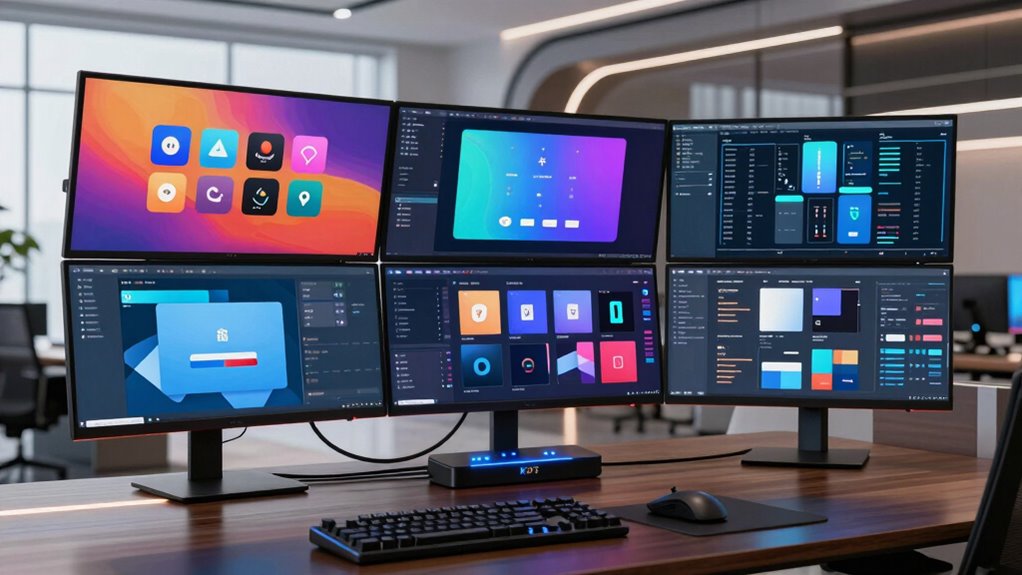

A quad-monitor KVM switch lets you control several computers with one set of four displays, but the right choice depends on your computers, ports, and resolution needs. I’d put the Terived 2-Port DisplayPort KVM first for its stated 8K@30Hz and 4K@144Hz support, aluminum build, and included cables. The NAWEN 4-Computer model and TESmart MST switch stand out for buyers who need to share four monitors across more than two computers. The main tradeoffs are computer capacity, HDMI versus DisplayPort connections, and whether a model’s resolution and refresh-rate claims match your full four-display setup. Read on for the differences, setup checks, and picks by buyer type.

Get privacy and security gear delivered free with Prime
- Fast, free delivery on millions of items
- Prime Video, Amazon Music and more included
- Member-only deals all year
Key Takeaways
- The Terived is the strongest general-purpose pick for two computers when DisplayPort and its stated 4K@144Hz support match your setup.
- Several models support four computers, including the NAWEN, KCEVE, TESmart, and Reyoten four-computer options; that capacity separates them from the many two-computer switches.
- The Reyoten two-computer model advertises 8K@60Hz over HDMI/DP, while the NAWEN two-computer model lists 4K@120Hz; buyers should check how those figures apply when all four monitors are connected.
- Camgeet and the wired-remote 1080P model are aimed at simpler, lower-resolution setups, so they may suit office use but are poor matches for high-resolution or high-refresh displays.
- A quad-monitor switch’s value depends on matching each computer’s video outputs and supported multi-display mode; four output ports alone do not guarantee four independent extended desktops.


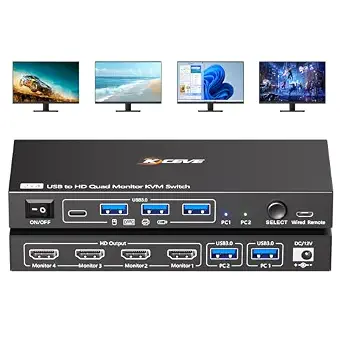


| kvm switch quad monitor | Computers supported | Monitors supported | Maximum resolution | Switching methods |
|---|---|---|---|---|
| Terived 2-Port DisplayPort USB | 2 | — | 8K at 30Hz; 4K at 144Hz | — |
| Reyoten 4-Monitor 2-Computer K | 2 | 4 | HDMI: 8K at 60Hz; DisplayPort: 8K at 30Hz; HDMI/DisplayPort: 4K at 120Hz | — |
| Camgeet 4-Monitor KVM Switch f | 2 | 4 | — | Physical button and wired remote |
| NAWEN Quad Monitor KVM Switch | 4 desktop PCs | 4 | 8K at 30Hz or 4K at 144Hz | — |
| NAWEN 8K Quad Monitor KVM Swit | 2 | — | 8K at 30Hz | — |
| 4-Monitor KVM Switch for 2 Com | 2 | 4 | Up to 8K at 60 Hz | Panel button and wired remote |
| Quad Monitor KVM Switch for 2 | 2 | 4 | 4 x 1080p at 60 Hz | Physical button and wired remote |
| KCEVE 4-Computer | 4 | 4 | — | Physical button and wired controller |
| TESmart Quad Monitor HDMI+DP M | 4 | 4 | 4K at 60 Hz, 4:4:4 | Hotkey, IR remote, and button |
| Reyoten KVM Switch 4 Monitors | 4 | 4: 3 DisplayPort and 1 HDMI | — | Front-panel button and wired remote |
More Details on Our Top Picks
Terived 2-Port DisplayPort USB 3.0 KVM Switch – Dual PC, Quad Monitor, 8K@30Hz / 4K@144Hz, Aluminum, Hotkey, Audio & Mic, HDR10, Cables Included
For two computers that each have four DisplayPort outputs, the Terived combines quad-screen switching with 4K at 144Hz, 8K at 30Hz, and HDR10 support. Its all-DisplayPort layout is a clearer fit for matching monitor banks than the mixed HDMI and DisplayPort connections on the Reyoten 4-Monitor 2-Computer KVM Switch. The aluminum housing, channel display, hotkey control, and adjustable automatic switching also give it more ways to manage a shared workstation than a basic button-only unit.
The tradeoff is a demanding connection setup: each computer needs four DisplayPort outputs, and the product guidance cautions against docking stations and adapters. Mac buyers should check their computer’s external-display limits first. Use the supplied cables and connect the USB leads, or the keyboard, mouse, and hub may not work. It makes the most sense for desktop users with a native four-DisplayPort graphics setup.
Pros:- Four DisplayPort outputs per computer support a consistent quad-monitor layout.
- Supports 4K at 144Hz, 8K at 30Hz, and HDR10.
- USB 3.0 hub supports data transfer up to 5Gbps, with audio and microphone pass-through.
- Includes hotkey and adjustable automatic switching, plus a channel display.
Cons:- Each computer needs four DisplayPort outputs; docking stations and adapters are poor fits.
- Mac external-display limits may prevent using all four monitors.
- The supplied cables and all USB connections are needed for peripheral operation.
Best for: Desktop users with two computers, four native DisplayPort outputs per computer, and high-refresh quad-monitor displays.
Not ideal for: Laptop and dock users, or Mac buyers whose computer cannot drive four external displays; adapters are not recommended.
- Computers supported:2
- Monitor outputs per computer:4 DisplayPort
- Maximum resolution:8K at 30Hz; 4K at 144Hz
- HDR:HDR10
- USB hub:USB 3.0, up to 5Gbps
- Switching:Keyboard hotkeys; adjustable automatic switching
- Audio:Audio and microphone pass-through
- Housing:Aluminum alloy
Our verdict“Choose the Terived if both desktop PCs have four native DisplayPort outputs and you want high-refresh quad-monitor switching with hotkey control.”
Reyoten 4-Monitor 2-Computer KVM Switch, 8K@60Hz HDMI/DP, USB 3.0 Hub with Power Adapter
The Reyoten suits two desktop PCs whose graphics cards provide a mix of two HDMI and two DisplayPort connections each. That flexibility sets it apart from the all-DisplayPort Terived, which requires four DP outputs per computer. Its four USB 3.0 ports give shared peripherals room to connect, while extended and mirrored display modes cover different multi-screen workflows. The listed video support includes HDMI up to 8K at 60Hz and both HDMI and DisplayPort up to 4K at 120Hz.
Those capabilities come with a narrow hardware fit: this is specified for Windows desktops with dedicated graphics cards, and laptops are not supported. It also calls for standard HDMI 2.1 and DP 1.4 cables, with shorter cables recommended for stable transmission. Each computer needs its USB connection for peripherals to work. Compared with the Camgeet, it targets higher-resolution desktop systems, but is less suitable for laptop owners or a straightforward 1080p setup.
Pros:- Mixed HDMI and DisplayPort inputs accommodate graphics cards with both connection types.
- Supports up to 4K at 120Hz on HDMI and DisplayPort, with HDMI listed up to 8K at 60Hz.
- Four USB 3.0 ports support peripheral sharing at up to 5Gbps.
- Offers extended and mirrored display modes.
Cons:- Designed for Windows desktop computers with dedicated graphics cards; laptops are unsupported.
- Requires suitable HDMI 2.1 and DP 1.4 cables, and shorter cables are recommended.
- Each computer needs a USB connection for shared peripherals.
Best for: Windows desktop owners with dedicated graphics cards that have two HDMI and two DisplayPort outputs per computer.
Not ideal for: Laptop users, owners of integrated-graphics systems, and people who need an all-DisplayPort or all-HDMI connection layout.
- Computers supported:2
- Monitors supported:4
- Video ports per computer:2 DisplayPort and 2 HDMI
- Maximum resolution:HDMI: 8K at 60Hz; DisplayPort: 8K at 30Hz; HDMI/DisplayPort: 4K at 120Hz
- USB hub:4 USB 3.0 ports, up to 5Gbps
- Display modes:Extended and mirrored
- Power:12V
- Compatibility:Windows desktop computers with dedicated graphics cards; laptops unsupported
Our verdict“Pick the Reyoten if two Windows desktops have the required mixed video outputs and you want quad-screen switching with higher-resolution support.”
Camgeet 4-Monitor KVM Switch for 2 Computers, 1080P@60Hz, USB 3.0, with Wired Remote and 2 USB Cables
The Camgeet is the simpler fit for buyers who need to share four 1080p at 60Hz displays between two computers and do not need 4K or high-refresh output. Its wired remote lets the switch sit out of reach while keeping the control accessible; the Reyoten, by comparison, is aimed at higher-resolution desktop setups and requires a specific mix of HDMI and DisplayPort connections. Four USB 3.0 ports also make it possible to share peripherals beyond a keyboard and mouse.
Camgeet lists Windows and Mac OS compatibility, but monitor recognition requires driver installation, and the product specifies PC systems of 11th generation or above. HDMI cables are not included, and there is no EDID emulation or hotkey switching. Those constraints make this less appealing for a plug-and-play, mixed-resolution setup than the higher-spec options. For a compatible 1080p workstation, the remote and straightforward button control may matter more than the resolution ceiling.
Pros:- Supports four 1080p at 60Hz displays shared across two computers.
- Four USB 3.0 ports support data transfer up to 5Gbps.
- Switches through either a physical button or wired remote.
- Includes two USB cables and a power adapter.
Cons:- Driver installation is required for monitor recognition, and the product specifies 11th-generation-or-newer PC systems.
- HDMI cables are not included.
- No EDID emulation or hotkey switching.
Best for: Owners of compatible Windows or Mac computers who want to share four 1080p displays and USB peripherals, with switching available by wired remote.
Not ideal for: Users who need 4K, high-refresh gaming, hotkey switching, or monitor recognition without installing a driver.
- Computers supported:2
- Monitors supported:4
- Resolution:1080p at 60Hz
- USB hub:4 USB 3.0 ports, up to 5Gbps
- Switching methods:Physical button and wired remote
- Compatibility:Windows and Mac OS; product specifies PC systems 11th generation or above
- Dimensions:6.69 x 2.56 x 0.79 inches
- Included:Two USB cables, wired remote, and power adapter
Our verdict“Choose the Camgeet for a compatible 1080p four-monitor setup where remote switching matters more than 4K support.”
NAWEN Quad Monitor KVM Switch 4 Monitors 4 Computers (HDMI + DisplayPort) with Audio Jack & 4 USB 3.0 Ports
Among these five, the NAWEN ZX-34D is the one built to switch a quad-monitor station among four desktop PCs, while most of the others serve two computers. Each PC needs three native DisplayPort outputs and one HDMI output, a specific arrangement that rules out laptops and adapter-based workarounds. For owners with matching graphics cards, it supports up to 8K at 30Hz or 4K at 144Hz and offers extended or mirrored modes. A wired remote and four USB 3.0 ports support a shared desk setup.
The tradeoff is flexibility: the Reyoten 2-computer model accepts two HDMI and two DisplayPort connections per PC, while the ZX-34D requires the same DP-heavy mix on all four computers. Video cables are not included, and there is no EDID emulation. Its audio jack also supports microphone and TF card functionality, but buyers should confirm their exact connection needs before choosing it. This is a specialist option for multi-PC desktop stations, not a general laptop hub.
Pros:- Supports switching among four computers while sharing four monitors.
- Supports up to 4K at 144Hz or 8K at 30Hz, with extended and mirrored modes.
- Includes four USB 3.0 ports and a wired remote.
- Provides a 3.5mm jack for audio, microphone, and TF card functionality.
Cons:- Every PC needs three native DisplayPort outputs and one HDMI output; adapters are unsupported.
- Laptops are unsupported, and the switch lacks EDID emulation.
- HDMI and DisplayPort cables are not included.
Best for: Users switching one four-monitor desk between as many as four desktop PCs, each with three native DisplayPort outputs and one HDMI output.
Not ideal for: Laptop owners and anyone whose computers lack the specified native video ports or depend on adapters.
- Computers supported:4 desktop PCs
- Monitors supported:4
- Video ports per computer:1 HDMI and 3 DisplayPort
- Maximum resolution:8K at 30Hz or 4K at 144Hz
- USB hub:4 USB 3.0 ports, up to 5Gbps
- Audio:3.5mm jack for playback, microphone, and TF card functionality
- Power:12V adapter included
- Warranty:12 months
Our verdict“Choose the ZX-34D if you need to share four monitors among four desktop PCs that all have its exact native video-port layout.”
NAWEN 8K Quad Monitor KVM Switch for 2 Computers, HDMI + DisplayPort, 4K@120Hz, USB 3.0
The NAWEN NW-KVM204D3 targets a two-PC workstation where four screens need more headroom than the Camgeet’s 1080p ceiling. It lists support for 4K at 120Hz, 8K at 30Hz, and 1080p at 240Hz, with both extended and mirrored display modes. Four USB 3.0 ports handle shared peripherals, and the included wired remote gives it a practical control option. The description presents it as plug-and-play, so it avoids the driver-installation requirement listed for the Camgeet.
Its port requirement is the deciding factor: each computer needs a dedicated graphics card with three DisplayPort outputs and one HDMI output. Laptops, integrated graphics, and adapters are unsupported, and video inputs cannot be cross-matched because each input maps only to its corresponding output. Compared with Terived’s four-DisplayPort layout, this is a mixed-port alternative, but it still demands a specific desktop GPU. Confirm that both computers match before buying.
Pros:- Supports 4K at 120Hz, 8K at 30Hz, and 1080p at 240Hz.
- Four USB 3.0 ports support data transfer up to 5Gbps.
- Supports extended and mirrored display modes.
- Includes a wired remote and is described as plug-and-play with no driver required.
Cons:- Requires dedicated graphics cards with three DisplayPort outputs and one HDMI output on both computers.
- Laptops, integrated graphics, and adapters are unsupported.
- Inputs cannot be cross-matched; each input maps only to its corresponding output.
Best for: Desktop users with two dedicated graphics cards that each provide three DisplayPort outputs and one HDMI output, especially for 4K at 120Hz displays.
Not ideal for: Laptop or integrated-graphics users, and desktop owners who need adapters or flexible cross-matching between video inputs and outputs.
- Computers supported:2
- Maximum resolution:8K at 30Hz
- Supported resolutions:4K at 120Hz; 4K at 60Hz; 1080p at 240Hz
- Video connectivity:HDMI and DisplayPort
- Required graphics outputs:3 DisplayPort and 1 HDMI per computer
- USB ports:4 USB 3.0, up to 5Gbps
- Display modes:Extended and mirrored
- Included:Two USB 3.0 cables, power adapter, wired remote, and user manual
Our verdict“Pick the NW-KVM204D3 for two desktop PCs with the exact required GPU ports when 4K at 120Hz support and remote switching suit your four-screen desk.”
4-Monitor KVM Switch for 2 Computers with DisplayPort and HDMI
This switch suits buyers who want to share four screens between two computers and have both DisplayPort and HDMI connections available. Its copy and extend modes let you choose between a mirrored view and a wider workspace, while the panel button and wired remote give you two ways to change computers. Compared with the TESmart Quad Monitor HDMI+DP MST KVM, it handles fewer computers and lacks the listed high-refresh options, but its stated maximum of 8K at 60 Hz may appeal to users with compatible gear. That resolution claim depends on the computers, monitors, and cables; four-monitor use also requires two DisplayPort and two HDMI connections from each computer. Factor in the separate USB connections needed for shared peripherals.
Pros:- Shares four monitors and USB peripherals between two computers
- Offers both panel-button and wired-remote switching
- Supports copy and extended display modes
- Lists resolution support up to 8K at 60 Hz with compatible equipment
Cons:- Each computer needs two DisplayPort and two HDMI connections for four-monitor use
- USB cables must connect to the computers for shared USB devices to work
- The stated 8K mode depends on compatible computers, monitors, and cables
Best for: Two-computer users with four monitors and the required mix of DisplayPort and HDMI outputs on each computer
Not ideal for: People who need to switch four computers or want a setup with minimal video cabling
- Computers supported:2
- Monitors supported:4
- Video inputs:DisplayPort and HDMI
- Maximum resolution:Up to 8K at 60 Hz
- USB ports:4 USB 3.0
- USB transfer speed:Up to 5 Gbps
- Switching methods:Panel button and wired remote
- Display modes:Copy and extend
Our verdict“Choose it if two computers already have the required DisplayPort and HDMI outputs and you want four shared screens with a wired remote.”
Quad Monitor KVM Switch for 2 Computers, 4 x 1080P@60Hz HDMI Outputs, USB 3.0, with Wired Remote and 2 USB Cables
This is the straightforward pick for a two-computer desk built around four HDMI monitors at 1080p and 60 Hz. A single USB cable per PC handles its computer connection, and the four USB 3.0 ports can share everyday accessories; button and wired-remote switching both show the active computer with LEDs. Compared with the 4-Monitor KVM Switch for 2 Computers with DisplayPort and HDMI, this model is limited to 1080p and requires driver installation, but its stated one-cable-per-computer USB connection may simplify peripheral setup. The tradeoff is that the video connections still need to be planned, HDMI cables are not included, and each PC must meet the listed 11th-generation-or-newer requirement. It is a poor fit for a driver-free or high-resolution workstation.
Pros:- Supports four HDMI monitors at 1080p and 60 Hz
- Uses one USB cable per computer for the listed PC connection
- Provides four USB 3.0 ports for shared peripherals
- Includes both wired-remote and physical-button switching with LED indicators
Cons:- Requires driver installation on each computer
- Lists an 11th-generation-or-newer PC requirement
- HDMI cables are not included
Best for: Owners of two 11th-generation-or-newer PCs who need to share four 1080p HDMI monitors and common USB peripherals
Not ideal for: Users who need 4K or higher output, driver-free operation, hotkey switching, or compatibility with older PCs
- Computers supported:2
- Monitors supported:4
- Maximum resolution:4 x 1080p at 60 Hz
- USB ports:4 USB 3.0, up to 5 Gbps
- Switching methods:Physical button and wired remote
- Compatibility:Windows and Mac OS
- System requirement:PC must be 11th generation or newer
- Driver requirement:Driver required
- Included accessories:2 USB 3.0 cables and wired remote; HDMI cables not included
Our verdict“Pick this for a compatible two-PC setup with four 1080p HDMI screens when simple USB hookup matters more than higher resolution or driver-free use.”
KCEVE 4-Computer, 4-Monitor HDMI and DisplayPort KVM Switch with USB 3.0 and Audio
Among these picks, the KCEVE is built for the buyer who needs to switch four computers across four monitors, rather than share a quad-monitor setup between only two machines. It adds a 3.5 mm audio jack and four USB 3.0 ports, with both a physical button and wired controller for switching. Compared with the TESmart Quad Monitor HDMI+DP MST KVM, the listing gives fewer details about refresh rates and does not list hotkey control or EDID emulation. Its stated 8K at 60 Hz maximum is conditional on compatible equipment, and the four-screen connection has a specific demand: every computer needs three DisplayPort connections and one HDMI connection. That port requirement makes graphics-card compatibility the main hurdle; the metal case and compact listed dimensions do not solve it.
Pros:- Connects four computers to four monitors
- Shares four USB 3.0 devices and an audio connection
- Offers physical-button and wired-controller switching
- Supports copy and extended display modes
Cons:- Each computer needs three DisplayPort and one HDMI connection for four-monitor use
- The stated 8K mode requires compatible computers, displays, and cables
- USB devices require a USB 3.0 connection to the computer
Best for: Workstations that rotate among four computers, each with three DisplayPort outputs and one HDMI output
Not ideal for: Buyers with only two computers or systems that lack the specified three-DisplayPort-plus-one-HDMI outputs
- Model:KCKVM404DH
- Computers supported:4
- Monitors supported:4
- Video connections:DisplayPort and HDMI; 3 DisplayPort plus 1 HDMI per computer for four-monitor use
- Maximum stated resolution:Up to 8K at 60 Hz
- USB ports:4 USB 3.0, up to 5 Gbps
- Audio connection:3.5 mm audio jack
- Switching methods:Physical button and wired controller
- Dimensions:8.27 x 3.94 x 1.77 inches
Our verdict“Choose the KCEVE when four computers must share four screens and every system can meet its demanding video-port layout.”
TESmart Quad Monitor HDMI+DP MST KVM Switch for 4 Computers, 4K@60Hz, USB 3.0 Docking Station
The TESmart stands out for combining four-computer, four-monitor switching with an 11-in-1 docking-station feature set. It lists 4K at 60 Hz, several higher refresh modes at lower resolutions, EDID emulation, audio and microphone connections, hotkeys, an IR remote, and a physical button. Compared with the KCEVE 4-Computer, 4-Monitor HDMI and DisplayPort KVM, TESmart offers more listed switching options and EDID support, which can help keep display layouts stable when changing computers. Its main compatibility caveat is significant: quad extended displays require MST-compatible GPUs. The feature-rich design also makes it a more involved choice than the simpler two-computer switches, and the IR remote needs AAA batteries that are not included. Included cables and removable rack ears suit a more permanent workstation.
Pros:- Controls four computers across four displays
- Combines switching with an 11-in-1 docking-station feature set
- Lists EDID emulation and hotkey, IR remote, and button switching
- Includes KVM and video cables and removable rack ears
Cons:- Quad extended displays require MST-compatible GPUs
- AAA batteries for the IR remote are not included
Best for: Power users managing four MST-compatible computers who want EDID support, multiple switching methods, audio, and rack-mount options
Not ideal for: Users whose graphics hardware lacks MST support or who need a simple two-computer switch
- Computers supported:4
- Monitors supported:4
- Video outputs:4 HDMI
- Maximum resolution:4K at 60 Hz, 4:4:4
- Listed high-refresh modes:Up to 1080p at 240 Hz; 2560 x 1440 at 120 Hz
- USB ports:4 USB 3.0, 2 USB 2.0, and 3 lockable USB 3.0 channels
- Switching methods:Hotkey, IR remote, and button
- Audio:3.5 mm headphone jack, integrated microphone, and left/right audio output
- Included cables:4 KVM cables, 6 HDMI cables, and 2 DisplayPort cables
Our verdict“Choose TESmart for a feature-rich four-computer workstation if its MST requirement matches your graphics hardware.”
Reyoten KVM Switch 4 Monitors 4 Computers, Quad Monitor HDMI/DP KVM 8K@60Hz
Reyoten targets a four-PC desk where resolution and refresh flexibility matter: it lists 8K at 60 Hz over HDMI 2.1 and 4K at 144 Hz over DisplayPort 1.4, plus a TF card reader and audio output. It supports four monitors in a fixed layout of three DisplayPort connections and one HDMI connection per computer. Compared with the TESmart Quad Monitor HDMI+DP MST KVM, Reyoten lists a higher maximum HDMI resolution and a USB-C port, while TESmart adds EDID emulation, hotkey control, and more docking connections. Reyoten’s port requirement is restrictive: all four outputs must come from the same discrete graphics card, and adapters for HDMI-to-DisplayPort or DVI/VGA-to-DisplayPort are unsupported. Its plug-and-play setup and wired remote keep operation simple, but docking stations may cause compatibility issues.
Pros:- Lists 8K at 60 Hz over HDMI 2.1 and 4K at 144 Hz over DisplayPort 1.4
- Supports four computers and four monitors
- Adds USB-C, a TF card reader, and audio output
- Provides front-panel and wired-remote switching with LED indicators
Cons:- Each computer needs three DisplayPort and one HDMI output on the same discrete graphics card
- Does not support HDMI-to-DisplayPort or DVI/VGA-to-DisplayPort conversion
- Docking stations may cause compatibility issues
Best for: Four-PC users with a discrete graphics card per computer that provides three DisplayPort outputs and one HDMI output
Not ideal for: People relying on docking stations, video adapters, or graphics cards without the required mix of outputs
- Computers supported:4
- Monitors supported:4: 3 DisplayPort and 1 HDMI
- Maximum HDMI resolution:8K at 60 Hz via HDMI 2.1
- Maximum DisplayPort resolution:4K at 144 Hz via DisplayPort 1.4
- USB ports:3 USB 3.0 and 1 USB-C
- USB transfer speed:Up to 5 Gbps
- Extras:TF card reader and audio output
- Switching methods:Front-panel button and wired remote
- Power:12 V / 1 A adapter; built-in on/off switch
Our verdict“Pick Reyoten for a four-computer setup needing its listed high-resolution modes, provided each graphics card meets the exact port requirements.”

How We Picked
I ranked these switches by how clearly their stated capabilities answer the main buying questions: how many computers they can share, which video connections they use, and what resolution and refresh rates they claim. I gave more weight to models that combine useful capacity with higher stated display performance, while recognizing that headline figures need to be checked against the exact four-monitor configuration. USB switching, audio connections, included cables, power supplies, and wired remotes also matter because they affect day-to-day setup and switching.
That logic puts the Terived first as a well-rounded two-computer DisplayPort option, while the Reyoten 8K@60Hz and NAWEN 4K@120Hz models serve buyers prioritizing newer display specifications. Four-computer switches rank highly for multi-host workstations, but their fit depends on the buyer actually needing that capacity. Lower-resolution models sit lower because their stated limits narrow their use, even if a remote or straightforward connection set may suit basic office setups. I treat product names and listed specifications as claims to verify against the manufacturer’s configuration details before purchase.
| kvm switch quad monitor | Switching methods |
|---|---|
| Terived 2-Port DisplayPort USB | — |
| Reyoten 4-Monitor 2-Computer K | — |
| Camgeet 4-Monitor KVM Switch f | Physical button and wired remote |
| NAWEN Quad Monitor KVM Switch | — |
| NAWEN 8K Quad Monitor KVM Swit | — |
| 4-Monitor KVM Switch for 2 Com | Panel button and wired remote |
| Quad Monitor KVM Switch for 2 | Physical button and wired remote |
| KCEVE 4-Computer | Physical button and wired controller |
| TESmart Quad Monitor HDMI+DP M | Hotkey, IR remote, and button |
| Reyoten KVM Switch 4 Monitors | Front-panel button and wired remote |
Factors to Consider When Choosing Kvm Switch Quad Monitor
Before choosing a model, map your actual computers, monitors, and peripherals. A switch can have four monitor outputs and still fail to deliver the desktop arrangement or refresh rate you expect if a computer’s graphics hardware, operating system, or cabling imposes a limit.
Check Whether Your Computers Can Drive Four Independent Displays
Start with each computer’s graphics hardware and the number of external displays it supports at once. A KVM switch routes video signals; it does not add graphics outputs or turn a single video stream into four independent desktops by itself. Some quad-display designs rely on DisplayPort MST, so confirm that the computer and operating system support the required multi-stream mode. Laptops may need a compatible dock or graphics adapter, and USB-C ports vary in their video capabilities. Write down the four monitor connections each computer can provide before choosing a switch. If you need separate content on all four screens, confirm the switch supports extended desktops in your precise computer configuration.
Match Ports and Cables Across the Whole Setup
Count the available HDMI and DisplayPort connections on every computer and monitor, then compare them with the switch’s input and output layout. A mixed HDMI/DisplayPort label does not always mean every input can use either connection in every arrangement. Adapters can sometimes bridge a mismatch, but they may not support the resolution, refresh rate, or audio path you want. Check whether required cables are included and whether the listed cable lengths suit your desk. Pay special attention to the computer-side connections: four displays mean several video cables per host, which can make a seemingly compact installation crowded. A simple port map can expose incompatibilities before the switch arrives.
Read Resolution and Refresh Claims as a Configuration
Look for the supported resolution and refresh rate with all four monitors active, rather than relying on a single headline figure. A listed 8K or 4K rate may describe a particular port, input mode, or reduced monitor count. Bandwidth is shared across video paths, and adapters, cable quality, graphics outputs, and monitor settings can reduce the available rate. HDR support, chroma format, and color depth can also affect the signal budget. If you use high-refresh gaming displays, confirm the exact four-screen mode and whether switching interrupts or resets their signal. For office monitors, a lower stated rate may be an acceptable trade if it yields the right computer capacity and simpler setup.
Choose Two-Computer or Four-Computer Capacity Deliberately
Most models in this lineup switch between two computers, while a smaller group supports four. The larger capacity helps when you share a workstation among a desktop, laptop, and additional hosts, but it can add ports, cables, and setup complexity. If you only have two computers, a four-host model may not improve your daily workflow. Consider how often you switch and whether a physical button, keyboard hotkey, or wired remote will be easiest to reach. A wired remote can sit near the keyboard when the switch itself is tucked away, while hotkeys may be convenient when you prefer fewer desk controls. Check how each switching method behaves with your operating system and connected USB devices.
Plan USB, Audio, and Power Alongside Video
List the peripherals you want to share, such as a keyboard, mouse, webcam, storage device, headset, or microphone. A USB 3.0 hub can reduce the need to move accessories between computers, but verify the number and type of ports against your devices. Audio jacks are useful only if the switch routes the connections you need, so check whether microphone input and speaker output are both supported. Some switches need an external power adapter, particularly when they share several USB devices; confirm whether one is supplied and where it can plug in. High-draw accessories may work better from their own powered hub. Separating your essential peripherals from occasional accessories helps you avoid paying for ports your setup will not use.
Check Switching Behavior and Recovery Needs
Changing the active computer can make displays and USB devices disconnect and reconnect, and some systems may rearrange windows when that happens. If you rely on open applications staying on specific screens, look for documentation about display emulation or EDID handling. This feature can help a computer retain monitor detection while another host is active, but its presence and behavior should be confirmed for the specific model. For shared workstations, consider whether a brief video resynchronization after switching is acceptable. Also check for firmware, operating-system, or setup guidance from the manufacturer before relying on an unusual multi-display combination. Buyers who need predictable daily switching should prioritize clear compatibility details over an extra headline specification.
Frequently Asked Questions
Will any quad-monitor KVM switch give both computers four independent extended displays?
No. The switch can route video, but each computer must still support four external displays and provide a compatible output arrangement. Some setups rely on DisplayPort MST, which depends on graphics hardware, operating-system support, and the switch’s design. Check the manufacturer’s compatibility details for your exact computer and operating system. If you need four separate desktops rather than mirrored screens, confirm that specific mode before buying.
Can I use an 8K-rated switch with four 4K monitors at high refresh rates?
An 8K headline figure alone does not answer that question. The supported rate may depend on how many monitors are active, which ports are used, and whether HDR or higher color depth is enabled. The graphics outputs and cables in the chain also affect the result. Ask the manufacturer for the supported four-monitor configuration, including refresh rate and color settings. If that information is unavailable, treat the maximum claim as unconfirmed for your setup.
Should I choose a two-computer or four-computer quad-monitor switch?
Choose based on the number of computers you actually need to control from the shared displays. A two-host model covers common desktop-and-laptop workstations and may simplify cabling. A four-host option makes sense when several machines regularly share one monitor bank, such as separate work, test, or production systems. More host capacity can mean a busier installation, so count the video connections and peripherals for every computer. Leave room for planned additions only if you expect to use them.
Do I need a separate dock or adapter for a laptop?
Possibly. The laptop must provide enough compatible video outputs for the switch, either directly or through a suitable dock or adapter. USB-C does not guarantee video support, and some docks use display technologies that behave differently from native HDMI or DisplayPort outputs. Confirm the laptop’s supported external-display count, output modes, and compatibility with MST if the switch requires it. Then check that any dock or adapter supports the resolution and refresh rate you intend to use on all four screens.
Will my displays and USB devices stay connected when I switch computers?
That depends on the switch’s handling of monitor detection and USB reconnection. Some systems may briefly lose the displays, move application windows, or take time to restore the previous resolution after a switch. Display emulation or EDID handling can reduce display-detection changes, but buyers should verify that the model supports it and that it works with their computers. USB peripherals can also reconnect with a short delay. If uninterrupted display placement matters, check manufacturer documentation for switching behavior before choosing a model.
Conclusion
For most two-computer setups with DisplayPort monitors, I’d choose the Terived as the best overall fit based on its stated 4K@144Hz support and included cables. The Camgeet or the similar wired-remote 1080P model makes more sense for a basic, lower-resolution office setup where straightforward switching matters more than display headroom. Buyers who want higher stated video specifications should compare the Reyoten 8K@60Hz and NAWEN 4K@120Hz options against their exact four-screen configuration. For beginners, a two-computer model with a wired remote and a clear port match may be simpler to operate than a four-host MST setup. If you need four computers on one bank of monitors, look first at the NAWEN four-computer, KCEVE, TESmart, and Reyoten four-computer models, then confirm their input layout and compatibility before deciding.
Halloween Picks
halloween
As an affiliate, we earn on qualifying purchases.