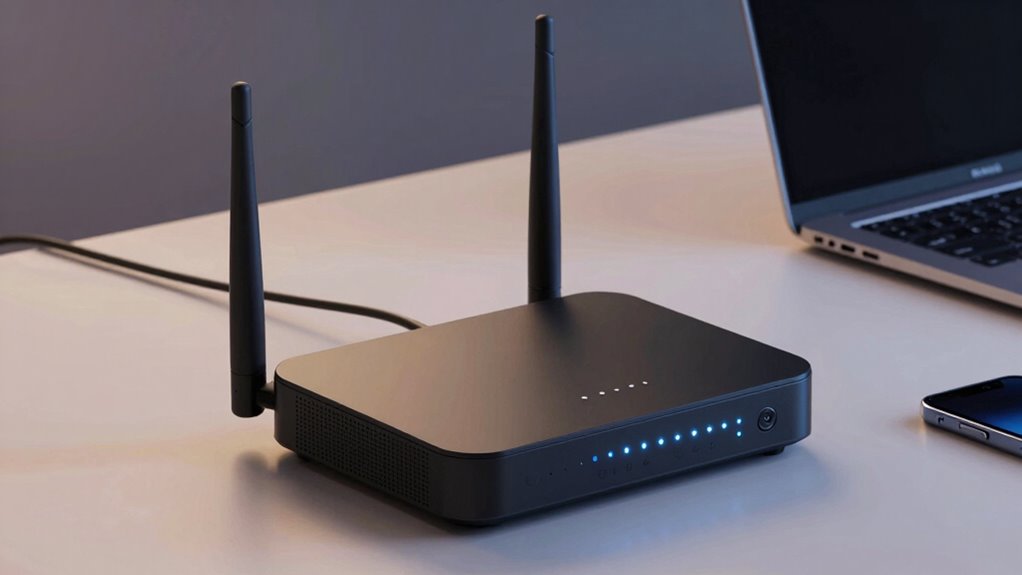

A cellular failover router keeps a connection available when wired internet drops, but the right model depends on whether you need fast 5G, dependable industrial operation, or a portable backup. I rank the Teltonika RUTM50 as the best overall for its industrial focus, while the GL.iNet GL-X3000 Spitz AX stands out for flexible 5G and Wi-Fi 6, and the GL.iNet GL-XE3000 Puli AX adds battery-powered mobility. The main tradeoffs are cellular speed and coverage versus setup simplicity, deployment features, and the cost and upkeep of a second SIM plan. A router with two SIM slots does not automatically mean two active cellular connections or seamless failover, so the details matter. Read on for how these nine options differ and which fits your backup-internet plan.

Get privacy and security gear delivered free with Prime
- Fast, free delivery on millions of items
- Prime Video, Amazon Music and more included
- Member-only deals all year
Key Takeaways
- The strongest picks serve different jobs: Teltonika’s RUTM50 is the industrial-leaning all-rounder, while GL.iNet’s GL-X3000 prioritizes flexible 5G and home or small-office Wi-Fi.
- Dual SIM is a flexibility feature, not a guarantee of uninterrupted service: check whether switching is automatic, how carriers are selected, and whether the router supports the failover behavior you need.
- Battery power changes the use case: the GL-XE3000 Puli AX is the lineup’s portable option; most other picks make more sense as fixed installations with a separate power source.
- Industrial connectivity is not the same as household Wi-Fi: the LINOVISION and InHand models emphasize equipment links and deployment needs, so buyers should check wireless coverage and client support separately.
- Renewed hardware adds a condition and support tradeoff: the renewed Cudy router may suit a buyer focused on features, but warranty, accessories, and return terms deserve extra scrutiny.
| Teltonika RUTM50 5G Industrial Router |  | Best for Industrial Failover Management | Cellular connectivity: 5G and 4G LTE | SIM support: Dual SIM with failover and load balancing | Wi-Fi: 802.11ac | VIEW ON AMAZON | See Our Full Breakdown |
| GL.iNet GL-XE3000 Puli AX 5G Wi-Fi 6 Router with Dual SIM and 6400mAh Battery | 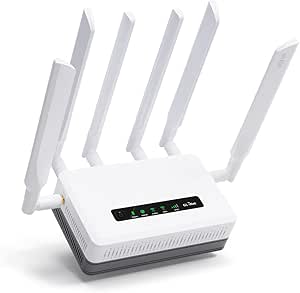 | Best Portable Cellular Failover | Cellular connectivity: 5G and 4G LTE | SIM support: Dual SIM with single standby | WAN options: Cellular, Ethernet, repeater, and tethering | VIEW ON AMAZON | See Our Full Breakdown |
| Hitron D60 5G Cellular Router with WiFi 6 |  | Best for a Straightforward Carrier-Compatible Setup | Cellular connectivity: 5G and 4G LTE | SIM: Nano SIM; eSIM capability mentioned | Compatible carriers: T-Mobile, AT&T, and US Cellular | VIEW ON AMAZON | See Our Full Breakdown |
| MOFI6500-5GXeLTE-RM520-HP 4G LTE & 5G Dual SIM Cellular Router with Wi-Fi 6, Auto Failover, Business-Class Performance |  | Best for Advanced Business Networks | Cellular connectivity: 4G LTE and 5G | SIM support: Dual SIM with auto failover | Wi-Fi: Wi-Fi 6 with amplification | VIEW ON AMAZON | See Our Full Breakdown |
| LINOVISION Industrial 4G LTE Wi-Fi Router with Dual SIM and RS485 |  | Best for Industrial IoT and Legacy Equipment | Cellular: 4G LTE Cat 4 | Maximum cellular speeds: 150 Mbps download; 50 Mbps upload | SIM slots: 2 | VIEW ON AMAZON | See Our Full Breakdown |
| GL.iNet GL-X3000 Spitz AX 5G Cellular Router with Wi-Fi 6 and Dual SIM |  | Best for Customizable Failover | Cellular connectivity: 5G NR, LTE, and 3G | Wi-Fi: Wi-Fi 6, dual-band; up to 3000 Mbps | SIM slots: 2 | VIEW ON AMAZON | See Our Full Breakdown |
| InHand Networks IR302 Industrial IoT 4G LTE VPN Cellular Router |  | Best for Industrial and Remote Sites | Cellular: 4G LTE Cat 4 | Carrier compatibility: Verizon, AT&T, and T-Mobile | SIM slots: 2 | VIEW ON AMAZON | See Our Full Breakdown |
| Cudy P5 5G AX3000 Wi-Fi 6 Router with Dual SIM |  | Best for Flexible 5G Failover | Cellular: 5G SA/NSA; Qualcomm X62, up to 3.4 Gbps | SIM slots: 2 Nano SIM | Wi-Fi: Wi-Fi 6, dual-band; 2402 Mbps on 5 GHz plus 574 Mbps on 2.4 GHz | VIEW ON AMAZON | See Our Full Breakdown |
| Cudy 5G NR SA/NSA AX3000 WiFi 6 Dual SIM Cellular Router (Renewed) |  | Best Renewed 5G Option | Cellular speeds: 5G NR up to 2.5 Gbps; 4G LTE up to 1 Gbps | SIM slots: 2 | Wi-Fi: Wi-Fi 6; up to 2402 Mbps on 5 GHz and 574 Mbps on 2.4 GHz | VIEW ON AMAZON | See Our Full Breakdown |
| cellular failover router | Wi-Fi | Cellular connectivity | SIM slots |
|---|---|---|---|
| Teltonika RUTM50 5G Industrial | 802.11ac | 5G and 4G LTE | — |
| GL.iNet GL-XE3000 Puli AX 5G W | Wi-Fi 6, dual-band 2.4 GHz and 5 GHz | 5G and 4G LTE | — |
| Hitron D60 5G Cellular Router | Wi-Fi 6 (802.11ax) | 5G and 4G LTE | — |
| MOFI6500-5GXeLTE-RM520-HP 4G L | Wi-Fi 6 with amplification | 4G LTE and 5G | — |
| LINOVISION Industrial 4G LTE W | 802.11b/g/n, 2.4 GHz | — | 2 |
| GL.iNet GL-X3000 Spitz AX 5G C | Wi-Fi 6, dual-band; up to 3000 Mbps | 5G NR, LTE, and 3G | 2 |
| InHand Networks IR302 Industri | 802.11 b/g/n, 2.4 GHz | — | 2 |
| Cudy P5 5G AX3000 Wi-Fi 6 Rout | Wi-Fi 6, dual-band; 2402 Mbps on 5 GHz plus 574 Mbps on 2.4 GHz | — | 2 Nano SIM |
| Cudy 5G NR SA/NSA AX3000 WiFi | Wi-Fi 6; up to 2402 Mbps on 5 GHz and 574 Mbps on 2.4 GHz | — | 2 |
More Details on Our Top Picks
Teltonika RUTM50 5G Industrial Router
I’d pick the RUTM50 for sites where cellular backup needs to sit inside a managed industrial network, rather than act as a portable home-office connection. Its dual-SIM failover and load balancing can help keep connected equipment online when a carrier link weakens, while RMS remote management gives administrators a way to monitor and configure deployments from afar. Five gigabit Ethernet ports and support for OpenVPN, IPsec, and WireGuard make it more adaptable to segmented wired networks than the battery-powered GL.iNet GL-XE3000 Puli AX. The tradeoff is that this is an industrial-focused unit, not the friendliest choice for a casual setup, and its listed Wi-Fi is 802.11ac, not the Wi-Fi 6 found on the Puli AX. I’d favor it for managed sites, not buyers prioritizing the newest wireless standard.
Pros:- Dual-SIM failover and load balancing support cellular resilience.
- Five gigabit Ethernet ports suit wired equipment and local networks.
- OpenVPN, IPsec, and WireGuard provide multiple VPN choices.
- Teltonika RMS supports remote monitoring and configuration.
Cons:- Listed Wi-Fi is 802.11ac, behind Wi-Fi 6 options such as the GL.iNet GL-XE3000.
- Industrial management features may be more involved than a typical home router setup.
Best for: IT teams and industrial operators connecting wired equipment at remote sites who need dual-SIM resilience, VPN options, and remote administration.
Not ideal for: Home users seeking a quick plug-and-play setup, battery-backed mobility, or Wi-Fi 6; the listed wireless standard is Wi-Fi 5.
- Cellular connectivity:5G and 4G LTE
- SIM support:Dual SIM with failover and load balancing
- Wi-Fi:802.11ac
- Ethernet ports:5
- LAN bandwidth:10/100/1000 Mbps
- Maximum data transfer rate:3.4 Gbps
- VPN protocols:OpenVPN, IPsec, WireGuard
- Operating system:RutOS (OpenWrt-based Linux)
Our verdict“Choose the RUTM50 for managed industrial sites that need dual-SIM cellular continuity and wired networking more than Wi-Fi 6 or portability.”
GL.iNet GL-XE3000 Puli AX 5G Wi-Fi 6 Router with Dual SIM and 6400mAh Battery
The GL-XE3000 Puli AX is the most flexible pick here for people who need failover on the move or through a short power outage. It can switch among cellular, Ethernet, repeater, and tethered connections, while its built-in 6400mAh battery is rated for up to eight hours—an advantage the fixed-installation Teltonika RUTM50 doesn’t offer. Wi-Fi 6 and dual-band networking also make it better suited to serving current phones and laptops than the RUTM50’s listed Wi-Fi 5. The compromise is that its dual SIMs operate in single standby, and the eSIM card must be purchased separately. Cellular service is restricted in some regions, too, so I’d check local compatibility before relying on it as a backup link. It offers unusual flexibility, but not a universal carrier solution.
Pros:- Automatic failover can use cellular, Ethernet, repeater, or tethered connections.
- Built-in 6400mAh battery is rated for up to eight hours of operation.
- Wi-Fi 6 dual-band networking supports newer client devices.
- OpenVPN and WireGuard support secure remote connections.
Cons:- Dual SIM is single standby rather than simultaneous active cellular links.
- A physical eSIM card is sold separately, and cellular service has regional restrictions.
- Battery runtime and real-world cellular speeds depend on usage and network conditions.
Best for: Mobile professionals, pop-up teams, and small offices that need several WAN choices and battery-backed connectivity during brief outages.
Not ideal for: Buyers who need a fixed industrial installation with multi-port wired connectivity or automatic simultaneous use of both SIMs.
- Cellular connectivity:5G and 4G LTE
- SIM support:Dual SIM with single standby
- WAN options:Cellular, Ethernet, repeater, and tethering
- Wi-Fi:Wi-Fi 6, dual-band 2.4 GHz and 5 GHz
- Maximum Wi-Fi data rate:3000 Mbps
- Battery:6400 mAh; up to 8 hours
- VPN protocols:OpenVPN and WireGuard
- Maximum VPN speed:150 Mbps OpenVPN; 300 Mbps WireGuard
Our verdict“Choose the Puli AX if portable, battery-backed failover and multiple WAN options matter more than an industrial fixed-install design.”
Hitron D60 5G Cellular Router with WiFi 6
The Hitron D60 makes sense for buyers who want a 5G router with cellular failover and Wi-Fi 6 without the industrial emphasis of the Teltonika RUTM50. It supports 5G and 4G LTE, accepts a Nano SIM, and lists compatibility with T-Mobile, AT&T, and US Cellular, giving buyers a defined starting point for checking carrier fit. Its stated Wi-Fi capacity is higher than the RUTM50’s listed 802.11ac connection, though those headline rates don’t guarantee real-world performance. The main reservation is support: the supplied data lists a three-month limited warranty, shorter than the RUTM50’s two years. The product text also mentions eSIM capability, but the SIM details are not fully clear. I’d shortlist it for a simple carrier-based setup, while buyers needing detailed management features should compare it with Teltonika.
Pros:- Supports both 5G and 4G LTE cellular networks.
- Wi-Fi 6 and gigabit LAN suit newer wireless clients and wired devices.
- Lists compatibility with T-Mobile, AT&T, and US Cellular.
- Cellular failover can help maintain access when a primary connection drops.
Cons:- The listed limited warranty is only three months.
- Requires a Nano SIM from a certified carrier; eSIM details are not fully specified.
- The supplied product details do not specify dual-SIM support or extensive VPN and remote-management options.
Best for: Households or small offices seeking a 5G cellular backup router with Wi-Fi 6 and a listed set of compatible US carriers.
Not ideal for: Organizations that need a longer stated warranty, detailed industrial management, or clearly documented dual-SIM failover.
- Cellular connectivity:5G and 4G LTE
- SIM:Nano SIM; eSIM capability mentioned
- Compatible carriers:T-Mobile, AT&T, and US Cellular
- Wi-Fi:Wi-Fi 6 (802.11ax)
- Maximum Wi-Fi speed:Up to 5.4 Gbps
- 5G download speed:Up to 3.4 Gbps
- LAN bandwidth:1000 Mbps
- Warranty:3-month limited warranty
Our verdict“Consider the D60 for a basic 5G and Wi-Fi 6 failover setup if its carrier requirements and short listed warranty fit your needs.”
MOFI6500-5GXeLTE-RM520-HP 4G LTE & 5G Dual SIM Cellular Router with Wi-Fi 6, Auto Failover, Business-Class Performance
The MOFI6500-5GXeLTE-RM520-HP is aimed at buyers who want more control over a business cellular connection than a basic failover appliance typically provides. Its dual-SIM auto failover is paired with VPN compatibility, IP pass-through, band lock, and ZeroTier certification, giving network administrators tools to shape how the cellular link joins an existing setup. The metal case and amplified Wi-Fi 6 are a better fit for a permanent worksite than the portable GL.iNet GL-XE3000 Puli AX, which trades fixed-install toughness for a built-in battery. That extra capability brings a steeper setup burden: band selection, pass-through, and VPN configuration may call for networking experience. The supplied specifications also omit port counts and performance figures, so I’d verify interface needs before choosing it over the more fully specified Teltonika RUTM50.
Pros:- Dual-SIM auto failover supports cellular backup across two SIMs.
- Band lock and IP pass-through give administrators added network control.
- VPN compatibility and ZeroTier certification suit managed remote access.
- Metal construction and amplified Wi-Fi 6 target a fixed business installation.
Cons:- Setup may be demanding for buyers without networking experience.
- The supplied data does not give port counts or specific speed figures.
- Its rugged fixed-install design is less suited to portable use than the GL.iNet GL-XE3000.
Best for: Small-business network administrators and technically confident site operators who need dual-SIM failover plus hands-on control of cellular routing.
Not ideal for: First-time router buyers or anyone who needs clearly documented port counts and speed figures before selecting equipment.
- Cellular connectivity:4G LTE and 5G
- SIM support:Dual SIM with auto failover
- Wi-Fi:Wi-Fi 6 with amplification
- Construction:Metal case with detachable antennas
- Routing features:IP pass-through and band lock
- Remote networking:ZeroTier certified
- VPN:VPN compatibility
Our verdict“Pick the MOFI6500 if you need advanced cellular routing controls and can handle a more involved setup.”
LINOVISION Industrial 4G LTE Wi-Fi Router with Dual SIM and RS485
The LINOVISION industrial router is the specialized choice for connecting field equipment, not a general-purpose high-speed backup for a busy office. Its RS485 and digital I/O let it communicate with industrial devices that the Wi-Fi-focused Hitron D60 is not described as supporting, while dual SIM and automatic failover provide a path to keep remote monitoring online. The rugged aluminum enclosure and stated operating range of -40°F to 158°F suit exposed installations, and two years of cloud service are included. The cost of that industrial focus is clear: this is 4G LTE Cat 4, with speeds up to 150 Mbps down and 50 Mbps up, and its Wi-Fi is older 2.4 GHz 802.11b/g/n. I’d choose it for sensors and machinery, not for a site that needs 5G throughput or modern Wi-Fi.
Pros:- RS485 and digital I/O support connections to industrial and IoT equipment.
- Dual SIM and automatic failover support cellular continuity.
- Wide operating range and aluminum enclosure suit harsh remote sites.
- Broad listed US frequency bands support multiple cellular network deployments.
Cons:- 4G LTE Cat 4 is limited to listed maximums of 150 Mbps down and 50 Mbps up.
- 2.4 GHz 802.11b/g/n Wi-Fi is older than the Wi-Fi 6 options in this roundup.
- 10/100 Mbps LAN can constrain wired throughput; SIM cards and data plans are separate.
Best for: Industrial IoT integrators and operators connecting RS485 equipment, digital I/O, or remote machinery in harsh-temperature locations.
Not ideal for: Small offices or households needing 5G speeds, Wi-Fi 6, or gigabit wired LAN; this model is 4G LTE Cat 4 with 10/100 Mbps LAN.
- Cellular:4G LTE Cat 4
- Maximum cellular speeds:150 Mbps download; 50 Mbps upload
- SIM slots:2
- Frequency bands:B2/B4/B5/B12/B13/B14/B66/B71
- Wi-Fi:802.11b/g/n, 2.4 GHz
- Interfaces:RS485, digital input/output, LAN
- LAN bandwidth:10/100 Mbps
- Operating temperature:-40°F to 158°F
- Power input:9–48 V DC
Our verdict“Choose LINOVISION for rugged 4G failover to industrial equipment, but skip it if your priority is fast 5G broadband or modern Wi-Fi.”
GL.iNet GL-X3000 Spitz AX 5G Cellular Router with Wi-Fi 6 and Dual SIM
The GL-X3000 suits buyers who want cellular backup they can shape around a more complex home or RV network. Its dual SIM and multi-WAN failover let it switch between cellular, Ethernet, repeater, and tethered connections, while load balancing can share traffic across available links. Compared with the Cudy P5, it offers the same broad mix of 5G, Wi-Fi 6, and dual SIM but adds an explicitly listed OpenWrt operating system for users who want more control over router behavior. Built-in WireGuard and OpenVPN add secure remote access, though their stated speeds may limit VPN throughput relative to the router’s wireless capacity. Six detachable antennas offer placement flexibility, but a physical eSIM card is a separate purchase, and cellular use is restricted in some regions.
Pros:- Supports 5G NR, LTE, and 3G cellular networks
- Dual SIM and multi-WAN options provide flexible backup paths
- OpenWrt offers customization beyond basic router settings
- Built-in WireGuard and OpenVPN support
Cons:- Physical eSIM card must be purchased separately
- Cellular functionality is restricted in certain countries and regions
- Listed VPN speeds are lower than the router’s maximum Wi-Fi data rate
Best for: Technically confident home or RV users who need flexible multi-WAN failover, dual-SIM backup, and OpenWrt customization.
Not ideal for: Buyers seeking a simple plug-and-play setup, or travelers in regions where the router’s cellular feature is restricted.
- Cellular connectivity:5G NR, LTE, and 3G
- Wi-Fi:Wi-Fi 6, dual-band; up to 3000 Mbps
- SIM slots:2
- WAN connections:Ethernet, repeater, cellular, and tethering
- VPN:OpenVPN up to 150 Mbps; WireGuard up to 300 Mbps
- Operating system:OpenWrt v21.02
- Antennas:6 detachable antennas
- LAN port bandwidth:1000 Mbps
Our verdict“Choose the GL-X3000 if you want configurable cellular failover and OpenWrt control; choose a simpler router if you do not plan to manage its advanced options.”
InHand Networks IR302 Industrial IoT 4G LTE VPN Cellular Router
The IR302 prioritizes dependable connectivity for equipment and remote sites over fast household Wi-Fi. Its dual-SIM LTE failover and automatic connection recovery can restore a link without someone on-site, while cloud management helps administrators oversee deployments from elsewhere. Unlike the 5G-focused GL.iNet GL-X3000 and Cudy P5, this is a 4G Cat 4 router, so it is better matched to monitoring, control, and modest data needs than high-bandwidth backup. Its DIN-rail mounting, digital I/O, and 9–36 V DC input suit industrial installations; the wide operating temperature range adds flexibility in harsher locations. The tradeoff is clear: Wi-Fi is only 2.4 GHz 802.11 b/g/n, and the Ethernet ports are 10/100 Mbps rather than Gigabit.
Pros:- Dual SIM failover with automatic connection recovery
- Supports Verizon, AT&T, and T-Mobile
- DIN-rail mounting, digital I/O, and 9–36 V DC input suit industrial deployments
- Cloud management plus OpenVPN, IPsec, WireGuard, and ZeroTier
Cons:- 4G LTE Cat 4 is slower than the 5G options in this lineup
- Wi-Fi is limited to single-band 2.4 GHz 802.11 b/g/n
- Both Ethernet ports are 10/100 Mbps rather than Gigabit
Best for: Operators of remote equipment, utility cabinets, or industrial systems who need LTE backup, digital I/O, and remote administration.
Not ideal for: Households or offices needing 5G speeds, dual-band Wi-Fi, or Gigabit wired networking for high-throughput backup.
- Cellular:4G LTE Cat 4
- Carrier compatibility:Verizon, AT&T, and T-Mobile
- SIM slots:2
- Ethernet:2 switchable WAN/LAN ports, 10/100 Mbps
- Wi-Fi:802.11 b/g/n, 2.4 GHz
- Digital I/O:2 ports
- Operating temperature:-20°C to 70°C
- Power input and mounting:9–36 V DC; DIN rail
Our verdict“Pick the IR302 for managed LTE backup at an industrial or remote site, not for fast home or office internet failover.”
Cudy P5 5G AX3000 Wi-Fi 6 Router with Dual SIM
The Cudy P5 makes a strong case for buyers who want a modern home router that can use cellular as one of several backup routes. Its failover choices span WAN and two cellular connections, so a wired internet outage need not leave the network dependent on a single SIM. Wi-Fi 6, four Gigabit ports, and mesh support make it more suitable for a connected home than the industrial InHand IR302, whose LTE radio and 10/100 Ethernet are aimed at lighter, site-focused workloads. The P5 also offers broad VPN protocol support and app-based cloud management. Its appeal depends on usable local 5G coverage, however, and the supplied data does not specify automatic SIM switching behavior in detail. Buyers should also weigh that it shares a similar home-router profile with the GL.iNet GL-X3000, which lists OpenWrt customization.
Pros:- Failover options include WAN and two cellular connections
- Dual-band Wi-Fi 6 with listed combined speeds up to 2976 Mbps
- Four Gigabit Ethernet ports, including one configurable as WAN/LAN
- Mesh support, app-based cloud management, and multiple VPN protocols
Cons:- Real-world cellular performance depends on local 5G coverage
- The provided specifications do not clarify automatic switching behavior between cellular SIMs
- Less suited to harsh industrial installations than the InHand IR302
Best for: Households or small offices seeking 5G backup, Wi-Fi 6, mesh capability, and multiple WAN or cellular failover paths.
Not ideal for: Sites without dependable 5G coverage, or users who need an industrial temperature range and DIN-rail installation.
- Cellular:5G SA/NSA; Qualcomm X62, up to 3.4 Gbps
- SIM slots:2 Nano SIM
- Wi-Fi:Wi-Fi 6, dual-band; 2402 Mbps on 5 GHz plus 574 Mbps on 2.4 GHz
- Failover:WAN, Cellular 1, and Cellular 2
- Ethernet ports:4 Gigabit ports; one configurable as WAN/LAN
- VPN protocols:WireGuard, OpenVPN, IPsec, ZeroTier, PPTP, and L2TP
- RAM:256 MB
- Antennas:6 total; 4 detachable SMA cellular antennas
Our verdict“Choose the Cudy P5 for a feature-rich home or small-office router with several failover paths, provided local 5G coverage is adequate.”
Cudy 5G NR SA/NSA AX3000 WiFi 6 Dual SIM Cellular Router (Renewed)
This renewed Cudy P5 is for buyers drawn to dual-SIM 5G failover who are willing to accept more uncertainty about the unit’s condition and support. Its listed 5G and Wi-Fi 6 capabilities broadly resemble the new Cudy P5 above, including dual-band wireless and a wide selection of VPN protocols. The key distinction is not a different failover design but the renewed status: the provided product data does not specify warranty coverage or the condition standard, so buyers should check the listing details before relying on it for a business-critical connection. Four detachable cellular antennas with SMA connectors allow external antenna options when indoor reception is weak, but antennas alone cannot overcome poor network coverage. Compared with the GL.iNet GL-X3000, this listing provides less detail about WAN modes and OpenWrt, making it harder to judge how it fits a customized network.
Pros:- 5G SA/NSA and LTE support are listed alongside dual SIM
- Dual-band Wi-Fi 6 supports up to 2402 Mbps on 5 GHz and 574 Mbps on 2.4 GHz
- Broad VPN protocol support, including WireGuard, OpenVPN, IPsec, and ZeroTier
- Detachable SMA cellular antennas allow external antenna options
Cons:- Renewed condition and warranty coverage are not specified in the provided data
- Setup may be complex for buyers unfamiliar with cellular router configuration
- The listing provides less detail about failover modes than the new Cudy P5
Best for: Technically comfortable buyers seeking a renewed dual-SIM 5G router for home broadband backup or mobile broadband who can verify its condition and support terms.
Not ideal for: Businesses needing predictable warranty coverage, buyers who want a clearly documented setup, or users without suitable 5G coverage.
- Cellular speeds:5G NR up to 2.5 Gbps; 4G LTE up to 1 Gbps
- SIM slots:2
- Wi-Fi:Wi-Fi 6; up to 2402 Mbps on 5 GHz and 574 Mbps on 2.4 GHz
- CPU:Qualcomm IPQ5018, 1 GHz dual-core ARM Cortex-A53
- Cellular antennas:4 x 5 dBi, detachable with SMA connectors
- Wi-Fi antennas:2 x 5 dBi
- VPN protocols:PPTP, L2TP, OpenVPN, WireGuard, IPsec, and ZeroTier
- External antenna interface:SMA connector
Our verdict“Consider this renewed Cudy if you can confirm its condition and support terms and want dual-SIM 5G backup; choose the new P5 for clearer product specifications.”

How We Picked
I ranked these routers around the job implied by cellular failover: maintaining a usable connection when a primary line fails, not simply delivering a high cellular speed under ideal conditions. The comparison weighs cellular generation and SIM flexibility alongside failover controls, Wi-Fi usefulness, wired and industrial connectivity, portability, and how well the design fits a home, office, vehicle, or equipment cabinet. A stated 5G capability is only one part of the decision; carrier compatibility, signal conditions, antenna placement, and the data plan all shape real-world results.
The order favors models that appear to balance backup-network capability with practical deployment, then separates specialist choices from general-purpose routers. Industrial models earn consideration for interfaces and installation flexibility, but they are not automatically the easiest home routers. Portable or consumer-oriented options rank higher for mobility and familiar Wi-Fi use, while the renewed model sits lower because its condition and support history can add uncertainty. Buyers should confirm exact regional bands, SIM requirements, failover behavior, and included accessories before choosing.
Factors to Consider When Choosing Cellular Failover Router
Choosing a cellular failover router is less about picking the biggest speed label and more about matching the backup connection to the outage you need to survive. I would settle the network, power, and deployment questions before comparing secondary features.
Match the router to your carrier and signal
Start by checking the router’s supported cellular bands against the carrier you plan to use in your location; a 5G label alone does not confirm compatibility. Coverage can vary between carriers even at the same address, so check local coverage and, if possible, test a SIM before relying on the connection. Also think about where the router and its antennas will sit: a strong indoor Wi-Fi signal cannot compensate for weak cellular reception. External antenna support may help in a difficult location, but the antenna type, cable length, and mounting position affect the result. Avoid choosing purely by advertised peak throughput when your real goal is steady access for calls, point-of-sale systems, or remote monitoring.
Understand what dual SIM and failover actually do
Two SIM slots can support carrier choice or backup switching, but they do not necessarily provide simultaneous connections or automatic, instant failover. Find out what triggers a switch, whether a failed connection is detected by internet reachability or only modem status, and how long recovery may take. Ask whether switching requires a reboot or manual action and whether the router can return to the primary SIM when service comes back. For a business that cannot tolerate a brief interruption, test the complete failover path with the services it uses, including VPNs and voice tools. A single well-tested carrier plan can be more dependable than dual SIM hardware with unclear switching behavior.
Size the data plan for the outage, not the headline speed
Estimate how much data your essential devices consume during a typical outage, then check the carrier’s hotspot rules, throttling thresholds, and roaming limits. Video meetings, cloud backups, and security-camera uploads can use far more data than basic browsing or payment traffic. Decide which devices should keep access during an outage; separating critical work from guest Wi-Fi can keep a backup plan from being consumed by nonessential traffic. A faster modem does not reduce the amount of data used by a workload. If outages are rare but long, compare the ongoing cost and terms of keeping a SIM active with the consequence of losing connectivity.
Plan power, placement, and recovery
A failover router only helps while it has power, so consider whether your primary modem, router, and cellular unit share a battery backup. A battery inside a portable router is useful for mobile work or short interruptions, but it may not power the rest of a home or office network. Fixed installations benefit from a location with both reliable power and a usable cellular signal, which may not be beside the wired modem. Check how the router reconnects after a power loss and whether status indicators or remote administration make recovery manageable. Test the setup by disconnecting the primary connection and then restoring power; an untested backup can hide configuration problems until an outage.
Choose consumer Wi-Fi or industrial connectivity deliberately
For a household or small office, prioritize Wi-Fi coverage, client capacity, and straightforward setup because the cellular connection still has to serve everyday devices. For machinery, remote sites, or control systems, wired interfaces, serial connections, VPN options, and installation flexibility may matter more than fast Wi-Fi. Industrial equipment can be a poor fit if you expect a guided consumer setup or broad room-to-room wireless coverage. Conversely, a home-focused router may lack the interfaces needed to connect directly to legacy or industrial equipment. Write down the devices and locations the router must support before treating Wi-Fi generation or cellular speed as the deciding feature.
Compare total ownership and support, not just hardware
The practical cost of a failover setup includes a cellular plan, possible antennas, mounting hardware, and any battery backup needed to keep the network alive. Confirm whether the router is locked to a carrier, what firmware and security-update support is available, and how configuration backups can be restored. For renewed hardware, check the seller’s condition description, warranty, return window, and whether essential power supplies or antennas are included. A lower-cost device can be a poor fit if replacing it or troubleshooting it is difficult during an outage. Pay more only when the extra capability matches a real need, such as mobility, industrial interfaces, or a more suitable failover workflow.
Frequently Asked Questions
Will a cellular failover router keep every device online without interruption?
Not always. A router can switch the internet path after it detects a wired outage, but active video calls, VPN sessions, and other connections may still drop when the public IP address changes. The detection interval and reconnection behavior vary by router and service. If a brief interruption is unacceptable, test failover with the exact applications and network equipment you use. For particularly sensitive systems, ask the service provider whether it supports connection continuity beyond ordinary router failover.
Do I need two SIM cards for cellular failover?
No: one SIM can provide cellular backup when the wired connection fails. Two SIMs can add another carrier option, which may help if the first carrier has a local outage or weak coverage. But dual-SIM support does not necessarily mean the router uses both networks at once or switches instantly. Check the router’s SIM selection rules and confirm both carriers work at the installation site. You will also need to account for the plans and activation requirements for each SIM.
Can I use a phone hotspot instead of buying a cellular router?
A phone hotspot can work as a temporary backup for a small number of devices, particularly during short outages. It is less suited to unattended failover because a person may need to enable tethering, keep the phone charged, and reconnect devices. A dedicated router can serve a wider network and may offer automatic switching, external antenna connections, or wired networking. Before relying on a phone, check carrier hotspot limits and whether your primary router can use it as a backup WAN. For a business or a remotely operated site, the reduced hands-on requirement of a dedicated router may matter more than convenience during an occasional outage.
Will a 5G router work if 5G coverage is unavailable?
Many 5G routers can fall back to supported 4G LTE networks, but that depends on the modem, carrier bands, SIM, and local signal. Check the exact specifications for the model and region rather than assuming every 5G router supports every LTE network. A strong LTE connection can be a more useful backup than weak or inconsistent 5G. Antenna placement and the carrier’s coverage at your site can change results more than the network-generation label. Confirm the router’s fallback modes with your intended carrier before deployment.
What should I test before trusting a router for business backup?
First, disconnect the wired internet and verify that the router detects the failure and reaches the cellular network without manual intervention. Check that essential devices can still access the services they need, including VPNs, payment systems, remote access, and any required DNS or security tools. Restore the wired connection and confirm the router returns to the intended primary path. Repeat the test after a power cycle, since outage recovery can differ from a simple cable disconnection. Record the steps and check data usage so the backup plan remains workable during a longer outage.
Conclusion
For most buyers seeking a fixed, adaptable backup connection, I would start with the Teltonika RUTM50 as the best overall pick. The GL.iNet GL-X3000 Spitz AX is my best value direction for buyers who want 5G, Wi-Fi 6, and dual-SIM flexibility in a more general-purpose router, while the GL-XE3000 Puli AX is the better fit for beginners who value a portable design and built-in battery. For a premium industrial deployment, compare the Teltonika with the MOFI6500-5GXeLTE-RM520-HP based on the failover controls and interfaces your site needs; for specific equipment connections, look closely at LINOVISION and InHand Networks. The Hitron D60 and standard Cudy P5 suit buyers weighing consumer-style Wi-Fi against cellular features, while the renewed Cudy option makes sense only if its condition, support, and included parts check out. Before deciding, verify carrier bands, failover behavior, power backup, and data-plan terms—the router is only one part of a dependable fallback connection.
Halloween Picks
halloween
As an affiliate, we earn on qualifying purchases.