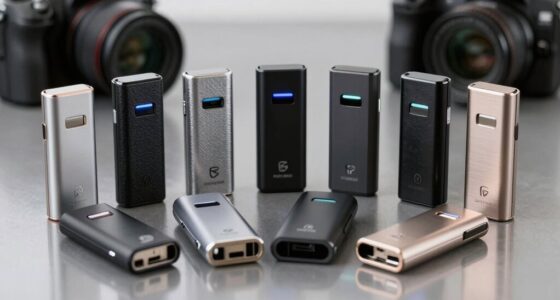
For a dependable serial to USB adapter with an FTDI chipset, I’d start with the Gearmo USB to RS-232 adapter for its LED indicators and short cable, while the CableCreation 6.6 ft model suits setups that need more reach. For several devices, the StarTech four-port industrial hub is the standout, though it takes more space and costs more to outfit than a single-port cable. The main choices are connector gender, cable length, port count, and whether you need a standard RS-232 connection or a null-modem wiring arrangement. I compare all 13 options by those practical differences, along with usability and build features, so you can match an adapter to your equipment. Read on for the full breakdown and guidance on avoiding common compatibility mismatches.

Get privacy and security gear delivered free with Prime
- Fast, free delivery on millions of items
- Prime Video, Amazon Music and more included
- Member-only deals all year
Key Takeaways
Gearmo’s LED indicators make activity easier to see at a glance, while its 16-inch cable is less convenient when the computer and serial device sit far apart.
Cable length varies widely: several picks offer six feet or more, while a compact adapter may be easier to manage at a desk or in a tight equipment cabinet.
The StarTech ICUSB2324I is the only four-port hub in this lineup, making it the clearest fit for multiple serial devices; a single-port cable is simpler for one connection.
Connector and wiring details can decide compatibility: male versus female DB9 and standard versus null-modem wiring must match the device or cable at the other end.
FTDI appears across the lineup, but the products are not interchangeable: cable reach, visible indicators, port count, USB connector type, and stated platform support distinguish their use cases.





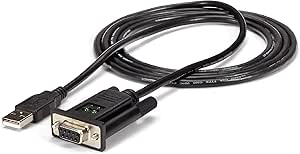
| serial to usb adapter ftdi | Chipset | Cable length | Connectors |
|---|---|---|---|
| USB Type-C to RS232 DB9 Serial | FTDI FT232RL | — | USB Type-C male to RS-232 DB9 male |
| Gearmo USB to RS-232 Serial Ad | Genuine FTDI | 16 in (40.6 cm) | — |
| Sabren USB 2.0 to Serial DB9 R | Prolific PL2303GS | — | — |
| SabreNT USB 2.0 to Serial DB-9 | FTDI | 6 ft | — |
| USB to RS232 Serial Adapter wi | FTDI FT232 | 6 ft | — |
| USB to RS232 Serial Adapter wi | FTDI | 6 ft | USB 2.0 male to DB9 female |
| Gearmo USB to Serial RS-232 Ad | FTDI | 5 ft | — |
| CableCreation USB to RS232 DB9 | FTDI | 6.6 ft (2 m) | USB 2.0 male to DB9 female |
| StarTech 4-Port USB to Serial | — | — | — |
| USB to RS232 Adapter with FTDI | FT232RL | — | USB Type-A to male DB9 |
| DTECH 10 ft USB 2.0 to RS232 D | FTDI FT232RL | 10 ft | USB Type-A male to DB9 female |
| StarTech 6ft 1-Port FTDI USB t | FTDI FT232RL | 6 ft (1.8 m) | USB Type-A to DB-9 |
| StarTech 6ft USB to Serial RS2 | FTDI FT232RL | 6 ft (1.8 m) | USB Type-A to DB9 |
More Details on Our Top Picks
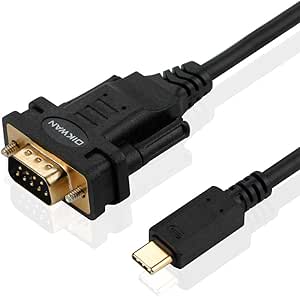
USB Type-C to RS232 DB9 Serial Port Adapter Cable with FTDI Chipset
For a laptop with USB-C ports, this adapter connects directly to a standard DB9 RS-232 device without adding a USB-A converter. Its FTDI FT232RL chipset supports communication up to 1 Mbps, matching the stated rate of the Gearmo USB to RS-232 Serial Adapter. That makes this a good fit for configuration work with routers, PLCs, or other serial equipment when your computer lacks a built-in serial port. It is bus powered, so there is no separate supply to carry. The tradeoff is connector flexibility: this is for 9-pin DB9 equipment and won’t suit devices that require a different connector. Compared with the Gearmo, it also lacks listed LED diagnostics and a short USB-A cable option; choose it for its direct USB-C connection.
Pros:- FTDI FT232RL chipset supports broad Windows, macOS, and Linux use
- Up to 1 Mbps data rate
- Direct USB-C connection avoids a separate USB-A adapter
- Bus powered, with no external supply
Cons:- Limited to DB9 serial devices
- Requires a one-time driver installation
- No signal-status LEDs are listed
Best for: Laptop users with USB-C ports who need a direct connection to DB9 serial equipment.
Not ideal for: Technicians connecting 15-pin or non-DB9 devices, or buyers who want visible signal LEDs.
- Chipset:FTDI FT232RL
- Transfer rate:Up to 1 Mbps
- Connectors:USB Type-C male to RS-232 DB9 male
- Supported operating systems:Windows 11/10/8/7, macOS, Linux
- Power:USB-C bus powered
- Driver setup:Plug and play after one-time driver installation
Our verdict“Choose this cable if your computer has USB-C and your serial device uses a standard DB9 connection.”
Gearmo USB to RS-232 Serial Adapter – Genuine FTDI Chipset, Dual-Color LED Indicators, Plug & Play (16-in Cable)
The Gearmo’s defining advantage is practical: dual-color LEDs make serial activity easier to see while troubleshooting a connected device. Its genuine FTDI chipset and support for communication up to 1 Mbps put it on similar footing to the USB Type-C to RS232 DB9 Serial Port Adapter, but this model uses USB Type-A and includes a 16-inch lead. That shorter reach suits a desk or server rack where a long cable would add clutter. The DB9 connector has hex nuts for a more secure attachment. The compromise is that the cable may not reach equipment set farther away, and the single port handles only one serial device at a time. Pick this over the SabreNT 6 ft cable when signal visibility and a compact setup matter more than reach.
Pros:- Genuine FTDI chipset with up to 1 Mbps communication
- Dual-color LEDs provide a visible signal-status cue
- 16-inch cable helps keep rack and desk setups tidy
- DB9 hex nuts help secure the connection
Cons:- Short cable can require an extension for distant equipment
- One serial port supports only one connected device
- USB Type-A connector may require an adapter for USB-C-only computers
Best for: Network and hardware technicians who want visible signal activity while configuring one DB9 device near a USB-A computer.
Not ideal for: Users working with equipment several feet from the computer, or anyone who needs multiple serial ports at once.
- Model:GM-FTDI-LED16
- Chipset:Genuine FTDI
- Connector:USB Type-A to DB9 male with hex nuts
- Ports:1
- Cable length:16 in (40.6 cm)
- Input voltage:5 V, bus powered
- Indicators:Dual-color LEDs
- Warranty:1 year
Our verdict“Choose the Gearmo when you want LED feedback and a short, secure cable for nearby serial equipment.”
Sabren USB 2.0 to Serial DB9 RS232 Male Adapter Cable (CB-DB9P)
This Sabren cable stands apart from the FTDI-based picks because it uses a Prolific PL2303GS chipset. Its all-nine-pin DB9 wiring is the more relevant distinction for buyers whose legacy equipment needs the full connector pinout. It supports rates up to 460,800 bps, below the 1 Mbps listed for the USB Type-C FTDI adapter and Gearmo, so those options are better fits when the higher stated ceiling matters. For PLCs, routers, switches, or POS terminals that work within its supported rate, the Sabren offers a bus-powered USB 2.0 connection and driver support across Windows, macOS, and Linux. The tradeoff is that some systems may need manual driver installation, so setup may take more attention than the Gearmo’s advertised plug-and-play experience.
Pros:- All nine DB9 pins are wired
- Supports baud rates up to 460,800 bps
- Bus-powered design needs no separate supply
- Driver support is available for Windows, macOS, and Linux
Cons:- Uses a Prolific chipset rather than FTDI
- Some operating systems may require manual driver installation
- Its stated maximum baud rate is lower than the FTDI options listed here
Best for: Owners of legacy DB9 equipment that needs all nine pins and operates within 460,800 bps.
Not ideal for: Buyers specifically seeking an FTDI chipset, a 1 Mbps stated rate, or the simplest driver setup.
- Chipset:Prolific PL2303GS
- Connector:DB9 male
- USB version:USB 2.0
- Pin wiring:All nine pins
- Maximum baud rate:460,800 bps
- Operating systems:Windows 10/11, macOS, Linux
- Power:Bus powered
- Warranty:1 year; extendable to 2 years with registration
Our verdict“Choose the Sabren when full-pin DB9 wiring matters more than an FTDI chipset or a 1 Mbps rate ceiling.”
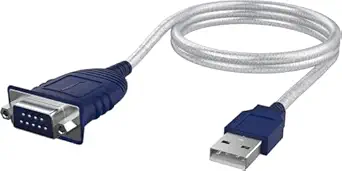
SabreNT USB 2.0 to Serial DB-9 RS-232 Cable (FTDI) – 6 ft
When the computer and serial device need some distance between them, the SabreNT’s 6 ft cable gives more placement freedom than the Gearmo’s 16-inch lead. It pairs that reach with an FTDI chipset and a standard nine-pin DB-9 connection for older equipment such as modems, cameras, and PDAs. The listed support for remote wake-up and power management may also suit installations where the serial connection stays in place. The source data describes its installation as driverless across Windows, macOS, and Linux, while the USB Type-C adapter in this roundup calls for a one-time driver install. The tradeoff is that this cable uses USB-A, so USB-C-only computers need an adapter. Its listed 480 Mbps figure is a USB transfer rate, not a stated RS-232 baud rate.
Pros:- Six-foot cable offers more placement flexibility than the Gearmo’s 16-inch lead
- FTDI chipset supports the listed driverless operation
- Remote wake-up and power-management support
- Male thumbscrew connectors help secure the serial connection
Cons:- USB-A connection may need an adapter for USB-C-only computers
- Supports standard DB-9 RS-232 only
- No advanced configuration utilities are included
Best for: Users who need an FTDI DB9 cable long enough to place legacy equipment several feet from a USB-A computer.
Not ideal for: USB-C-only laptop owners without an adapter, or buyers looking for a stated RS-232 baud-rate ceiling.
- Chipset:FTDI
- Cable length:6 ft
- Connector:USB to 9-pin DB-9 RS-232
- USB compatibility:USB 1.1, USB 2.0, USB CDC v1.1
- Listed data transfer rate:480 Mbps
- Power management:Remote wake-up supported; no IRQ conflicts
- Weight:113 g
- Maximum current:2 A
Our verdict“Choose the SabreNT if you need extra cable reach for a USB-A computer and standard DB9 serial equipment.”
USB to RS232 Serial Adapter with FTDI Chipset, USB 2.0 Male DB9 Cable (6 ft)
This 6-foot cable is a straightforward pick for buyers who want an FTDI FT232 bridge to a male DB9 port and do not need extras such as the Gearmo’s signal LEDs. Its stated rate reaches 1 Mbps, and USB power keeps the setup simple around a laptop or workstation. The gold-plated connectors and PVC cable are listed as durability features, while the FTDI driver is available from the manufacturer’s site. Compared with the SabreNT 6 ft FTDI cable, this option also provides six feet of reach, but its supplied details do not list remote wake-up or power-management support. Check the serial device’s connector before buying: the male DB9 end will not fit equipment that requires a female plug, and it is limited to RS-232 rather than video or other interfaces.
Pros:- FTDI FT232 chipset with data rates up to 1 Mbps
- Six-foot cable provides useful reach
- Gold-plated connectors and PVC cable are listed construction features
- USB powered with no external supply
Cons:- Male DB9 end is unsuitable for devices requiring a female connector
- Driver is available from FTDI’s website rather than described as driverless
- Limited to RS-232 serial connections
Best for: PC and workstation users who need a six-foot, USB-powered FTDI cable for a male DB9 RS-232 device.
Not ideal for: Buyers whose equipment requires a female DB9 plug, USB-C-only connection, or an interface other than RS-232.
- Chipset:FTDI FT232
- Cable length:6 ft
- Connector:USB 2.0 to male DB9 RS-232
- Maximum data rate:1 Mbps
- Power:USB powered
- Cable material:PVC
- Connector finish:Gold plated
Our verdict“Choose this cable for a simple, six-foot FTDI connection when your device accepts a male DB9 plug.”
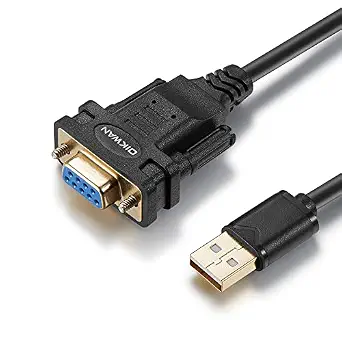
USB to RS232 Serial Adapter with FTDI Chipset – USB 2.0 to Female DB9 Cable (6 ft)
For connecting a female DB9 device when the computer is several feet away, this OIKWAN cable combines a 6-foot lead with an FTDI chipset and USB bus power. The listed 1 Mbps transfer rate and support for Windows, macOS, and Linux fit common legacy serial tasks such as printers, POS equipment, and CNC controllers. Compared with the CableCreation 6.6-foot adapter, it is slightly shorter but names older Windows versions and macOS 10.6 onward in its compatibility details. Its key limitation is connector fit: the female DB9 end suits devices with a male serial port, while the OIKWAN male-DB9 adapter in this roundup is intended for the opposite device-side connector. It also cannot serve 15-pin connections.
Pros:- FTDI chipset with listed support for Windows, macOS, and Linux
- Six-foot cable allows flexible placement
- USB-powered operation needs no separate adapter
- Lists a 1 Mbps data transfer rate
Cons:- Female DB9 connector will not fit devices that also have a female DB9 port
- Supports only nine-pin DB9 connections
- The listed OS support does not specify newer macOS versions
Best for: Owners of a legacy modem, POS system, or controller with a male DB9 port who need a six-foot connection and broad OS support.
Not ideal for: Buyers connecting equipment with a female DB9 port or a 15-pin connector, because this cable has a female DB9 end and nine pins.
- Chipset:FTDI
- Connectors:USB 2.0 male to DB9 female
- Cable length:6 ft
- Data transfer rate:1 Mbps
- Pins:9
- Supported OS:Windows 10/8.1/8/7/Vista/XP/2000, Linux 2.4+, macOS 10.6+
- Power:USB powered
- Warranty:2 years
Our verdict“Choose this OIKWAN when you need a six-foot, FTDI-based connection to a male DB9 device; skip it if your device needs a male adapter end.”
Gearmo USB to Serial RS-232 Adapter with LED Indicators, FTDI Chipset
The dual-color LED indicators give this Gearmo adapter a practical edge when diagnosing whether signals are moving between a computer and a DB9 device. That makes it more useful at a service bench than the OIKWAN six-foot adapter, whose listing focuses on reach and compatibility rather than visible signal checks. Its 5-foot cable is a little shorter, and Gearmo lists support for Windows, Linux, and macOS, though the macOS version range is less detailed than OIKWAN’s. The FTDI chipset is a good fit for common serial hardware, but the listing says manual driver installation may be needed. I would pick it when troubleshooting visibility matters more than maximum cable length; buyers seeking the longest lead in this group should look to the CableCreation 6.6-foot model.
Pros:- Dual-color LEDs provide a quick visual indication for host-to-device signal testing
- FTDI chipset supports Windows, Linux, and macOS
- Five-foot cable offers some placement flexibility
- Useful troubleshooting feature absent from the basic OIKWAN cable listing
Cons:- Manual driver installation may be required
- Shorter than the six-foot OIKWAN and 6.6-foot CableCreation options
- macOS version support is not fully specified
Best for: IT technicians and hobbyists who regularly diagnose DB9 serial connections and want visual signal activity at the adapter.
Not ideal for: Buyers who need a cable longer than five feet or want clearly specified support for older macOS releases.
- Chipset:FTDI
- Interface:USB to DB-9 RS-232
- Cable length:5 ft
- LED indicators:Dual-color host-to-device testing display
- Supported OS:Windows 7/8/10/11, Linux, macOS 10.x
Our verdict“Choose Gearmo if visible serial activity will help you troubleshoot; choose a longer cable if placement range matters more.”
CableCreation USB to RS232 DB9 Serial Adapter Cable, FTDI Chipset, 6.6 ft (2 m)
With a 6.6-foot (2 m) cable, this CableCreation adapter offers the longest specified lead among the single-port cable options here, giving equipment more room around a workstation or machine. Its USB 2.0 male to female DB9 connection and FTDI chipset suit common RS-232 devices, while bus power avoids a separate supply. The OIKWAN six-foot model is close in length and explicitly lists older OS versions, but CableCreation adds a stated lifetime warranty and gold-plated USB contacts. Those details do not make it a fit for every device: it is limited to DB9 and the listing excludes cutting plotters and triple-shielded cables. Its stated 1 Mbps rate also makes this a legacy serial solution rather than a high-speed USB link.
Pros:- Longest listed cable among these single-port cable picks at 6.6 feet
- FTDI chipset with Windows, Linux, and macOS compatibility
- USB bus powered, with no external adapter required
- Lifetime warranty is specified
Cons:- Listing excludes cutting plotters and triple-shielded cable setups
- Limited to USB 2.0 and a stated 1 Mbps transfer rate
- Female DB9 connector will not fit equipment with a female DB9 port
Best for: Users placing a DB9 serial device farther from a computer who want a longer cable and broad stated platform compatibility.
Not ideal for: Owners of cutting plotters, devices requiring triple-shielded cable, or equipment without a nine-pin RS-232 port.
- Chipset:FTDI
- Connectors:USB 2.0 male to DB9 female
- Cable length:6.6 ft (2 m)
- Data transfer rate:1 Mbps
- Supported OS:Windows 11/10/8.1/8/7/Vista/XP, Linux, macOS
- USB contacts:Gold plated
- Power:USB bus powered
- Warranty:Lifetime
Our verdict“Pick CableCreation when extra cable reach and a stated lifetime warranty matter for a standard male-DB9 device.”
StarTech 4-Port USB to Serial RS232 Hub, Industrial, TAA (ICUSB2324I)
This StarTech hub changes the buying question from cable reach to how many serial devices need a connection. Four RS-232 ports let one USB host serve multiple devices, and COM port retention helps keep software assignments stable after reboots. The all-metal enclosure, DIN-rail clips, and wall brackets suit fixed workstations or industrial installations better than the single-device OIKWAN and CableCreation cables. That extra capacity comes with a different tradeoff: the listing does not specify an FTDI chipset, transfer rate, or operating-system versions, so buyers choosing specifically for FTDI driver behavior should verify those details before purchasing. USB-host power keeps installation simple, but the manufacturer notes that it may limit cable length in some setups.
Pros:- Four RS-232 ports connect multiple devices through one USB host
- Metal enclosure is suited to demanding installations
- COM port assignments are retained after reboots
- Includes wall-mount brackets and DIN-rail clips
Cons:- USB power may limit cable length in some installations
- Listing does not specify an FTDI chipset
- OS versions and data transfer rate are not provided
Best for: Industrial technicians connecting several RS-232 devices to one host computer in a fixed, mountable installation.
Not ideal for: Buyers who need a single inexpensive-style cable solution or require explicitly documented FTDI chipset and OS details.
- Ports:4
- Interface:USB to RS-232
- Enclosure:All metal
- COM retention:Yes
- Power:USB host port
- Mounting:Wall brackets and DIN-rail clips
- Compliance:TAA
Our verdict“Choose the StarTech hub for a mounted multi-device RS-232 setup, after confirming its chipset and OS support meet your requirements.”
USB to RS232 Adapter with FTDI Chipset – Male DB9 Serial Converter for Cashier Register, Modem, Scanner, Industrial Machinery, CNC (Black)
This OIKWAN adapter fills a connector gap in a lineup weighted toward female DB9 cable ends: its male DB9 plug is designed for equipment with a female RS-232 port. The FT232RL chipset and listed support for Windows, macOS, and Linux make it relevant for cash registers, scanners, and CNC equipment, while a driver link and manual are noted. Compared with the OIKWAN six-foot female-DB9 cable, this is the better match when the device port is female, but its cable length and transfer rate are not listed. That missing length information makes placement harder to plan, and the unusually broad macOS 8+ claim is less specific than the OS version details provided for the CableCreation adapter.
Pros:- Male DB9 connector fits devices with a female serial port
- Uses the FT232RL chipset
- Lists Windows, macOS, and Linux support
- Driver download link and user manual are included
Cons:- Cable length is not specified
- Transfer rate is not listed
- Male DB9 end will not connect directly to devices with a male DB9 port
Best for: Owners of a legacy device with a female DB9 serial port who need an FTDI-based USB Type-A adapter.
Not ideal for: Buyers whose equipment has a male DB9 port or who need a specified cable length or transfer rate before ordering.
- Chipset:FT232RL
- Connectors:USB Type-A to male DB9
- Ports:1
- Supported OS:Windows 7/8/10/11, macOS 8+, Linux 2.4+
- Color:Black
- Weight:1.12 ounces
- Drivers:Download link and user manual included
Our verdict“Choose this OIKWAN when your device has a female DB9 port and you can confirm the unspecified cable details suit your setup.”
DTECH 10 ft USB 2.0 to RS232 DB9 Serial Port Adapter Cable with FTDI Chipset Supports Windows 11/10/8/7 and Mac/Linux
For installations where the computer cannot sit beside the serial device, the 10-foot cable is the DTECH adapter’s clearest advantage. Its FTDI FT232RL chipset and USB Type-A to DB9 female connection suit a range of legacy RS232 equipment, while the listed Windows, macOS, and Linux support offers more flexibility than a platform-specific adapter. Compared with the StarTech 6ft 1-Port FTDI USB to Serial RS232 Adapter, DTECH gives you four extra feet of reach, though StarTech lists COM port retention and detailed serial settings that may matter more for repeatable workflows. DTECH’s tradeoffs are a single port, USB 2.0 interface, and possible driver installation. Choose it for distance and a DB9 female connector; skip it if you need documented COM retention or a shorter, tidier cable.
Pros:- 10-foot cable offers more placement flexibility than the 6-foot StarTech options
- FTDI FT232RL chipset with Windows, macOS, and Linux support listed
- DB9 female connector suits devices with a male serial port
- Gold-plated connectors are specified for corrosion resistance
Cons:- Some systems may require driver installation
- Single-port USB 2.0 connection
- Blue cable may stand out in discreet or color-matched installations
Best for: People connecting a desktop or laptop to an RS232 device several feet away, such as equipment on a bench or in a cabinet
Not ideal for: Buyers who need documented COM port retention, a multiport adapter, or a compact cable run
- Cable length:10 ft
- Chipset:FTDI FT232RL
- Connectors:USB Type-A male to DB9 female
- Interface:USB 1.1/2.0
- Data transfer rate:>1 Mbps
- Operating systems:Windows 11/10/8/7, macOS 8+, Linux 2.4+
- Ports:1
- Input voltage:5 V
Our verdict“Choose DTECH when a long cable and DB9 female connection matter more than COM port retention or a compact setup.”
StarTech 6ft 1-Port FTDI USB to Serial RS232 Adapter
The standout here is COM port retention: keeping the same assignment after a reboot or reconnect can save setup changes in workflows that depend on a fixed port. The FTDI FT232RL chipset and USB-powered design also keep the connection straightforward, with no external power adapter to place. Compared with the DTECH 10 ft adapter, this StarTech cable is shorter and offers less reach, but its COM retention is a more explicit fit for repeat-use configurations. The listed maximum baud rate of 115.2 Kbps is a constraint beside the StarTech null-modem model’s 921.6 Kbps rating, and may rule it out for higher-speed serial tasks. I’d pick it for routine RS232 connections where a predictable COM assignment matters; buyers needing higher baud rates should look elsewhere.
Pros:- COM port retention helps preserve software configuration across reconnects and reboots
- USB-powered design requires no external power adapter
- FTDI FT232RL chipset with configurable serial operation
- Supports listed data bits, stop bits, and parity modes
Cons:- Maximum baud rate of 115.2 Kbps is lower than the null-modem StarTech option
- Six-foot cable provides less reach than the DTECH 10 ft adapter
- Single port limits connections to one serial device
Best for: Technicians and office users whose software is configured to use a consistent COM port after reconnects or restarts
Not ideal for: Users transferring data at rates above 115.2 Kbps or needing a null-modem connection
- Cable length:6 ft (1.8 m)
- Chipset:FTDI FT232RL
- Maximum baud rate:115.2 Kbps
- Connectors:USB Type-A to DB-9
- Data bits:7 or 8
- Stop bits:1 or 2
- Parity modes:None, Odd, Even, Mark
- Ports:1
- Warranty:2-year limited
Our verdict“Choose this StarTech for a standard RS232 connection where keeping the COM assignment stable matters more than high baud rates.”
StarTech 6ft USB to Serial RS232 Adapter, Null Modem, TAA (ICUSB232FTN)
This StarTech is the specialized pick for equipment that needs a null-modem RS232 connection, with a listed maximum baud rate of 921.6 Kbps. That makes it a different fit from the standard RS232 adapters here: the StarTech 6ft 1-Port model tops out at 115.2 Kbps, while the DTECH provides a longer cable but does not specify a null-modem interface. Its FTDI FT232RL chipset, stated Windows, macOS, and Linux compatibility, and retained COM assignment suit systems where reconnection behavior matters. The tradeoff is that null-modem wiring is not interchangeable with every conventional serial setup, so buyers should match the cable type to their device. It is also USB Type-A rather than native USB-C and remains a single-port, six-foot adapter.
Pros:- Null-modem RS232 interface serves equipment that requires that wiring
- Listed maximum baud rate of 921.6 Kbps exceeds the other StarTech adapter in this batch
- Retains COM port assignment after disconnects or reboot
- FTDI FT232RL chipset with Windows, macOS, and Linux compatibility listed
Cons:- Null-modem wiring is not suitable for every RS232 device
- Six-foot cable may be short for installations with separated equipment
- USB Type-A connector requires an adapter or hub for USB-C-only computers
Best for: IT and industrial users with RS232 equipment specifically requiring null-modem wiring and a higher listed baud rate
Not ideal for: Buyers whose device requires a standard straight-through serial cable, a longer run, or native USB-C
- Cable length:6 ft (1.8 m)
- Chipset:FTDI FT232RL
- Interface:Null-modem RS232 DB9
- Maximum baud rate:921.6 Kbps
- Connectors:USB Type-A to DB9
- Operating systems:Windows, macOS, Linux
- Weight:3.2 oz (90 g)
- Operating temperature:0 °C to 55 °C
- Warranty:2 years
Our verdict“Choose this model when your device requires null-modem wiring and you need the higher listed baud rate.”
How We Picked
I compared these adapters by the factors that determine whether a serial connection will fit a real setup: FTDI chipset identification, RS-232 and DB9 configuration, cable length, connector type, port count, and stated operating system support. I also looked at practical usability features such as LED indicators, compactness, and industrial or TAA positioning where those details were given. Because the product list includes both standard cables and a null-modem model, wiring role mattered alongside connector shape.
The order favors options with a clear advantage for a common buyer need, then distinguishes specialized picks from basic single-port adapters. Gearmo’s indicators make its short lead more useful for monitoring a nearby connection; longer cables suit devices farther from the computer. The StarTech four-port unit ranks for multi-device work rather than as a default choice, while the null-modem adapter is a targeted solution for equipment that needs crossed serial signals. Where listings provide limited detail, I avoid assuming extra capabilities beyond the stated features.
| serial to usb adapter ftdi | Chipset | Connectors |
|---|---|---|
| USB Type-C to RS232 DB9 Serial | FTDI FT232RL | USB Type-C male to RS-232 DB9 male |
| Gearmo USB to RS-232 Serial Ad | Genuine FTDI | — |
| Sabren USB 2.0 to Serial DB9 R | Prolific PL2303GS | — |
| SabreNT USB 2.0 to Serial DB-9 | FTDI | — |
| USB to RS232 Serial Adapter wi | FTDI FT232 | — |
| USB to RS232 Serial Adapter wi | FTDI | USB 2.0 male to DB9 female |
| Gearmo USB to Serial RS-232 Ad | FTDI | — |
| CableCreation USB to RS232 DB9 | FTDI | USB 2.0 male to DB9 female |
| StarTech 4-Port USB to Serial | — | — |
| USB to RS232 Adapter with FTDI | FT232RL | USB Type-A to male DB9 |
| DTECH 10 ft USB 2.0 to RS232 D | FTDI FT232RL | USB Type-A male to DB9 female |
| StarTech 6ft 1-Port FTDI USB t | FTDI FT232RL | USB Type-A to DB-9 |
| StarTech 6ft USB to Serial RS2 | FTDI FT232RL | USB Type-A to DB9 |
Factors to Consider When Choosing Serial To Usb Adapter Ftdi
Before choosing by brand or cable length, I’d check the serial link from the computer to the device as a complete path. A USB adapter can have the right chipset and still fail to connect if its DB9 gender, wiring, or port arrangement does not match the equipment. These broader checks help narrow the field before you buy.
Match DB9 Gender and the Device’s Serial Port
DB9 connectors come in male and female forms, and the port on the device may not match the connector on the adapter. Check the port itself or the equipment manual rather than relying on a product photo or the words “serial cable.” A gender mismatch may be solvable with a coupler, but each extra connection adds bulk and another point that can loosen. Also check whether the device uses a DB9 connector at all; some serial equipment exposes a different connector or requires a separate cable. I’d settle the physical connection before comparing convenience features.
Confirm Standard Versus Null-Modem Wiring
Connector shape alone does not tell you how serial signals are wired. A standard straight-through link and a null-modem link route transmit and receive signals differently, and choosing the wrong one can prevent communication even when the adapter appears to fit. Look up the device’s connection requirements or inspect the cable you are replacing. Null-modem adapters are common in direct computer-to-computer links and some equipment pairings, but they are not a universal upgrade. If documentation is unclear, identify the required wiring before ordering rather than treating an adapter as interchangeable with a null-modem cable.
Choose Cable Length for the Whole Setup
Measure the route from the computer’s USB port to the serial device, including the path around a desk, rack, or machine enclosure. A short lead reduces clutter when both devices are close; a longer cable can avoid placing a computer beside equipment or stretching a connection taut. Avoid buying the longest cable by default, since extra slack can snag or make a crowded installation harder to manage. If the required run exceeds the adapter’s stated length, check whether your setup supports an appropriate extension rather than assuming any USB extension will work. Leave enough slack for access and movement without turning the cable into a trip or snag point.
Decide Whether One Serial Port Is Enough
A single-port adapter is the straightforward choice when you need to connect one device at a time. If a workstation regularly talks to several serial devices, a multi-port hub can reduce the need to swap cables and occupy multiple USB ports. That convenience comes with a larger unit, more connected cables, and a need to manage which serial port your software addresses. Count the devices you need to use at once, not just the total number you own. For occasional connections, separate single-port cables may be easier to store and troubleshoot.
Check Operating System and Driver Details
FTDI identification is useful, but it does not replace checking compatibility with your computer’s operating system and application. Compare the adapter listing and manufacturer documentation with the operating system version you actually use, especially on a managed or older machine. Some applications also expect a particular serial port setting or COM port assignment, so a successful USB connection is only one part of setup. If you maintain equipment across several computers, verify support on each platform instead of assuming that a shared chipset means identical setup steps. Keep the product’s model information available so you can find the correct driver and documentation later.
Pay for Features That Solve Your Actual Problem
LED indicators, longer leads, industrial positioning, and multiple ports can make a setup easier, but each feature matters only for a matching need. Indicators help when you want a visible cue during connection checks; extra reach helps when devices are separated; a multi-port unit makes sense when several serial links are active together. TAA positioning may matter for procurement requirements, while many home or bench setups may not need it. A simpler cable can be easier to carry and troubleshoot if it connects one device in a familiar environment. I’d spend more attention on fit and wiring than on a feature that will sit unused.
Frequently Asked Questions
Does an FTDI chipset guarantee this adapter will work with my serial device?
No. The chipset addresses USB-to-serial conversion, but you still need the correct RS-232 connection, DB9 gender, wiring, and software settings. Check whether the device expects a straight-through or null-modem link and whether it uses a standard DB9 port. Then confirm the operating system and application can use the adapter’s serial port. These checks catch common mismatches that the chipset name alone cannot resolve.
How do I know whether I need a null-modem adapter?
Start with the device manual or the wiring of the cable you are replacing; the required signal routing matters more than the connector’s appearance. Null-modem wiring is used for some direct serial links where transmit and receive signals must cross. Other devices expect a straight-through connection, so using null-modem wiring there can stop communication. If the documentation does not state the wiring, identify the equipment’s serial pinout or ask its manufacturer before choosing. The StarTech ICUSB232FTN in this roundup is specifically labeled null modem.
Should I choose a male or female DB9 adapter?
Choose the connector that physically mates with the serial port or cable in your setup, and verify both ends before ordering. DB9 gender does not tell you whether the connection needs null-modem wiring, so check that separately. A gender changer can sometimes bridge a mismatch, but it adds another connector and may complicate an installation with limited clearance. If the device manual names a cable type, follow that specification rather than guessing from the device’s role. Also confirm the adapter’s connector description refers to the end that will attach to your equipment.
When is a four-port USB to serial hub a better choice than separate adapters?
A four-port hub is useful when several serial devices need to remain connected to one computer at the same time. It can reduce cable swapping and free up USB ports, but it also takes more space and requires software to address the right serial port. For one device, a simple single-port adapter is easier to place and manage. Consider how many devices you use concurrently, how much room the installation allows, and whether your application can select among multiple serial ports. The StarTech ICUSB2324I is the lineup’s dedicated multi-device option.
Is a longer USB-to-serial cable always the safer choice?
No. A longer cable can make placement easier when the computer and serial device are separated, but excess length can create clutter and snag points. Measure the actual route and include room to connect and move equipment. If a short adapter would leave the USB plug under tension, choose more reach; if the devices sit beside each other, a compact lead may be easier to handle. For runs beyond the listed cable length, check the adapter and extension guidance rather than assuming every extension will behave the same way.
Conclusion
For the best overall balance, I’d choose the Gearmo adapter with LED indicators if its 16-inch lead reaches your device. For value in a basic single-device setup, compare the straightforward FTDI cable options by connector gender and the length your workspace needs; the Sabren CB-DB9P is a simple pick when its DB9 configuration fits. Beginners may prefer a clearly identified FTDI adapter with a cable long enough to avoid awkward placement, such as the CableCreation 6.6 ft model. For premium multi-device work, the StarTech ICUSB2324I is the specialist choice with four serial ports. If your link specifically needs crossed signals, choose the StarTech ICUSB232FTN null-modem model; if you need a Type-C connection or a longer run, narrow the remaining picks by USB connector and cable length. The right choice comes down to matching the adapter’s wiring and connectors to your equipment before weighing convenience features.
Halloween Picks
halloween
As an affiliate, we earn on qualifying purchases.