
TL;DR

Get privacy and security gear delivered free with Prime
- Fast, free delivery on millions of items
- Prime Video, Amazon Music and more included
- Member-only deals all year
Privacy screen protectors limit side viewing angles, shielding sensitive info from prying eyes. Recent tech improvements boost clarity and ease of use, making them a must-have for mobile security.
If you’ve ever worked in a coffee shop or on a crowded train, you know the nervous dance of tilting your screen or squinting to hide your work. Privacy screen protectors turn that struggle into a simple, elegant shield. They’re more than just a privacy tool—they’re a smart way to keep confidential info out of sight from wandering eyes.
In this article, you’ll learn what makes a good privacy screen protector, how recent innovations improve your experience, and practical tips to pick the right one for your laptop. Whether you’re a remote worker, a student, or just someone who values privacy, these insights will make your digital life safer and more comfortable.
Choose a privacy screen matching your laptop’s size and features—accuracy saves frustration.
Recent tech improvements make privacy filters clearer and easier to use, with added blue light filtering for eye comfort.
High-quality filters reduce glare and color shift—don’t compromise on clarity for privacy.
Magnetic and snap-on designs simplify installation and removal, ideal for intermittent privacy needs.
Remember: privacy screens shield you from shoulder surfers but don’t replace digital security measures.
What exactly is a privacy screen protector and how does it work?
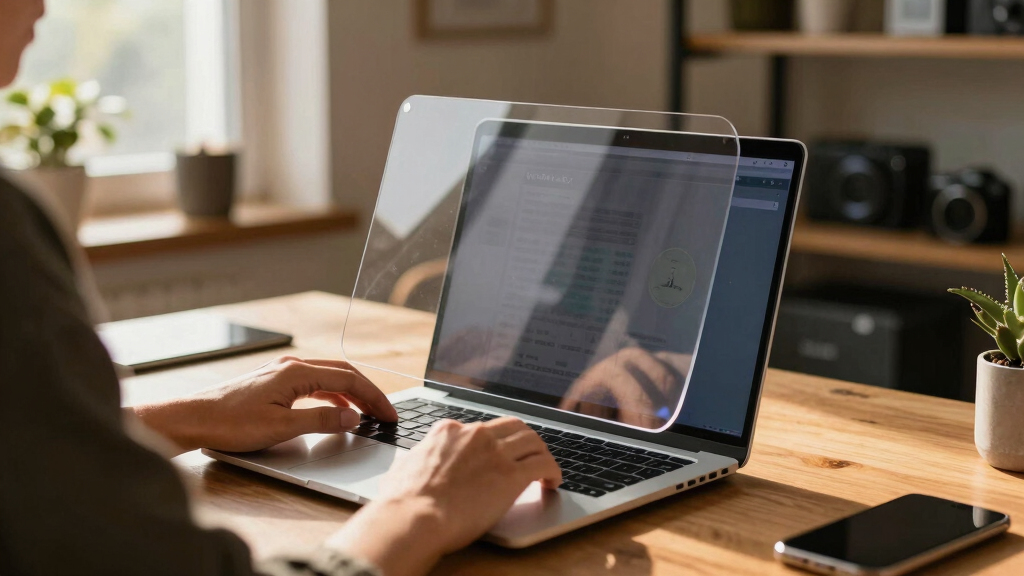
A privacy screen protector is a thin film or glass that attaches to your laptop screen, designed to limit the viewing angle. When you look straight at your screen, everything appears crisp and clear. But from the sides—say, from a person sitting next to you—the display looks dark or blurred.
Think of it like a window with tinted glass—only you can see through the glass clearly from the front. If someone tries to peek from the side, all they see is a shadowy, obscured image. This simple physical barrier stops shoulder surfers from stealing your sensitive info at cafes, airports, or shared offices.
Why it matters: This physical limitation isn’t just about privacy; it also reduces the risk of accidental data exposure in public spaces. However, it’s important to understand that while privacy screens effectively block side views, they don’t prevent digital hacking or malware. They are a layer of physical security that complements digital safeguards, not replaces them.
laptop privacy screen protector 15 inch
As an affiliate, we earn on qualifying purchases.
As an affiliate, we earn on qualifying purchases.
Types of privacy screen protectors—what’s best for your laptop?
There are mainly two types of privacy screen protectors: matte and glossy. Matte filters scatter light, reducing glare and fingerprints, which is especially beneficial in bright environments or for users who dislike reflections. Glossy filters, on the other hand, tend to produce more vibrant visuals and sharper images, but they can reflect more ambient light, potentially causing glare in certain settings.
Choosing between them involves understanding your typical environment and preferences. Matte filters might be better if you work outdoors or in brightly lit spaces, as they minimize reflections. Glossy filters could be preferable indoors, where color accuracy and visual richness are priorities.
Additionally, you’ll find physical (film-based) filters that stick directly onto your screen, offering a straightforward, non-intrusive way to add privacy. Electronic or software-based solutions, like display modes that obscure content at certain angles, provide flexibility but may require compatible hardware or software. Installation varies: some attach with adhesive, others clip or magnetize onto your device. Consider how often you need to switch privacy modes—if your privacy needs are intermittent, magnetic or snap-on filters offer quick, tool-free installation and removal.
Tradeoffs exist: physical filters may slightly reduce screen clarity or brightness, while electronic solutions might impact system performance or battery life. Your choice should balance convenience, performance, and the level of privacy needed.
magnetic privacy screen for MacBook Air
As an affiliate, we earn on qualifying purchases.
As an affiliate, we earn on qualifying purchases.
How to pick a privacy screen that actually works for your laptop
- Measure your screen size accurately—use a ruler or check your device specifications—to ensure the filter fits perfectly. An ill-fitting filter can leave gaps that compromise privacy or cause installation issues.
- Check your laptop’s aspect ratio—most common are 16:9 and 3:2. Using a mismatched aspect ratio can result in distorted images or incomplete coverage, undermining privacy and visual quality.
- Match the filter’s specifications with your screen dimensions and features (touchscreen or non-touch). For touchscreens, ensure the filter doesn’t interfere with touch sensitivity, which could diminish usability.
- Read reviews about clarity—look for filters that claim over 90% glare reduction with minimal color shift. High glare reduction improves visibility in bright conditions, but excessive color distortion can make the display appear unnatural, affecting your ability to work accurately.
- Decide if you want added features like blue light filtering or anti-glare coating. These enhancements can reduce eye strain during long hours, but they might also add to the cost or slightly alter display colors.
For example, a 15.6″ laptop needs a privacy filter designed specifically for that size. Picking the wrong size means either gaps that let views sneak through or a filter that’s too tight to install properly. Proper measurement and understanding of your device’s specifications are crucial to ensure optimal privacy and visual clarity.
blue light filtering privacy screen for laptop
As an affiliate, we earn on qualifying purchases.
As an affiliate, we earn on qualifying purchases.
What recent innovations are making privacy screens better?
New tech has made privacy screens clearer and easier to use. Manufacturers now develop ultra-thin filters that barely add bulk—so your laptop stays sleek. These thin filters reduce the visual impact, making the privacy feature less noticeable and more comfortable for long-term use. Some incorporate blue light filters, which are especially beneficial for reducing eye strain during extended screen time, a common concern for remote workers and students.
Magnetic and snap-on designs have simplified installation—no more sticky adhesives or complicated alignments. This ease of use encourages more users to adopt privacy measures regularly. The latest electronic privacy screens can switch between transparent and private modes at the push of a button, giving you more control and flexibility—ideal for fluctuating privacy needs. Eco-friendly options are also emerging, utilizing sustainable materials that do not compromise performance, aligning with increasing environmental consciousness among consumers.
Why it matters: These innovations mean privacy screens are becoming more user-friendly, less obtrusive, and adaptable to different scenarios. They also reflect a broader trend toward integrating privacy features seamlessly into everyday tech, making privacy protection a natural part of mobile computing rather than an afterthought.
anti-glare privacy screen film for laptop
As an affiliate, we earn on qualifying purchases.
As an affiliate, we earn on qualifying purchases.
What you need to know before buying—key facts about privacy screen protectors
Market demand for privacy screens has surged, especially with the rise of remote work. They offer a physical layer of data security but aren’t a replacement for digital security measures. For instance, they prevent shoulder surfing but won’t stop someone from hacking your device remotely or intercepting data via malware. Understanding this distinction is vital to maintaining comprehensive security.
Cost varies—basic models start around $20, with premium options featuring blue light filters, anti-glare coatings, and ultra-clear visuals costing up to $100 or more. Compatibility is another critical factor—some screens, especially OLED or touchscreens, may have restrictions or special requirements. Always verify your laptop size, screen type, and features before purchasing to avoid mismatches that could compromise privacy or display quality.
Additional considerations include durability, ease of installation, and whether the filter can be easily removed or repositioned. Investing in a quality product ensures longevity and consistent performance, reducing the need for frequent replacements and providing reliable privacy protection over time.
Your most common questions about privacy screens—answered
- Do privacy screens affect display quality? Yes, some reduction in brightness or color vibrancy can occur, but high-quality filters aim to minimize this. The tradeoff is often between privacy level and visual fidelity—higher privacy filters may slightly diminish display vibrancy, but the latest high-end filters are designed to maintain color accuracy while providing effective side-view blocking.
- Are they easy to install and remove? Many are designed for quick attachment—magnetic or snap-on models make it straightforward to add or remove the filter without tools, which is essential if you need privacy only occasionally or switch between devices regularly.
- Can I use one with a touchscreen laptop? Absolutely, but double-check compatibility to ensure the filter doesn’t interfere with touch sensitivity. Some filters are specifically designed to be ultra-thin or have special coatings that preserve touch responsiveness.
- Do privacy screens protect against digital hacking? No, they only block shoulder surfing; software security tools, such as firewalls, encryption, and antivirus programs, are necessary to defend against cyber threats.
- Are they worth the cost? If privacy in public is a concern, they’re a smart investment, especially with recent innovations that enhance clarity and usability. The peace of mind they provide can outweigh the initial expense, particularly for professionals handling sensitive information.
Conclusion
Privacy screen protectors are a simple yet powerful layer of security for anyone working in public or shared spaces. Recent innovations mean they’re more effective and user-friendly than ever before. Invest a few minutes to pick the right one, and you’ll enjoy peace of mind knowing your sensitive info stays private.
As mobile work becomes the norm, these tiny shields will remain a vital part of your digital toolkit—quietly protecting your privacy when it matters most.
Halloween Picks
halloween
As an affiliate, we earn on qualifying purchases.