Password manager hardware tokens fall into two camps: FIDO2 security keys that lock your logins with phishing-resistant passkeys, and offline password keepers that store and auto-fill credentials without touching the cloud. The YubiKey 5C NFC stands out as the best overall pick because it combines USB-C and NFC in a single certified key that works across nearly every major platform, while the PasswordPocket makes the most sense for buyers who want a standalone device that physically remembers 1,000 logins instead of a password manager subscription. Budget shoppers get real value from the Thetis FIDO2 2-Pack, though single-protocol OTP tokens like the Symantec VIP cost less and do far less. The main tradeoff you’ll face is versatility versus simplicity — multi-protocol keys cost more but cover more accounts, while display tokens and offline keepers each solve one narrow problem well. Keep reading for the full breakdown of all fifteen options and which one fits your setup.

Get privacy and security gear delivered free — and shop member deals
- Fast, free delivery on millions of items
- Access to Prime Big Deal Days deals on October 6–7
- Prime Video, Amazon Music and more included
Key Takeaways
- The lineup splits into three distinct device types — FIDO2 passkey keys, offline password keepers, and OTP display tokens — and mixing them up is the most common buying mistake in this category.
- Multi-protocol support (FIDO2 plus TOTP/HOTP plus PIV) was the single biggest differentiator among the top picks; the Thetis Pro and YubiKey models earned their spots largely on versatility rather than build alone.
- NFC capability separated future-proof picks from desk-bound ones: keys without it, like the YubiKey 5 Nano FIPS, still work well but lock you out of tap-to-authenticate on phones.
- Dedicated OTP tokens like the SafeNet IDProve 110 only make sense when a specific service mandates them — buying one for general account security is wasted money compared to a FIDO2 key.
- Bundles like the PasswordPocket + ATLKey kit filled a real gap for buyers who want both password storage and hardware MFA in one purchase, beating piecing together two separate devices.
| Thetis Nano-A FIDO2 Security Key Hardware Passkey Device |  | Best Compact Pick | Interface: USB 2.0 Type-A | Protocols: FIDO2.0, WebAuthn, CTAP2, TOTP, HOTP | Capacity: 200 FIDO2 passkey slots, 50 OATH-TOTP slots | VIEW LATEST PRICE | See Our Full Breakdown |
| Hirsch SecureKey USB-C NFC Security Key |  | Best for Enterprise and Government | Interface: USB-C + NFC | Protocols: FIDO2, U2F, WebAuthn, HOTP, PIV | Compliance: TAA compliant, FIDO Alliance certified | VIEW LATEST PRICE | See Our Full Breakdown |
| Offline Password Keeper with Auto-Filling and Type-C Port |  | Best Offline Password Vault | Capacity: Up to 500 account entries | Connection: Type-C | Storage: 100% offline/local | VIEW LATEST PRICE | See Our Full Breakdown |
| Symantec VIP Hardware Authenticator – TOTP Display Token |  | Best Keychain OTP Token for Symantec VIP Shops | Authentication Type: Time-Based TOTP (OATH compliant) | Display: 6-digit OTP with countdown time bar | Form Factor: Keychain token | VIEW LATEST PRICE | See Our Full Breakdown |
| Symantec VIP Card Authenticator – HOTP Display Token |  | Best Wallet-Friendly OTP Token | Form Factor: Credit card size (ISO standard) | Dimensions: 3.4″ L x 2.1″ W | Weight: 5 g | VIEW LATEST PRICE | See Our Full Breakdown |
| Token2 miniOTP-2-i Programmable Two-Factor Security Token with Time Sync |  | Best Wallet-Friendly TOTP Card | Protocol: TOTP (time-based one-time password) | Programmable: Unlimited re-seeding | Clock Sync: NFC time sync via Token2 Token Burner or Protectimus TOTP Burner | VIEW LATEST PRICE | See Our Full Breakdown |
| PasswordPocket Offline Hardware Password Keeper with Bluetooth Auto-Fill |  | Best Offline Password Vault | Storage Capacity: Up to 1,000 account credentials | Encryption: AES-256 | Connectivity: Bluetooth (no internet required) | VIEW LATEST PRICE | See Our Full Breakdown |
| Thetis Nano-C FIDO2 Security Key with TOTP/HOTP Support |  | Best Compact USB-C Hybrid | Connector: USB Type-C (no NFC) | Protocols: FIDO2.0, WebAuthn, CTAP2, TOTP, HOTP | Capacity: 200 FIDO2 passkey slots, 50 OATH-TOTP slots | VIEW LATEST PRICE | See Our Full Breakdown |
| SafeNet IDProve 110 6-digit OTP Token |  | Best Dedicated AWS MFA Token | Protocols: OATH TOTP and HOTP | Code Format: 6-digit OTP with LCD display and generation button | Compatibility: Amazon Web Services (AWS) MFA | VIEW LATEST PRICE | See Our Full Breakdown |
| PasswordPocket + ATLKey Offline Identity Security Bundle |  | Best Complete Security Kit | Bundle Contents: ATLKey FIDO2 security key + PasswordPocket offline vault | Key Connector: USB Type-C | Key Protocols: FIDO2 / WebAuthn passkey authentication | VIEW LATEST PRICE | See Our Full Breakdown |
| Hirsch SecureKey USB-A NFC Security Key, FIDO2, U2F, WebAuthn MFA |  | Best for Government & Regulated Buyers | Manufacturer: Hirsch Secure, Inc. (formerly Identiv) | Interface: USB-A + NFC | Protocols: FIDO2, FIDO U2F, WebAuthn, HOTP, PIV | VIEW LATEST PRICE | See Our Full Breakdown |
| Yubico YubiKey 5 Nano FIPS (140-3) |  | Best Premium for High-Security Compliance | Certification: FIPS 140-3 (Overall Level 2, Physical Security Level 3) | Interface: USB-A (Nano form factor) | Protocols: FIDO2/WebAuthn, FIDO U2F, Yubico OTP, OATH-TOTP/HOTP, PIV | VIEW LATEST PRICE | See Our Full Breakdown |
| Thetis FIDO2 Security Key (USB-A, 2-Pack) |  | Best Value for Fleet Deployment | Interface: USB-A (folding design) | Protocols: FIDO2 / WebAuthn, passkeys | Certification: FIDO2 Level 1 | VIEW LATEST PRICE | See Our Full Breakdown |
| Thetis Pro FIDO2 Security Key with PinPlex | 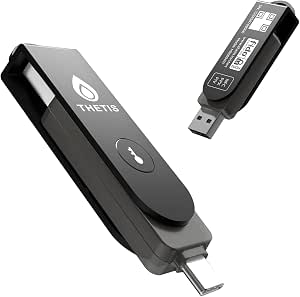 | Best Budget All-Connector Pick | Interface: USB-A + USB-C + NFC | Protocols: FIDO2, FIDO U2F, PIV, TOTP, HOTP | Special feature: PinPlex complex PIN for enhanced physical security | VIEW LATEST PRICE | See Our Full Breakdown |
| Yubico YubiKey 5C NFC |  | Best Overall | Interface: USB-C + NFC | Protocols: FIDO2/WebAuthn, FIDO U2F, Yubico OTP, OATH-TOTP/HOTP, PIV, OpenPGP | Passkey slots: 100 FIDO2 passkey slots | VIEW LATEST PRICE | See Our Full Breakdown |
| password manager hardware token | Compatibility | Protocols |
|---|---|---|
| Thetis Nano-A FIDO2 Security K | Windows, macOS, iOS, Android, Linux, Chrome OS | FIDO2.0, WebAuthn, CTAP2, TOTP, HOTP |
| Hirsch SecureKey USB-C NFC Sec | Windows, macOS, Linux, ChromeOS, Android, iOS | FIDO2, U2F, WebAuthn, HOTP, PIV |
| Offline Password Keeper with A | Phones, tablets, computers | — |
| Symantec VIP Hardware Authenti | Symantec VIP Access only | — |
| Symantec VIP Card Authenticato | Symantec VIP Access only | — |
| Token2 miniOTP-2-i Programmabl | Google, Facebook, Coinbase, GDAX, Dropbox, GitHub, Kickstarter, Microsoft, TeamViewer | — |
| PasswordPocket Offline Hardwar | — | — |
| Thetis Nano-C FIDO2 Security K | Windows, macOS, iOS, Android, Linux; Google, Microsoft, GitHub, Dropbox | FIDO2.0, WebAuthn, CTAP2, TOTP, HOTP |
| SafeNet IDProve 110 6-digit OT | Amazon Web Services (AWS) MFA | OATH TOTP and HOTP |
| PasswordPocket + ATLKey Offlin | — | — |
| Hirsch SecureKey USB-A NFC Sec | Windows, macOS, Linux, ChromeOS, Android, iOS | FIDO2, FIDO U2F, WebAuthn, HOTP, PIV |
| Yubico YubiKey 5 Nano FIPS | Windows, macOS, ChromeOS, Linux, Chrome, Edge; 1000+ services | FIDO2/WebAuthn, FIDO U2F, Yubico OTP, OATH-TOTP/HOTP, PIV |
| Thetis FIDO2 Security Key | — | FIDO2 / WebAuthn, passkeys |
| Thetis Pro FIDO2 Security Key | Google, Microsoft, GitHub, Dropbox and other FIDO2 services | FIDO2, FIDO U2F, PIV, TOTP, HOTP |
| Yubico YubiKey 5C NFC | Google, Microsoft, Apple, password managers and 1000+ services | FIDO2/WebAuthn, FIDO U2F, Yubico OTP, OATH-TOTP/HOTP, PIV, OpenPGP |
More Details on Our Top Picks
Thetis Nano-A FIDO2 Security Key Hardware Passkey Device
Most security keys demand pocket space or dangle awkwardly from a laptop port, but the Thetis Nano-A is built to disappear. At roughly three-quarters of an inch square, it plugs in and stays put, which makes it a natural fit for desktops you leave unattended — no dongle protruding to snap off. Underneath the tiny shell, it carries 200 FIDO2 passkey slots and 50 OATH-TOTP slots, more capacity than most people will ever fill, so one key can secure a whole fleet of accounts across Gmail, GitHub, and Coinbase. Compared with its sibling, the Thetis Nano-C, the difference is purely the connector: this USB-A version suits older laptops and desktops, while the Nano-C targets modern USB-C machines. The tradeoff is real, though — USB-A only means no direct phone support and no NFC tap-to-authenticate like the Hirsch SecureKey USB-C NFC offers.
Pros:- Extremely small footprint designed to stay plugged in permanently
- 200 FIDO2 passkey slots plus 50 TOTP/HOTP slots covers heavy multi-account use
- FIDO-certified passkey support works across Google, Microsoft, GitHub and more
- Cross-platform compatibility spanning Windows, macOS, Linux, iOS and Android via compatible ports
Cons:- USB-A only — no NFC or USB-C, limiting mobile use
- Tiny size makes it easy to lose if removed from the port
Best for: Owners of USB-A desktops and older laptops who want a plug-and-stay passkey key for dozens of accounts without carrying a full-size dongle
Not ideal for: Anyone who authenticates primarily on a smartphone or a USB-C-only laptop — there is no NFC and no Type-C option here
- Interface:USB 2.0 Type-A
- Protocols:FIDO2.0, WebAuthn, CTAP2, TOTP, HOTP
- Capacity:200 FIDO2 passkey slots, 50 OATH-TOTP slots
- Dimensions:0.74 x 0.75 x 0.25 inches
- Compatibility:Windows, macOS, iOS, Android, Linux, Chrome OS
- Form Factor:Keychain / plug-and-stay nano
- Color:Black
Our verdict“This key makes the most sense for desktop-centric users who want set-and-forget phishing-resistant authentication on a USB-A machine.”
Hirsch SecureKey USB-C NFC Security Key
Where the Thetis Nano-A is a consumer-friendly nano key, the Hirsch SecureKey plays in a different league: it adds PIV smart-card support and HOTP alongside standard FIDO2, U2F, and WebAuthn, which is exactly what regulated workplaces look for when employees need certificate-based logins in addition to passkeys. The TAA-compliant designation matters if procurement rules require US-friendly sourcing — something no Thetis or Token2 option in this lineup can claim. Dual USB-C and NFC connectivity means it works tapped against a phone or plugged into a modern laptop, matching the connectivity of the pricier YubiKey 5C NFC without the Yubico brand premium. The tradeoff: this is a single-connector key, so desks still running USB-A ports will need an adapter or the separate Hirsch SecureKey USB-A variant, and there is no on-device PIN pad — PIN entry happens through the host.
Pros:- PIV and HOTP support alongside FIDO2/WebAuthn covers enterprise certificate-based login
- TAA compliance suits government and regulated procurement
- USB-C plus NFC gives dual connectivity across laptops and phones
- SecureKey Manager software simplifies fleet-wide PIN and device management
Cons:- Single USB-C connector — USB-A desktops require an adapter or the separate USB-A model
- No on-device PIN entry, unlike keypad-equipped keys such as the Thetis Pro
Best for: IT buyers, government contractors, and enterprises needing TAA-compliant, PIV-capable hardware MFA for mixed laptop-and-phone fleets
Not ideal for: Users on older USB-A-only machines who don’t want to carry an adapter, and anyone who doesn’t need PIV or compliance features
- Interface:USB-C + NFC
- Protocols:FIDO2, U2F, WebAuthn, HOTP, PIV
- Compliance:TAA compliant, FIDO Alliance certified
- Compatibility:Windows, macOS, Linux, ChromeOS, Android, iOS
- Management:SecureKey Manager for PIN and device management
- Manufacturer:Hirsch Secure, Inc. (formerly Identiv)
- Intended Use:Personal, business, enterprise, government
Our verdict“This pick makes the most sense for organizations where compliance certifications and PIV support matter more than connector versatility.”
Offline Password Keeper with Auto-Filling and Type-C Port
This product answers a different question than the FIDO2 keys dominating this roundup. Instead of passkeys, it is a dedicated offline password manager holding up to 500 credentials behind one master password, auto-filling login fields when plugged in over Type-C. Compared with the PasswordPocket Bluetooth model, which stores 1,000 logins and fills wirelessly, this wired version trades convenience for a hard physical connection — no pairing, no wireless surface to attack — and adds alphabetical tabs and quick search so finding a credential takes seconds. It is a fit for people who want their entire credential vault literally in a drawer rather than in a cloud subscription. The drawbacks are structural: a single master password becomes a single point of failure, and unlike a Thetis FIDO2 key, it generates no phishing-resistant cryptographic logins — it just types your existing passwords.
Pros:- 100% offline storage keeps credentials entirely off the cloud
- Auto-fill login functionality reduces manual typing and errors
- Alphabetical tabs and quick search make 500 entries manageable
- Works across phones, tablets and computers over Type-C
Cons:- Requires a physical Type-C connection to view or fill credentials
- Single master password is a single point of failure if forgotten or exposed
- Capped at 500 entries — half the capacity of the PasswordPocket
Best for: Password-heavy users who want a subscription-free, cloud-free vault they physically control, with auto-fill instead of reading passwords off paper
Not ideal for: Anyone seeking true phishing-resistant authentication — this stores and types passwords rather than replacing them with passkeys
- Capacity:Up to 500 account entries
- Connection:Type-C
- Storage:100% offline/local
- Compatibility:Phones, tablets, computers
- Access Control:Single master password
- Included Accessories:Travel protection case, Type-C adapter
Our verdict“This model is better suited to cloud-skeptical users who want a portable password vault than to buyers chasing modern passkey security.”
Symantec VIP Hardware Authenticator – TOTP Display Token
This is a classic display token: press nothing, and a 6-digit TOTP code with a countdown bar refreshes on screen every cycle, no software or battery charging needed on the user’s end. Its role in this lineup is narrow but legitimate — unlike the Thetis Nano-A or Hirsch SecureKey, which speak open FIDO2 standards across hundreds of services, this token only works with Symantec VIP Access. That is the whole tradeoff. If your employer or bank runs VIP, this is a zero-footprint, drop-in second factor that clips to a keychain and never needs a phone. If they run Duo, Okta, Microsoft Entra ID, or WatchGuard, the token is a paperweight — a restriction stated plainly by the manufacturer. It also offers no passwordless login and no passkey support; it is strictly a one-time-code companion to a password.
Pros:- Zero footprint — no software installation or phone dependency
- Sturdy, long-life hardware with portable keychain design
- Countdown time bar shows code validity at a glance
- Standard OATH-compliant TOTP operation familiar to IT departments
Cons:- Locked exclusively to Symantec VIP Access — incompatible with every other MFA provider
- TOTP codes are phishable, unlike FIDO2 passkeys on the Thetis or Hirsch keys
- Fixed battery — once it expires, the token must be replaced
Best for: Employees or customers whose organization mandates Symantec VIP Access and who prefer a phone-free, software-free code generator on their keychain
Not ideal for: Anyone whose services use Duo, Okta, Microsoft Entra ID, or any non-VIP MFA platform — the token will not register with them
- Authentication Type:Time-Based TOTP (OATH compliant)
- Display:6-digit OTP with countdown time bar
- Form Factor:Keychain token
- Software Required:None (zero footprint)
- Compatibility:Symantec VIP Access only
- Power:Internal long-life battery
Our verdict“This option stands out for one scenario only: a Symantec VIP environment that needs a durable, phone-free keychain code generator.”
Symantec VIP Card Authenticator – HOTP Display Token
Think of this as the Symantec VIP keychain token flattened into a credit card: same 6-digit codes, same VIP-only restriction, but in an ISO-standard wallet form factor that slips behind a credit card instead of dangling from keys. It uses event-based HOTP, meaning a fresh code appears at the press of a button rather than on a timer — some users prefer this because the code cannot expire mid-login, though it means codes are generated per tap rather than continuously displayed. The tamper-resistant credential storage cannot be duplicated, and the three-year warranty beats what most token makers offer. The tradeoff is identical to its keychain sibling: VIP Access only, no Duo, no Okta, no Entra ID, and no path to passwordless FIDO2 login like the Hirsch SecureKey provides. It is also the least featured device in this roundup — no passkeys, no PIV, no multi-service support.
Pros:- Credit-card size fits invisibly in a standard wallet
- Tamper-resistant credentials cannot be duplicated or extracted
- One-button HOTP codes never expire mid-use
- 3-year manufacturer warranty
Cons:- Compatible only with Symantec VIP Access — no other MFA provider
- Event-based HOTP requires a button press for every code and offers no countdown preview
Best for: VIP Access users who carry a wallet rather than keys and want the slimmest possible backup second factor
Not ideal for: Anyone outside the Symantec VIP ecosystem, or users who want passkey/passwordless login — this card does neither
- Form Factor:Credit card size (ISO standard)
- Dimensions:3.4″ L x 2.1″ W
- Weight:5 g
- Authentication Type:Event-Based HOTP
- Display:6-digit OTP at button press
- Compatibility:Symantec VIP Access only
- Warranty:3 years from date of purchase
- Manufacturer:FEITIAN Technologies Co., Ltd.
Our verdict“This card makes the most sense as a slim VIP Access backup token for wallet carriers, and little sense for anyone else.”
Token2 miniOTP-2-i Programmable Two-Factor Security Token with Time Sync
Most TOTP tokens in this roundup, like the SafeNet IDProve 110, ship pre-seeded and locked to one service. The Token2 miniOTP-2-i flips that model: it is fully reprogrammable, so one card can move from Google to GitHub to Coinbase as needs change, and re-seeding requires no vendor involvement. Its standout trick is the syncable clock, which corrects drift through NFC apps like Token2 Token Burner on Android or iPhone 7 and later — a fix cheaper tokens simply cannot offer. The credit-card form factor slides into a wallet, something bulkier keys like the Thetis Nano-C keychain dongle cannot match. The tradeoff: it generates TOTP codes only, with no FIDO2 or passkey support, and setup depends on a companion app, which adds friction that display-only tokens avoid.
Pros:- Unlimited reprogramming lets one token serve many services over its life
- Clock sync via NFC app prevents code drift that plagues fixed tokens
- Credit-card size and thickness fits a standard wallet
- Codes generated offline cannot be intercepted by phone malware
Cons:- Requires a companion burner app and NFC-capable phone for setup and syncing
- TOTP-only — no FIDO2, U2F, or passkey support
Best for: Users who want one slim, reusable TOTP card covering multiple accounts without carrying a keychain dongle
Not ideal for: Anyone wanting phishing-resistant FIDO2/passkey login — this card only generates time-based codes
- Protocol:TOTP (time-based one-time password)
- Programmable:Unlimited re-seeding
- Clock Sync:NFC time sync via Token2 Token Burner or Protectimus TOTP Burner
- Compatibility:Google, Facebook, Coinbase, GDAX, Dropbox, GitHub, Kickstarter, Microsoft, TeamViewer
- Setup Device:Android (Google Play) and iOS (iPhone 7 and later)
- Form Factor:About half the size of a credit card, credit-card thickness
Our verdict“This card makes the most sense for buyers who want a reprogrammable, always-in-the-wallet TOTP generator rather than a platform-locked hardware key.”
PasswordPocket Offline Hardware Password Keeper with Bluetooth Auto-Fill
Where every other entry here handles one factor of authentication, the PasswordPocket takes on the whole login: it stores up to 1,000 sets of credentials offline and auto-fills them over Bluetooth with a single click. Because the vault never touches the internet, there is no cloud account to breach — a different threat model than the Thetis Nano-C, which replaces passwords with FIDO2 passkeys instead of storing them. The AES-256 encryption and iOS/Android support make it a practical bridge for people whose services do not yet accept passkeys, which is still most of the web. The compromises are real though: it manages passwords rather than eliminating them, it does nothing for TOTP codes or FIDO2 logins, and losing the pocket device without a backup strategy could lock you out of everything.
Pros:- Stores up to 1,000 logins fully offline with no cloud exposure
- Bluetooth auto-fill eliminates manual password entry on mobile
- AES-256 encryption protects the local vault
- Cross-platform support for iOS and Android phones and tablets
Cons:- No FIDO2, passkey, or TOTP capability — it is a password store only
- Single physical device means loss or damage risks total lockout without backups
Best for: Password-heavy users who want cloud-free credential storage with phone-based auto-fill on both iPhone and Android
Not ideal for: Buyers who want to replace passwords entirely with phishing-resistant passkeys — this stores them instead
- Storage Capacity:Up to 1,000 account credentials
- Encryption:AES-256
- Connectivity:Bluetooth (no internet required)
- Auto-Fill:One-click credential entry on paired device
- Platform Support:iOS and Android phones and tablets
- Color:White
Our verdict“This pick suits mobile-first users who want a genuinely offline password vault with auto-fill, not a second-factor key.”
Thetis Nano-C FIDO2 Security Key with TOTP/HOTP Support
The Thetis Nano-C is the rare hardware key that does two jobs: FIDO2 passkey authentication and built-in TOTP/HOTP generation with 50 OATH slots. Compared with the Hirsch SecureKey USB-C, which is FIDO2-only, this hybrid means one pocketable device covers passwordless logins and the many services still running six-digit codes. Its 0.73 × 0.60 × 0.30-inch body plugs into any USB-C port — PC, Mac, Android, and USB-C iPhones — and offers a generous 200 passkey slots, more headroom than most single-protocol rivals. The fine print matters, though: Windows Hello sign-in needs Enterprise edition with Entra ID, ID Austria is unsupported, and there is no NFC, so older USB-A machines and tap-to-authenticate phones are out of luck — a gap the YubiKey 5C NFC fills.
Pros:- Combines FIDO2 passkeys and TOTP/HOTP in a single device
- 200 FIDO2 passkey slots plus 50 OATH-TOTP slots
- Ultra-compact 0.73-inch body stays plugged in or rides a keychain
- Works across Windows, macOS, iOS, Android, and Linux via USB-C
Cons:- No NFC — USB-C port required for every authentication
- Windows Hello login restricted to Enterprise edition with Entra ID
Best for: USB-C-equipped users who want passkey login and TOTP codes in one tiny keychain device
Not ideal for: Anyone still on USB-A desktops or relying on NFC phone tap authentication
- Connector:USB Type-C (no NFC)
- Protocols:FIDO2.0, WebAuthn, CTAP2, TOTP, HOTP
- Capacity:200 FIDO2 passkey slots, 50 OATH-TOTP slots
- Dimensions:0.73 × 0.60 × 0.30 inches
- Compatibility:Windows, macOS, iOS, Android, Linux; Google, Microsoft, GitHub, Dropbox
- Certification:FIDO and FIDO2 certified
Our verdict“This model is the strongest fit for modern USB-C households that want both passkey and TOTP coverage without carrying two gadgets.”
SafeNet IDProve 110 6-digit OTP Token
The SafeNet IDProve 110 is the most narrowly focused item in this lineup: a pre-seeded, OATH-certified 6-digit OTP token built for AWS MFA enrollment, nothing else. That single-purpose design is also its strength — there is nothing to program, no app to install, and no phone involved, unlike the Token2 miniOTP-2-i, which demands NFC setup before it works anywhere. Build quality reflects its enterprise heritage: waterproof casing, time- and event-based modes, and a battery rated for roughly seven years, with a lifetime warranty tied to a SafeNet Trusted Access subscription. For anyone securing a root or IAM account on AWS, a token that never pairs with a phone removes an entire class of compromise. The obvious catch: outside AWS contexts it is close to useless, and it offers no FIDO2 or passkey capability whatsoever.
Pros:- Zero setup — pre-seeded and ready for AWS MFA out of the box
- Approximately 7-year battery life with lifetime warranty under subscription
- Waterproof casing with both time-based and event-based modes
- Completely phone-independent, so codes cannot be intercepted by mobile malware
Cons:- Locked to AWS — incompatible with Google, GitHub, and other consumer services
- Not reprogrammable once seeded
Best for: AWS account owners and IT admins who want a zero-setup, phone-free MFA token for cloud root accounts
Not ideal for: General consumers — it works with Amazon Web Services only and cannot be reprogrammed for other sites
- Protocols:OATH TOTP and HOTP
- Code Format:6-digit OTP with LCD display and generation button
- Compatibility:Amazon Web Services (AWS) MFA
- Battery:1 CR2 battery, approx. 7-year life
- Casing:Waterproof
- Weight:0.381 ounces
Our verdict“This token makes sense only for AWS-centric users who value a hardened, battery-sipping authenticator over versatility.”
PasswordPocket + ATLKey Offline Identity Security Bundle
This bundle from Atlancube is the only entry here that attacks authentication end to end: the ATLKey FIDO2 USB-C key handles phishing-resistant login, while the PasswordPocket vault keeps passwords, recovery codes, and backup keys offline for the moments when a passkey is not an option. Compared with buying the standalone PasswordPocket, the pairing closes its biggest gap — account recovery — and against the YubiKey 5C NFC, it adds a place to store the fallback secrets that key-only buyers typically leave in a notes app. There are no subscriptions, batteries, or internet dependency, which appeals to crypto holders and privacy-focused professionals. The drawbacks: two devices to carry and keep track of instead of one, USB-C only on the key, and it costs more upfront than single-purpose alternatives — a poor ratio for casual users with a handful of accounts.
Pros:- Covers both login (FIDO2 passkeys) and recovery (offline code storage) in one purchase
- Phishing-resistant physical authentication with the ATLKey USB-C key
- No subscriptions, batteries, or internet connection required
- 1,000-credential offline vault keeps sensitive data out of the cloud
Cons:- Two physical devices to carry, secure, and avoid losing
- USB-C only — no USB-A or NFC fallback on the security key
Best for: Security-conscious professionals, crypto users, and remote workers who want login and recovery covered offline
Not ideal for: Casual users with few accounts — two devices to manage outweighs the benefit of the bundle
- Bundle Contents:ATLKey FIDO2 security key + PasswordPocket offline vault
- Key Connector:USB Type-C
- Key Protocols:FIDO2 / WebAuthn passkey authentication
- Vault Capacity:Up to 1,000 credentials
- Vault Connectivity:Bluetooth, internet-free
- Power:No batteries or subscriptions required
Our verdict“This kit fits buyers who want a full offline identity stack in one purchase rather than assembling a key and a vault separately.”
Hirsch SecureKey USB-A NFC Security Key, FIDO2, U2F, WebAuthn MFA
The Hirsch SecureKey stands out in this lineup for one thing most rivals can’t claim: TAA compliance. That single attribute makes it a legitimate option for federal procurement, where YubiKeys built in Sweden and budget keys like the Thetis FIDO2 simply can’t be considered. Its feature set is otherwise solid rather than flashy — FIDO2, U2F and WebAuthn for phishing-resistant logins, plus HOTP and PIV support, which puts it ahead of the Thetis models on smart-card credentials but behind the YubiKey 5C NFC, which adds OpenPGP, TOTP and Yubico OTP. The USB-A plus NFC combo covers both aging desktop fleets and modern phones, and the SecureKey Manager app gives IT teams PIN and device administration. The tradeoff is ecosystem breadth: with far fewer documented service integrations than Yubico’s 1000+ list, buyers should verify compatibility with their specific stack before committing.
Pros:- TAA-compliant, opening the door to federal and government procurement
- PIV and HOTP support alongside FIDO2 for enterprise credential workflows
- USB-A plus NFC covers legacy desktops and modern mobile devices
- SecureKey Manager software for PIN and fleet device management
Cons:- Smaller documented ecosystem of compatible services than Yubico keys
- USB-A only over wire — awkward for newer USB-C laptops without an adapter
- Less brand recognition means fewer community setup guides when things go wrong
Best for: Government agencies, contractors and regulated enterprises that need a TAA-compliant, PIV-capable FIDO2 key for USB-A desktop fleets
Not ideal for: Individuals who want maximum out-of-box compatibility with consumer services and passkey ecosystems — Yubico’s platform support is far broader
- Manufacturer:Hirsch Secure, Inc. (formerly Identiv)
- Interface:USB-A + NFC
- Protocols:FIDO2, FIDO U2F, WebAuthn, HOTP, PIV
- Management:SecureKey Manager for FIDO2 PIN and device management
- Compatibility:Windows, macOS, Linux, ChromeOS, Android, iOS
- Compliance:TAA compliant; FIDO Alliance certified
Our verdict“This is the key to buy when procurement rules force your hand — otherwise, most buyers get more versatility elsewhere for the money.”
Yubico YubiKey 5 Nano FIPS (140-3)
The YubiKey 5 Nano FIPS is the most expensive tier of security key in this roundup, and the reason is its FIPS 140-3 validation (Overall Level 2, Physical Security Level 3). Compared with the Hirsch SecureKey, which offers TAA compliance but not FIPS validation, this is the key that satisfies auditors in defense, healthcare and finance, where the certification itself is a hard requirement. The Nano form factor is the other draw: it’s built to live semi-permanently in a laptop’s USB-A port, so you tap it rather than fumble for it — a genuinely different workflow from keychain-carried keys like the Thetis Pro or the NFC-tapping YubiKey 5C NFC. That always-plugged-in design is also its biggest tradeoff: there’s no NFC, no USB-C, and leaving a key inserted invites loss or theft with the machine. Protocol support is the fullest in the lineup — FIDO2, U2F, OTP, OATH and PIV — though no OpenPGP is listed for this variant.
Pros:- FIPS 140-3 validated to satisfy government and regulated-industry audits
- Nano low-profile design stays flush in the port for tap-to-authenticate convenience
- Widest protocol support: FIDO2, U2F, Yubico OTP, OATH-TOTP/HOTP and PIV
- Waterproof, crush-resistant build with 1000+ documented service integrations
Cons:- No NFC and no USB-C — single connector, single device
- Always-inserted design increases risk of loss or damage with the laptop itself
- Premium positioning means you pay a compliance tax that most personal users don’t need
Best for: Compliance-driven organizations and professionals who need FIPS 140-3 validated hardware that stays docked in a USB-A laptop
Not ideal for: Anyone who moves between machines or needs mobile authentication — no NFC and no USB-C means it’s a one-port, one-device key
- Certification:FIPS 140-3 (Overall Level 2, Physical Security Level 3)
- Interface:USB-A (Nano form factor)
- Protocols:FIDO2/WebAuthn, FIDO U2F, Yubico OTP, OATH-TOTP/HOTP, PIV
- Compatibility:Windows, macOS, ChromeOS, Linux, Chrome, Edge; 1000+ services
- Build:Waterproof, crush-resistant; made in Sweden
- Power:No batteries or internet connection required
Our verdict“Buy this only if FIPS validation is mandated or you want a set-and-forget key that never leaves your laptop; everyone else should look at the 5C NFC.”
Thetis FIDO2 Security Key (USB-A, 2-Pack)
Sold as a two-pack, the Thetis FIDO2 is the pragmatist’s choice: one key for daily use, one as a spare, which is exactly the redundancy every security guide recommends and exactly what buying two YubiKeys would cost you twice over. The rotating metal cover is a nice touch the YubiKeys don’t offer — the connector is protected on a keychain rather than exposed. It’s FIDO2 L1 certified and works with the big consumer and business services, plus the Thetis Manager App handles the initial PIN setup, which smooths the onboarding process for non-technical staff. The limitations are real, though: no NFC at all, so phone-based authentication is off the table — unlike the Hirsch SecureKey or YubiKey 5C NFC — and Windows Hello sign-in only works on Enterprise editions with Entra ID. Protocol support is also thinner than Thetis’s own Pro model, which adds USB-C, NFC and TOTP/HOTP.
Pros:- Two keys included, solving the backup-key problem out of the box
- Rotating metal cover protects the connector during keychain carry
- FIDO2 L1 certified with broad service compatibility including Google Workspace and Apple ID
- Dedicated Manager App simplifies initial PIN setup across a fleet
Cons:- No NFC, locking out mobile authentication entirely
- Windows Hello requires Enterprise editions with Entra ID
- Lacks the TOTP/HOTP and PIV versatility of the Thetis Pro and YubiKeys
Best for: Small businesses and schools equipping multiple staff or students with primary-plus-backup keys without per-user premium pricing
Not ideal for: Users who authenticate on phones or tablets — the absence of NFC makes it desktop-and-laptop only
- Interface:USB-A (folding design)
- Protocols:FIDO2 / WebAuthn, passkeys
- Certification:FIDO2 Level 1
- Management:Thetis Manager App for hardware PIN setup
- Mobile support:None — NFC not supported
- Build:Water, crush and tamper-resistant metal cover; no batteries
- Known limits:Windows Hello needs Enterprise + Entra ID; ID Austria unsupported
Our verdict“The smartest way to outfit a team with phishing-resistant MFA on a budget, as long as nobody in the group logs in from a phone.”
Thetis Pro FIDO2 Security Key with PinPlex
The Thetis Pro solves the connector anxiety that plagues key shopping: it carries USB-A, USB-C and NFC on a single device, matching the connectivity of the pricier YubiKey 5C NFC while adding PIV certificates and TOTP/HOTP support that the standard Thetis FIDO2 2-pack lacks. Its differentiator is PinPlex, a complex-PIN system layered on top of standard WebAuthn/CTAP2 passkey login to harden the device against physical tampering — a genuine attempt at extra security you won’t find on Yubico’s consumer keys. The tradeoffs mirror its sibling: Windows Hello login requires Enterprise edition with Entra ID, ID Austria isn’t supported, and Yubico still wins on breadth of documented service integrations and the polish of its Authenticator app. Still, for a buyer who wants one key that plugs into an old desktop, a new laptop and taps against a phone, this covers every base at a working price point.
Pros:- Triple connectivity: USB-A, USB-C and NFC cover nearly every device
- PinPlex complex-PIN layer adds physical security beyond standard FIDO2
- Supports PIV certificates plus TOTP and HOTP for enterprise apps
- Works with major platforms including Google, Microsoft, GitHub and Dropbox
Cons:- Windows Hello limited to Enterprise editions with Entra ID
- Smaller ecosystem and weaker companion software than the Yubico experience
- Dual-connector body is bulkier than single-interface keys like the YubiKey 5 Nano
Best for: Multi-device users who want USB-A, USB-C and NFC authentication plus PIV and TOTP support without paying Yubico prices
Not ideal for: Windows Home users relying on Windows Hello sign-in, or anyone needing FIDO2 Level 2 services like ID Austria
- Interface:USB-A + USB-C + NFC
- Protocols:FIDO2, FIDO U2F, PIV, TOTP, HOTP
- Special feature:PinPlex complex PIN for enhanced physical security
- Mobile:NFC authentication with Android and iPhone
- Compatibility:Google, Microsoft, GitHub, Dropbox and other FIDO2 services
- Known limits:Windows Hello needs Enterprise + Entra ID; ID Austria unsupported
Our verdict“The most complete set of connectors and protocols per dollar here — a sensible YubiKey 5C NFC alternative if you can live with its Windows limits.”
Yubico YubiKey 5C NFC
The YubiKey 5C NFC earns the top spot because it asks the fewest compromises of any key in this roundup. It pairs USB-C and NFC, so it handles a modern laptop and any phone without adapters — a step ahead of the USB-A-only Thetis FIDO2 and more portable than the port-docked YubiKey 5 Nano FIPS. Its protocol stack is the deepest here: FIDO2/WebAuthn, U2F, Yubico OTP, OATH TOTP/HOTP, PIV and OpenPGP, which even the versatile Thetis Pro can’t match. With firmware 5.7 and room for 100 passkey slots, a single key can secure a lifetime of accounts, and Yubico’s 1000+ documented service integrations mean setup friction is close to zero. The honest tradeoff: it’s the priciest mainstream option on pure hardware terms, it has no USB-A connector for older machines, and NFC behavior varies by phone case and positioning. Buy two if accounts matter — one key is still a single point of failure.
Pros:- USB-C plus NFC covers laptops and both mobile platforms
- Widest protocol support: FIDO2, U2F, OTP, OATH, PIV and OpenPGP
- 100 passkey slots and 1000+ documented service integrations
- Waterproof, crush-resistant, keychain-friendly build with no batteries
Cons:- No USB-A connector for older hardware
- Highest mainstream price in the category — and you still need a second key as backup
- NFC taps can be finicky with thick phone cases
Best for: Anyone with a USB-C laptop and a smartphone who wants the broadest compatibility and protocol support in one key
Not ideal for: Homes or offices still running USB-A-only desktops — you’ll need an adapter or should choose a USB-A model
- Interface:USB-C + NFC
- Protocols:FIDO2/WebAuthn, FIDO U2F, Yubico OTP, OATH-TOTP/HOTP, PIV, OpenPGP
- Passkey slots:100 FIDO2 passkey slots
- Firmware:YubiKey Firmware 5.7
- Compatibility:Google, Microsoft, Apple, password managers and 1000+ services
- Build:Water resistant, crush resistant, fits on keychain
- Dimensions:0.15″D x 0.7″W x 1.77″H
Our verdict“If I had to recommend one hardware token to one person for the next five years, this is it — the only buyers who should pass are those stuck on USB-A.”
How We Picked
I ranked these password manager hardware tokens on four factors: protocol support, platform compatibility, ease of setup, and value per account protected. Protocol support carried the most weight because a key that handles FIDO2/WebAuthn, TOTP, and sometimes PIV covers dramatically more services than a single-function OTP token at a similar price. Platform compatibility came next — a token that works across Windows, macOS, iOS, Android, and Linux protects more of your digital life than one tied to a single vendor like AWS or Symantec VIP.
Setup burden and recovery also shaped the rankings. Devices requiring a companion app or programming software, like the Token2 miniOTP-2-i, scored lower for casual users even when their hardware was excellent. Finally, I factored in physical practicality: USB-A versus USB-C, NFC or none, and whether a 2-pack or bundle genuinely lowered the cost of protecting multiple accounts. Products that serve one narrow purpose well were ranked for that purpose specifically, not penalized for being different — but they had to justify their existence against a versatile key that could do the same job and more.
Factors to Consider When Choosing Password Manager Hardware Tokens
Before choosing a token, understand what kind of protection you actually need — the wrong device type can leave you paying for capability you’ll never use, or worse, locked out of accounts you thought were covered.Know the Three Device Types Before You Buy
Not every product in this category does the same job, and confusing them wastes money. FIDO2 security keys authenticate you to websites and services — they prove you are you, but they don’t store passwords. Offline password keepers like the PasswordPocket actually hold your credentials and type or Bluetooth them into login forms. OTP display tokens generate rotating six-digit codes for a single service. A common mistake is buying an OTP token expecting it to replace a password manager, or buying a keeper expecting it to secure an account that demands hardware MFA. Figure out which problem you have first, then pick the device built for it. Many buyers ultimately want both a keeper and a key, which is exactly why bundles exist in this lineup.
Match the Connector to Your Devices
The fastest way to render a token useless is owning the wrong port. If you carry a modern laptop, USB-C keys like the YubiKey 5C NFC or Thetis Nano-C fit without adapters; desktop-only users get more life from USB-A variants. NFC is the quiet dealmaker here — it lets you tap the key against an Android phone or iPhone, sidestepping port issues entirely and making a single key work across your whole device fleet. Keys without NFC, however well-built, tie you to whatever cable you own on launch day. If you’re buying for a household or office with mixed hardware, prioritize dual-interface models or multi-packs with both connector types. And check whether you can register a backup key before you commit — losing your only token can lock you out of accounts permanently.
Protocol Breadth Determines Longevity
A key’s protocol list predicts how long it stays useful. FIDO2/WebAuthn is the current standard behind passkeys and covers Google, Apple, Microsoft, GitHub, and most major banks. TOTP/HOTP support adds the older six-digit-code world of services that haven’t migrated yet, while PIV certificate support matters mainly for enterprise or advanced users managing smart-card credentials. A key with all three, like the Thetis Pro, will still be relevant when individual services change their requirements. Cheaper single-protocol devices work fine today but become paperweights the moment their one standard falls out of favor. Paying slightly more for breadth is usually cheaper than buying twice — unless you know for certain you only need one protocol for one mandated service.
Offline Keepers: Storage Capacity and Auto-Fill Method
When comparing offline password keepers, capacity and input method matter more than encryption marketing — AES-256 is table stakes, not a differentiator. A keeper holding 1,000 logins covers a heavy user for years; smaller-capacity units force awkward triage. The auto-fill mechanism is the real usability test: Bluetooth-based fill on phones is convenient but drains battery and adds pairing friction, while USB typing works everywhere but is slower. Ask yourself where you actually log in most — mobile-first users should prioritize Bluetooth keepers, desktop users the plug-in variety. Also confirm how the keeper handles backups and what happens if the device dies, because an offline vault with no export path can mean losing every credential at once. That recovery question is the most commonly overlooked step before purchase.
When Regulated Environments Demand Certified Hardware
Some buyers don’t get to choose freely — government contracts, healthcare, and finance often require FIPS 140-3 validated tokens, which immediately narrows the field to certified models like the YubiKey 5 Nano FIPS. Certified hardware typically costs meaningfully more than consumer equivalents with similar features, and that premium buys compliance paperwork rather than extra capability. If your organization mandates certification, don’t try to substitute a non-validated key to save money — it will be rejected during audit. Conversely, if nothing in your life requires FIPS, paying the certified premium buys you nothing tangible. Check your actual requirements before assuming the most expensive option is the safest one; for personal accounts, a standard FIDO-certified key delivers identical phishing resistance.
Single-Purpose OTP Tokens: Only When Mandated
Display tokens like the Symantec VIP series and the SafeNet IDProve 110 occupy a shrinking niche. They make sense only when a specific service — an employer’s VPN, an AWS root account, a banking platform — mandates that exact token model. Their drawbacks are real: they protect exactly one service, they can’t be repurposed, batteries eventually die, and replacing a lost one means navigating vendor support queues. For self-directed security, a FIDO2 key with built-in TOTP does everything an OTP token does plus far more. The mistake to avoid is buying these out of caution because they look simple — simplicity here means limitation, not ease. Buy single-purpose tokens reactively, when a requirement forces your hand, not proactively as general protection.
Frequently Asked Questions
Can a hardware token replace my password manager subscription?
Only the offline password keepers in this lineup — the PasswordPocket and similar devices — actually store credentials, and even then the experience differs from software managers. Keepers store encrypted logins on the device itself and auto-fill via Bluetooth or USB, which removes subscription costs and keeps data off the cloud entirely. The tradeoff is convenience: no cross-device browser extensions, no secure sharing, and if the device is lost without a backup, your vault is gone. FIDO2 keys take a different approach entirely — combined with passkeys, they can eliminate passwords on supported sites rather than store them. Many security-conscious users end up running a key for authentication and either a keeper or software manager for the accounts passkeys don’t yet cover.
Do I need NFC on my security key if all my computers have USB ports?
Probably yes, unless you genuinely never authenticate on a phone or tablet. NFC lets you tap the key against mobile devices, which matters for two reasons: phone ports vary (or are occupied), and tapping is faster than fumbling with an adapter on the go. NFC also future-proofs the purchase — if your next laptop or phone changes ports, the tap interface keeps working. The main exception is a key that lives permanently plugged into a server or desktop, where NFC would never be used and a low-profile USB-A nano form factor makes more sense. If you’re torn, dual-interface keys cost only slightly more than USB-only equivalents and eliminate the guesswork.
What happens if I lose my hardware token — am I locked out of everything?
You’re only locked out if you registered the key without setting up alternatives, which is why recovery planning matters more than the key itself. Every major service lets you register multiple keys, so the standard practice is buying two and keeping one in a drawer as a spare — this is where multi-packs like the Thetis 2-Pack offer real value beyond the discount. Most platforms also let you save one-time recovery codes when you enroll a key; store those separately and they’ll bail you out even if both keys vanish. Offline password keepers are the bigger risk: if the device holds your only copy of 1,000 logins and it dies, that data is gone unless the product supports export or a paired backup. Check the recovery path before you migrate anything sensitive onto a single piece of hardware.
Why would I buy a programmable token like the Token2 miniOTP instead of using a free authenticator app?
A programmable hardware token makes sense when you want TOTP codes without handing your phone the job. Help desks like issuing them because they work for employees who don’t want corporate accounts on personal devices, and they keep codes flowing even when a phone is dead, wiped, or left at home. Compared with an app, the token is immune to phishing app clones and OS-level compromise, and compared with fixed vendor tokens, programmable ones can be re-seeded for different services over time. The cost-per-convenience math only works for specific situations, though — a free app does the same job for most individuals. Buy one when phone separation or durability is a genuine requirement, not as a default upgrade over an app.
Are the more expensive keys actually more secure than budget FIDO2 options?
Not in any way that matters for personal accounts — FIDO certification requires the same cryptographic standards regardless of price. A budget-certified key and a premium one both deliver phishing-resistant authentication; the price differences buy versatility and polish, not stronger crypto. Premium models typically add multi-protocol support (TOTP, PIV, smart card), FIPS validation for regulated industries, more polished companion software, and longer vendor track records. Budget keys sometimes cut corners on NFC, durability, or firmware update support, which affects longevity rather than day-one security. Decide based on the protocol list and connector type you need, and let those features drive the price rather than assuming cost equals safety.
Conclusion
For best overall, the YubiKey 5C NFC earns the top spot with its combination of USB-C, NFC, FIDO certification, and broad protocol support that covers nearly every account a typical user has. The best value pick is the Thetis FIDO2 2-Pack, which protects multiple accounts (or gives you the backup key every security key owner should have) at a lower per-key cost. For best premium, the Thetis Pro with its triple-interface USB-A/USB-C/NFC design and full protocol stack — including PIV — justifies its price for power users, while the YubiKey 5 Nano FIPS is the only real choice where FIPS 140-3 validation is mandated.
Beginners should start with the Thetis Nano-A or Nano-C, which keep things simple with one connector and core FIDO2 support. For specific needs: choose the PasswordPocket if you want offline password storage and auto-fill rather than authentication, the PasswordPocket + ATLKey bundle if you want both functions in one purchase, and the Symantec VIP, Token2, or SafeNet OTP tokens only when a particular service or employer requires that exact device. Whatever you choose, plan your recovery path — a spare key or exported backup — before you rely on any single piece of hardware to guard your accounts.
Fall Picks
fall essentials
As an affiliate, we earn on qualifying purchases.