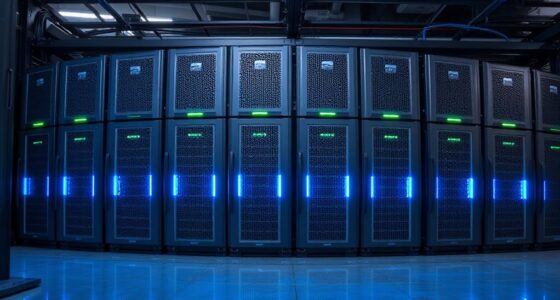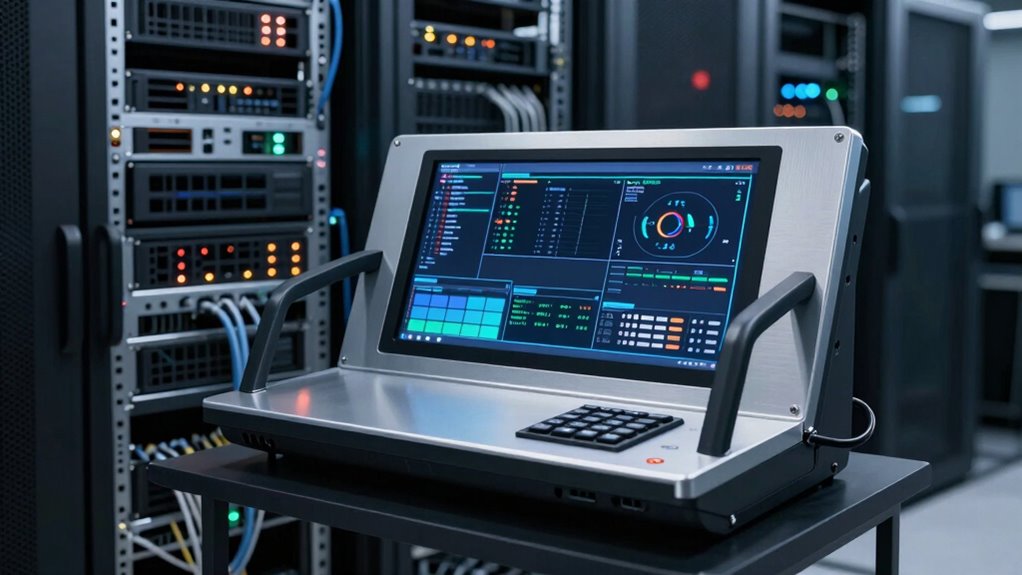
A rackmount LCD console folds a monitor, keyboard, and touchpad into a sliding 1U drawer, giving you direct server access without dedicating a desk or a full monitor to the rack. The category splits along a few lines: whether the console includes a built-in KVM switch, whether it connects over HDMI or aging VGA, and whether it fits shallow racks. The Tripp Lite NetDirector 8-Port HDMI KVM Console with IP Remote Access stands out as the best overall pick because it adds browser-based remote control on top of local switching. The Tripp Lite B021-SWHD-K short-depth console is the smarter choice for cramped wall-mount and shallow racks, while the 1U console with a 17.3-inch 1080p screen and 8-port HDMI switch offers the sharpest picture for the money. Read on for the full breakdown, including where budget VGA models still make sense and which consoles I’d skip.

Get privacy and security gear delivered free with Prime
- Fast, free delivery on millions of items
- Prime Video, Amazon Music and more included
- Member-only deals all year
Key Takeaways
- Tripp Lite’s three consoles dominated the top of this comparison because of their slide-rail build quality, vendor support, and thoughtful depth options — the clone-brand consoles matched them on specs but not on rail hardware and documentation.
- Integrated KVM switching (8 ports on five models here) is the biggest value differentiator: a console-only unit still leaves you buying a separate switch, which often erases the price gap within months.
- Short-depth chassis on the B021-SWHD-K and B021-000-19-SH fit racks under 24 inches deep, a hard requirement for wall-mount cabinets that most buyers discover too late.
- VGA-only consoles (the 19-inch 8-Port VGA and 17-inch models) only make sense for legacy server fleets — every modern server with HDMI or DisplayPort output will need adapters.
- IP remote access on the NetDirector model changes who can even use a console: if your team rarely stands in front of the rack, remote capability matters more than screen size.





More Details on Our Top Picks
Tripp Lite B021-SWHD-K Rackmount KVM Console, 1U Short Depth, 18.5″ HD LCD, HDMI & USB
This pick makes the most sense for most buyers because it solves the two biggest rackmount console headaches at once: shallow rack compatibility and modern HDMI/USB connectivity. The 1080p widescreen panel is a noticeable step up from the 1280 x 1024 displays on the Tripp Lite B021-000-19 and the two VGA consoles in this roundup, making configuration screens and terminal text noticeably easier to read. The bundled cable kit and mounting hardware mean you are not hunting for compatible adapters on day one.
The tradeoff is that this is a console only — unlike the 1U HDMI console with 8-port switching (B0F66VXXPD), it has no built-in KVM ports, so you still need a separate switch to control multiple machines. That modularity is a plus if you already own a switch, but a cost if you are starting from zero.
Pros:- Short-depth 1U design fits racks where deeper consoles cannot
- Full HD 1080p widescreen with automatic video adjustment
- HDMI and USB connectivity matches current-generation servers
- Complete accessory kit including cables, rails, and power cords
Cons:- No built-in KVM switching — requires a separate switch for multi-server control
- 18.5-inch screen feels cramped compared to larger 19-inch alternatives
Best for: IT admins with shallow racks or modern HDMI servers who want a crisp 1080p console and already own (or will choose) their own KVM switch
Not ideal for: Buyers who want to control several computers out of the box without purchasing a separate KVM switch
- Screen Size:18.5 inches
- Resolution:1920 x 1080 (1080p) at 60 Hz
- Rack Height:1U
- Connectivity:HDMI, USB
- Pointing Device:Touchpad
- Front USB Port:Yes (flash drives, CAC readers)
- OS Compatibility:Windows, macOS, Linux, Sun
- Warranty:1 year
Our verdict“The safest all-around choice for modern racks, provided you pair it with your own KVM switch.”
1U Rack-Mount KVM Console with 17.3-Inch 1080p Monitor and 8-Port HDMI Switch
This model stands out as the only all-in-one option in this batch with both Full HD resolution and an integrated 8-port HDMI switch. Compared with the VGA-based 8-port console (B07GZLX2DD), the jump from 1280 x 1024 to 1920 x 1080 is immediately visible, and HDMI switching means no dongles for servers that dropped analog video years ago. Three switching methods — front-panel buttons, hotkeys, and OSD — plus bundled HDMI cables and auto-lock rails make this a genuinely turnkey solution.
The compromises are real, though. The 17.3-inch panel is the smallest here, and the 20–33.46 inch mounting depth requirement rules out shallow wall-mount cabinets. If your rack is deep and your servers are HDMI-native, this option is hard to beat; if you run older VGA gear, the 800:1 contrast and lack of analog ports will frustrate you.
Pros:- Integrated 8-port HDMI switch controls up to eight computers with no extra hardware
- Full HD 1080p display with tilting panel up to about 110 degrees
- Three switching methods including hotkeys and OSD
- Bundled HDMI KVM cables and auto-lock slide rails
Cons:- Requires 20–33.46 inches of rack depth
- 17.3-inch screen is the smallest in this lineup
- No analog VGA ports for legacy servers
Best for: Operators of modern HDMI-only server fleets who want eight-machine control from a single 1U drawer
Not ideal for: Shallow racks under 20 inches deep, or environments still running VGA-only servers
- Monitor:17.3-inch TFT LED, 1920×1080 at 60 Hz
- KVM Ports:8 HDMI ports
- Rack Space:1U
- Mount Depth:20–33.46 inches
- Switching Methods:Front-panel buttons, hotkeys, OSD
- Brightness:250 cd/m²
- OS Compatibility:Windows, Linux, Mac, Unix, Solaris, Ubuntu
- Included Accessories:HDMI KVM cables, ground wire
Our verdict“The best fit for deep racks full of HDMI servers where one drawer needs to command eight machines.”
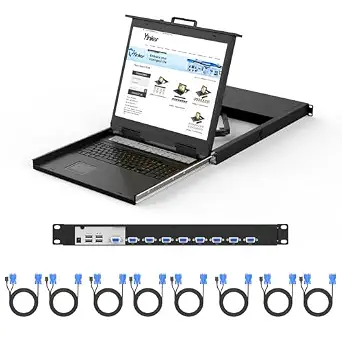
1U Rack Mount KVM Console with 19″ Monitor, Keyboard, Touchpad, and Built-in 8-Port VGA KVM Switch
For buyers who want eight-server control from a single drawer at the lowest total cost, this option bundles everything: monitor, keyboard, touchpad, switch, cables, and rails. Compared with the Tripp Lite B021-SWHD-K, you save the cost of a separate KVM switch entirely, and the 2-year warranty plus a long list of international safety certifications is more reassurance than most generic consoles in this category offer. Management extras like Auto Scan and BRC mode go beyond basic button-press switching.
The catch is connectivity: VGA-only switching with no DVI, HDMI, or DisplayPort support, so modern servers need adapters. It also demands a minimum rack depth of 28.2 inches — deeper than the Tripp Lite short-depth pick — and the 1280 x 1024 panel matches the older B021-000-19 rather than today’s 1080p standard. For legacy VGA environments, those tradeoffs barely matter.
Pros:- True all-in-one design with switch, cables, and rails included
- Auto Scan and BRC management modes beyond basic switching
- 2-year warranty and broad international safety certifications
- Works across Windows, Linux, Mac, and Sun systems
Cons:- VGA-only — no HDMI, DVI, or DisplayPort support
- Requires a deep rack of at least 28.2 inches
- 1280 x 1024 resolution lags behind 1080p alternatives
Best for: Budget-conscious admins managing older VGA servers who want a complete 8-port solution in one purchase
Not ideal for: Shallow cabinets or racks with modern HDMI/DisplayPort-only servers
- Screen Size:19 inches
- Resolution:1280 x 1024 @ 60 Hz (5:4)
- Ports:8-port VGA KVM
- Rack Height:1U
- Mount Depth:28.2 to 32.5 inches
- Switching Methods:Front panel buttons, hotkeys, OSD
- OS Compatibility:Windows, Linux, Mac, Sun
- Warranty:2 years
Our verdict“The most cost-effective way to run eight VGA servers from one drawer, as long as your rack is deep and your video is analog.”
Tripp Lite B021-000-19 1U Rack Mount KVM Console with 19-inch LCD, Keyboard and Touchpad
This model earns its spot primarily through TAA compliance, which makes it one of the few console options eligible for GSA Schedule and federal procurement — something none of the generic consoles here can claim. Its dual PS/2 and USB KVM compatibility also makes it unusually flexible across mixed-generation server rooms, and the USB 2.0 pass-through port is handy for flashing firmware or reading CAC cards right at the rack.
Against the newer Tripp Lite B021-SWHD-K, it shows its age: the 1280 x 1024 panel is a generation behind that model’s 1080p widescreen, and like that pick it needs an external KVM switch for multi-server control. Compared with the 8-port VGA console (B07GZLX2DD), you give up built-in switching but gain a trusted brand, TAA status, and PS/2 support for genuinely old hardware.
Pros:- TAA-compliant for GSA Schedule and federal purchases
- Dual PS/2 and USB compatibility covers legacy and modern servers
- USB 2.0 pass-through port for flash drives and card readers
- Full 88-key keyboard with numeric keypad and touchpad
Cons:- 1280 x 1024 maximum resolution is dated by current standards
- Requires a separate KVM switch or compatible server console ports
Best for: Government contractors, agencies, and mixed PS/2/USB environments that require TAA-compliant equipment
Not ideal for: Buyers wanting a 1080p display or built-in KVM switching in a single purchase
- Display:19-inch LCD
- Max Resolution:1280 x 1024
- Rack Height:1U
- Input Devices:88-key keyboard with touchpad and numeric keypad
- Connectivity:PS/2 and USB KVM compatibility
- Pass-Through Port:USB 2.0
- Compliance:TAA-compliant
- Warranty:1 year
Our verdict“The right pick when procurement rules demand TAA compliance or your rack still mixes PS/2 and USB systems.”
19-Inch Rack-Mount LCD KVM Console, 8-Port VGA, 1U
What separates this console from the similar 8-port VGA model (B07GZLX2DD) is scalability through daisy-chaining, expanding from eight machines to as many as 64 via cascade connections. That makes it better suited to labs, classrooms, or data closets where the server count keeps growing and a second console would waste another rack unit. The 19-inch 5:4 panel gives slightly more vertical workspace than the 17.3-inch widescreen on the HDMI 8-port console (B0F66VXXPD), which matters for terminal windows and long config files.
The limitations mirror its sibling: VGA-only video means modern servers need conversion hardware, and rack depth requirements may force adjustments during installation — measure before you buy. It also skips the Auto Scan and BRC extras found on the B07GZLX2DD, trading convenience features for raw expandability.
Pros:- Daisy-chain support scales from 8 up to 64 computers
- 19-inch panel offers more vertical space than widescreen rivals
- Three switching methods: OSD, hotkeys, and front-panel buttons
- Ships with eight KVM cables, slide rails, and power adapter
Cons:- VGA video only — no digital interface support
- Rack depth compatibility may require adjustment during install
- Lacks Auto Scan and BRC modes offered by competing models
Best for: Server rooms and test labs planning to scale beyond eight machines without adding another console
Not ideal for: HDMI-native server fleets or buyers who want auto-scanning management features
- Monitor:19-inch LCD
- Resolution:1280 × 1024 at 60 Hz
- Ports:8 VGA KVM ports
- Max Computers:64 via daisy-chain/cascade
- Rack Height:1U
- Switching Methods:OSD, hotkeys, front-panel buttons
- Included Cables:8 KVM cables (4 × 5 ft, 4 × 6 ft)
- Certifications:CE, RoHS, REACH, PSE
Our verdict“The pick for growing VGA environments where one console needs to eventually manage dozens of machines.”
Tripp Lite Short-Depth Rackmount Console with Keyboard, Touchpad, and 19-Inch LCD (B021-000-19-SH)
Most full-depth consoles assume you have 24 inches or more of usable cabinet space, which rules out wall-mount racks and compact enclosures. The short-depth design here is the whole point: it installs in cabinets with as little as 19 inches of depth, while still delivering a 19-inch display at 1280 × 1024 — the same screen real estate as the standard Tripp Lite B021-000-19, just in a tighter chassis. Compared with the MT-VIKI 15.6-inch drawer, this model trades modern HDMI switching for a bigger panel and dual PS/2 and USB compatibility, which matters if your fleet still mixes legacy and current servers. The tradeoff is that it’s a console only — no built-in KVM switching — and the 5:4 aspect ratio feels dated next to 1080p rivals.
Pros:- Fits cabinets with a minimum depth of just 19 inches
- 19-inch display matches larger full-depth consoles in screen size
- Dual PS/2 and USB compatibility covers legacy and modern servers
- Auto-sensing 100–240 V power supply works internationally
Cons:- No integrated KVM switching — requires a separate switch
- 1280 × 1024 resolution lags behind 1080p competitors
Best for: IT admins with shallow wall-mount or compact racks who need a large console screen without deep cabinet space
Not ideal for: Buyers wanting an all-in-one solution — this has no integrated KVM switch, so you’ll need a separate unit
- Minimum cabinet depth:19 inches
- Display size:19 inches
- Display resolution:1280 × 1024
- Compatibility:KVMs or servers with PS/2 or USB connectors
- Power supply:100–240 V auto-sensing external
- Included controls:Keyboard and touchpad
Our verdict“If your rack is too shallow for standard consoles but you refuse to shrink to a 15.6-inch screen, this is the pick that solves both problems at once.”
17-Inch Rack LCD Console
This is the no-frills option in the lineup: a 17-inch rack-mounted LCD console that does the one job it’s asked to do without switching hardware, IP features, or premium branding. Compared with the StarTech.com 17-inch console, which adds USB/PS/2 flexibility and a key lock, this model strips things back further — appealing when budget is the primary filter. Its green compliance listing also makes it a candidate for organizations with sustainability procurement requirements, something none of the other entries here advertise. The flip side is sparse documentation around depth requirements and connectivity, so you’ll want to verify fit and cabling before committing. Where the Tripp Lite NetDirector bundles eight ports and remote access, this console makes you assemble your own switching stack — a fair trade if you already own a KVM.
Pros:- Straightforward 17-inch rack console with no unused features to pay for
- Listed as green compliant for sustainability-focused purchasing
- Works as a drop-in display replacement alongside an existing KVM switch
Cons:- No integrated KVM switching or included accessories
- Sparse published specs make pre-purchase fit verification harder
Best for: Budget-conscious buyers or procurement teams needing a green-compliant replacement console for an existing KVM setup
Not ideal for: Anyone starting from scratch who needs switching, cables, and mounting hardware bundled together
- Display size:17 inches
- Form factor:Rack-mounted console
- Green compliant:Yes
- Integrated switching:No
- Included accessories:None listed
Our verdict“A sensible spare-or-replacement console for shops that already have the switching side sorted and just need a screen in the rack.”
Tripp Lite NetDirector 8-Port Rackmount Console HDMI KVM Switch with 17-Inch LCD and IP Remote Access
The standout feature here isn’t the display or the ports — it’s the built-in IP access that lets an admin control connected servers over a LAN, WAN, or the open Internet. None of the other entries in this roundup offer remote control, which changes who this unit serves: colocation customers and distributed teams that can’t always walk to the rack. The 1U dual-rail design keeps the drawer sliding smoothly even in busy cabinets, and support for 1920 × 1080 puts it ahead of the 1280 × 1024 Tripp Lite B021-000-19-SH in visual clarity. Against the MT-VIKI 8-port HDMI console, you give up the included cable bundle and 1080p-native panel size advantages in exchange for enterprise network features like IPv6, HTTPS, and RADIUS support. Note that remote access depends entirely on network availability, and the 17-inch screen is smaller than dedicated 19-inch consoles.
Pros:- IP remote access over LAN, WAN, or Internet from a browser
- Eight ports with console, keyboard, and touchpad integrated in 1U
- 1920 × 1080 video support outclasses 1280 × 1024 rivals
- Enterprise-grade network stack including IPv6, HTTPS, and RADIUS
Cons:- Remote features fail if network connectivity drops
- 17-inch display is smaller than 19-inch dedicated consoles
Best for: Colocation users and distributed IT teams who need to manage servers remotely without being physically present at the rack
Not ideal for: Single-site shops with no remote-access needs — the network features add cost without benefit
- Ports:8
- Display:17-inch LCD
- Remote access:IP access via LAN, WAN, or the Internet
- Video resolution:Up to 1920 × 1080
- Network support:IPv4, IPv6, TCP/IP, HTTP, HTTPS, UDP, RADIUS, DHCP, SSL, ARP, DNS, 10Base-T/100Base-TX
- Mounting:1U rack mount, dual rail
- Warranty:3-year limited
Our verdict“The only pick here that lets you fix a server at 2 a.m. from home, making it the default choice for off-site management.”
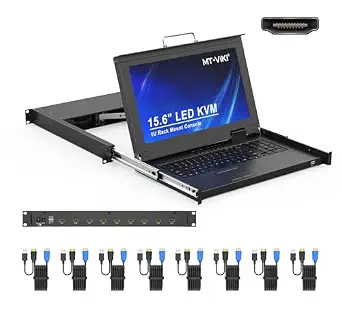
MT-VIKI 8-Port HDMI KVM Console with 15.6-Inch LCD Monitor
This is the most complete package in the batch: eight HDMI ports, a 1080p 60 Hz panel, keyboard, touchpad, both short and long rails, and eight bundled KVM cables — accessories that other makers sell separately or omit entirely. Against the Tripp Lite NetDirector 8-port, the MT-VIKI wins on out-of-box readiness and price-to-feature ratio, but loses the IP remote access that remote teams depend on. The 15.6-inch screen is the smallest here, smaller than the StarTech 17-inch console, though the native 1920 × 1080 resolution keeps text sharp anyway. Fit is the main watch item: rails adjust for racks from 18.9 to 31.5 inches deep, but shallower racks under 23.6 inches may create cable-clearance headaches, so measure before buying. With three switching methods and two-level password security, it covers multi-admin shops reasonably well.
Pros:- Eight 5-foot USB HDMI KVM cables included, saving separate purchases
- Native 1920 × 1080 at 60 Hz delivers sharper visuals than 1280 × 1024 consoles
- OSD, hot-key, and push-button switching plus two-level password security
- Short and long rails fit racks from 18.9 to 31.5 inches deep
Cons:- 15.6-inch display is the smallest in this lineup
- Shallow racks under 23.6 inches may have cable-clearance issues
Best for: Small-to-mid-size server rooms that want a full 8-port HDMI setup with everything in the box at a lower total cost
Not ideal for: Remote or off-site administrators — there’s no IP access, so someone must be at the rack
- Model:1568HL
- Ports:8 HDMI KVM ports
- Display:15.6-inch LCD, 1920 × 1080 at 60 Hz
- Form factor:1U rackmount drawer
- Rack depth compatibility:18.9–31.5 in (480–800 mm)
- Switching methods:OSD menu, hot-key, push button
- Security:Two-level password; up to 8 authorized users
- Compatibility:Windows, DOS, Linux, Mac OS 8.6/9/10
- Included accessories:8 × 5 ft USB HDMI KVM cables, 12 V 2 A adapter, rails, manual
Our verdict“The strongest bundle-per-dollar pick for on-site admins who want to unbox, mount, cable, and go the same afternoon.”
StarTech.com 17-Inch Rackmount LCD Console, 1U, USB and PS/2, 1280 × 1024
The differentiator here is physical security: a built-in key lock that stops anyone from opening the drawer and accessing the console without authorization. In shared server closets and office back rooms where the rack itself isn’t behind a locked door, that matters more than raw specs. Functionally it sits between the generic 17-Inch Rack LCD Console — which offers no locking or documented connectivity — and the pricier Tripp Lite units: you get both USB and PS/2 connections and verified compatibility with IBM System X racks plus generic VGA servers and KVMs. The 1U form factor conserves rack space, but the 1280 × 1024 resolution trails the 1080p MT-VIKI, and like the Tripp Lite B021-000-19-SH there’s no integrated switching, so budget for a KVM if you need multi-server control.
Pros:- Key lock physically prevents unauthorized console access
- Dual USB and PS/2 support spans legacy and modern hardware
- Verified compatibility with IBM System X and VGA-based KVM setups
- Compact 1U design preserves rack space
Cons:- 1280 × 1024 resolution falls short of 1080p competitors
- No integrated KVM switching
Best for: Offices and shared spaces where unauthorized hands could reach the rack and a physical lock is required
Not ideal for: Multi-server environments expecting built-in switching — this is a console only
- Brand:StarTech.com
- Display size:17 inches
- Resolution:1280 × 1024
- Form factor:1U rack-mountable
- Connections:USB and PS/2
- Compatibility:IBM System X rack servers; VGA servers or KVM switches
- Security:Key lock
Our verdict“The right console when the rack lives somewhere people walk past and you need the drawer locked, not just the door.”

How We Picked
I ranked these consoles on four factors that actually determine long-term satisfaction. Screen quality and inputs came first: 1080p panels with HDMI beat 1280 × 1024 VGA panels for modern servers, and I flagged every model likely to need adapters. Mechanical fit came second — total extended depth, rail design, and whether the unit works in shallow or wall-mount racks, since a console that doesn’t fit your rack is worthless regardless of specs. Switching capability was third: models with integrated 8-port KVM switching scored higher than console-only units at similar cost, because they solve the whole problem in one drawer.
Finally, I weighed build quality and support. Tripp Lite and StarTech earned the top slots on rail hardware, warranty coverage, and firmware support, while generic-brand models were ranked on raw feature-per-dollar value instead — a legitimate tradeoff for homelabs and tight budgets. The ranking favors versatility for mixed fleets over pure screen size, which is why a smaller-panel unit with HDMI and IP access can outrank a bigger VGA console.
Factors to Consider When Choosing Rackmount Lcd Console
Before locking in a console, a few rack-level decisions matter more than any single product spec. These are the factors that most often cause returns and regret in this category.Measure Your Rack Depth Before Anything Else
The single most common mistake in this category is buying a console that physically cannot close inside the rack. Every 1U console needs clearance not just for its closed chassis but for its fully extended slide rails — often 6 to 10 inches beyond the front posts when open. Check your rack’s internal depth against the manufacturer’s minimum depth figure, and remember that rear-mounted PDUs and cabling eat into usable space. Wall-mount cabinets are the tightest case: most need a short-depth chassis specifically designed for them. If your rack is under about 24 inches deep, filter your shortlist to short-depth models immediately rather than hoping a standard unit squeezes in.
HDMI Versus VGA: Match Your Server Fleet
Console connectivity should mirror what your servers actually output, not what sounds future-proof. HDMI and USB consoles connect cleanly to anything built in the last decade, while VGA and PS/2 models suit legacy hardware in labs, industrial floors, and older enterprise fleets. Adapters do exist, but chaining them inside a 1U drawer creates failure points and ghost-display problems that are miserable to diagnose mid-outage. If your fleet is mixed, an 8-port switch with both connection options available, or dongle-based cabling, saves real hassle. Buying VGA because it’s cheaper only pays off if every server you’ll touch for the next five years still has a blue port.
Integrated KVM Switch Versus Console-Only
A console-only drawer gives you one screen and keyboard; a console with a built-in multiport KVM switch lets that one drawer control eight or sixteen servers. Console-only units look cheaper until you price a separate switch, rack space, and the cabling to tie them together — at which point the integrated model usually wins on total cost and rack density. The catch is that an integrated switch locks you into its port count and connection type, so oversized fleets will outgrow it. My general guidance: integrated switching makes sense up to the switch’s port count in a single rack; beyond that, or across multiple racks, a modular switch plus a simple console is the more flexible architecture.
Panel Size, Resolution, and Practical Viewing
Console panels range from 15.6 to 19 inches, but resolution matters more than diagonal size. A 17.3-inch 1080p panel renders terminal text and management interfaces far more comfortably than a 19-inch 1280 × 1024 panel, because the extra pixels do the work the inches can’t. Consider how you’ll actually use it: for occasional BIOS-level access, any panel works; for extended configuration sessions or reading dense dashboards, 1080p is worth prioritizing. Also check the panel’s brightness and whether it holds up under fluorescent server-room lighting, where cheap panels wash out. Widescreen versus squarish aspect ratio is a real preference question too — legacy 5:4 panels feel cramped for modern web-based management tools.
IP Remote Access: The Feature That Changes Everything
Some consoles include network-attached KVM over IP, letting you control servers from a browser anywhere — the same drawer works locally and remotely. This feature is what separates a maintenance convenience from a genuine out-of-band management tool. If your servers are in a colocation facility, a remote office, or any room you’d rather not walk to at 2 a.m., IP access easily justifies its premium. If the console sits two steps from your desk in a closet rack, the same premium buys nothing. Be honest about who will use this hardware and from where before paying for remote capability you’ll never exercise.
Rails, Build Quality, and the Hidden Costs
The sliding mechanism is the part you touch every single session, and it’s where budget consoles cut corners. Loose rails, plastic latches, and flimsy locking tabs turn daily use into a chore and eventually a failure. Vendor support and warranty coverage matter more here than with most rack gear, because a dead console takes down your local access path to everything in the rack. Established vendors also publish depth drawings, rail kits, and cable compatibility charts — generic brands frequently don’t, which turns installation into guesswork. Budget models still earn their place in homelabs, but factor in the time cost of imprecise documentation and shorter warranties when comparing prices.
Frequently Asked Questions
Will a 1U rackmount console fit in a wall-mount cabinet?
Only if it’s a short-depth model — standard consoles are usually too deep for wall-mount enclosures. Wall-mount cabinets commonly offer 16 to 22 inches of internal depth, while standard consoles need 25 inches or more of clearance plus rail extension. The Tripp Lite B021-SWHD-K and B021-000-19-SH in this roundup were designed specifically for shallow and wall-mount installations. Before buying any console, compare the manufacturer’s stated minimum rack depth against your cabinet’s measured internal depth, and account for anything mounted at the rear. Guessing here is the fastest way to an unusable purchase.
Do I need a console with a built-in KVM switch?
If you manage more than one server in the rack, an integrated 8-port switch almost always makes sense. It consolidates screen, keyboard, and switching into one drawer, saves 1U of rack space versus a separate switch, and simplifies cabling. The tradeoff is lock-in: you’re committed to that switch’s port count and connection type, so growing beyond it means adding hardware anyway. Console-only units like the StarTech 17-inch model still make sense when you already own a KVM switch, when you just need occasional direct access to one server, or when you plan a modular multi-rack setup. Add up the cost of a separate switch before assuming the console-only unit is the bargain it appears to be.
Can I connect a VGA console to modern HDMI-only servers?
Technically yes, with HDMI-to-VGA adapters or dongle cables, but it’s a fragile arrangement. Active adapters add a failure point inside a cramped drawer, sometimes cause resolution-detection problems, and can produce ghosting or blank screens during BIOS handoff — exactly when you need the console most. If most of your servers output HDMI or DisplayPort natively, buy an HDMI console from the start. VGA consoles earn their keep in environments with genuinely legacy hardware: industrial controls, older lab equipment, or servers from the PS/2 era. For mixed fleets, a switch with dual-type cabling support smooths this over better than adapters will.
Is IP remote access worth the extra cost?
It depends entirely on how often anyone stands in front of the rack. KVM over IP lets you reboot, enter BIOS, and troubleshoot from anywhere with a browser, which is transformative for colocation racks, remote branch offices, and after-hours emergencies. For a closet rack next to your desk, that capability mostly duplicates walking three steps. The NetDirector model in this roundup pairs IP access with local switching, so you’re not choosing between the two. One honest caution: IP consoles need to sit on a management network you’ve secured properly, since they represent direct keyboard-level access to every attached server.
What’s the real difference between a 17-inch and 19-inch console panel?
Less than you’d expect, because resolution does most of the work. A 17.3-inch 1080p widescreen panel displays modern management interfaces and terminal windows more comfortably than a 19-inch 1280 × 1024 panel, since extra pixels improve text clarity in ways extra inches can’t. The 19-inch panels in this roundup largely use the older 5:4 aspect ratio, which feels cramped for web-based dashboards but works fine for text consoles and legacy tooling. Panel choice should follow your workload: dense configuration sessions favor 1080p, quick BIOS checks are fine on anything. Don’t pay a premium for diagonal size alone — check the native resolution first.
Conclusion
For most buyers, the Tripp Lite NetDirector 8-Port HDMI Console with IP Access is the best overall choice — it combines local switching, modern HDMI connectivity, and remote control in one supported package. For best value, the 1U console with the 17.3-inch 1080p panel and 8-port HDMI switch delivers the sharpest screen and full switching without the brand-name premium. On the premium side, the Tripp Lite B021-SWHD-K short-depth HDMI console justifies its cost with a compact chassis and clean modern connectivity for tight racks.
For beginners and homelab builders, the MT-VIKI 15.6-inch HDMI console is a low-risk way to get keyboard, screen, and 8-port switching into one drawer. Shallow and wall-mount racks call for the B021-000-19-SH, while legacy VGA and PS/2 fleets are best served by the 19-inch 8-Port VGA console or the StarTech 17-inch with PS/2 support. Whatever you choose, confirm your rack depth and your servers’ video outputs before ordering — those two checks prevent nearly every regret in this category.
Evergreen bestsellers Picks
bestsellers
As an affiliate, we earn on qualifying purchases.