
If you’re looking for the best PCIe capture cards for 4K in 2026, I recommend considering models like AVerMedia’s HDMI 2.1 options, Blackmagic DeckLink, and Elgato’s 4K Pro. These cards support high resolutions, fast frame rates, and low latency, making them ideal for streaming and professional workflows. They also offer multiple HDMI inputs and future-proof features like HDR and 8K passthrough. Keep going to discover more about each powerful choice and find the perfect fit.
Key Takeaways
- Supports 4K at 60 fps with HDR pass-through, ensuring high-quality streaming and recording for modern setups.
- Compatible with PCIe x1, x4, x8, and x16 slots across Windows, macOS, and Linux for versatile integration.
- Features multiple HDMI inputs (up to four) for multi-source workflows and seamless multi-camera streaming.
- Boasts ultra-low latency and hardware acceleration for real-time gameplay, recording, and streaming.
- Notable models include AVerMedia HDMI 2.1 PCIe, Blackmagic DeckLink Quad HDMI, and Elgato 4K Pro.
| AVerMedia HDMI 2.1 Internal PCIe Capture Card | 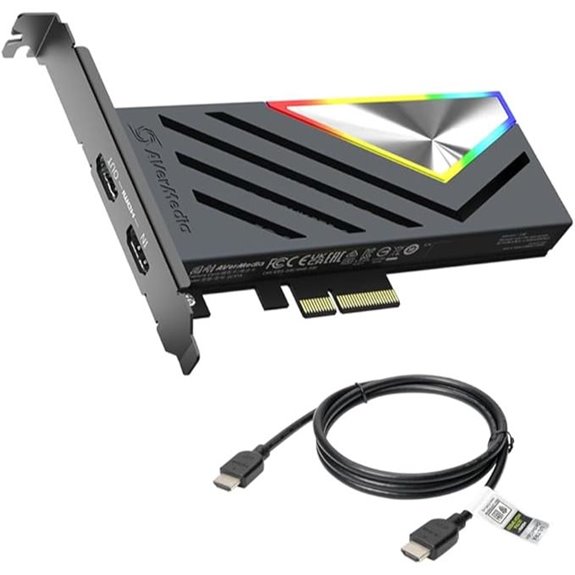 | Best High-Performance | Input Type: HDMI 2.1 | Maximum Resolution: 4K60 | Frame Rate Support: 60 fps at 4K | VIEW LATEST PRICE | See Our Full Breakdown |
| AVerMedia HDMI Capture Card for Streaming and Gaming | 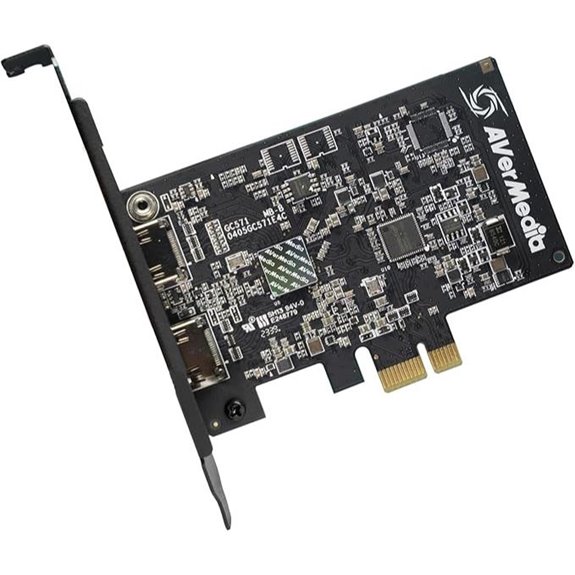 | Versatile Streaming Power | Input Type: HDMI 2.0 | Maximum Resolution: 4K60 pass-through, 4K30 capture | Frame Rate Support: 60 fps at 4K, 120 fps at 1080p | VIEW LATEST PRICE | See Our Full Breakdown |
| Blackmagic DeckLink Quad HDMI Capture Card | 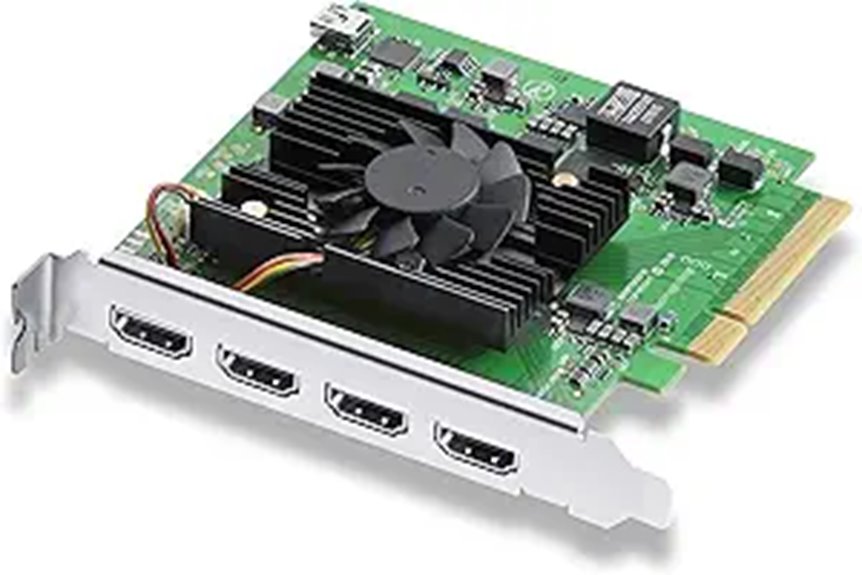 | Professional Multi-Source | Input Type: HDMI 2.0b | Maximum Resolution: Up to 4Kp30 | Frame Rate Support: 30 fps at 4K | VIEW LATEST PRICE | See Our Full Breakdown |
| AVerMedia GC573 4K Internal Capture Card | 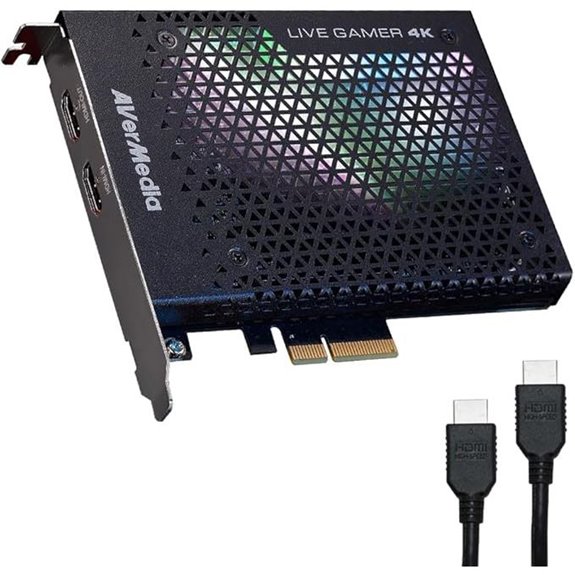 | High-Quality 4K Capture | Input Type: HDMI 2.0a | Maximum Resolution: 4K60 HDR10 | Frame Rate Support: 60 fps at 4K, 240Hz at 1080p | VIEW LATEST PRICE | See Our Full Breakdown |
| Blackmagic Design DeckLink Mini Recorder 4K PCIe Capture Card | 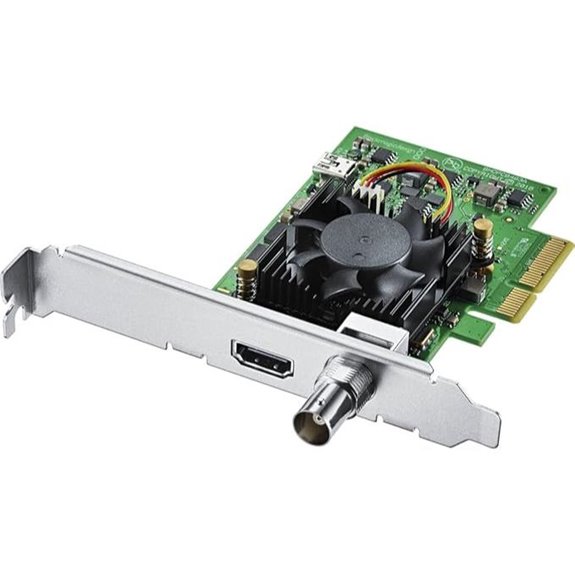 | Compact Professional | Input Type: HDMI 2.0 & SDI | Maximum Resolution: 4K Ultra HD | Frame Rate Support: 60 fps at 4K | VIEW LATEST PRICE | See Our Full Breakdown |
| Elgato 4K Pro Capture Card for Consoles and PC | 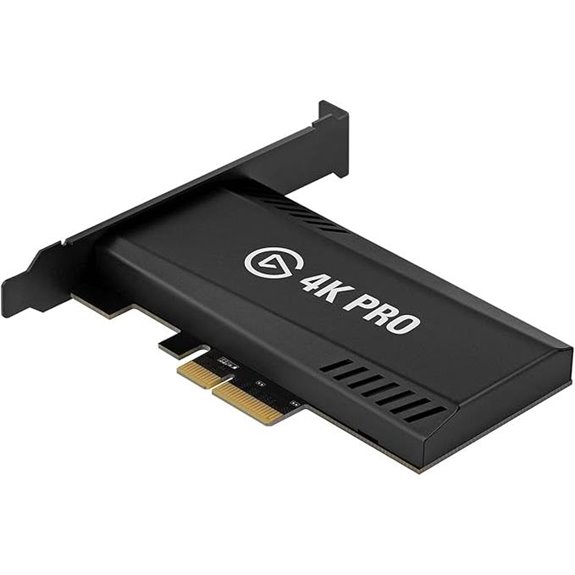 | Streamer’s Favorite | Input Type: HDMI 2.1 | Maximum Resolution: 4K60 HDR10 | Frame Rate Support: 60 fps at 4K | VIEW LATEST PRICE | See Our Full Breakdown |
| HDMI PCIe 4K Capture Card for Gaming and Streaming | 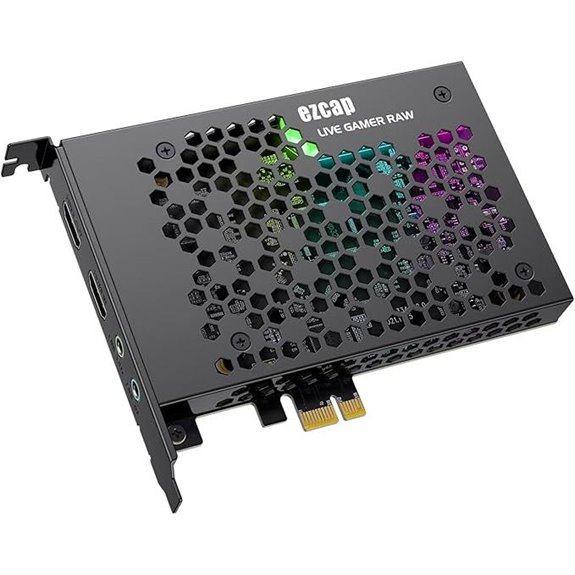 | Budget Powerhouse | Input Type: HDMI 2.0 | Maximum Resolution: 4K30 | Frame Rate Support: 30 fps at 4K | VIEW LATEST PRICE | See Our Full Breakdown |
| Quad HDMI PCIe Video Capture Card | 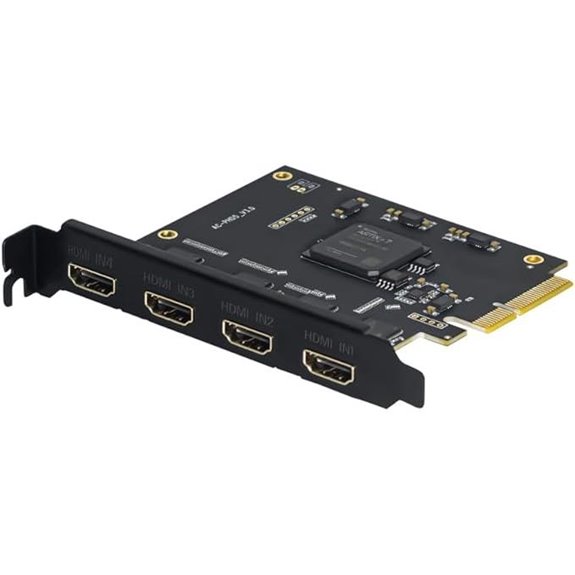 | Multi-Source Master | Input Type: HDMI | Maximum Resolution: 1080p60 (multi-channel support) | Frame Rate Support: 60 fps at 1080p (multi-channel) | VIEW LATEST PRICE | See Our Full Breakdown |

More Details on Our Top Picks
-
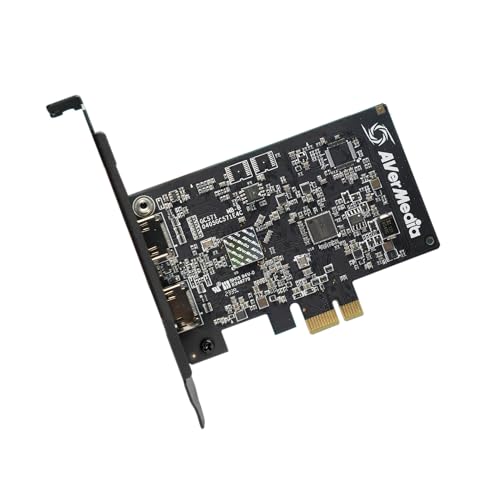
AVerMedia HDMI Capture Card for Streaming and Video Gaming, 4K60 Pass-Through with Ultra-Low Latency on PS5, PS4 Pro, Xbox Series X/S, Xbox One X, Switch Games - GC571 Live Streamer Ultra HD
4K Streaming: Effortlessly capture HDMI 2.0 input sources with 4K60 pass-through for an immersive video gaming experience and...
As an affiliate, we earn on qualifying purchases.
AVerMedia HDMI 2.1 Internal PCIe Capture Card
If you’re serious about high-quality streaming and gaming, the AVerMedia HDMI 2.1 Internal PCIe Capture Card is a top choice. It supports HDMI 2.1 for fast data transfer and can capture and stream in stunning 4K60 resolution. With ultra-low latency, it guarantees seamless gameplay and recording without lag. Designed for modern consoles like PS5, Xbox Series X/S, and Nintendo Switch, it delivers high-resolution, high-refresh-rate captures. This PCIe card is perfect for gamers wanting professional-quality streams and content creators seeking reliable, top-tier performance. Its compatibility and performance make it a standout option for anyone aiming for immersive, high-performance gaming experiences.
- Input Type:HDMI 2.1
- Maximum Resolution:4K60
- Frame Rate Support:60 fps at 4K
- Low Latency:Ultra-low latency
- Compatibility:PCIe x1, x4, x8, x16
- Software Support:Streaming/recording compatible
- Additional Feature:Supports HDMI 2.1 standard
- Additional Feature:Captures in 4K60 resolution
- Additional Feature:Ultra-low latency design
-
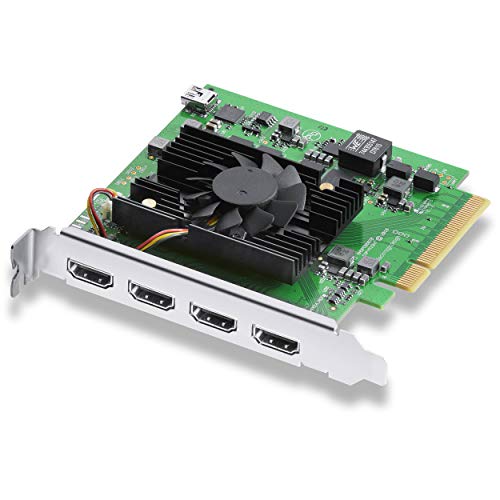
Blackmagic Design DeckLink Quad HDMI PCIe Capture Card, Up to 4K60, 4 HDMI 2.0b inputs (BDLKDVQDHDMI4K)
Quad HDMI Connections: Equipped with four HDMI 2.0b connections allowing for simultaneous capture of multiple HDMI sources (8,...
As an affiliate, we earn on qualifying purchases.
AVerMedia HDMI Capture Card for Streaming and Gaming
Looking for a capture card that delivers stunning 4K visuals with ultra-low latency? The AVerMedia HDMI Capture Card for Streaming and Gaming fits the bill perfectly. It supports HDMI 2.0 input sources with 4K60 pass-through, ensuring smooth gameplay, while offering 4K30 capture for crisp streaming visuals. With VRR support, it guarantees tear-free, responsive gaming experiences. Its broad compatibility with PCIe slots makes installation easy—no drivers needed. Whether you’re streaming on a PS5, Xbox Series X, or gaming PC, this card enhances your setup with high-quality visuals and minimal delay, making it ideal for serious streamers and gamers alike.
- Input Type:HDMI 2.0
- Maximum Resolution:4K60 pass-through, 4K30 capture
- Frame Rate Support:60 fps at 4K, 120 fps at 1080p
- Low Latency:Ultra-low latency
- Compatibility:PCIe x1, x4, x8, x16
- Software Support:Compatible with major streaming software
- Additional Feature:Supports HDMI 2.0 pass-through
- Additional Feature:1080p120 high frame rate
- Additional Feature:Plug-and-play setup
-

AVerMedia GC573 Live Gamer 4K, Internal Capture Card, Stream and Record 4K60 HDR10 with ultra-low latency on PS5, PS4 Pro, Xbox Series X/S, Xbox One X, in OBS, Twitch, YouTube
Clean and crisp 4K60 unlimited HDR10 video format with zero-lag pass-through for game capture and live streaming
As an affiliate, we earn on qualifying purchases.
Blackmagic DeckLink Quad HDMI Capture Card
The Blackmagic DeckLink Quad HDMI Capture Card stands out as an ideal choice for professional streamers and video producers who need to capture multiple high-quality HDMI sources simultaneously. It features four HDMI 2.0b inputs, supporting SD, HD, and 4K video, including HDR and deep color. With up to 4Kp30 DCI resolution and 8, 10, or 12-bit color depth, it delivers stunning image quality. Its PCIe 8-lane Gen 3 interface guarantees fast, reliable data transfer, compatible with Mac, Windows, and Linux systems. Seamlessly integrating with major streaming and editing software, it’s perfect for multi-source workflows, though it can’t capture copy-protected HDMI signals.
- Input Type:HDMI 2.0b
- Maximum Resolution:Up to 4Kp30
- Frame Rate Support:30 fps at 4K
- Low Latency:Low latency
- Compatibility:PCIe 8-lane Gen 3
- Software Support:Media Express, OBS, vMix, others
- Additional Feature:Four HDMI inputs
- Additional Feature:Supports HDR and Deep Color
- Additional Feature:Compatible with multiple OS
AVerMedia GC573 4K Internal Capture Card
Designed for serious gamers and content creators, the AVerMedia GC573 4K Internal Capture Card stands out with its support for ultra-smooth 4K60 HDR10 pass-through, ensuring crystal-clear gameplay without lag. It’s an internal PCIe card compatible with PS5, Xbox Series X/S, and PCs, supporting platforms like OBS Studio, Twitch, and YouTube. The plug-and-play design requires no drivers, making setup quick and easy. It delivers ultra-low latency with zero-lag pass-through, perfect for live streaming or recording. Plus, its HDR10 support enhances visual quality with vibrant colors and contrast, all wrapped in a compact, seamless design suitable for any gaming setup.
- Input Type:HDMI 2.0a
- Maximum Resolution:4K60 HDR10
- Frame Rate Support:60 fps at 4K, 240Hz at 1080p
- Low Latency:Ultra-low latency
- Compatibility:PCIe (unspecified lanes)
- Software Support:OBS, Streamlabs, Twitch, YouTube
- Additional Feature:HDR10 support
- Additional Feature:240Hz high frame rate passthrough
- Additional Feature:Compact, easy install
Blackmagic Design DeckLink Mini Recorder 4K PCIe Capture Card
For professionals seeking reliable high-quality 4K capture, the Blackmagic Design DeckLink Mini Recorder 4K PCIe Capture Card stands out with its versatile input options. It offers a 10-bit SD/HD/Ultra HD SDI input that’s switchable, along with HDMI 2.0a support for SD, HD, and Ultra HD formats. Its PCIe Gen 2 interface guarantees fast, stable data transfer, compatible with 4, 8, and 16-lane slots. The card also features 16 embedded SDI audio channels, making it ideal for high-resolution workflows. Designed specifically for professional use, it delivers high-quality video capture without sacrificing performance or flexibility.
- Input Type:HDMI 2.0 & SDI
- Maximum Resolution:4K Ultra HD
- Frame Rate Support:60 fps at 4K
- Low Latency:Low latency
- Compatibility:PCIe 4-lane
- Software Support:Streaming and editing software
- Additional Feature:Supports SDI and HDMI
- Additional Feature:16 embedded SDI audio channels
- Additional Feature:PCIe Gen 2 interface
Elgato 4K Pro Capture Card for Consoles and PC
If you’re looking for a versatile capture card that seamlessly handles both console and PC gaming, the Elgato 4K Pro stands out with its support for 8K60 passthrough and 4K60 HDR10 recording. It works with PS5 Pro, Xbox Series S, Nintendo Switch 2, and dual PC setups, providing flexible options. Its HDMI 2.1 ports ensure high-quality, high frame rate connections, while VRR passthrough eliminates tearing. You can stream effortlessly across platforms like Twitch, YouTube, and Discord, thanks to compatibility with OBS, Streamlabs, and others. Ultra-low latency guarantees precise sync between gameplay and broadcast, delivering a smooth, professional streaming experience.
- Input Type:HDMI 2.1
- Maximum Resolution:4K60 HDR10
- Frame Rate Support:60 fps at 4K
- Low Latency:Ultra-low latency
- Compatibility:PCIe (unspecified lanes)
- Software Support:Compatible with streaming apps
- Additional Feature:8K60 passthrough
- Additional Feature:HDMI 2.1 in/out
- Additional Feature:VRR passthrough technology
HDMI PCIe 4K Capture Card for Gaming and Streaming
Gamers and streamers who want high-quality, low-latency capture will find the HDMI PCIe 4K Capture Card an ideal choice, thanks to its support for 4K at 30FPS and zero-delay HDMI loop-out. It delivers sharp images with smooth motion and clear audio, compatible with various HDMI devices like consoles, Blu-ray players, and cameras. Easy to install, it works with Windows and Mac, and fits into PCI-E slots of all sizes. Its high-speed transmission up to 500MB/s ensures seamless streaming to platforms like Twitch and YouTube. Plus, the plug-and-play setup makes recording and sharing gameplay, meetings, or presentations straightforward and hassle-free.
- Input Type:HDMI 2.0
- Maximum Resolution:4K30
- Frame Rate Support:30 fps at 4K
- Low Latency:Zero delay
- Compatibility:PCIe x1, x4, x8, x16
- Software Support:OBS, VLC, PotPlayer, others
- Additional Feature:Zero delay HDMI loop-out
- Additional Feature:Supports 500MB/s transfer speed
- Additional Feature:Compatible with multiple streaming apps
Quad HDMI PCIe Video Capture Card
The Quad HDMI PCIe Video Capture Card stands out for its ability to handle four separate 1080p60 video sources simultaneously, making it ideal for professional streamers, broadcasters, and content creators who need multi-source recording and live streaming. It features four HDMI inputs, allowing you to connect multiple cameras, game consoles, or media players effortlessly. Compatible with Linux and Windows 11, it supports popular software like OBS, vMix, Zoom, and VLC. Using a PCIe x4 interface, it delivers high-speed data transfer with minimal latency, ensuring smooth, reliable performance for demanding workflows. Its built-in design and straightforward setup make it a versatile choice for multi-channel video capture.
- Input Type:HDMI
- Maximum Resolution:1080p60 (multi-channel support)
- Frame Rate Support:60 fps at 1080p (multi-channel)
- Low Latency:Low latency
- Compatibility:PCIe x4
- Software Support:OBS, vMix, Zoom, others
- Additional Feature:Four simultaneous HDMI inputs
- Additional Feature:Supports Linux and Windows 11
- Additional Feature:PCIe x4 interface
Factors to Consider When Choosing a PCIE Capture Card 4K
When choosing a PCIe capture card for 4K, I focus on compatibility with my devices and whether it supports the video resolution I need. Speed and latency are essential for smooth streaming, so I check how quickly it processes data. I also consider the number of inputs and how easy it is to install, ensuring it fits my setup and skill level.
Compatibility With Devices
Choosing the right PCIe capture card requires ensuring it’s compatible with your existing devices and system. First, check that it fits your computer’s PCIe slot type—whether x1, x4, x8, or x16—to guarantee proper installation. Next, verify that the capture card supports your video input standards, like HDMI 2.0, HDMI 2.1, or SDI, for seamless connectivity. It’s also essential to confirm compatibility with your operating system—Windows, macOS, or Linux—to ensure driver support and stable operation. Additionally, make sure it can connect to your gaming consoles, cameras, or other sources via the right ports and resolutions. Finally, consider if the card supports pass-through features like 4K60 HDR or 8K60 to match your high-performance setup.
Video Resolution Support
Ensuring your PCIe capture card supports the right video resolution and frame rate is key to capturing high-quality content. For 4K recording and streaming, I look for a device that supports 4K at 60fps, guaranteeing smooth, crisp footage. Pass-through capabilities like 4K60 HDR or 4K30 are also important, so I can play games in high resolution without latency during live streams. Compatibility with HDMI 2.0 or 2.1 standards allows higher bandwidth and features like VRR, which improves visual quality. Additionally, I consider whether the card supports high-bit-depth color formats like 10-bit or 12-bit, which deliver richer colors for professional workflows. Finally, I verify the maximum resolution and frame rate supported for both input and output to ensure seamless integration with my setup.
Latency and Speed
Low latency is essential for seamless gameplay and live streaming, as even small delays can disrupt the experience. Ideal capture cards offer latency as low as a few milliseconds, ensuring real-time responsiveness. High-speed PCIe interfaces like PCIe 3.0 or 4.0 are critical, enabling faster data transfer and reducing lag. The bandwidth of the slot (x1, x4, x8, x16) directly impacts maximum throughput, influencing overall speed and performance. Supporting high frame rates such as 4K60 or 1080p120 requires rapid data processing to prevent lag or dropped frames. Ultra-low latency features, including zero-lag pass-through and optimized hardware, are indispensable for synchronized gameplay and streaming. Prioritizing these factors will help you select a capture card that delivers smooth, high-quality video with minimal delay.
Number of Inputs
The number of inputs on a PCIe capture card directly affects how many devices or sources you can record or stream at once. If you’re working with multiple cameras, gaming consoles, or media players, more inputs mean you can handle several sources simultaneously without extra hardware. For example, a card with four HDMI ports allows you to record or stream from multiple devices at the same time, increasing your setup’s flexibility. This is especially useful for multi-camera productions, live events, or multi-angle gaming streams. It’s also crucial to ensure the capture card supports the right input types, like HDMI or SDI, for your equipment. Keep in mind, more inputs can impact system bandwidth and performance, particularly when capturing high-resolution 4K content from multiple sources.
Ease of Installation
When choosing a PCIe capture card for 4K content, ease of installation is a key factor that can save you time and frustration. A straightforward process usually means just inserting the card into a compatible PCIe slot on your motherboard. Plug-and-play models are especially helpful, as they eliminate the need for extra driver installations, making setup simple even for beginners. Compatibility with different PCIe slot types, like x1, x4, x8, or x16, ensures the card fits your system without hassle. Clear, accessible user manuals or online guides can also reduce setup time and troubleshooting. Finally, verifying that the capture card works with your operating system and hardware prevents potential complications, streamlining the entire installation process.
Software Compatibility
Making certain your PCIe capture card is compatible with your chosen streaming software and operating system is crucial for a smooth recording and streaming experience. I always verify that the card supports popular platforms like OBS, vMix, or Streamlabs, which are essential for seamless integration. It’s also important to confirm compatibility with my hardware, including PCIe slot type and system resources, to prevent bottlenecks. I check if the card offers driver support and regular software updates, which guarantee stability and access to new features over time. Additionally, I look for software that allows easy configuration of resolution, frame rate, and audio settings. Features like VRR, HDR, or low latency modes within the software environment can greatly improve my streaming quality and responsiveness.
Power and Space
Choosing a PCIe capture card 4K requires paying close attention to your system’s power and space constraints. First, verify the card fits into your motherboard’s available slot—x1, x4, x8, or x16—to avoid installation issues. Check the card’s physical size to prevent blocking adjacent slots or components inside your case. Power requirements vary; high-performance models might need extra power connections or greater PCIe lane bandwidth. Make sure your power supply can handle the added load from the capture card and other components. For small or space-limited cases, opt for a compact design that doesn’t sacrifice performance. Taking these factors into account helps avoid hardware conflicts and ensures your system remains stable and efficient during demanding 4K capture tasks.
Price and Value
Budget and feature considerations play a key role in selecting a PCIe capture card for 4K recording. Higher-priced models often support better resolution, lower latency, and professional features like HDR and multi-source input. These advanced capabilities are worth it if you’re serious about streaming or recording at a professional level. Cheaper options might handle basic 4K capture but often lack features like VRR support or zero-lag pass-through, which can impact gaming and streaming quality. Investing in a higher-priced card can be more cost-effective long-term by ensuring compatibility with future hardware and software updates. To make the best choice, I recommend comparing the price-to-performance ratio, weighing the benefits of premium features against the cost, and considering your specific needs for quality and functionality.
Frequently Asked Questions
What Is the Maximum Supported Frame Rate for 4K Capture?
The maximum supported frame rate for 4K capture varies depending on the device, but many high-end PCIe capture cards can handle up to 60 frames per second. I’ve found that capturing at 4K60 offers smooth, high-quality footage ideal for streaming or recording. Keep in mind, achieving this also depends on your system’s hardware capabilities and the software you’re using, so guarantee everything is optimized for the best performance.
How Does Latency Impact Live Streaming Quality?
Latency really impacts live streaming quality because it’s the delay between capturing your video and viewers seeing it. High latency causes lag, making interactions feel out of sync and reducing overall stream smoothness. I’ve found that minimizing latency improves viewer engagement and creates a more professional experience. That’s why I always look for capture cards with low latency, ensuring my stream feels seamless and real-time to my audience.
Are These Cards Compatible With All Streaming Software?
Think of these cards as versatile bridges—they generally play well with most streaming software. I’ve found that most PCIe capture cards support popular platforms like OBS, Streamlabs, and XSplit, making integration smooth sailing. However, it’s wise to double-check each device’s compatibility list. I always recommend verifying your chosen card’s specifications to guarantee it seamlessly connects with your preferred software, avoiding any unexpected technical hiccups.
What Are the Power Requirements for High-End PCIE Capture Cards?
High-end PCIe capture cards typically require a dedicated power connection, often drawing around 25 to 75 watts depending on the model. I recommend checking the specific card’s specifications, as some need additional power connectors like 6-pin or 8-pin PCIe power cables. Ensuring your power supply can handle the load is vital, especially for high-performance, 4K capture cards that demand stable, ample power for maximum operation.
Do These Capture Cards Support HDR 4K Content?
Yes, most high-end PCIe capture cards support HDR 4K content. I’ve found that these cards are designed to handle the latest video standards, including HDR10 and Dolby Vision, ensuring vibrant colors and enhanced contrast. They’re perfect for streaming or recording professional-quality gameplay or content. Just make sure to check the specific model’s specifications to confirm HDR support, as features can vary between devices.
Conclusion
As I look at these top PCIe 4K capture cards, it’s funny how the perfect choice often feels like finding a needle in a haystack—until I see the right fit, like a clear reflection in a mirror. Whether for streaming, gaming, or professional work, these options align with my needs just like a puzzle piece fitting seamlessly. Sometimes, the best device appears when I least expect it, ready to elevate my setup effortlessly.