
If you’re looking to upgrade your workspace, I recommend considering the top 27-inch 5K monitors like the ASUS ProArt, KTC models, ViewSonic VP2788-5K, BenQ with KVM, Samsung ViewFinity S9, and LG’s Ultrafine—each offers stunning clarity, exceptional color accuracy, and versatile connectivity. These models support premium features like Thunderbolt and HDR, helping you work more efficiently and comfortably. Stay with me to discover why these options can truly elevate your professional setup.
Key Takeaways
- Look for monitors with true 5K resolution (5120 x 2880) to ensure ultra-sharp visuals and detailed workspace.
- Prioritize models with high color accuracy (99% DCI-P3, Delta E < 2) and factory calibration for professional creative work.
- Choose monitors with versatile connectivity options like USB-C, Thunderbolt 4, and HDMI for seamless device integration.
- Opt for ergonomic stands with height, tilt, swivel, and pivot adjustments to enhance comfort during long work sessions.
- Consider warranty coverage and extra features such as built-in cameras, speakers, and calibration tools for added value.
| ASUS ProArt 27” 5K HDR Professional Monitor | 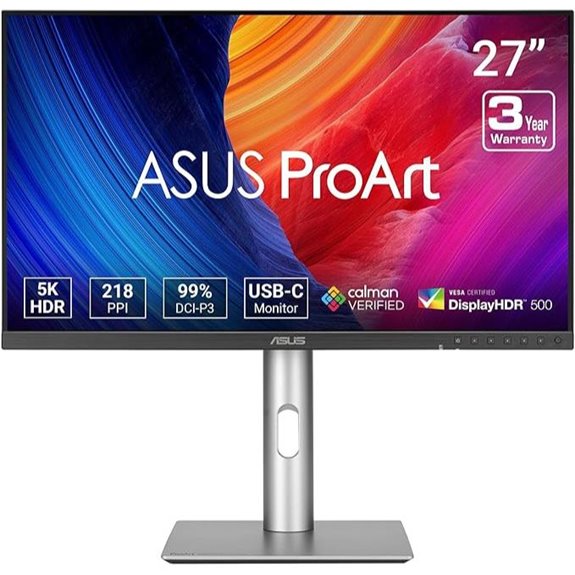 | Professional Grade | Screen Size: 27 inches | Resolution: 5K (5120 x 2880) | Color Gamut: 99% DCI-P3, 100% sRGB | VIEW LATEST PRICE | See Our Full Breakdown |
| KTC 27″ 5K Monitor with Type-C HDR IPS Panel | 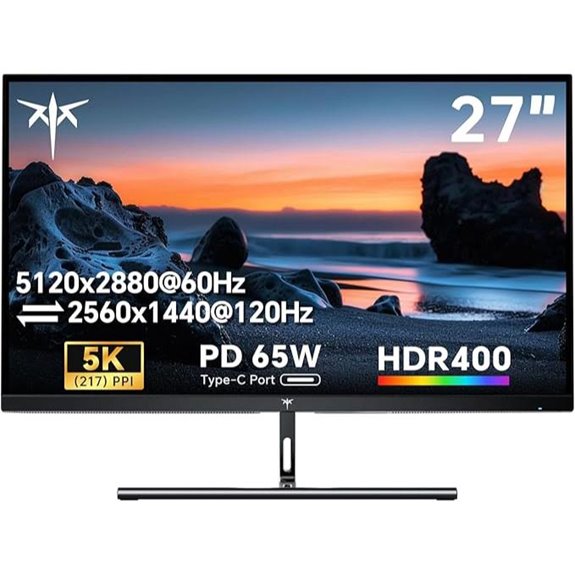 | Versatile Creatives | Screen Size: 27 inches | Resolution: 5K (5120 x 2880) | Color Gamut: 135% sRGB, 99% DCI-P3 | VIEW LATEST PRICE | See Our Full Breakdown |
| ViewSonic VP2788-5K 27″ 5K Monitor with Thunderbolt 4 |  | Industry-Leading Color | Screen Size: 27 inches | Resolution: 5K (5120 x 2880) | Color Gamut: 100% sRGB, 99% DCI-P3 | VIEW LATEST PRICE | See Our Full Breakdown |
| BenQ 27″ 5K Monitor with Thunderbolt & KVM | 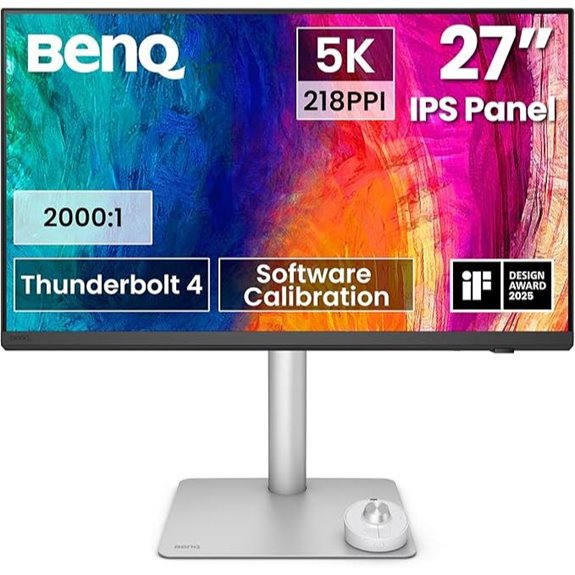 | Workflow Powerhouse | Screen Size: 27 inches | Resolution: 5K (5120 x 2880) | Color Gamut: 98% P3 | VIEW LATEST PRICE | See Our Full Breakdown |
| KTC 27″ 5K Monitor with Dual Mode and HDR |  | Dual-Mode Flexibility | Screen Size: 27 inches | Resolution: 5K (5120 x 2880) | Color Gamut: 99% DCI-P3, 100% sRGB | VIEW LATEST PRICE | See Our Full Breakdown |
| Samsung 27″ ViewFinity S9 5K Monitor with Thunderbolt |  | Premium Connectivity | Screen Size: 27 inches | Resolution: 5K (5120 x 2880) | Color Gamut: 99% DCI-P3, 100% sRGB | VIEW LATEST PRICE | See Our Full Breakdown |
| LG 27MD5KL-B Ultrafine 27-inch IPS LCD 5K UHD Monitor (Renewed) |  | Apple-Friendly | Screen Size: 27 inches | Resolution: 5K (5120 x 2880) | Color Gamut: 99% DCI-P3, 100% sRGB | VIEW LATEST PRICE | See Our Full Breakdown |

More Details on Our Top Picks
-

KTC 27 Inch 5K Monitor, 5120 x 2880 5K2K Monitor with 65W Type-C Port, Dual Mode Computer Monitors Compatible with Mac mini, IPS Panel, HDR 400, 217 PPI, 135% sRGB, HDMI DisplayPort, Tilt, H27P3
Premium 27" 5K Monitor: Experience 5120x2880 clarity with 217 PPI on this ktc 27 inch IPS Mac mini-compatible...
As an affiliate, we earn on qualifying purchases.
ASUS ProArt 27” 5K HDR Professional Monitor
If you’re a creative professional who demands top-tier color accuracy and stunning visuals, the ASUS ProArt 27” 5K HDR Professional Monitor is an excellent choice. Its 27-inch 5K display delivers crisp, detailed images with a wide 178° IPS panel for consistent viewing from all angles. With 99% DCI-P3 and 100% sRGB coverage, plus factory calibration and a Delta E < 2, color precision is guaranteed. HDR support ensures vibrant, lifelike imagery. Features like ambient light sensors keep brightness and color temperature accurate. Plus, USB-C with 96W Power Delivery simplifies connectivity and charging, making it a versatile, reliable tool for any professional workspace.
- Screen Size:27 inches
- Resolution:5K (5120 x 2880)
- Color Gamut:99% DCI-P3, 100% sRGB
- Connectivity Options:USB-C, Thunderbolt 4, HDMI, DisplayPort
- Power Delivery:96W
- Additional Features:Factory calibration, HDR support, LuxPixel, warranty
- Additional Feature:Factory pre-calibrated, Calman Verified
- Additional Feature:Ambient light sensors included
- Additional Feature:LuxPixel technology enhances colors
-

ViewSonic VP2788-5K 27" 5K Mac-Ready Monitor with 100% sRGB, 99% DCI-P3, Pantone Validated, Advanced Ergonomics, Thunderbolt 4, USB Hub, HDMI, and DP for Home and Office
PREMIUM MONITOR: 27 Inch 5K (5120x2880p) IPS Mac-ready monitor with 75Hz refresh rate
As an affiliate, we earn on qualifying purchases.
KTC 27″ 5K Monitor with Type-C HDR IPS Panel
Looking for a monitor that combines stunning visuals with versatile connectivity? The KTC 27″ 5K Monitor delivers with its crisp 5120×2880 IPS display, offering ultra-sharp details at 217 PPI. HDR 400 boosts contrast and color vibrancy, while its 135% sRGB coverage guarantees accurate, vivid images. Supporting both 5K at 60Hz and 2K at 120Hz modes, it adapts perfectly to work or play. Equipped with a full-function 65W Type-C port, DisplayPort, and HDMI, it’s compatible with Macs, laptops, and gaming consoles. The tilt stand, eye-care tech, and VESA mount make it ergonomic and flexible for any setup.
- Screen Size:27 inches
- Resolution:5K (5120 x 2880)
- Color Gamut:135% sRGB, 99% DCI-P3
- Connectivity Options:USB-C, HDMI, DisplayPort
- Power Delivery:65W
- Additional Features:HDR400, tilt, eye-care, 3-year support
- Additional Feature:Supports dual modes (5K/2K)
- Additional Feature:Tilt adjustable stand
- Additional Feature:HDR 400 for contrast
-

BenQ PD2730S 27" 5K 218 PPI Mac Monitor, 90W Thunderbolt 4, 98% P3, Uniformity, 2000:1 Contrast, Nano Matte Panel, Daisy Chain, KVM, Height Adjustable, for 3D Artists, VFX Animators, Game Designers
RETINA-LIKE 5K RESOLUTION: Experience 5120x2880 clarity with 218 PPI, delivering ultra-sharp details and smooth gradients. View details with...
As an affiliate, we earn on qualifying purchases.
ViewSonic VP2788-5K 27″ 5K Monitor with Thunderbolt 4
The ViewSonic VP2788-5K stands out as an excellent choice for creative professionals and designers who demand precise color accuracy and sharp detail. Its 27-inch 5K IPS display delivers 5120×2880 resolution, ensuring stunning clarity and vibrant visuals. With HDR400 support and 100% sRGB coverage, it offers deep contrast and accurate color reproduction, validated by Pantone. The Thunderbolt 4 port provides blazing data transfer speeds up to 40 Gbps and supports daisy chaining for dual 5K setups. Its sleek, frameless design combined with ergonomic adjustments makes it perfect for both home and office workflows, elevating your workspace effortlessly.
- Screen Size:27 inches
- Resolution:5K (5120 x 2880)
- Color Gamut:100% sRGB, 99% DCI-P3
- Connectivity Options:Thunderbolt 4, USB-C, HDMI, DisplayPort
- Power Delivery:Up to 100W
- Additional Features:Thunderbolt 4, VESA, ergonomic stand
- Additional Feature:Pantone Validated accuracy
- Additional Feature:Thunderbolt 4 daisy chaining
- Additional Feature:75Hz refresh rate
BenQ 27″ 5K Monitor with Thunderbolt & KVM
For professionals seeking a seamless, high-performance workspace, the BenQ 27″ 5K Monitor with Thunderbolt and KVM stands out as an ideal choice. Its 5120×2880 resolution and 77.8% more pixels than 4K provide ultra-sharp details and ample workspace. With 98% P3 color gamut and a 2000:1 contrast ratio, it delivers vibrant, accurate colors and deep blacks, perfect for creative work. The Thunderbolt 4 port offers fast data transfer, 90W power delivery, and connection to multiple displays. Plus, the built-in KVM switch and ergonomic features, like height adjustment, make it a versatile, eye-friendly monitor for demanding workflows.
- Screen Size:27 inches
- Resolution:5K (5120 x 2880)
- Color Gamut:98% P3
- Connectivity Options:Thunderbolt 4, USB-C, HDMI, DisplayPort
- Power Delivery:Up to 90W
- Additional Features:KVM, reflection-free, Hotkey Puck
- Additional Feature:Nano matte panel reduces glare
- Additional Feature:Built-in KVM switch
- Additional Feature:Wireless Hotkey Puck
KTC 27″ 5K Monitor with Dual Mode and HDR
If you need a versatile monitor that adapts to both creative work and gaming, the KTC 27″ 5K Monitor with Dual Mode and HDR is an excellent choice. It supports 5K@60Hz for detailed visuals, perfect for professional editing, and switches to 2K@120Hz for smooth gaming and multitasking. With 99% DCI-P3 and 100% sRGB coverage, colors are vivid and accurate, while HDR400 enhances clarity in various lighting conditions. It features USB-C with 65W fast charging, multiple connectivity options, and eye care technologies like Flicker-Free and Low Blue Light. This monitor combines high performance with user comfort and seamless Mac Mini compatibility.
- Screen Size:27 inches
- Resolution:5K (5120 x 2880)
- Color Gamut:99% DCI-P3, 100% sRGB
- Connectivity Options:USB-C, HDMI, DisplayPort
- Power Delivery:65W PD
- Additional Features:Dual modes, HDR400, eye care
- Additional Feature:2K@120Hz gaming mode
- Additional Feature:Hardware Low Blue Light
- Additional Feature:65W Power Delivery
Samsung 27″ ViewFinity S9 5K Monitor with Thunderbolt
Designed for professionals who demand exceptional color accuracy and seamless connectivity, the Samsung 27″ ViewFinity S9 5K Monitor with Thunderbolt stands out as an ideal choice. Its 5K resolution delivers sharp, detailed visuals with 218 PPI, while the 99% DCI-P3 color gamut guarantees vibrant, true-to-life colors. Factory calibration guarantees high color accuracy, and the matte display minimizes reflections. Smart Calibration via smartphone allows easy customization of color spaces, temperature, luminance, and gamma. With a sleek design, adjustable stand, built-in 4K camera, and Thunderbolt 4 ports, it offers both versatility and high performance for creative professionals and multitaskers alike.
- Screen Size:27 inches
- Resolution:5K (5120 x 2880)
- Color Gamut:99% DCI-P3, 100% sRGB
- Connectivity Options:Thunderbolt 4, DisplayPort, USB-C
- Power Delivery:Up to 94W
- Additional Features:Smart Calibration, built-in camera, Smart TV features
- Additional Feature:Smart Calibration via smartphone
- Additional Feature:Built-in 4K SlimFit camera
- Additional Feature:Smart TV Apps included
LG 27MD5KL-B Ultrafine 27-inch IPS LCD 5K UHD Monitor (Renewed)
Looking to upgrade your workspace with a monitor that combines stunning image quality and seamless connectivity? The LG 27MD5KL-B Ultrafine offers a 27-inch IPS LCD display with 5K UHD resolution, delivering crisp, vibrant visuals thanks to its 99% DCI-P3 color gamut. Its brightness of 500 nits ensures bright images even in well-lit environments. Equipped with Thunderbolt 3 and three USB-C ports, it handles multiple devices effortlessly, while supporting up to 94W power delivery. The built-in camera and speakers make video calls simple, and its compatibility with Mac OS adds versatility. As a renewed product, it offers premium quality at a more accessible price.
- Screen Size:27 inches
- Resolution:5K (5120 x 2880)
- Color Gamut:99% DCI-P3, 100% sRGB
- Connectivity Options:Thunderbolt 3, USB-C, other ports
- Power Delivery:Up to 94W
- Additional Features:Built-in camera, wide viewing angles, RGB wide gamut
- Additional Feature:Integrated camera for video calls
- Additional Feature:94W Thunderbolt 3 port
- Additional Feature:Compatible with Mac OS
Factors to Consider When Choosing a 27-Inch 5K Monitor

When choosing a 27-inch 5K monitor, I focus on display resolution quality, color accuracy, and connectivity options to guarantee I get sharp visuals and versatile connections. I also consider ergonomic adjustments and built-in features for comfort and productivity during long work sessions. Understanding these factors helps me select a monitor that truly meets my needs.
Display Resolution Quality
Choosing a 27-inch 5K monitor means paying close attention to its resolution quality, as this directly affects how sharp and detailed your visuals will be. A true 5K resolution of 5120 x 2880 pixels guarantees you get ultra-sharp images and plenty of workspace. The high pixel density, around 217 PPI, allows for finer image rendering and greater detail, which is essential for professional tasks like photo editing or design work. It’s also important to verify that the monitor genuinely supports 5K resolution to avoid compromises in clarity. A high-quality resolution not only boosts visual clarity but also improves the monitor’s ability to display high-resolution content smoothly. When selecting, prioritize true 5K resolution for maximum detail and workspace efficiency.
Color Accuracy & Gamut
Color accuracy and gamut are key factors that determine how faithfully a 27-inch 5K monitor can reproduce images. A wide color gamut, such as 99% DCI-P3 or 100% sRGB, allows the monitor to display a broader spectrum of colors, resulting in more vibrant and true-to-life images. Factory calibration and tools like Delta E < 2 ensure that colors are precise right out of the box, which is vital for professional work like color grading or design. High color coverage percentages indicate the monitor’s ability to accurately reproduce specific color spaces. Additionally, features like Pantone validation and advanced calibration options help maintain consistent, industry-standard color performance. These qualities give creative professionals confidence in their work and streamline their workflow.
Connectivity Options
Selecting the right connectivity options is essential to guarantee your 27-inch 5K monitor integrates seamlessly with your existing devices. I look for monitors with multiple ports like USB-C, Thunderbolt, HDMI, and DisplayPort, ensuring compatibility with a variety of setups. Power delivery via USB-C or Thunderbolt is a bonus, reducing clutter by eliminating extra power adapters. I also verify support for high-speed data transfer rates, such as 40 Gbps Thunderbolt 4 or USB 3.1/3.2, to handle large files efficiently. Daisy chaining capability is another feature I consider, allowing me to connect multiple monitors through a single port. Finally, I check that connectivity ports are easily accessible and positioned conveniently for ergonomic use, making setup and daily use smoother.
Ergonomic Adjustments
When setting up a 27-inch 5K monitor, ergonomic adjustments play a vital role in creating a comfortable workspace. Features like adjustable height, tilt, swivel, and pivot allow me to customize my viewing angles, reducing strain and promoting proper posture. Proper ergonomic setup helps prevent neck and eye fatigue during long work sessions, which is essential for maintaining focus and health. Monitors with multiple ergonomic options support a healthier workspace and can boost productivity by allowing quick, easy adjustments. Additionally, look for VESA compatibility, as it offers more mounting flexibility and personalized positioning. Prioritizing ergonomic adjustments ensures I stay comfortable during extended use, avoiding musculoskeletal issues and making my workspace more efficient and sustainable over time.
Built-in Features
Built-in features can substantially enhance a 27-inch 5K monitor’s functionality, making it a more versatile centerpiece for your workspace. Integrated cameras, like 4K or HD models, allow seamless video conferencing without extra equipment, boosting productivity. Built-in speakers help reduce desk clutter by providing direct audio output, simplifying setup. Advanced ergonomics—including height adjustment, tilt, swivel, and pivot—ensure comfort during long hours of work. Smart features such as wireless mirroring, streaming apps, and calibration tools can optimize your workflow and multimedia experience. These integrated capabilities eliminate the need for multiple devices, streamline your setup, and create a more efficient, user-friendly environment. When selecting a monitor, consider these built-in features to ensure it complements your specific needs and enhances overall productivity.
Price & Warranty
Price and warranty are key factors that can substantially impact your overall investment in a 27-inch 5K monitor. Higher-priced models often come with extensive warranties, like three years of coverage, which offers peace of mind for professional use and reduces long-term costs. Budget-friendly options may have shorter warranties or limited coverage, potentially leading to higher replacement expenses down the line. Premium monitors with all-encompassing warranties typically cover defects, calibration issues, and hardware failures, ensuring consistent performance. Some models even include extra benefits like free repairs or replacements for accidental damage, adding value. When choosing a monitor, considering the warranty and support services is essential, as these factors influence both the device’s reliability and your overall cost-effectiveness.
Frequently Asked Questions
What Are the Key Differences Between 5K and 4K Monitors?
The key difference between 5K and 4K monitors is resolution. I find that 5K offers nearly double the pixel count, resulting in sharper images and more detailed visuals, especially helpful for editing or design work. While 4K is great for most tasks, 5K provides crisper text and finer details, making it ideal for professional creatives who need precision. However, 5K monitors tend to be more expensive and require more powerful hardware.
How Does Color Accuracy Impact Professional Creative Work?
Color accuracy is vital in my creative work because it guarantees my designs and photos look consistent and true to life across different devices. When colors are precise, I can trust that my clients see exactly what I envisioned. It also helps me make better decisions about hues and shades, saving time on corrections. Overall, high color accuracy boosts my confidence and the quality of my professional projects.
What Connectivity Options Are Essential for 5K Monitors?
Ever wondered what makes a 5K monitor truly versatile? I believe essential connectivity options include Thunderbolt 3 or 4, USB-C, and HDMI, so you can connect seamlessly to various devices. These options guarantee fast data transfer, charging capabilities, and compatibility with your workspace. Isn’t it frustrating when your monitor lacks the right ports? That’s why I always look for multiple, modern connectivity choices to keep my workflow smooth and flexible.
Are There Specific Hardware Requirements for 5K Display Performance?
Yes, there are specific hardware requirements for 5K display performance. You’ll need a powerful graphics card that supports DisplayPort 1.4 or Thunderbolt 3/4 to handle the high resolution smoothly. Your CPU should be capable of managing large data throughput, and ample RAM is essential for multitasking without lag. Additionally, guarantee your system’s ports match the monitor’s input options to avoid compatibility issues and attain peak performance.
How Do Refresh Rates Affect 5K Monitor Usability?
Refresh rates markedly impact 5K monitor usability, especially for fast-paced tasks like gaming or video editing. Higher refresh rates, like 60Hz or above, make motion smoother and reduce blur, enhancing your experience. For professional work, a standard 60Hz is usually enough, but if you’re into gaming or real-time editing, opting for 120Hz or higher can make a noticeable difference. I recommend matching your refresh rate to your primary activities.
Conclusion
Choosing the right 27-inch 5K monitor can truly transform your workspace. Imagine editing high-resolution photos seamlessly, just like a photographer I know who upgraded to the ASUS ProArt—her workflow became smoother and more enjoyable. Whether you’re a creative professional or someone who demands crystal-clear visuals, these monitors offer incredible clarity and features. Trust me, investing in one of these will elevate your productivity and make your daily tasks feel more effortless and inspiring.