A 10GbE PoE switch can connect high-bandwidth devices while delivering power over Ethernet, but models differ in port speeds, PoE capacity, and management tools. My best overall pick is the Ubiquiti USW-Pro-XG-8-PoE for buyers seeking a feature-rich 10GbE PoE++ setup. The TRENDnet TPE-7124SBF stands out for its larger port count and web-smart controls, while the YuanLey 8-Port model suits buyers who want a simpler unmanaged design. The main tradeoffs are whether you need 10GbE at every device port, higher-power PoE++, or more affordable mixed-speed ports and uplinks. Read on for the full breakdown and guidance on matching a switch to your devices.

Get privacy and security gear delivered free with Prime
- Fast, free delivery on millions of items
- Prime Video, Amazon Music and more included
- Member-only deals all year
Key Takeaways
- The Ubiquiti USW-Pro-XG-8-PoE is the most feature-rich fit among these picks for buyers combining 10GbE connections with PoE++ and managed network controls.
- The TRENDnet TPE-7124SBF prioritizes port count with 12 ports and web-smart management, making it a different choice from the eight-port Ubiquiti and YuanLey models.
- Unmanaged designs trade control for simplicity: Binardat and YuanLey are aimed at buyers who want straightforward connectivity without web-based configuration.
- Mixed-speed models are not full 10GbE access switches: GigaPlus combines four 2.5Gb PoE ports with two 10Gb RJ45 ports, while NICGIGA pairs 2.5Gb PoE+ ports with 10G SFP+ uplinks.
- The MokerLink‘s 10G SFP+ ports change the cabling decision: buyers should check whether their network uses fiber or compatible direct-attach cables before choosing it over RJ45-focused options.
| Binardat 14-Port 10G PoE Unmanaged Ethernet Switch |  | Best for Mixed-Speed Expansion | Ethernet ports: 8 x 2.5GbE PoE; 2 x 10GbE RJ45 | SFP+ slots: 4 x 10G; supports 1G/10G modules | PoE standard: IEEE 802.3af/at | VIEW ON AMAZON | See Our Full Breakdown |
| TRENDnet 12-Port 10G PoE++ Web Smart Switch (TPE-7124SBF) | 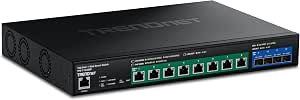 | Best for High-Power Managed Networks | Ports: 8 x 10G PoE++; 4 x 10G SFP+ | PoE power budget: 720W | Maximum PoE++ output: Up to 90W per port | VIEW ON AMAZON | See Our Full Breakdown |
| YuanLey 8-Port 10G Unmanaged PoE Network Switch |  | Best for Simple All-Copper 10G | Ports: 8 x RJ45 PoE | Port speeds: 100Mbps, 1Gbps, 2.5Gbps, 5Gbps, 10Gbps | PoE standard: IEEE 802.3af/at | VIEW ON AMAZON | See Our Full Breakdown |
| Ubiquiti USW-Pro-XG-8-PoE 8-Port 10GbE PoE++ Network Switch |  | Best Compact Layer 3 Pick | Model: USW-Pro-XG-8-PoE | Ports: 8 x 10GbE RJ45 PoE++; 2 x 10G SFP+ | PoE budget: 155W | VIEW ON AMAZON | See Our Full Breakdown |
| GigaPlus 6-Port Unmanaged PoE Ethernet Switch with 4 × 2.5G PoE Ports and 2 × 10G RJ45 Ports |  | Best Compact Fanless Pick | Number of ports: 6 | PoE ports: 4 x 100/1000/2500Mbps RJ45 | Uplink ports: 2 x 10G RJ45 | VIEW ON AMAZON | See Our Full Breakdown |
| MokerLink 8-Port 10Gb Managed PoE Switch with 10G SFP+ |  | Best for Managed 10Gb PoE | Ports: 7 x 10Gb RJ45 PoE++ and 1 x 10Gb SFP+ | Ethernet speeds: 10G/5G/2.5G/1G/100Mbps auto-negotiation | PoE standards: IEEE 802.3af/at/bt | VIEW ON AMAZON | See Our Full Breakdown |
| NICGIGA 10-Port 2.5Gb PoE+ Unmanaged Switch with 10G SFP+ Uplinks |  | Best Fanless 2.5Gb PoE+ Uplinks | Ports: 8 x 2.5GbE PoE+ RJ45 and 2 x 10Gb SFP+ | PoE standards: IEEE 802.3af/at | Maximum PoE per port: 30W | VIEW ON AMAZON | See Our Full Breakdown |
| 10gbe poe switch | Management | Ports | Total PoE power | Mounting |
|---|---|---|---|---|
| Binardat 14-Port 10G PoE Unman | Unmanaged | — | 120W | — |
| TRENDnet 12-Port 10G PoE++ Web | Web-based GUI | 8 x 10G PoE++; 4 x 10G SFP+ | — | 1U, 19-inch rack mountable |
| YuanLey 8-Port 10G Unmanaged P | Unmanaged | 8 x RJ45 PoE | 110W | Rackmount or wall mount |
| Ubiquiti USW-Pro-XG-8-PoE 8-Po | — | 8 x 10GbE RJ45 PoE++; 2 x 10G SFP+ | — | Desktop or wall mount |
| GigaPlus 6-Port Unmanaged PoE | Unmanaged | — | — | Desktop or wall |
| MokerLink 8-Port 10Gb Managed | Layer 2 web management | 7 x 10Gb RJ45 PoE++ and 1 x 10Gb SFP+ | 260W | — |
| NICGIGA 10-Port 2.5Gb PoE+ Unm | — | 8 x 2.5GbE PoE+ RJ45 and 2 x 10Gb SFP+ | 120W | — |
More Details on Our Top Picks
Binardat 14-Port 10G PoE Unmanaged Ethernet Switch
The Binardat suits a network that needs several kinds of connections in one box: eight 2.5GbE PoE ports for access points or cameras, two 10GbE RJ45 ports, and four 10G SFP+ slots for fiber or compatible modules. That port mix gives it more flexibility for uplinks than the eight-port YuanLey, while its unmanaged design keeps setup simple. The tradeoff is a 120W total PoE budget, which can constrain how many high-draw devices run at once, and the SFP+ modules are sold separately. It also lacks the 10G PoE++ ports and management controls of the TRENDnet TPE-7124SBF. I’d choose Binardat for mixed-speed networks where extra uplink options matter more than configuration or high-power PoE.
Pros:- Combines eight 2.5GbE PoE ports with 10GbE RJ45 and SFP+ connections
- Four SFP+ slots support 1G or 10G modules
- Plug-and-play operation avoids management setup
- Metal case supports desktop or rackmount installation
Cons:- 120W total PoE budget can limit simultaneous high-draw devices
- SFP+ modules are not included
- Does not power 24V passive PoE devices
Best for: Small offices or home labs combining 2.5GbE PoE devices with 10GbE copper and fiber uplinks.
Not ideal for: Installers powering several high-demand PoE++ devices or buyers who need VLANs and traffic controls.
- Ethernet ports:8 x 2.5GbE PoE; 2 x 10GbE RJ45
- SFP+ slots:4 x 10G; supports 1G/10G modules
- PoE standard:IEEE 802.3af/at
- Maximum PoE per port:30W
- Total PoE power:120W
- Backplane bandwidth:160Gbps
- Management:Unmanaged
- Installation:Desktop or rackmount
Our verdict“Choose Binardat when mixed-speed ports and flexible uplinks matter more than managed features or a large PoE budget.”
TRENDnet 12-Port 10G PoE++ Web Smart Switch (TPE-7124SBF)
For a deployment that needs 10G PoE++ on eight ports, the TRENDnet is the most capable fit in this group. Its 720W budget and up to 90W per port give it room for power-hungry devices, while VLANs, link aggregation, QoS, and SNMP add control the unmanaged YuanLey and Binardat cannot provide. Four 10G SFP+ ports also leave dedicated options for fiber links. That capacity comes with a real setup burden: the web interface and network controls suit an administrator more than someone seeking plug-and-play simplicity. Its 12-port layout also has fewer total connections than Binardat’s 14. I’d put it first for managed, high-power 10G deployments, but it is more switch than a small camera or access-point installation may need.
Pros:- Eight 10G PoE++ ports support up to 90W per port
- 720W total PoE budget accommodates multiple high-power devices
- VLAN, link aggregation, QoS, traffic controls, and SNMP provide network control
- Four 10G SFP+ ports and 1U rack mounting suit structured installations
Cons:- Web management requires networking experience to configure effectively
- NDAA and TAA compliance applies only in the U.S. and Canada
Best for: Network administrators powering multiple high-draw 10G access points, cameras, or other PoE++ equipment.
Not ideal for: Home users or small installations seeking a simple unmanaged switch with only a few PoE devices.
- Ports:8 x 10G PoE++; 4 x 10G SFP+
- PoE power budget:720W
- Maximum PoE++ output:Up to 90W per port
- Management:Web-based GUI
- Management features:VLANs, link aggregation, QoS, traffic controls, SNMP
- Mounting:1U, 19-inch rack mountable
- Case material:Metal
- Operating temperature:32°F to 122°F
Our verdict“Pick the TRENDnet for a managed 10G network with substantial PoE++ demands and an administrator available to configure it.”
YuanLey 8-Port 10G Unmanaged PoE Network Switch
The YuanLey keeps the port plan straightforward: eight adaptive PoE RJ45 ports that negotiate from 100Mbps up to 10Gbps. That makes it a better match than the Binardat when every connected device needs copper access and an SFP+ uplink is unnecessary. The unmanaged design also means no VLAN or traffic configuration, so a basic network can come online with little setup. Its 110W PoE budget, however, leaves less room for high-draw devices than the TRENDnet’s 720W, and there are no dedicated fiber slots. Rack or wall mounting adds installation flexibility, though the listed 24dB fan means it isn’t a fanless option like the compact GigaPlus. I’d choose YuanLey for simple multi-gig copper networks where eight PoE ports matter more than management or fiber.
Pros:- Eight RJ45 PoE ports adapt across speeds up to 10Gbps
- Plug-and-play unmanaged operation keeps setup simple
- Metal case supports rackmount or wall mounting
- 160Gbps switching capacity
Cons:- 110W total PoE budget may restrict simultaneous high-power loads
- No SFP+ ports for direct fiber uplinks
- Unmanaged operation provides no VLAN or traffic controls
Best for: Small businesses or home labs connecting up to eight copper devices at mixed multi-gig speeds.
Not ideal for: Buyers who need fiber uplinks, VLAN management, or enough PoE capacity for many high-power devices.
- Ports:8 x RJ45 PoE
- Port speeds:100Mbps, 1Gbps, 2.5Gbps, 5Gbps, 10Gbps
- PoE standard:IEEE 802.3af/at
- Total PoE power:110W
- Maximum power per port:30W
- Switching capacity:160Gbps
- Management:Unmanaged
- Mounting:Rackmount or wall mount
- Cooling fan noise:24dB
Our verdict“Choose YuanLey for a simple eight-device copper network that needs multi-gig speeds without management setup.”
Ubiquiti USW-Pro-XG-8-PoE 8-Port 10GbE PoE++ Network Switch
The Ubiquiti brings 10GbE and PoE++ to all eight RJ45 ports in a desktop or wall-mount form, with two 10G SFP+ ports for uplinks. Its Layer 3 management gives it a more advanced role than the unmanaged YuanLey, while the compact mounting options suit spaces without a rack. The 155W PoE budget supports a modest powered-device load, but it falls far short of the TRENDnet’s 720W when many high-wattage devices are involved. Two SFP+ ports also give less fiber expansion than Binardat’s four slots. The feature set makes most sense for a managed network that values compact installation and 10G copper access across every edge port. Buyers who need extensive fiber connections or a large PoE reserve should look elsewhere.
Pros:- All eight RJ45 ports provide 10GbE with PoE++
- Layer 3 managed features support advanced network setups
- Two 10G SFP+ ports provide dedicated uplinks
- Desktop or wall mounting fits compact installations
Cons:- 155W PoE budget is modest beside the TRENDnet’s 720W
- Two SFP+ ports offer less fiber expansion than Binardat
- Layer 3 features may be unnecessary for buyers seeking simple plug-and-play operation
Best for: Ubiquiti network owners needing compact Layer 3 switching and 10G PoE++ for a limited number of devices.
Not ideal for: Sites powering many high-draw devices or expanding through several fiber uplinks.
- Model:USW-Pro-XG-8-PoE
- Ports:8 x 10GbE RJ45 PoE++; 2 x 10G SFP+
- PoE budget:155W
- Switch layer:Layer 3
- Data transfer rate:10Gbps
- Interfaces:RJ45, SFP+, PoE++
- Mounting:Desktop or wall mount
Our verdict“Choose the Ubiquiti for a compact managed network with eight 10G PoE++ access ports and moderate power needs.”
GigaPlus 6-Port Unmanaged PoE Ethernet Switch with 4 × 2.5G PoE Ports and 2 × 10G RJ45 Ports
The GigaPlus is the smallest, simplest fit here for a few powered devices and a fast copper uplink. Four 2.5G PoE ports cover access points or cameras, while two 10G RJ45 ports connect to a faster backbone without requiring SFP+ modules. Compared with the 14-port Binardat, it gives up port count and fiber options; against the YuanLey, it has fewer PoE ports and no 10G on every edge connection. Its strengths are a fanless metal case for quiet placement and desktop or wall mounting. The supplied data does not state a PoE power budget, so buyers should check device draw and compatibility before planning a powered deployment. This is for compact copper setups, not growing installations that need more PoE connections.
Pros:- Four 2.5GbE PoE ports pair with two 10G RJ45 uplinks
- Fanless cooling suits quiet workspaces
- Plug-and-play unmanaged setup
- Metal case supports desktop or wall placement
Cons:- Only four ports supply PoE
- Unmanaged design provides no configuration options
- Product data does not state a total PoE budget
Best for: Home offices or small rooms needing quiet 2.5GbE PoE for a few devices and 10G copper uplinks.
Not ideal for: Installers who need more than four PoE ports, managed controls, or a stated power budget for planning.
- Number of ports:6
- PoE ports:4 x 100/1000/2500Mbps RJ45
- Uplink ports:2 x 10G RJ45
- Switching capacity:60Gbps
- Management:Unmanaged
- Cooling:Fanless
- Mounting:Desktop or wall
- Warranty:1 year
Our verdict“Choose GigaPlus for a quiet, compact setup with four 2.5GbE PoE devices and 10G copper uplinks.”
MokerLink 8-Port 10Gb Managed PoE Switch with 10G SFP+
The MokerLink suits networks that need 10GbE and PoE++ across multiple copper ports, with Layer 2 controls to organize traffic. Seven 10Gb RJ45 ports can power compatible devices at up to 90W per port, while the 10Gb SFP+ port gives a fiber or module-based link option. Its 260W total PoE budget and 160Gbps switching capacity make it a stronger fit for a dense, configurable setup than the unmanaged YuanLey 8-Port 10G Unmanaged PoE Network Switch. QoS, VLAN, ACL, LACP, and SNMP add useful network controls, but they also mean more setup than a plug-and-play model. The tradeoffs are the single SFP+ slot, a smart fan, and no passive 24V PoE support; the SFP+ module is also sold separately.
Pros:- Seven 10Gb RJ45 ports support PoE++
- Up to 260W total PoE power, with up to 90W per port
- Layer 2 tools include VLAN, QoS, ACL, LACP, and SNMP
- 10Gb SFP+ port supports a fiber or module-based connection
Cons:- Smart fan may be audible in quiet rooms
- SFP+ module is not included
- Does not support passive 24V PoE
Best for: Small offices and advanced home networks powering several 10GbE PoE++ devices that need VLAN, QoS, or link aggregation controls.
Not ideal for: Buyers who want silent operation, passive 24V PoE, or a simple unmanaged switch with no configuration work.
- Ports:7 x 10Gb RJ45 PoE++ and 1 x 10Gb SFP+
- Ethernet speeds:10G/5G/2.5G/1G/100Mbps auto-negotiation
- PoE standards:IEEE 802.3af/at/bt
- Maximum PoE per port:90W
- Total PoE power:260W
- Switching capacity:160Gbps
- Management:Layer 2 web management
- Cooling and case:Smart fan; metal case
Our verdict“Choose the MokerLink if you need managed 10Gb copper ports and PoE++ power; skip it if you want a silent, hands-off switch.”
NICGIGA 10-Port 2.5Gb PoE+ Unmanaged Switch with 10G SFP+ Uplinks
The NICGIGA is for buyers whose powered devices need 2.5GbE rather than 10GbE, but whose network still needs fast 10Gb SFP+ uplinks. Eight PoE+ ports can connect access points, cameras, or other compatible equipment, while two SFP+ ports provide more uplink capacity than the MokerLink’s single SFP+ port. Its fanless metal design and plug-and-play setup suit a quiet room or a straightforward deployment where VLANs and traffic rules are unnecessary. The tradeoff is limited flexibility: it is unmanaged, offers up to 30W per PoE port, and its stated 120W budget constrains how many high-draw devices it can power together. Unlike the 10GbE models in this roundup, its RJ45 ports top out at 2.5GbE.
Pros:- Eight 2.5GbE RJ45 ports support PoE+
- Two 10Gb SFP+ uplinks
- Fanless metal case supports quiet placement
- Unmanaged plug-and-play setup
Cons:- RJ45 ports do not provide 10GbE speeds
- No software configuration or Layer 2 management
- 120W total PoE budget and 30W per-port limit restrict high-power deployments
Best for: Home network owners or small offices connecting several 2.5GbE access points or cameras and needing two 10Gb SFP+ uplinks.
Not ideal for: Buyers who need 10GbE speeds on copper ports, managed network controls, or PoE++ power for high-draw devices.
- Ports:8 x 2.5GbE PoE+ RJ45 and 2 x 10Gb SFP+
- PoE standards:IEEE 802.3af/at
- Maximum PoE per port:30W
- Total PoE power:120W
- Switch type:Unmanaged
- Cooling and case:Fanless; metal case
- Operating temperature:-10°C to 50°C
- Warranty:1 year
Our verdict“Pick the NICGIGA for quiet, simple 2.5GbE PoE+ access with two 10Gb SFP+ uplinks, but choose a 10GbE RJ45 model if copper speed is the priority.”

How We Picked
I ranked these switches around the needs implied by 10GbE and PoE together: which ports actually run at 10GbE, what power delivery the product description identifies, how many devices can connect, and whether configuration tools are available. I gave weight to the difference between 10GbE access ports and 10Gb uplinks, since those serve different network layouts. I also considered whether the design is managed, web-smart, or unmanaged, and how that affects setup and ongoing control.
The order reflects fit across those factors rather than a single specification. The Ubiquiti leads for its combination of 10GbE, PoE++, and network management; TRENDnet follows for buyers prioritizing more ports and web-smart controls. Simpler unmanaged switches rank as accessible options, while mixed-speed models and SFP+ designs suit narrower needs. Exact PoE budgets, port-by-port speeds, and feature support can vary by configuration, so buyers should confirm the manufacturer’s specifications for their intended devices.
| 10gbe poe switch | Management |
|---|---|
| Binardat 14-Port 10G PoE Unman | Unmanaged |
| TRENDnet 12-Port 10G PoE++ Web | Web-based GUI |
| YuanLey 8-Port 10G Unmanaged P | Unmanaged |
| Ubiquiti USW-Pro-XG-8-PoE 8-Po | — |
| GigaPlus 6-Port Unmanaged PoE | Unmanaged |
| MokerLink 8-Port 10Gb Managed | Layer 2 web management |
| NICGIGA 10-Port 2.5Gb PoE+ Unm | — |
Factors to Consider When Choosing 10gbe Poe Switch
Before choosing a model, map the switch to the devices and cabling you already have. Port labels can hide major differences: a switch with 10G uplinks may still have slower ports for end devices, and PoE support does not by itself tell you how many devices can be powered at once.
Check which ports provide 10GbE
Count the devices that need a 10GbE connection, then check the speed of each relevant switch port. Some compact switches pair slower PoE access ports with 10G uplinks, which can connect the switch to a fast router or core switch without giving every attached device 10GbE. That arrangement can work well when cameras, access points, or other endpoints do not need 10GbE. A common mistake is treating “10G” in a product name as a promise that every port runs at that speed. Match the port map to your actual wiring plan before comparing models.
Size PoE power for the whole deployment
Check both the PoE standard required by each device and the switch’s total power budget. A PoE++ label describes a capability, but it does not tell you how much power remains when several ports are active at once. Add the expected draw of your cameras, wireless access points, or other powered equipment, allowing room for startup demands and future additions. If the switch cannot cover the combined load, devices may not operate as intended even when each individual port supports the right standard. Compare the manufacturer’s power budget with device requirements rather than relying on the PoE label alone.
Choose RJ45, SFP+, or a mix based on your cabling
RJ45 ports fit familiar twisted-pair Ethernet cabling, while SFP+ ports are designed for compatible fiber or direct-attach connections. The right choice depends on the equipment at the other end, cable distance, and whether you already have transceivers or cables. SFP+ uplinks can suit a switch-to-switch or switch-to-server link, but they are not interchangeable with an RJ45 port without compatible hardware. Mixed-speed switches can also be useful when only the backbone needs 10GbE. Confirm compatibility at both ends to avoid buying a switch that requires extra components you did not plan for.
Decide whether you need network management
An unmanaged switch keeps setup simple, which can be a good fit for a small network with no need to adjust traffic or segment devices. Web-smart and managed models can offer more control, but those tools matter only if you plan to configure and maintain them. Features such as VLANs or traffic prioritization may help separate devices or manage busy links, depending on the model’s actual support. Do not assume that “web smart” means every advanced management feature is available. Check the feature list against a specific task you want to handle.
Plan for heat, noise, and placement
Higher-speed switching and PoE power delivery can make placement a practical concern, especially in a quiet room or a confined cabinet. Check the manufacturer’s information on cooling, operating conditions, and mounting before selecting a location. A fan-cooled unit may be a poor fit beside a desk even when its port mix is ideal. Also leave room for cable bends and ventilation, and consider how you will reach the switch for resets or maintenance. A suitable installation spot can matter as much as the feature list for a small office or home network.
Frequently Asked Questions
Do I need 10GbE on every PoE port?
No. Devices such as many cameras and access points may not need a 10GbE link, so slower PoE ports paired with 10G uplinks can be a sensible layout. The important distinction is whether the 10G ports connect your endpoints or only carry traffic between switches and routers. If you have several workstations, servers, or storage devices that need 10GbE directly, look for enough 10GbE access ports. Check each port’s listed speed rather than relying on the switch’s headline name.
Can I power several PoE++ devices at once?
That depends on the switch’s total PoE power budget as well as the power requirement of each connected device. A port may support PoE++ while the switch still lacks enough total capacity to supply every port at its maximum. Add the expected draw for all devices and compare it with the manufacturer’s stated budget. Leave capacity for devices you may add later or for equipment with higher startup demand. If the specifications do not make the budget clear, seek the exact model’s documentation before buying.
Are 10G SFP+ ports compatible with my existing Ethernet cables?
Not directly in every setup. SFP+ ports need compatible modules or direct-attach cables, and the suitable choice depends on the equipment at both ends and the link distance. An RJ45 Ethernet cable does not plug into a standard SFP+ cage without an appropriate module, which may have its own compatibility and heat considerations. If your network is already wired with copper Ethernet, an RJ45 10G port may be simpler. Check the switch maker’s compatibility guidance before purchasing transceivers or cables.
When is a managed 10GbE PoE switch worth choosing over an unmanaged one?
Choose management features when you have a clear need to configure the network, such as separating device groups or controlling traffic on busy links, and verify that the specific model supports that task. For a small network that only needs devices connected and powered, an unmanaged switch can reduce setup work. Management also brings more settings to maintain, so unused features may add complexity without helping your setup. Web-smart products can sit between the two, but their feature sets vary. Compare the exact functions offered rather than relying on the management label.
Will a 10GbE switch make every device on my network run at 10Gbps?
No. A device’s connection is limited by its own network interface, the switch port it uses, and the cable or transceiver path. A 10G uplink can improve the connection between network segments while endpoints on 2.5Gb or 1Gb ports remain at their respective link speeds. Real data transfer can also depend on the router, server, storage, and workload. Plan around the slowest link in the path to the device you want to speed up. Upgrading only the switch will not give a slower endpoint a 10GbE interface.
Conclusion
For an all-around managed setup with 10GbE and PoE++, I’d choose the Ubiquiti USW-Pro-XG-8-PoE. The TRENDnet TPE-7124SBF is my pick for buyers who need more ports and web-smart controls, while the YuanLey 8-Port is a straightforward option for those who prefer unmanaged operation. For a mixed-speed layout with 10G RJ45 links, consider the GigaPlus; for SFP+ uplinks, compare the MokerLink and NICGIGA against your cabling and endpoint speeds. The best value depends on which ports and features you will actually use, while first-time buyers who want minimal configuration should favor a clearly specified unmanaged model. Before choosing, confirm the port speeds and total PoE budget against your devices.