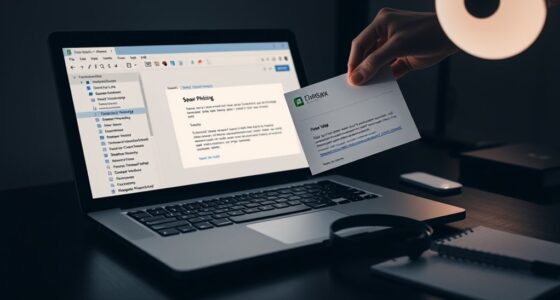
When evaluating MFA providers, focus on their biometric options like fingerprint, facial recognition, and iris scans to enhance security and user convenience. Consider how easily they integrate with your existing systems, supporting protocols like SAML, OAuth, or FIDO. Check if they work across various devices and environments to guarantee deployment flexibility. Also, review their support and update policies. Exploring these criteria further can help you find the most suitable solution for your organization’s needs.
Key Takeaways
- Assess biometric support options, including multi-modal capabilities, for security effectiveness and user flexibility.
- Evaluate integration ease with existing systems via APIs, protocols, and compatibility with legacy infrastructure.
- Consider deployment environment diversity, ensuring the solution functions across devices, platforms, and remote access points.
- Review ongoing support, updates, and vendor responsiveness to maintain security and operational efficiency.
- Balance biometric security benefits with usability factors like speed, accuracy, and minimal user frustration.

Choosing the right multi-factor authentication (MFA) provider is essential for securing your organization’s digital assets. As you evaluate options, it’s important to consider the biometric options each provider offers. Biometrics, such as fingerprint scans, facial recognition, or iris scans, can greatly enhance security because they rely on unique physical traits that are difficult to compromise. However, not all MFA providers support the same biometric methods, so you need to ensure their offerings align with your security needs and user convenience. Some providers may offer multi-modal biometric options, allowing users to choose the most suitable method, while others may be limited to a single biometric type. It’s also crucial to verify the biometric authentication‘s accuracy and speed, as delays or false rejections can frustrate users and hinder productivity.
Assess biometric options carefully to enhance security, usability, and user experience in your MFA deployment.
Beyond biometric options, you must also assess the integration challenges that come with each MFA provider. Seamless integration with your existing infrastructure is fundamental for smooth deployment and ongoing management. Some providers excel at integrating with popular identity providers, cloud services, and enterprise systems, making implementation straightforward. Others might require extensive customization or additional middleware, which can increase deployment time and costs. You should evaluate whether their solutions support APIs and standard protocols like SAML, OAuth, or FIDO, as these facilitate smoother integration with your current applications and security frameworks. Additionally, consider the ease of user enrollment and management; a provider that complicates these processes can lead to user frustration and reduced adoption rates.
Another critical factor is how well the provider handles potential integration challenges related to legacy systems or diverse device environments. For instance, if your organization relies on older hardware or a mix of desktop, mobile, and remote access points, the MFA solution needs to work consistently across all platforms. Some providers might offer dedicated apps or hardware tokens, while others may depend on push notifications or biometric sensors embedded in smartphones. You need to weigh the security benefits of biometric options against the practicalities of deployment in your specific environment. Moreover, incorporating MFA solutions that are compatible with various hardware configurations can streamline implementation and improve user experience.
Finally, don’t overlook the importance of vendor support and ongoing updates. Integration challenges can sometimes surface after initial deployment, so it’s essential to have access to responsive support teams and comprehensive documentation. This ensures you can troubleshoot issues efficiently and adapt your MFA deployment as your organization evolves. In conclusion, when evaluating MFA providers, carefully analyze their biometric options to enhance security and usability, and scrutinize potential integration challenges to guarantee a smooth, effective implementation that aligns with your organizational needs.

Fingerprint Reader Biometric Authentication – DigitalPersona URU4500 USB – Fingerprint Scanner – Original HID Brand
New replacement old Red Logo Digital persona URU4500, HID , USB reader. Original HID Brand
As an affiliate, we earn on qualifying purchases.
As an affiliate, we earn on qualifying purchases.
Frequently Asked Questions
How Often Should MFA Providers Be Reviewed or Updated?
You should review your MFA provider at least annually to make certain it meets your needs. Regular reviews help assess provider scalability, making sure it can grow with your organization. Additionally, evaluate vendor support to confirm timely, effective assistance when issues arise. If your organization experiences significant changes or security challenges, consider more frequent reviews. Staying proactive ensures your MFA solution remains secure, reliable, and aligned with your evolving requirements.
What Are Common Integration Challenges With MFA Solutions?
Imagine trying to fit a key into a lock only to find it’s slightly misaligned—that’s how integration challenges with MFA solutions feel. Biometric challenges like fingerprint or facial recognition inconsistencies, along with compatibility issues across different platforms, often slow down deployment. You might struggle with device restrictions or software conflicts, making seamless authentication tough. These hurdles require careful planning to guarantee your MFA system works smoothly across all user environments.
How Does User Experience Impact MFA Adoption?
User experience greatly impacts MFA adoption because if onboarding feels smooth and intuitive, users are more likely to embrace it. Incorporate accessibility features to accommodate all users, reducing frustration and barriers. When you simplify the onboarding process and guarantee the solution is user-friendly, users gain confidence and trust, leading to higher adoption rates. A seamless experience encourages consistent use and minimizes resistance, making MFA a natural part of their security routine.
Are There Industry-Specific MFA Compliance Requirements?
Imagine you’re implementing MFA for a healthcare organization. Industry standards and compliance frameworks, like HIPAA, require you to safeguard patient data with strict authentication measures. Most industries have specific requirements; financial services follow PCI DSS, while government agencies adhere to FISMA. You must guarantee your MFA solution aligns with these industry-specific compliance mandates to avoid penalties and safeguard sensitive information effectively.
How Do MFA Providers Handle Data Privacy and Security?
You can trust MFA providers to prioritize data privacy and security by adhering to strict encryption standards that protect your information during transmission and storage. They also implement biometric privacy measures, ensuring your biometric data remains secure and private. These providers regularly update security protocols to stay ahead of threats, giving you confidence that your sensitive data, including biometric identifiers, stays protected against unauthorized access or breaches.

Face Beauty Device, 7 Color Multifunctional Facial Massager, Portable Face Massager Tool for Skin Care, Firming, Smoothing, Glossy White
7 Color Led Skin Care: The face massager has 7 colors modes, each color with a different skincare…
As an affiliate, we earn on qualifying purchases.
As an affiliate, we earn on qualifying purchases.
Conclusion
Choosing the right MFA provider is essential for your security and user experience. By considering factors like ease of use, reliability, and support, you make sure your organization stays protected without added hassle. Remember, isn’t it worth investing a little time now to prevent bigger issues later? With the right provider, you’ll strengthen your defenses and keep your data safe. So, are you ready to make the best choice for your security needs?

Yubico – YubiKey 5C NFC – Multi-Factor authentication (MFA) Security Key and passkey, Connect via USB-C or NFC, FIDO Certified – Protect Your Online Accounts
POWERFUL SECURITY KEY: The YubiKey 5C NFC is the most versatile physical passkey, protecting your digital life from…
As an affiliate, we earn on qualifying purchases.
As an affiliate, we earn on qualifying purchases.
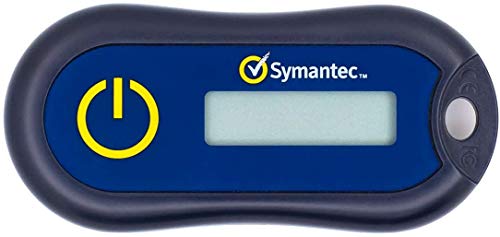
Symantec VIP Hardware Authenticator – OTP One Time Password Display Token – Two Factor Authentication – Time Based TOTP – Key Chain Size
Standard OATH compliant TOTP token (time based)
As an affiliate, we earn on qualifying purchases.
As an affiliate, we earn on qualifying purchases.