Encrypted USB flash drives add protection if a drive is lost, but they differ in how you unlock them, how much storage they offer, and how easily they fit your workflow. I name the Kingston IronKey Vault Privacy 50 128GB my best overall pick for buyers who want a capable balance of capacity and hardware encryption. The Apricorn Aegis Secure Key 3NX stands out for keypad-based access, while the Kingston IronKey Locker+ 50 G2 family offers multiple capacity choices. The main tradeoffs are keypad versus software-based access, small versus large storage, and convenience versus stricter security controls. Read on for the full breakdown and help matching a drive to your devices and risk level.

Get privacy and security gear delivered free with Prime
- Fast, free delivery on millions of items
- Prime Video, Amazon Music and more included
- Member-only deals all year
Key Takeaways
- The Vault Privacy 50 128GB is the most balanced pick in this lineup, pairing a roomy capacity with the IronKey family’s hardware-encryption focus.
- The IronKey Locker+ 50 G2 models mainly differ by capacity; choose among 32GB, 64GB, 128GB, and 256GB based on file volume rather than assuming the largest is automatically the best buy.
- The Aegis Secure Key 3NX and IronKey Keypad 200 offer keypad access, which can suit users who want to unlock a drive without relying on a host computer for password entry.
- The two 8GB options are aimed at modest, sensitive file sets; limited capacity can be a practical constraint for backups, media, or growing work archives.
- Several Kingston choices share a product family but serve different needs: Vault Privacy 50 emphasizes a broader security-oriented feature set, while Locker+ 50 G2 provides more capacity variants.
| Kingston IronKey Vault Privacy 50 128GB Encrypted USB Drive | 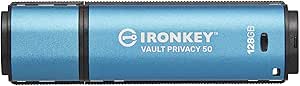 | Best Overall | Storage capacity: 128 GB | Encryption: Hardware-based AES-256 in XTS mode | Certification: FIPS 197 | VIEW LATEST PRICE | See Our Full Breakdown |
| Integral Crypto-197 16GB USB 3.0 Hardware-Encrypted Flash Drive |  | Best for Rugged, Automatic Locking | Storage capacity: 16 GB | Encryption: 256-bit AES hardware encryption | Certification: FIPS 197 | VIEW LATEST PRICE | See Our Full Breakdown |
| Kingston DataTraveler Vault Privacy 8GB USB 3.0 Flash Drive |  | Best for Corporate IT Customization | Storage capacity: 8 GB | Encryption: 256-bit AES hardware-based | Interface: USB 3.0 | VIEW LATEST PRICE | See Our Full Breakdown |
| Kingston IronKey Locker+ 50 G2 32GB Encrypted USB Drive | 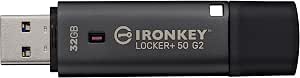 | Best for Shared Access | Storage capacity: 32 GB | Encryption: 256-bit XTS-AES hardware encryption | Certification: FIPS 197 | VIEW LATEST PRICE | See Our Full Breakdown |
| Kingston IronKey Vault Privacy 50 16GB Encrypted USB Drive |  | Best Compact Security Pick | Storage capacity: 16 GB | Encryption: FIPS 197-certified AES-256 hardware encryption in XTS mode | Interface: USB 3.2 Gen 1 | VIEW LATEST PRICE | See Our Full Breakdown |
| Kingston IronKey Locker+ 50 G2 256GB Encrypted USB Drive |  | Best for High-Capacity Secure Storage | Storage: 256 GB | Encryption: 256-bit XTS-AES hardware encryption | Certification: FIPS 197 | VIEW LATEST PRICE | See Our Full Breakdown |
| Kingston IronKey Locker+ 50 G2 64GB Encrypted USB Drive |  | Best for Everyday Secure Documents | Storage: 64 GB | Encryption: 256-bit XTS-AES hardware encryption | Certification: FIPS 197 | VIEW LATEST PRICE | See Our Full Breakdown |
| Apricorn Aegis Secure Key 3NX 8GB Encrypted USB 3.0 Flash Drive |  | Best for Keypad-Based Access | Storage: 8 GB | Encryption: 256-bit AES-XTS hardware encryption | Security validation: FIPS 140-2 Level 3 | VIEW LATEST PRICE | See Our Full Breakdown |
| Kingston IronKey Locker+ 50 G2 128GB Encrypted USB Drive |  | Best Balanced Capacity | Storage: 128 GB | Encryption: 256-bit XTS-AES hardware encryption | Certification: FIPS 197 | VIEW LATEST PRICE | See Our Full Breakdown |
| Kingston IronKey Keypad 200 32GB USB-C Encrypted Flash Drive |  | Best for USB-C Keypad Security | Storage: 32 GB | Interface and connector: USB 3.2 Gen 1, USB Type-C | Encryption: XTS-AES 256-bit hardware-based | VIEW LATEST PRICE | See Our Full Breakdown |
| encrypted USB flash drife | Encryption | Certification | Interface | Warranty |
|---|---|---|---|---|
| Kingston IronKey Vault Privacy | Hardware-based AES-256 in XTS mode | FIPS 197 | USB 3.2 Gen 1 | — |
| Integral Crypto-197 16GB USB 3 | 256-bit AES hardware encryption | FIPS 197 | USB 3.0 | — |
| Kingston DataTraveler Vault Pr | 256-bit AES hardware-based | — | USB 3.0 | — |
| Kingston IronKey Locker+ 50 G2 | 256-bit XTS-AES hardware encryption | FIPS 197 | USB 3.2 Gen 1 | 5 years |
| Kingston IronKey Vault Privacy | FIPS 197-certified AES-256 hardware encryption in XTS mode | — | USB 3.2 Gen 1 | — |
| Kingston IronKey Locker+ 50 G2 | 256-bit XTS-AES hardware encryption | FIPS 197 | — | 5 years |
| Kingston IronKey Locker+ 50 G2 | 256-bit XTS-AES hardware encryption | FIPS 197 | — | 5 years |
| Apricorn Aegis Secure Key 3NX | 256-bit AES-XTS hardware encryption | — | USB 3.0 | 3 years |
| Kingston IronKey Locker+ 50 G2 | 256-bit XTS-AES hardware encryption | FIPS 197 | — | 5 years |
| Kingston IronKey Keypad 200 32 | XTS-AES 256-bit hardware-based | FIPS 140-3 Level 3 (pending) | — | 5 years |
More Details on Our Top Picks
Kingston IronKey Vault Privacy 50 128GB Encrypted USB Drive
I’d rank the 128GB Vault Privacy 50 first for buyers who need a substantial working archive without giving up layered security. Its FIPS 197-certified AES-256 hardware encryption in XTS mode is paired with brute-force defenses, digitally signed firmware intended to help guard against BadUSB attacks, and flexible password modes. Those protections make it a more security-feature-rich choice than the IronKey Locker+ 50 G2 32GB, which offers admin and user passwords but less storage and lower listed speeds. The Vault Privacy 50 also reaches 250 MB/s read and write, useful when moving large files regularly. The tradeoff is its USB Type-A connector, which may need an adapter for newer devices, and its dual write-protect settings can block changes when enabled. Its size also makes it a less convenient pick for carrying only a few files.
Pros:- FIPS 197-certified hardware AES-256 encryption in XTS mode
- Brute-force protection and digitally signed firmware intended to help defend against BadUSB attacks
- Supports complex passwords and passphrases
- 250 MB/s listed read and write speeds, plus dual read-only settings
Cons:- USB Type-A may require an adapter for devices without that port
- Write protection can prevent edits or deletion while enabled
- Its 128GB capacity may be unnecessary for buyers carrying only a small set of documents
Best for: Professionals who regularly carry large confidential files and want hardware encryption, attack protections, and room for a sizable work set
Not ideal for: People who mainly use USB-C-only laptops or need a tiny everyday transfer drive; this model uses USB Type-A and offers more capacity than they may need
- Storage capacity:128 GB
- Encryption:Hardware-based AES-256 in XTS mode
- Certification:FIPS 197
- Interface:USB 3.2 Gen 1
- Connector:USB Type-A
- Read/write speed:250 MB/s read and 250 MB/s write
- Password options:Complex and passphrase modes
- Security features:Brute-force and BadUSB attack protection; digitally signed firmware
- Write protection:Dual read-only settings
Our verdict“Choose this Vault Privacy 50 if you want the strongest combination here of listed capacity, speed, and layered protection in a USB Type-A drive.”
Integral Crypto-197 16GB USB 3.0 Hardware-Encrypted Flash Drive
The Integral Crypto-197 is my pick for buyers who want a straightforward encrypted drive with useful physical protection and automatic lock behavior. It uses FIPS 197-certified 256-bit AES hardware encryption, locks when disconnected or when the host computer locks, and needs no software installation. Its hardened inner case and rubberized, waterproof outer casing offer a different emphasis from the Kingston IronKey Vault Privacy 50 16GB, which provides BadUSB defenses and write-protect settings but does not list a waterproof design. The Integral’s main limitation is its 16GB capacity, which leaves less room than the 128GB Vault Privacy 50 for large work files. Its failed-password response is also severe: six incorrect attempts erase the data and encryption key. That suits tightly controlled use, but makes password discipline important.
Pros:- FIPS 197-certified 256-bit AES hardware encryption
- Locks automatically when disconnected or when the host computer locks
- Waterproof double-layer casing with a hardened inner case and silicone outer layer
- Erases data and the encryption key after six failed access attempts
Cons:- 16GB capacity is restrictive for large files or growing archives
- Six failed password attempts trigger irreversible data and key erasure
- Requires an 8–16 character alphanumeric password
Best for: Field workers and travelers who need a small set of encrypted files in a waterproof-cased drive that locks automatically
Not ideal for: Users who store large archives or may mistype passwords repeatedly; capacity is 16GB and six failed attempts erase the data and key
- Storage capacity:16 GB
- Encryption:256-bit AES hardware encryption
- Certification:FIPS 197
- Interface:USB 3.0
- Connector:USB Type-A
- Read/write speed:130 MB/s read and 100 MB/s write
- Password requirement:8–16 alphanumeric characters
- Failed access protection:Erases data and encryption key after 6 failed attempts
- Design:Waterproof; hardened inner case and rubberized silicone outer casing
Our verdict“Pick the Integral if automatic locking and a waterproof outer design matter more to you than storage capacity or forgiving password recovery.”
Kingston DataTraveler Vault Privacy 8GB USB 3.0 Flash Drive
I’d consider the DataTraveler Vault Privacy 8GB when an organization needs a compact hardware-encrypted drive that can be tailored to its IT requirements. Its 256-bit AES hardware encryption and USB 3.0 interface cover the core need, while optional ESET antivirus protection may suit managed environments that want an additional security layer. Compared with the Kingston IronKey Locker+ 50 G2 32GB, this model is far more limited in capacity and its listed data gives no transfer-speed figures or password-management details. Its distinction is customization potential, not a broad feature set for individual buyers. The 8GB capacity works for a controlled set of documents, but is a poor fit for large projects. Since the supplied specifications do not describe its password controls or attack protections, I would not choose it on those points without confirming the configuration with the seller or IT team.
Pros:- Hardware-based 256-bit AES encryption
- USB 3.0 interface
- Can be customized for corporate IT requirements
- Optional ESET antivirus protection
Cons:- 8GB capacity leaves little room for large files or expanding work sets
- The supplied specifications do not state read or write speeds
- Password controls and specific attack protections are not described in the supplied product data
Best for: Organizations that need low-capacity encrypted drives customized to corporate IT requirements, potentially with optional ESET protection
Not ideal for: Individual buyers needing a large drive or clearly specified password and attack protections; this model has only 8GB and the supplied product data leaves those details unstated
- Storage capacity:8 GB
- Encryption:256-bit AES hardware-based
- Interface:USB 3.0
- Customization:Supports customization for corporate IT requirements
- Antivirus protection:Optional ESET protection
- Compliance:TAA compliant
- Model:DTVP30/8GB
Our verdict“Choose the DataTraveler Vault Privacy when corporate customization is the priority and 8GB is enough for the organization’s managed file set.”
Kingston IronKey Locker+ 50 G2 32GB Encrypted USB Drive
The IronKey Locker+ 50 G2 32GB makes the most sense when more than one authorized person may need access: it supports separate admin and user passwords, with complex-password or passphrase modes. Its FIPS 197-certified XTS-AES hardware encryption offers a defined security foundation, and listed speeds of up to 145 MB/s read and 115 MB/s write are adequate for routine document transfers. Compared with the Vault Privacy 50 16GB, it has double the capacity and distinct admin/user credentials, but the Vault Privacy 50 lists faster speeds and additional BadUSB and brute-force protections. The G2’s 32GB capacity is a practical middle ground, not an archive-sized option. USB Type-A also limits direct use with some newer devices. I’d favor this model for managed sharing rather than buyers seeking the most extensive listed attack defenses.
Pros:- FIPS 197-certified 256-bit XTS-AES hardware encryption
- Separate admin and user password options
- Complex-password and passphrase modes
- Listed read speeds up to 145 MB/s and write speeds up to 115 MB/s
Cons:- 32GB capacity is limited for large media or long-term archives
- USB Type-A may not connect directly to newer USB-C-only devices
- Listed speeds are lower than the 250 MB/s read and write figures for the Vault Privacy 50 models
Best for: Small teams or IT administrators who want separate admin and user passwords on a modest-capacity encrypted drive
Not ideal for: People storing large archives or seeking the Vault Privacy 50’s listed BadUSB and brute-force defenses; this model offers 32GB and does not list those protections
- Storage capacity:32 GB
- Encryption:256-bit XTS-AES hardware encryption
- Certification:FIPS 197
- Interface:USB 3.2 Gen 1
- Connector:USB Type-A
- Password options:Separate admin and user passwords; complex or passphrase modes
- Read/write speed:Up to 145 MB/s read and 115 MB/s write
- Weight:22.68 g
- Warranty:5 years
Our verdict“Choose the Locker+ 50 G2 if separate admin and user credentials matter more than maximum speed, capacity, or the broader listed defenses of the Vault Privacy 50.”
Kingston IronKey Vault Privacy 50 16GB Encrypted USB Drive
The Vault Privacy 50 16GB brings the same core security approach as its 128GB sibling to a smaller file set: FIPS 197-certified AES-256 encryption in XTS mode, brute-force protection, BadUSB defenses, multiple password options, and write-protect settings. Its 250 MB/s read and 180 MB/s write figures give it a speed advantage over the Integral Crypto-197 16GB, whose listed rates are 130 MB/s and 100 MB/s. The Integral counters with a waterproof casing and automatic locking, so the better choice depends on whether speed and attack protections or ruggedness and lock behavior matter more. This Kingston also offers substantially more listed security detail than the DataTraveler Vault Privacy 8GB, but its 16GB capacity is still restrictive for bulky files. USB Type-A may call for an adapter on newer laptops.
Pros:- FIPS 197-certified AES-256 hardware encryption in XTS mode
- Brute-force and BadUSB attack protections
- Complex-password and passphrase options
- 250 MB/s read and 180 MB/s write speeds, with dual write-protect settings
Cons:- 16GB capacity can be restrictive for large files
- USB Type-A may require an adapter for newer devices
- Write-protect settings can block edits or deletion when enabled
Best for: People who want the Vault Privacy 50’s layered protections and fast transfers for a small, carefully selected set of sensitive files
Not ideal for: Users with large archives or USB-C-only devices; 16GB can fill quickly and the drive uses USB Type-A
- Storage capacity:16 GB
- Encryption:FIPS 197-certified AES-256 hardware encryption in XTS mode
- Interface:USB 3.2 Gen 1
- Connector:USB Type-A
- Read/write speed:250 MB/s read and 180 MB/s write
- Password options:Multiple password options, including passphrases
- Security features:BadUSB and brute-force protection
- Write protection:Write-protect settings
- Compliance:TAA compliant
Our verdict“Pick the 16GB Vault Privacy 50 for a compact set of sensitive files when its stronger listed protections and faster transfers matter more than storage space.”
Kingston IronKey Locker+ 50 G2 256GB Encrypted USB Drive
The 256GB Locker+ 50 G2 is the capacity pick in this group for buyers who need room for large work folders alongside 256-bit XTS-AES hardware encryption and FIPS 197 certification. Its administrator and user password options, including passphrase mode, make it more flexible for shared or managed use than the single-user setup some buyers may prefer. Compared with the 128GB Locker+ 50 G2, this version leaves more room for archives and bulky files without changing the listed speed or security features. That extra space is useful, but can be unnecessary if the drive will hold only documents; the 64GB Locker+ 50 G2 is a more restrained fit for lighter workloads. The USB Type-A connector may also need an adapter on newer devices.
Pros:- 256-bit XTS-AES hardware encryption with FIPS 197 certification
- Separate administrator and user passwords, with complex and passphrase modes
- 256GB capacity suits large file collections
- Read speeds up to 145 MB/s and write speeds up to 115 MB/s
Cons:- USB Type-A may require an adapter for USB-C-only devices
- Its capacity may be more than needed for basic document storage
Best for: Professionals who need to carry large, password-protected project files on a FIPS 197-certified drive
Not ideal for: People storing only a small set of documents or using devices without USB Type-A ports and no adapter
- Storage:256 GB
- Encryption:256-bit XTS-AES hardware encryption
- Certification:FIPS 197
- Passwords:Administrator and user; complex and passphrase modes
- Interface and connector:USB 3.2 Gen 1, USB Type-A
- Read speed:Up to 145 MB/s
- Write speed:Up to 115 MB/s
- Warranty:5 years
Our verdict“Choose this Locker+ 50 G2 if you need substantial capacity with hardware encryption and password-management options in a Type-A drive.”
Kingston IronKey Locker+ 50 G2 64GB Encrypted USB Drive
The 64GB Locker+ 50 G2 keeps the same core protections as its larger siblings: 256-bit XTS-AES hardware encryption, FIPS 197 certification, and separate administrator and user password options. Its smaller capacity suits people carrying office files, presentations, and personal records rather than extensive media libraries. Compared with the 256GB Locker+ 50 G2, it gives up room, not listed speed or password features; that makes it a sensible middle choice when the largest model would sit mostly empty. The Apricorn Aegis Secure Key 3NX adds an onboard PIN keypad and tamper-resistant construction, but this Kingston uses password entry rather than a physical keypad. Its main limitation is connectivity: USB Type-A may not fit newer devices without an adapter.
Pros:- 256-bit XTS-AES hardware encryption and FIPS 197 certification
- Separate administrator and user passwords with complex or passphrase modes
- 64GB capacity balances everyday file storage with portability
- Listed read and write speeds reach up to 145 MB/s and 115 MB/s
Cons:- Less room for large media libraries than the 128GB and 256GB versions
- USB Type-A may require an adapter on USB-C-only devices
Best for: Office workers and students who need a moderate-capacity drive for confidential documents and presentations
Not ideal for: Users carrying large video or design archives, or those whose devices lack USB Type-A ports
- Storage:64 GB
- Encryption:256-bit XTS-AES hardware encryption
- Certification:FIPS 197
- Passwords:Administrator and user; complex or passphrase modes
- Interface and connector:USB 3.2 Gen 1, USB Type-A
- Read speed:Up to 145 MB/s
- Write speed:Up to 115 MB/s
- Warranty:5 years
Our verdict“Pick the 64GB Locker+ 50 G2 for everyday confidential files when you want the larger models’ listed security features without their extra capacity.”
Apricorn Aegis Secure Key 3NX 8GB Encrypted USB 3.0 Flash Drive
The Aegis Secure Key 3NX takes a different approach from the Kingston Locker+ 50 G2 drives: users enter a PIN on the drive’s onboard keypad instead of relying on password entry through a connected computer. That can suit people who want access control handled at the device, while its hardware AES-XTS encryption, FIPS 140-2 Level 3 validation, epoxy protection, and locked-down firmware add layers focused on physical and firmware security. It also works across several operating systems when connected to a powered USB port. The tradeoff is capacity: 8GB is far below the 64GB, 128GB, and 256GB Locker+ options, and listed speeds are lower. PIN entry and the powered-port requirement add friction, making this a specialist choice rather than a general file-storage drive.
Pros:- Hardware-based 256-bit AES-XTS encryption with FIPS 140-2 Level 3 validation
- Onboard keypad PIN access with separate administrator and user modes
- Tamper-resistant epoxy protection and locked-down firmware
- Compatibility across Windows, iOS, Linux, Android, and Chrome
Cons:- 8GB capacity is far below the Kingston Locker+ 50 G2 options
- PIN entry on the keypad adds steps each time access is needed
- Requires a powered USB port and compatible storage file system
Best for: Security-conscious users who prefer keypad PIN entry and carry a small set of sensitive files across operating systems
Not ideal for: People who need room for large files, want fast transfers, or cannot reliably access a powered USB port
- Storage:8 GB
- Encryption:256-bit AES-XTS hardware encryption
- Security validation:FIPS 140-2 Level 3
- Authentication:Onboard keypad PIN; administrator and user modes
- Interface:USB 3.0
- Read and write speeds:77 MB/s read; 72 MB/s write
- Compatibility:Windows, iOS, Linux, Android, and Chrome
- Warranty:3 years
Our verdict“Choose the Aegis Secure Key 3NX if keypad-based access and physical protection matter more to you than capacity and transfer speed.”
Kingston IronKey Locker+ 50 G2 128GB Encrypted USB Drive
The 128GB Locker+ 50 G2 lands between the everyday-document focus of the 64GB model and the archive-friendly 256GB Locker+ 50 G2. It retains the same 256-bit XTS-AES hardware encryption, FIPS 197 certification, separate administrator and user passwords, and listed transfer speeds, so the decision is mainly about how much room you need. For mixed work files, backups, and larger projects, 128GB offers breathing room without jumping to the highest-capacity version. Unlike the Kingston IronKey Keypad 200 32GB, it uses passwords rather than keypad PIN access and has a USB Type-A connector, so it may need an adapter with USB-C-only devices. The listed write speed reaches up to 115 MB/s, below the Keypad 200’s stated 145 MB/s.
Pros:- 128GB capacity provides room for mixed files without reaching the 256GB model’s size
- 256-bit XTS-AES hardware encryption with FIPS 197 certification
- Separate administrator and user passwords with complex and passphrase modes
- Read speeds up to 145 MB/s and write speeds up to 115 MB/s
Cons:- USB Type-A may require an adapter for USB-C-only devices
- Listed write speed is lower than the Kingston IronKey Keypad 200’s stated 145 MB/s
Best for: Consultants and office teams carrying a varied mix of sensitive documents, project files, and moderate-sized archives
Not ideal for: People who need keypad PIN access, USB-C connectivity, or capacity for very large media collections
- Storage:128 GB
- Encryption:256-bit XTS-AES hardware encryption
- Certification:FIPS 197
- Passwords:Administrator and user; complex password and passphrase modes
- Interface and connector:USB 3.2 Gen 1, USB Type-A
- Read speed:Up to 145 MB/s
- Write speed:Up to 115 MB/s
- Warranty:5 years
Our verdict“Choose the 128GB Locker+ 50 G2 if you want a flexible amount of encrypted storage without needing a keypad or a USB-C connector.”
Kingston IronKey Keypad 200 32GB USB-C Encrypted Flash Drive
The IronKey Keypad 200 pairs a USB-C connector with keypad PIN access, making it a distinct fit for users who want to secure files without depending on a computer-based password prompt. Hardware XTS-AES 256-bit encryption is joined by brute-force and BadUSB protections, tamper-evident construction, and optional administrator and user PINs. Compared with the Apricorn Aegis Secure Key 3NX, it offers USB-C and higher listed read and write speeds, while the Apricorn has FIPS 140-2 Level 3 validation listed. The Keypad 200’s FIPS 140-3 Level 3 status is pending, so buyers who need completed certification should weigh that carefully. Its 32GB capacity is also modest beside the 64GB and 128GB Locker+ models.
Pros:- XTS-AES 256-bit hardware-based encryption
- Keypad PIN access supports administrator and user PINs
- Brute-force and BadUSB attack protection
- USB-C connector with listed read and write speeds of 145 MB/s
Cons:- FIPS 140-3 Level 3 certification is pending
- 32GB capacity is smaller than the 64GB, 128GB, and 256GB Locker+ options
- Keypad PIN entry adds a manual step to access
Best for: USB-C laptop and tablet users who want keypad PIN access, attack protections, and a compact secure drive for essential files
Not ideal for: Buyers who require completed FIPS 140-3 Level 3 certification or need more than 32GB of storage
- Storage:32 GB
- Interface and connector:USB 3.2 Gen 1, USB Type-C
- Encryption:XTS-AES 256-bit hardware-based
- Certification:FIPS 140-3 Level 3 (pending)
- PIN options:Administrator and user
- Protection:Brute-force and BadUSB attack protection
- Read and write speeds:145 MB/s read; 145 MB/s write
- Warranty:5 years
Our verdict“Choose the Keypad 200 if you want USB-C and PIN-based protection, but skip it if completed FIPS 140-3 certification is a requirement.”
How We Picked
I ranked these encrypted USB flash drives by how well their stated security approach, access method, capacity, and day-to-day usability fit common buyer needs. I gave weight to hardware-based encryption and practical ways to manage authentication, while also accounting for whether a keypad, software interaction, or a particular connector could complicate use across different computers. Capacity mattered as a fit question, not a race to the largest number: a compact drive can make sense for a small set of confidential documents, while larger options better suit ongoing file storage.
The order reflects balance and audience fit, not a claim that every model has identical security features or that one drive suits every threat. The Vault Privacy 50 128GB leads as a strong all-round choice; the keypad models earn attention for distinct access needs, and the Locker+ 50 G2 variants give buyers a clear capacity ladder. Smaller or more specialized options rank lower for general use because their capacity or workflow may narrow their appeal. Buyers should check the manufacturer’s current compatibility and security specifications before purchase, especially for managed devices or required certification standards.
| encrypted USB flash drife | Certification | Interface |
|---|---|---|
| Kingston IronKey Vault Privacy | FIPS 197 | USB 3.2 Gen 1 |
| Integral Crypto-197 16GB USB 3 | FIPS 197 | USB 3.0 |
| Kingston DataTraveler Vault Pr | — | USB 3.0 |
| Kingston IronKey Locker+ 50 G2 | FIPS 197 | USB 3.2 Gen 1 |
| Kingston IronKey Vault Privacy | — | USB 3.2 Gen 1 |
| Kingston IronKey Locker+ 50 G2 | FIPS 197 | — |
| Kingston IronKey Locker+ 50 G2 | FIPS 197 | — |
| Apricorn Aegis Secure Key 3NX | — | USB 3.0 |
| Kingston IronKey Locker+ 50 G2 | FIPS 197 | — |
| Kingston IronKey Keypad 200 32 | FIPS 140-3 Level 3 (pending) | — |
Factors to Consider When Choosing Encrypted USB Flash Drives
Choosing an encrypted drive is less about picking the longest feature list and more about matching protection to how you handle files. I would start with your access routine and device requirements, then choose enough storage for the work you actually need to carry.
Choose an Unlock Method That Fits Your Routine
Encrypted drives may rely on software-based authentication or a keypad on the device, and the difference affects where and how you can unlock them. A keypad can reduce dependence on entering a password through a host computer, which may appeal in shared or tightly managed environments. Software-based methods can feel more familiar, but they may require compatibility with the computer’s operating system or permission to run associated tools. Before buying, check whether your workplace restricts USB software or blocks removable storage utilities. A common mistake is choosing a keypad for its security appeal without considering the time needed to enter codes repeatedly. Pick the method you can use correctly every time, since friction can lead to workarounds that weaken security.
Match Capacity to the Data You Carry
Capacity should reflect the size and growth of your files, not just the contents you plan to copy today. The 8GB drives in this group can suit a limited document set, but they leave less room for large presentations, archives, or routine backups. Larger capacities such as 128GB or 256GB provide more headroom, yet extra space can encourage users to carry more sensitive data than necessary. Estimate the size of your working files and leave room for updates or temporary copies. If you mainly transport a few confidential documents, a smaller drive may limit exposure and be easier to manage. If the device will hold an evolving project library, buying too little can create repeated copying and deletion.
Check Device and Port Compatibility Before You Buy
A secure drive still has to connect to the computers you use, and connector type can shape its usefulness as much as capacity does. The lineup includes a USB-C model, while other options are described as USB 3.0 drives; confirm the ports and operating systems in your actual workflow. Adapters can solve a port mismatch, but they add another item to carry and may be restricted on managed devices. Also check whether unlocking requires installation rights or a supported application, particularly if you use public, school, or corporate computers. Buyers sometimes focus on encryption specifications and discover only later that their device cannot authenticate the drive conveniently. Verify both physical connection and unlock compatibility before settling on a model.
Separate Encryption From Backup and Recovery
Encryption protects data on a drive from unauthorized access, but it does not protect against accidental deletion, corruption, loss, or a forgotten password. Treat a secure USB drive as a transport or working copy, not the only home for important files. Keep a separate backup in a controlled location and learn the manufacturer’s recovery rules before storing irreplaceable data. Some security designs may restrict access after repeated incorrect attempts, so password handling matters as much as the lock itself. Avoid choosing a device on the assumption that encryption guarantees recoverability. Paying more for security features cannot replace a backup plan.
Pay for Security Features You Can Actually Use
Higher-end security features may be worthwhile when you carry regulated, confidential, or business-critical information, but a feature only helps if it fits your procedures. For personal documents, a straightforward hardware-encrypted model may be a better match than a more specialized access workflow. Organizations should check whether a product meets their written security requirements rather than relying on broad terms such as hardware encrypted. Confirm the current specification sheet for encryption details, authentication controls, certifications, and supported platforms. A frequent buying mistake is treating every product in the same brand family as interchangeable because the names look alike. Compare the exact model and capacity variant against your needs before paying for capabilities you will not use.
Frequently Asked Questions
Is a keypad-encrypted USB drive better than one that uses software?
Neither approach is automatically better; the right choice depends on where you unlock the drive and what your devices permit. A keypad model can let you enter credentials on the drive itself, which may suit shared computers or environments where software installation is restricted. A software-based model may fit a familiar desktop workflow but can depend on operating-system support or permission to run its unlocking tool. Check your organization’s USB policies before choosing either style. If you regularly switch between unfamiliar computers, prioritize a method that works reliably without administrator access.
How much capacity should I choose for sensitive work files?
Start by measuring the files you expect to carry over the next year, then allow room for updates and temporary working copies. The 8GB models in this roundup are better suited to a small collection of documents than to large media or evolving project folders. A 128GB option offers more flexibility for broader file sets, while 256GB makes sense when you have a clear need for that extra space. Bigger capacity is not automatically safer or more convenient, since it can encourage carrying more data. Keep only the files you need on the drive and store separate backups elsewhere.
Can I use an encrypted USB drive on a work computer that blocks software installs?
Possibly, but you should confirm the specific drive’s unlocking method and your employer’s removable-storage policy before purchase. A keypad model may avoid the need to install an unlocking application on the host computer, though the organization can still block USB storage or require approved devices. Some software-authenticated models may not work if the computer prevents their required tool from running. Ask IT which models and authentication methods are permitted rather than testing an unapproved drive with work data. Compatibility and policy approval matter as much as the drive’s connector.
What happens if I forget the password or PIN?
Recovery options differ by model, and some secure designs may erase or lock data after repeated failed attempts. Read the manufacturer’s current instructions before relying on a drive for important files, and do not assume that a reset will preserve stored data. Keep credentials in an approved password manager or another secure record, following any workplace rules. Maintain a separate backup of important information so a forgotten credential does not become permanent data loss. If the files are irreplaceable, test the recovery process with non-sensitive data first.
Does encryption make a USB drive safe as my only backup?
No. Encryption helps prevent someone from reading files if the drive is lost, but it cannot prevent hardware failure, accidental deletion, or damage. A single USB device is a single point of failure, regardless of its security features. Keep another copy in a separate, secure location and check that the backup can be restored. For highly sensitive files, protect every copy with suitable access controls rather than leaving an unencrypted duplicate elsewhere. Choose a drive for secure transport, then build a backup routine around it.
Conclusion
For most buyers, I recommend the Kingston IronKey Vault Privacy 50 128GB as the best overall balance of capacity and security-focused design. The best value fit is the IronKey Locker+ 50 G2 in the capacity that matches your files, with the 32GB or 64GB versions making sense when you do not need a large archive. For a more specialized or premium access approach, consider the Kingston IronKey Keypad 200 or Apricorn Aegis Secure Key 3NX, after checking connector and workflow compatibility. Beginners who want a familiar Kingston option can start with a Locker+ 50 G2 model and choose modest capacity rather than paying for unused space. For small document sets, the 8GB options may be sufficient; for larger working libraries, the Vault Privacy 50 128GB or Locker+ 50 G2 256GB offers more room. Match the access method to your devices, verify exact model specifications, and keep a separate backup of every important file.
Black Friday Picks

Ledger Nano Gen5 Crypto Wallet with Touchscreen, Black
As an affiliate, we earn on qualifying purchases.