For most households seeking wireless routers with built-in VPN, I’d start with the GL.iNet Flint 3: its Wi-Fi 7 and multi-gigabit ports make it the strongest all-around fit in this group. The GL.iNet Flint 2 is a more affordable home-network alternative, while the GL.iNet Beryl AX suits travelers who want VPN protection in a compact router. The key tradeoff is that faster Wi-Fi and more ports do not automatically mean faster VPN traffic; processor capacity, VPN protocol support, and setup all matter. Some options in this roundup are built for a whole home, while others are meant to protect devices on the road. Read on for my full comparison and recommendations by buyer type.

Get privacy and security gear delivered free with Prime
- Fast, free delivery on millions of items
- Prime Video, Amazon Music and more included
- Member-only deals all year
Key Takeaways
- The Flint 3 ranks first for home use because its Wi-Fi 7 and five 2.5G ports give it more room for fast wired devices and a growing network than the Wi-Fi 6 picks.
- The Flint 2 is the home value alternative: it keeps the GL.iNet VPN-focused approach but steps down from the newer Flint 3 platform.
- The Beryl AX and Cudy TR1200 solve a different problem from the home routers: their compact travel format is useful on trips, but is not a substitute for broad home coverage.
- ASUS and Synology stand out for familiar home-router ecosystems, while buyers should check the specific model’s VPN client features and setup requirements before choosing one.
- Wi-Fi generation is only part of the ranking; VPN workload, wired connections, ease of management, and whether the router is meant for home or travel change which model makes sense.
| GL.iNet Flint 3 Tri-Band Wi-Fi 7 Router with 5 x 2.5G Ports |  | Best Overall | Wi-Fi standard: Wi-Fi 7 | Bands: Tri-band, including 6 GHz | Maximum wireless speed: Up to 9 Gbps | VIEW LATEST PRICE | See Our Full Breakdown |
| ASUS RT-AX86U Pro AX5700 Dual-Band WiFi 6 Gaming Router |  | Best for Gaming and Remote Access | Wi-Fi standard: Wi-Fi 6 (802.11ax) | Bands: Dual-band | Maximum data rate: Up to 5,700 Mbps | VIEW LATEST PRICE | See Our Full Breakdown |
| ASUS RT-AX3000S Dual-Band WiFi 6 Router |  | Best for Flexible Home Networks | Wi-Fi standard: Wi-Fi 6 (802.11ax) | Bands: 2.4 GHz and 5 GHz | Maximum combined data rate: Up to 3,000 Mbps | VIEW LATEST PRICE | See Our Full Breakdown |
| ASUS RT-AX1800S Dual-Band WiFi 6 Router |  | Best Entry-Level Instant Guard Option | Wi-Fi standard: Wi-Fi 6 (802.11ax) | Bands: Dual-band | Maximum data rate: Up to 1,800 Mbps | VIEW LATEST PRICE | See Our Full Breakdown |
| Synology RT2600ac Dual-Band Gigabit Wi-Fi Router |  | Best for VPN and Network Management | Wi-Fi standard: Wi-Fi 5 (802.11ac) | Bands: Dual-band | Maximum data rate: Up to 2.53 Gbps | VIEW LATEST PRICE | See Our Full Breakdown |
| NETGEAR Nighthawk RAX36 AX3000 WiFi 6 Dual-Band Router |  | Best Straightforward Wi-Fi 6 Pick | Wi-Fi generation: Wi-Fi 6 (802.11ax) | Wireless speed: Up to 3 Gbps (AX3000) | Frequency band: Dual-band | VIEW LATEST PRICE | See Our Full Breakdown |
| GL.iNet Flint 2 Wi-Fi 6 Gaming Router (GL-MT6000) |  | Best Value for Built-In VPN Performance | Wi-Fi standard: Wi-Fi 6 (802.11ax) | Maximum data transfer rate: Up to 6 Gbps | Wireless speeds: Up to 1148 Mbps and 4804 Mbps | VIEW LATEST PRICE | See Our Full Breakdown |
| GL.iNet Flint 3e BE6500 Wi-Fi 7 Router with VPN |  | Best Wi-Fi 7 VPN Upgrade | Wi-Fi standard: Wi-Fi 7 (802.11be) | Maximum Wi-Fi speed: Up to 6.5 Gbps | Frequency bands: Dual-band | VIEW LATEST PRICE | See Our Full Breakdown |
| Cudy TR1200 AC1200 Wi-Fi 5 Mini VPN Travel Router |  | Best Compact Multi-Mode Travel Pick | Wi-Fi standard: Wi-Fi 5 (802.11ac) | Wireless speed: AC1200; up to 867 Mbps on 5 GHz and 300 Mbps on 2.4 GHz | Ethernet ports: 1 WAN and 1 LAN, 10/100 Mbps | VIEW LATEST PRICE | See Our Full Breakdown |
| GL.iNet GL-MT3000 Beryl AX Wi-Fi 6 Travel Router | 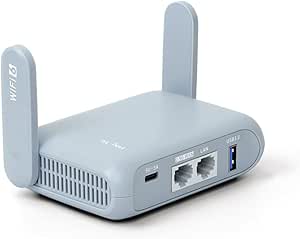 | Best Travel Router for Faster Wired Links | Wi-Fi generation: Wi-Fi 6 | Wireless speed: 574 Mbps on 2.4 GHz and 2402 Mbps on 5 GHz | Frequency bands: Dual-band | VIEW LATEST PRICE | See Our Full Breakdown |
| wireless routers with built-in VPN | Wi-Fi standard | Bands | Ports |
|---|---|---|---|
| GL.iNet Flint 3 Tri-Band Wi-Fi | Wi-Fi 7 | Tri-band, including 6 GHz | 5 x 2.5G |
| ASUS RT-AX86U Pro AX5700 Dual- | Wi-Fi 6 (802.11ax) | Dual-band | 6 total; includes a 2.5 Gbps port |
| ASUS RT-AX3000S Dual-Band WiFi | Wi-Fi 6 (802.11ax) | 2.4 GHz and 5 GHz | — |
| ASUS RT-AX1800S Dual-Band WiFi | Wi-Fi 6 (802.11ax) | Dual-band | — |
| Synology RT2600ac Dual-Band Gi | Wi-Fi 5 (802.11ac) | Dual-band | 5 total; Gigabit LAN bandwidth |
| NETGEAR Nighthawk RAX36 AX3000 | — | — | — |
| GL.iNet Flint 2 Wi-Fi 6 Gaming | Wi-Fi 6 (802.11ax) | — | 2 x 2.5G and 4 x 1G |
| GL.iNet Flint 3e BE6500 Wi-Fi | Wi-Fi 7 (802.11be) | — | — |
| Cudy TR1200 AC1200 Wi-Fi 5 Min | Wi-Fi 5 (802.11ac) | — | — |
| GL.iNet GL-MT3000 Beryl AX Wi- | — | — | 2.5G WAN, 1 Gbps LAN, and USB 3.0 |
More Details on Our Top Picks
GL.iNet Flint 3 Tri-Band Wi-Fi 7 Router with 5 x 2.5G Ports
The Flint 3 is the strongest fit here for buyers who want a modern, fast home network without giving up VPN capability. Its Wi-Fi 7 tri-band design includes 6 GHz, while OpenVPN and WireGuard support is rated up to 680 Mbps—useful for protecting more than a single remote connection, though real VPN throughput depends on the provider and server. Compared with the ASUS RT-AX86U Pro, it adds a third band and five 2.5G ports, making it more flexible for multi-gig wired devices. That extra capacity comes with a more feature-rich setup, and firmware updates are recommended at installation. The listed 2,000-square-foot coverage is not a guarantee for every floor plan, so large or obstructed homes may still need additional access points.
Pros:- Tri-band Wi-Fi 7 with 6 GHz and Multi-Link Operation support.
- OpenVPN and WireGuard support with listed speeds up to 680 Mbps.
- Five 2.5G ports suit multi-gig wired devices.
- Includes AdGuard Home support and parental controls.
Cons:- VPN and wireless throughput vary with the connection, VPN server, and home layout.
- The feature set can require more setup than a basic home router.
- Firmware updating is recommended during initial setup.
Best for: Households with many connected devices, multi-gig wired equipment, and a preference for WireGuard or OpenVPN on a Wi-Fi 7 network.
Not ideal for: Buyers who only need basic VPN access and gigabit networking, or who want a simple router with minimal setup and configuration.
- Wi-Fi standard:Wi-Fi 7
- Bands:Tri-band, including 6 GHz
- Maximum wireless speed:Up to 9 Gbps
- VPN:OpenVPN and WireGuard, up to 680 Mbps
- Ports:5 x 2.5G
- Coverage:Up to 2,000 sq ft
- Device capacity:Over 100 devices
- Memory and storage:1 GB DDR4 RAM; 8 GB eMMC
Our verdict“Choose the Flint 3 if you want the broadest combination of Wi-Fi generation, multi-gig ports, and built-in VPN support in this group.”
ASUS RT-AX86U Pro AX5700 Dual-Band WiFi 6 Gaming Router
The ASUS RT-AX86U Pro suits buyers who want gaming controls and a straightforward route to secure remote access on one Wi-Fi 6 router. Its Instant Guard VPN is paired with AiProtection Pro, QoS, and Mobile Game Mode, so the appeal is broader than VPN alone: traffic management and security features are built into the same package. Compared with the tri-band Flint 3, this ASUS has only two bands and one 2.5 Gbps port, so it is less compelling for multi-gig wired setups or a crowded network needing extra spectrum. Its 5,700 Mbps combined rate and AiMesh compatibility still make it a capable choice for gaming households that may expand coverage later. Buyers seeking explicit OpenVPN or WireGuard throughput figures should compare its VPN details carefully with the Flint 3.
Pros:- Instant Guard VPN is included alongside AiProtection Pro.
- Mobile Game Mode and QoS support traffic prioritization.
- A 2.5 Gbps port and aggregated WAN support accommodate faster wired service.
- AiMesh compatibility allows expansion with compatible ASUS routers.
Cons:- Dual-band Wi-Fi offers less band capacity than the tri-band Flint 3.
- Only one 2.5 Gbps port is listed.
- The supplied product details do not give a VPN throughput figure.
Best for: Wi-Fi 6 gaming households that want Instant Guard remote access, traffic prioritization, and the option to expand with AiMesh.
Not ideal for: Buyers who need tri-band Wi-Fi, several 2.5G wired connections, or a stated high-throughput OpenVPN or WireGuard implementation.
- Wi-Fi standard:Wi-Fi 6 (802.11ax)
- Bands:Dual-band
- Maximum data rate:Up to 5,700 Mbps
- VPN:ASUS Instant Guard
- Ports:6 total; includes a 2.5 Gbps port
- WAN support:Up to 2 Gbps aggregated
- Memory:1 GB RAM
- Network features:AiProtection Pro, Mobile Game Mode, AiMesh, parental controls, QoS
Our verdict“Pick the RT-AX86U Pro if gaming features and ASUS Instant Guard matter more than tri-band capacity or multiple multi-gig ports.”
ASUS RT-AX3000S Dual-Band WiFi 6 Router
The RT-AX3000S is a practical middle ground for buyers who want VPN features alongside a router that can also serve as an access point, repeater, or AiMesh node. Its four operating modes make it more adaptable than the RT-AX1800S, whose supplied feature list focuses on standard home-router use and Instant Guard access. Wi-Fi 6, MU-MIMO, and OFDMA help it handle several devices, while the listed coverage reaches 2,250 square feet; that figure will vary with walls and placement. The tradeoff is that this is a dual-band, 3,000 Mbps-class router, not a multi-gig Wi-Fi 7 option like the Flint 3. The product data confirms VPN features but does not specify protocol choices or VPN speeds, so buyers with demanding encrypted-throughput needs should verify those details before choosing it.
Pros:- Supports VPN features, parental controls, and AiProtection.
- Multiple operating modes allow use as a router, access point, repeater, or AiMesh node.
- MU-MIMO and OFDMA support simultaneous connections.
- Listed coverage is up to 2,250 square feet.
Cons:- VPN protocols and VPN speeds are not specified in the supplied product details.
- Dual-band Wi-Fi 6 has less capacity than the tri-band Flint 3.
- Listed LAN bandwidth is 1 Gbps, limiting multi-gig wired expansion.
Best for: Households that want a midrange Wi-Fi 6 router with VPN features and the flexibility to repurpose it as an access point, repeater, or mesh node.
Not ideal for: Buyers who need confirmed WireGuard or OpenVPN support and throughput, tri-band Wi-Fi, or multi-gigabit LAN ports.
- Wi-Fi standard:Wi-Fi 6 (802.11ax)
- Bands:2.4 GHz and 5 GHz
- Maximum combined data rate:Up to 3,000 Mbps
- VPN:VPN features; protocols and speeds not specified
- LAN bandwidth:1,000 Mbps
- Coverage:Up to 2,250 sq ft
- Memory:256 MB RAM; 128 MB flash
- Operating modes:Router, access point, AiMesh node, repeater
Our verdict“Choose the RT-AX3000S if flexible network modes matter more than verified VPN protocol and throughput details.”
ASUS RT-AX1800S Dual-Band WiFi 6 Router
The ASUS RT-AX1800S is the simpler Wi-Fi 6 pick for buyers who want Instant Guard VPN access and basic home-network security without stepping up to the RT-AX86U Pro. Its five Gigabit Ethernet ports cover everyday wired needs, and MU-MIMO and OFDMA help share the connection across multiple devices. Compared with the RT-AX3000S, it has a lower listed wireless rate and less RAM, but the VPN feature is named explicitly as Instant Guard rather than described only as a general VPN feature. It is not the right fit for a multi-gig internet plan or heavy VPN traffic: its Ethernet is Gigabit, and no VPN speed figure is provided. The 2×2, 80 MHz design also leaves less wireless headroom than higher-tier options such as the Flint 3.
Pros:- ASUS Instant Guard VPN access is included.
- Four Gigabit LAN ports plus one Gigabit WAN port support wired home devices.
- Wi-Fi 6 MU-MIMO and OFDMA help manage multiple connected devices.
- AiProtection Classic adds network security features.
Cons:- Gigabit Ethernet does not support multi-gig wired service.
- VPN throughput and coverage figures are not provided.
- Its 1,800 Mbps maximum rate is below the RT-AX3000S and RT-AX86U Pro.
Best for: Households with a standard broadband connection that want Wi-Fi 6, Gigabit Ethernet, and ASUS Instant Guard for remote access.
Not ideal for: Users with multi-gig broadband, demanding VPN throughput needs, or a large home that requires tri-band capacity or a specified coverage rating.
- Wi-Fi standard:Wi-Fi 6 (802.11ax)
- Bands:Dual-band
- Maximum data rate:Up to 1,800 Mbps
- VPN:ASUS Instant Guard
- Ethernet ports:1 Gigabit WAN and 4 Gigabit LAN
- Antennas:4 external antennas
- Memory:256 MB RAM
- Security:AiProtection Classic; WPA-Enterprise and WPA2-Enterprise
Our verdict“Choose the RT-AX1800S for basic Wi-Fi 6 networking with Instant Guard, but look higher in the lineup for multi-gig or high-throughput VPN use.”
Synology RT2600ac Dual-Band Gigabit Wi-Fi Router
The Synology RT2600ac stands apart for its range of VPN choices and management tools, rather than for having the newest wireless standard. Synology Router Manager supports WebVPN, Synology SSL VPN, and SSTP VPN, with traffic monitoring, bandwidth management, and parental controls that suit households wanting detailed oversight. Its dual-WAN support also allows load balancing or failover, a useful distinction from the ASUS models in this group. The tradeoff is clear against the Flint 3: the RT2600ac uses Wi-Fi 5 and has Gigabit LAN, so it is less suited to newer high-speed devices and multi-gig wired networks. Its 4×4 radios and MU-MIMO still offer useful capacity for compatible clients, but buyers prioritizing Wi-Fi generation or stated WireGuard support should look elsewhere.
Pros:- Supports WebVPN, Synology SSL VPN, and SSTP VPN.
- Traffic monitoring, bandwidth management, and parental controls are included.
- Dual WAN supports load balancing and failover.
- 4×4 Wi-Fi radios and MU-MIMO support compatible multi-device use.
Cons:- Wi-Fi 5 is an older generation than the Wi-Fi 6 ASUS options and Wi-Fi 7 Flint 3.
- Gigabit LAN limits wired multi-gigabit performance.
- WireGuard support and VPN throughput are not listed in the supplied details.
Best for: Technically minded households that value several VPN connection types, detailed traffic controls, and dual-WAN failover.
Not ideal for: Buyers building a Wi-Fi 6 or Wi-Fi 7 network, needing multi-gig Ethernet, or specifically seeking listed WireGuard support.
- Wi-Fi standard:Wi-Fi 5 (802.11ac)
- Bands:Dual-band
- Maximum data rate:Up to 2.53 Gbps
- VPN types:WebVPN, Synology SSL VPN, SSTP VPN
- Ports:5 total; Gigabit LAN bandwidth
- WAN features:Dual WAN with load balancing and failover
- Processor:1.7 GHz dual-core
- Operating system:Synology Router Manager (SRM)
Our verdict“Pick the RT2600ac if VPN variety and network-management controls outweigh the need for current-generation Wi-Fi or multi-gig ports.”
NETGEAR Nighthawk RAX36 AX3000 WiFi 6 Dual-Band Router
The RAX36 offers a capable Wi-Fi 6 foundation, but it is a less direct fit for this roundup than the GL.iNet Flint 2 or Flint 3e: the supplied product details do not list built-in VPN client or server support. Its AX3000 dual-band Wi-Fi and four Gigabit Ethernet ports suit a household that mainly wants conventional wireless and wired networking, while the 1.7 GHz quad-core processor is specified for handling several common activities at once. Coverage is listed at up to 2,000 square feet for as many as 25 devices, a more modest target than the GL.iNet models’ stated capacity of over 100 devices. The tradeoff is clear: choose it for basic Wi-Fi 6 needs, not for a documented, router-level VPN setup. It also requires a separate modem and supports internet plans up to 1 Gbps.
Pros:- Wi-Fi 6 dual-band networking with wireless speeds up to 3 Gbps
- Four Gigabit Ethernet ports for wired devices
- Coverage specified for up to 2,000 square feet and 25 devices
- 1.7 GHz quad-core processor
Cons:- Product details do not specify built-in VPN client or server support
- Requires a separate modem for internet service
- Compatible internet service is limited to plans up to 1 Gbps
Best for: Households seeking a conventional Wi-Fi 6 router for up to 25 devices that do not need built-in VPN features
Not ideal for: Buyers who specifically need a documented built-in VPN client or server, or households with more than 25 devices
- Wi-Fi generation:Wi-Fi 6 (802.11ax)
- Wireless speed:Up to 3 Gbps (AX3000)
- Frequency band:Dual-band
- Coverage:Up to 2,000 sq. ft.
- Maximum devices:25
- Ethernet ports:4 x 1 Gigabit
- Processor:1.7 GHz quad-core
- Modem:Not included; requires a separate modem
Our verdict“Pick the RAX36 for everyday Wi-Fi 6 and wired connections, but choose a GL.iNet model if built-in VPN support is a requirement.”
GL.iNet Flint 2 Wi-Fi 6 Gaming Router (GL-MT6000)
The Flint 2 is the strongest fit here for buyers who want a home router with named VPN protocols and substantial wired connectivity. It supports WireGuard and OpenVPN, with advertised VPN speeds up to 900 Mbps and 880 Mbps respectively; those figures give it a clear advantage over the travel-focused Beryl AX, whose stated VPN limits are lower. Two 2.5G ports, four Gigabit ports, and support for over 100 connected devices make it better suited to a busy home network than the compact Cudy TR1200. AdGuard Home support adds filtering options, though setup and firmware upkeep ask more of the owner than a simple plug-in router. The manufacturer recommends a firmware update during initial setup, and real VPN throughput depends on the network and service. This is a feature-rich choice, not a hands-off one.
Pros:- Supports WireGuard and OpenVPN, with advertised VPN speeds up to 900 Mbps and 880 Mbps
- Two 2.5G ports plus four Gigabit Ethernet ports
- Designed to support over 100 connected devices
- AdGuard Home support for filtering selected advertisements and trackers
Cons:- Firmware update is recommended during initial setup
- Actual VPN performance varies with the network, VPN provider, and server
- Dual-band Wi-Fi rather than tri-band
Best for: VPN-conscious households with many devices, multi-gig wired equipment, and willingness to manage router settings
Not ideal for: Buyers who want a very simple travel router or do not want to update firmware and configure VPN settings
- Wi-Fi standard:Wi-Fi 6 (802.11ax)
- Maximum data transfer rate:Up to 6 Gbps
- Wireless speeds:Up to 1148 Mbps and 4804 Mbps
- VPN protocols:WireGuard and OpenVPN
- Advertised VPN speeds:Up to 900 Mbps with WireGuard; up to 880 Mbps with OpenVPN
- Ports:2 x 2.5G and 4 x 1G
- Memory and storage:1 GB DDR4 RAM; 8 GB eMMC
- Features:AdGuard Home support, QoS, Guest Mode, Access Point Mode, and Multi-WAN
Our verdict“Choose the Flint 2 for a home network that needs fast VPN options and flexible wired ports without moving to the newer Wi-Fi 7 Flint 3e.”
GL.iNet Flint 3e BE6500 Wi-Fi 7 Router with VPN
The Flint 3e pairs the newest wireless generation in this group with documented support for both major VPN protocols. Its stated WireGuard and OpenVPN speeds reach up to 1,100 Mbps, exceeding the Flint 2’s advertised VPN figures, while Wi-Fi 7 features such as MLO and 4K-QAM target newer compatible devices. The listed coverage of up to 2,500 square feet and capacity for over 100 devices also suit larger, busier homes better than the RAX36’s stated 2,000-square-foot, 25-device target. Those advantages come with a qualification: the Flint 3e is dual-band, not tri-band, and real VPN results depend on the service and network. For households that need broad capacity and fast VPN capability, it makes a more future-oriented pick than the Flint 2; for older devices or lighter use, its Wi-Fi 7 features may matter less.
Pros:- Wi-Fi 7 support with MLO and 4K-QAM
- Supports WireGuard and OpenVPN with stated VPN speeds up to 1,100 Mbps
- Designed for up to 2,500 square feet and over 100 devices
- AdGuard Home support and parental controls
Cons:- Dual-band design rather than tri-band
- Actual VPN speeds vary with the network, provider, and VPN server
Best for: Large or device-heavy households seeking Wi-Fi 7, router-level VPN support, and built-in network management features
Not ideal for: Buyers with mostly older Wi-Fi devices, or anyone who specifically wants a tri-band router
- Wi-Fi standard:Wi-Fi 7 (802.11be)
- Maximum Wi-Fi speed:Up to 6.5 Gbps
- Frequency bands:Dual-band
- VPN protocols:WireGuard and OpenVPN
- Maximum VPN speed:Up to 1,100 Mbps
- Coverage:Up to 2,500 sq. ft.
- Device capacity:Over 100 devices
- Features:MLO, 4K-QAM, AdGuard Home support, and parental controls
Our verdict“Choose the Flint 3e over the Flint 2 if you want Wi-Fi 7 and higher stated VPN throughput for a large, device-heavy home.”
Cudy TR1200 AC1200 Wi-Fi 5 Mini VPN Travel Router
The TR1200 is the lightest and most mode-flexible option in this set: it weighs 99 g and can work as a router, access point, range extender, or WISP device. It also lists a broad selection of VPN protocols, including WireGuard, OpenVPN, IPsec, and ZeroTier, giving configuration-minded travelers more choices than the Beryl AX’s two named VPN protocols. The tradeoff is hardware speed. Its Wi-Fi 5 connection and 10/100 Mbps Ethernet ports are a step down from the Beryl AX’s Wi-Fi 6 and 2.5G WAN, so it is better for portable sharing than for fast wired connections. Optional manual OpenWrt installation adds flexibility but is not as straightforward as relying on the supplied configuration. App and cloud management can simplify routine control, while the USB-C power adapter is not specified as included.
Pros:- Compact 99 g design with USB-C power
- Router, access point, range extender, and WISP modes
- Supports WireGuard, OpenVPN, IPsec, ZeroTier, PPTP, and L2TP
- App and cloud management, with optional manual OpenWrt installation
Cons:- Both Ethernet ports are limited to 10/100 Mbps
- Wi-Fi 5 is older than the Wi-Fi 6 in the Beryl AX
- USB-C power adapter is not specified as included
Best for: Travelers who need a lightweight router with multiple operating modes and a choice of VPN protocols
Not ideal for: Users who need Gigabit-or-faster wired networking, high Wi-Fi throughput, or a plug-and-play OpenWrt setup
- Wi-Fi standard:Wi-Fi 5 (802.11ac)
- Wireless speed:AC1200; up to 867 Mbps on 5 GHz and 300 Mbps on 2.4 GHz
- Ethernet ports:1 WAN and 1 LAN, 10/100 Mbps
- VPN protocols:WireGuard, OpenVPN, IPsec, ZeroTier, PPTP, and L2TP
- Operating modes:Router, access point, range extender, and WISP
- Maximum client devices:128 (40 recommended)
- Power:USB-C
- Weight:99 g (3.49 oz)
Our verdict“Pick the TR1200 for lightweight travel and broad VPN protocol choice, but choose the Beryl AX for newer Wi-Fi and faster wired ports.”
GL.iNet GL-MT3000 Beryl AX Wi-Fi 6 Travel Router
The Beryl AX is the more capable travel pick for buyers who value newer Wi-Fi and a fast uplink over a long list of VPN protocols. It includes OpenVPN and WireGuard client and server support, plus a 2.5G WAN port, Gigabit LAN, and USB 3.0. Against the Cudy TR1200, that port selection and Wi-Fi 6 make it the better fit for hotel or temporary networks where wired throughput matters; the Cudy counters with more VPN protocol options and more operating modes. The Beryl’s stated VPN limits—up to 300 Mbps with WireGuard and 150 Mbps with OpenVPN—are well below the Flint 2 and Flint 3e figures, so it is not the pick for maximum VPN throughput at home. Its configurable physical switch is useful only after setup, and VPN service use may require a separate subscription.
Pros:- Dual-band Wi-Fi 6 for portable networking
- 2.5G WAN, Gigabit LAN, and USB 3.0
- OpenVPN and WireGuard client and server support
- OpenWrt-based firmware and a configurable physical switch
Cons:- VPN speeds are specified up to 150 Mbps with OpenVPN and 300 Mbps with WireGuard
- Physical toggle switch has no function by default and requires configuration
- Using a compatible VPN service may require an active subscription
Best for: Frequent travelers who want Wi-Fi 6, a 2.5G WAN port, and configurable OpenVPN or WireGuard access
Not ideal for: Buyers prioritizing the highest VPN speeds, multiple VPN protocols beyond OpenVPN and WireGuard, or an unconfigured one-touch switch
- Wi-Fi generation:Wi-Fi 6
- Wireless speed:574 Mbps on 2.4 GHz and 2402 Mbps on 5 GHz
- Frequency bands:Dual-band
- VPN support:OpenVPN and WireGuard client and server
- Maximum VPN speed:150 Mbps with OpenVPN; 300 Mbps with WireGuard
- Ports:2.5G WAN, 1 Gbps LAN, and USB 3.0
- Firmware:OpenWrt 21.02
- Security:WPA2-PSK, WPA3, DNS over HTTPS, and DNS over TLS
Our verdict“Choose the Beryl AX for a travel router with Wi-Fi 6 and faster wired ports, but pick the Flint 2 if higher stated VPN throughput matters more.”
How We Picked
I ranked these routers by how well they serve the central promise: routing network traffic through a VPN without requiring a separate dedicated VPN appliance. I weighed the stated Wi-Fi generation, port selection, home-versus-travel design, and the practicality of configuring and maintaining VPN settings. I also separated routers with a clear VPN-oriented identity from general-purpose routers where buyers should verify client support and service compatibility for the exact model and firmware.
The Flint 3 leads as the most capable home-focused choice on the supplied specifications, while the Flint 2 offers a more restrained home alternative and the travel models earn their place for portability. The ASUS, Synology, and NETGEAR options remain relevant for buyers who value familiar router features, but their position reflects the need to confirm VPN setup details rather than assume that every built-in VPN function works the same way. No router is ranked on speed labels alone: a home router and a pocket-sized travel unit solve different problems, and VPN throughput can differ from headline wireless rates.
| wireless routers with built-in VPN | Wi-Fi standard |
|---|---|
| GL.iNet Flint 3 Tri-Band Wi-Fi | Wi-Fi 7 |
| ASUS RT-AX86U Pro AX5700 Dual- | Wi-Fi 6 (802.11ax) |
| ASUS RT-AX3000S Dual-Band WiFi | Wi-Fi 6 (802.11ax) |
| ASUS RT-AX1800S Dual-Band WiFi | Wi-Fi 6 (802.11ax) |
| Synology RT2600ac Dual-Band Gi | Wi-Fi 5 (802.11ac) |
| NETGEAR Nighthawk RAX36 AX3000 | — |
| GL.iNet Flint 2 Wi-Fi 6 Gaming | Wi-Fi 6 (802.11ax) |
| GL.iNet Flint 3e BE6500 Wi-Fi | Wi-Fi 7 (802.11be) |
| Cudy TR1200 AC1200 Wi-Fi 5 Min | Wi-Fi 5 (802.11ac) |
| GL.iNet GL-MT3000 Beryl AX Wi- | — |
Factors to Consider When Choosing Wireless Routers With Built-in VPN
Before choosing among these wireless routers with built-in VPN, I’d match the router to the job the VPN needs to do. A whole-home VPN gateway, a router that only protects selected devices, and a travel router used in hotels can call for different hardware and setup. These broader checks can help prevent buying a fast router that is awkward to configure or a portable model that cannot serve your home.
Decide Whether the VPN Should Cover Every Device
Some buyers want every device on the network to use one VPN connection; others only need a work laptop or streaming device protected. Router-level VPN can simplify protection for devices that cannot run VPN apps, but it may also route traffic you would rather leave on your regular connection. Check whether the router supports policies or device-based routing before assuming you can make exceptions. If everyone in the household needs the same VPN route, a simpler whole-network setup may be easier to maintain. If needs vary by person or service, flexibility matters more than a broad feature label. A common mistake is buying a router with VPN capability but no convenient way to control which devices use it.
Check VPN Client Support and Service Compatibility
“Built-in VPN” can refer to different functions, including connecting the router to a VPN provider or letting remote users connect back to the home network. Confirm which role you need before comparing models. Then check that the router supports the protocols and configuration files offered by your VPN service. A provider’s app may not be available on the router, so setup can require importing settings and entering credentials in the router interface. Also check whether the router can keep a VPN connection active after a reboot or connection interruption. These details can matter more to everyday reliability than the number of VPN-related features listed on a product page.
Treat VPN Speed Separately From Wi-Fi Speed
Wi-Fi 6 or Wi-Fi 7 describes wireless capability, not the speed you should expect through an encrypted VPN tunnel. VPN performance also depends on the router’s processing capacity, the protocol in use, the VPN server, and your internet connection. If you regularly transfer large files or stream on several devices, look for independent VPN throughput measurements for the exact model and protocol rather than relying on wireless class names. A high-speed wireless router can still become the bottleneck when all traffic is encrypted. For lighter browsing, paying for the fastest wireless tier may bring less benefit than choosing a router with straightforward VPN management. Leave room for real-world overhead when comparing your current internet plan with advertised router speeds.
Choose Home Coverage or Portability First
A compact travel router can protect devices on hotel or public networks, but its small size and travel-oriented design do not make it a direct replacement for a home router. For a home, consider the floor plan, wall materials, number of active devices, and whether a mesh system may be needed for distant rooms. For travel, prioritize compactness, simple setup, and the ability to connect the router to the network available at your destination. Avoid choosing solely by the number of antennas or the Wi-Fi generation: placement and building layout often shape coverage more. Buyers who need both jobs may prefer separate home and travel devices rather than asking one small router to cover a whole house.
Match Ports and Wi-Fi to the Rest of Your Network
Count the devices that need a wired connection, such as a desktop, network storage, or game console, and check the router’s port speeds as well as the port count. Multi-gigabit ports are useful only when your internet service, switch, and connected devices can use them. For wireless devices, consider whether your current phones, laptops, and smart-home equipment can take advantage of a newer Wi-Fi generation. If most devices are older or your internet plan is modest, a less advanced router may cover your needs without paying for unused capacity. The reverse mistake is buying a router with too few fast ports and adding extra hardware later. Plan for the devices you expect to keep, not just the ones connected today.
Weigh Setup and Ongoing Management
A router’s VPN features are only useful if you can configure and maintain them confidently. Before buying, look at how the interface handles provider setup, server changes, software updates, and recovery if the VPN connection drops. A more configurable router can suit buyers who want control, but it may ask for more hands-on setup than a conventional home router. Households that rarely change network settings may benefit from a simpler management experience, even if it offers fewer advanced controls. Check the manufacturer’s update and support information, since VPN settings and security practices need attention after installation too. Buying a feature-rich model without planning time for configuration can leave its main advantage unused.
Frequently Asked Questions
Will a router with built-in VPN protect every device automatically?
Not necessarily. Some routers can send all connected devices through a VPN, while others let you choose which devices or traffic use the tunnel. You may need to enable the VPN client, add provider credentials, and select a server before protection begins. Devices connected through another router or a separate network may bypass it. I’d check the model’s routing controls and confirm the VPN is active before relying on it for the whole household.
Can I use a router VPN and a VPN app on my laptop at the same time?
Often you can, but running both may create routing conflicts, reduce speed, or make some services harder to access. A laptop app can be useful when you need a different VPN location or want protection away from home, while the router can cover devices without VPN apps. If both are active, the laptop’s traffic may pass through two VPN connections, depending on how the router and app are configured. Test the setup with the services you use rather than assuming double VPN always adds useful protection. For most buyers, one clearly managed VPN route is easier to troubleshoot.
Will VPN routing slow down gaming, video calls, or streaming?
It can, since encrypted traffic takes extra processing and VPN servers may add distance or congestion. The effect varies with the router, VPN protocol, server location, internet plan, and application. For gaming or latency-sensitive calls, consider routing only selected devices through the VPN if the router supports that control. A fast Wi-Fi specification alone does not predict VPN performance. Check model-specific VPN throughput information and try a nearby server before deciding whether the slowdown is acceptable.
Should I choose a travel router or a full-size home router?
Choose based on where you need VPN protection most often. The Cudy TR1200 and GL.iNet Beryl AX are compact options for carrying on trips and connecting personal devices through a travel network. The Flint and other full-size models are better suited to staying in one place and serving a home network with more connected equipment. A travel router can be handy at a hotel, but its format is not designed to replace a home router’s coverage and connection capacity. If you need reliable protection in both settings, two purpose-built devices may be a better fit than one compromise.
Do I need Wi-Fi 7 to use a router VPN?
No. VPN capability does not require Wi-Fi 7, and the older Wi-Fi 6 or Wi-Fi 5 routers in this roundup can still suit buyers whose devices and internet service do not need the newer wireless generation. Wi-Fi 7 may offer more headroom for compatible devices and fast local networks, but it does not guarantee faster VPN traffic. Give greater weight to VPN client support, controls, and measured encrypted throughput for your use. Paying for Wi-Fi 7 makes most sense when the rest of your network can benefit from it too.
Conclusion
For most home networks, I’d choose the GL.iNet Flint 3 as the best overall, with its newer wireless platform and five 2.5G ports. The GL.iNet Flint 2 is my best value direction for buyers who want a VPN-focused home router without prioritizing Wi-Fi 7. If you want the most advanced home setup, the Flint 3 is also the best premium pick in this lineup; for beginners who prefer a familiar general-purpose router, I’d compare the ASUS models and confirm the exact VPN setup before buying. Travelers should look at the Beryl AX for a more capable compact option or the Cudy TR1200 for a simpler travel-focused choice. Choose the Synology or NETGEAR options when their broader router features suit your needs, but verify VPN client compatibility and controls first.