Among these encrypted external SSDs, I’d choose the SanDisk Professional G-DRIVE ArmorLock as the best overall for its combination of rugged construction, NVMe performance, and app-based access control. The Kingston IronKey Vault Privacy 80 is a stronger fit for buyers who want onboard hardware controls, while the Apricorn Aegis Fortress L3 stands out for organizations with demanding security requirements. The main tradeoff is between convenient software-based protection, keypad or touchscreen access, and certified hardware encryption—alongside capacity, speed, and portability. A regular portable SSD may be easier to use, but its encryption options and safeguards can differ from purpose-built secure drives. Read on for the full breakdown and help matching a drive to your security needs.

Get privacy and security gear delivered free with Prime
- Fast, free delivery on millions of items
- Prime Video, Amazon Music and more included
- Member-only deals all year
Key Takeaways
The strongest picks put security controls first. The G-DRIVE ArmorLock, IronKey Vault Privacy 80, and Apricorn models offer more purpose-built access protection than the standard SanDisk Portable, Extreme, and Samsung T7 drives.
Access method changes everyday usability. App-based control on ArmorLock, onboard input on IronKey and Aegis models, and a smart display each suit different workflows; pick the method you can use reliably on your host devices.
Certified security is a different buying goal from convenience. The Aegis Fortress L3 is the specialist choice for buyers who need FIPS 140-2 Level 3 validation, while most personal users may prefer simpler access and broader capacity choices.
Capacity is not the same across product families. The roundup includes options from 500GB to 4TB, so encryption needs should be weighed against how much data must stay on one drive and how often it will be moved.
Fast portable SSDs are not automatically encrypted drives. SanDisk Extreme and Samsung T7 models may suit speed-focused storage, but buyers should confirm the exact model’s encryption features rather than assume the product name guarantees hardware encryption.
| SanDisk Professional G-DRIVE ArmorLock 1TB Rugged Encrypted NVMe SSD |  | Best for Phone-Based Access | Capacity: 1 TB | Drive type: NVMe solid-state drive | Read speed: Up to 1,000 MB/s | VIEW LATEST PRICE | See Our Full Breakdown |
| Kingston IronKey Vault Privacy 80 1.92TB Hardware-Encrypted External SSD |  | Best for Standalone Touchscreen Security | Capacity: 1.92 TB | Encryption: XTS-AES 256-bit | Certification: FIPS 197 | VIEW LATEST PRICE | See Our Full Breakdown |
| SanDisk 2TB Portable SSD |  | Best for Capacity and Everyday Portability | Capacity: 2 TB | Read speed: Up to 1,000 MB/s | Interface: USB 3.0 / USB-C | VIEW LATEST PRICE | See Our Full Breakdown |
| SanDisk 1TB Portable SSD, Up to 1000 MB/s Read Speed, Black | | Best Compact Basic Storage | Capacity: 1 TB | Read speed: Up to 1,000 MB/s | Interface: USB 3.0 | VIEW LATEST PRICE | See Our Full Breakdown |
| SanDisk 2TB Extreme Portable SSD |  | Best Rugged Encrypted Pick | Capacity: 2 TB | Interface: USB 3.2 Gen 2 | Read speed: Up to 1,050 MB/s | VIEW LATEST PRICE | See Our Full Breakdown |
| Apricorn 1TB Aegis Padlock SSD 256-Bit FIPS 140-2 Level 2 Validated Ruggedized USB 3.0 Encrypted External Portable Drive |  | Best for Regulated, Rugged Work | Capacity: 1 TB | Interface: USB 3.0 / 3.1 | Encryption: Hardware-based 256-bit AES XTS | VIEW LATEST PRICE | See Our Full Breakdown |
| 2TB Touchscreen Encrypted External SSD with Smart Display |  | Best for On-Drive Status Monitoring | Capacity: 2 TB | Interface: USB 3.2 Gen 2×2 (20Gbps) | Read speed: Up to 2,000 MB/s | VIEW LATEST PRICE | See Our Full Breakdown |
| Samsung T7 Portable SSD, 1TB, Titan Gray, USB 3.2 Gen 2 | 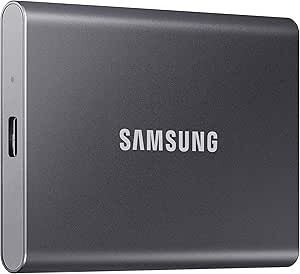 | Best Mainstream Encrypted SSD | Capacity: 1 TB | Interface: USB 3.2 Gen 2 | Read speed: Up to 1,050 MB/s | VIEW LATEST PRICE | See Our Full Breakdown |
| Apricorn Aegis Padlock 500GB USB 3.0 Hardware-Encrypted Portable External Hard Drive |  | Best for Basic Keypad-Controlled Security | Capacity: 500 GB | Interface: USB 3.0 | Encryption: 256-bit AES XTS hardware encryption | VIEW LATEST PRICE | See Our Full Breakdown |
| SanDisk 1TB Extreme Portable SSD |  | Best Rugged, Lightweight Pick | Capacity: 1 TB | Interface: USB 3.0 | Connector: USB Type-C | VIEW LATEST PRICE | See Our Full Breakdown |
| Apricorn Aegis Fortress L3 4TB FIPS 140-2 Level 3 Encrypted Portable Drive |  | Best for High-Assurance Security | Capacity: 4TB | Encryption: 256-bit AES-XTS hardware encryption | Security validation: FIPS 140-2 Level 3 | VIEW LATEST PRICE | See Our Full Breakdown |
| Kingston IronKey Vault Privacy 80 960GB External SSD | | Best for Screen-Based Password Control | Capacity: 960GB | Encryption: XTS-AES 256-bit, FIPS 197 certified | Interface: USB 3.2 Gen 1 | VIEW LATEST PRICE | See Our Full Breakdown |
| SanDisk Extreme Portable SSD, 2TB, Up to 2000MB/s | | Best for Rugged Everyday Portability | Capacity: 2TB | Encryption: Optional 256-bit AES password protection | Interface: USB 3.0 | VIEW LATEST PRICE | See Our Full Breakdown |
| encrypted external SSD | Capacity | Interface | Read speed | Encryption |
|---|---|---|---|---|
| SanDisk Professional G-DRIVE A | 1 TB | USB-C | Up to 1,000 MB/s | — |
| Kingston IronKey Vault Privacy | 1.92 TB | USB 3.2 Gen 1 | 250 MB/s | XTS-AES 256-bit |
| SanDisk 2TB Portable SSD | 2 TB | USB 3.0 / USB-C | Up to 1,000 MB/s | Not specified in supplied product data |
| SanDisk 1TB Portable SSD | 1 TB | USB 3.0 | Up to 1,000 MB/s | Not specified in supplied product data |
| SanDisk 2TB Extreme Portable S | 2 TB | USB 3.2 Gen 2 | Up to 1,050 MB/s | — |
| Apricorn 1TB Aegis Padlock SSD | 1 TB | USB 3.0 / 3.1 | — | Hardware-based 256-bit AES XTS |
| 2TB Touchscreen Encrypted Exte | 2 TB | USB 3.2 Gen 2×2 (20Gbps) | Up to 2,000 MB/s | — |
| Samsung T7 Portable SSD | 1 TB | USB 3.2 Gen 2 | Up to 1,050 MB/s | 256-bit AES hardware encryption |
| Apricorn Aegis Padlock 500GB U | 500 GB | USB 3.0 | — | 256-bit AES XTS hardware encryption |
| SanDisk 1TB Extreme Portable S | 1 TB | USB 3.0 | Up to 2,000 MB/s | 256-bit AES with password protection |
| Apricorn Aegis Fortress L3 4TB | 4TB | USB 3.0 | Up to 600 MB/s | 256-bit AES-XTS hardware encryption |
| Kingston IronKey Vault Privacy | 960GB | USB 3.2 Gen 1 | Up to 250 MB/s | XTS-AES 256-bit, FIPS 197 certified |
| SanDisk Extreme Portable SSD | 2TB | USB 3.0 | Up to 2000 MB/s | Optional 256-bit AES password protection |
More Details on Our Top Picks
SanDisk Professional G-DRIVE ArmorLock 1TB Rugged Encrypted NVMe SSD
The G-DRIVE ArmorLock suits buyers who want encrypted access without typing a password each time: a compatible phone’s biometric authentication can unlock it, and Auto Unlock can speed up repeat access. Its up to 1,000 MB/s read and write speeds make it a stronger fit for moving large work files than the Kingston IronKey Vault Privacy 80, whose listed read speed is 250 MB/s. ArmorLock also supports managing multiple users and drives, a useful distinction for shared workflows. The tradeoff is that access depends on a compatible phone and its biometric features; buyers who want the drive itself to handle PIN entry may prefer the Kingston touchscreen. The supplied USB-C and USB-A cables add connection flexibility, but actual performance depends on the host device.
Pros:- Phone-based biometric authentication avoids entering a drive password.
- Auto Unlock can speed access from a pre-authorized device.
- Read and write speeds are listed up to 1,000 MB/s.
- Multi-user and multi-drive management supports shared workflows.
Cons:- Unlocking relies on a compatible phone and its biometric authentication.
- Actual performance can vary with the host device and usage conditions.
Best for: Creative professionals and small teams who want phone-based biometric unlocking, fast file transfers, and shared drive management.
Not ideal for: Buyers who need standalone PIN or passphrase entry without a compatible phone, or who prioritize a clearly specified hardware-encryption certification.
- Capacity:1 TB
- Drive type:NVMe solid-state drive
- Read speed:Up to 1,000 MB/s
- Write speed:Up to 1,000 MB/s
- Interface:USB-C
- Security:ArmorLock phone-based biometric authentication
- Access features:Auto Unlock; multi-user and multi-drive management
- Warranty:5-year limited warranty
Our verdict“Choose the G-DRIVE ArmorLock if phone-based biometric access and fast transfers matter more to you than standalone touchscreen authentication.”
Kingston IronKey Vault Privacy 80 1.92TB Hardware-Encrypted External SSD
The IronKey Vault Privacy 80 puts access control on the drive itself: its touchscreen accepts a PIN or passphrase, with separate administrator and user options. That makes it a better fit than the phone-dependent SanDisk Professional G-DRIVE ArmorLock for buyers who want to authenticate without a smartphone. Its XTS-AES 256-bit encryption and FIPS 197 certification give security-conscious users a clear set of stated protections, while crypto-erase after repeated incorrect passwords adds a forceful response to guessing attempts. That safeguard has a real cost: the drive crypto-erases after 15 consecutive incorrect administrator or user passwords by default, so forgotten credentials or repeated mistakes can destroy the stored data. The listed 250 MB/s read speed is also far below the SanDisk options rated up to 1,000 MB/s, making this a security-first rather than speed-first choice.
Pros:- XTS-AES 256-bit encryption with FIPS 197 certification.
- Touchscreen supports PIN and passphrase access without a phone.
- Separate administrator and user password options.
- Includes USB-C and USB-A cables plus a neoprene travel case.
Cons:- Listed read speed of 250 MB/s is much lower than the SanDisk options rated up to 1,000 MB/s.
- Crypto-erases after 15 consecutive incorrect administrator or user passwords by default.
- At 289.5 g, it is heavier than the pocket-sized SanDisk portable drives.
Best for: Security-focused professionals who need hardware encryption, touchscreen PIN or passphrase access, and separate administrator and user credentials.
Not ideal for: Video editors and other users who regularly move large files and need higher listed transfer speeds, or anyone concerned about data loss after repeated incorrect password attempts.
- Capacity:1.92 TB
- Encryption:XTS-AES 256-bit
- Certification:FIPS 197
- Interface:USB 3.2 Gen 1
- Read speed:250 MB/s
- Password access:Touchscreen PIN and passphrase; administrator and user options
- Dimensions:4.82 × 3.32 × 0.73 inches
- Weight:289.5 g
- Warranty:Limited 3-year
Our verdict“Pick the IronKey Vault Privacy 80 when standalone touchscreen credentials and stated encryption certification outweigh transfer speed and the risk of password-triggered erasure.”
SanDisk 2TB Portable SSD
This 2TB SanDisk Portable SSD is the capacity-led pick for people who want a compact place to carry large files, but its product details do not list encryption or password protection. That gap matters in a roundup of encrypted SSDs: unlike the SanDisk 2TB Extreme Portable SSD, which specifies 256-bit AES hardware encryption and password protection, this model should not be treated as a secured drive based on the supplied information. Its strengths are straightforward portability: a 1.12-ounce body, USB-C plug-and-play connectivity, and IP65 dust and water resistance with drop protection up to 2 meters. The read speed reaches 1,000 MB/s, though write speed is not specified. Choose it for carrying files where physical durability and capacity matter; skip it for confidential data that needs documented encryption.
Pros:- 2TB capacity in a 1.12-ounce pocket-sized design.
- Read speeds are listed up to 1,000 MB/s.
- IP65 dust and water resistance with drop protection up to 2 meters.
- USB-C plug-and-play compatibility with computers and mobile devices.
Cons:- The supplied product details do not specify encryption or password protection.
- Write speed is not listed, so transfer performance is less clear than on the SanDisk Extreme Portable SSD.
- Actual performance can vary by host device and usable capacity is below the advertised figure after formatting.
Best for: Mobile workers and students who need 2TB of portable storage for everyday files and do not require documented drive encryption.
Not ideal for: Anyone storing confidential work, personal records, or other data that requires specified encryption or password protection.
- Capacity:2 TB
- Read speed:Up to 1,000 MB/s
- Interface:USB 3.0 / USB-C
- Durability:IP65 dust and water resistance; drop protection up to 2 meters
- Dimensions:1.77 × 3.35 × 0.39 inches
- Weight:1.12 ounces
- Compatibility:Mac, PC, desktop, laptop, smartphone, and tablet
- Encryption:Not specified in supplied product data
Our verdict“Choose this SanDisk for lightweight 2TB storage, but choose the encrypted SanDisk Extreme Portable SSD instead if data protection is a requirement.”
SanDisk 1TB Portable SSD, Up to 1000 MB/s Read Speed, Black
The SanDisk 1TB Portable SSD is the simplest, lightest option here for carrying files, but it is not a convincing encrypted-drive choice: the supplied product details do not list encryption or password protection. Compared with the SanDisk Professional G-DRIVE ArmorLock, it offers less access control and does not specify a write speed, though both list read speeds up to 1,000 MB/s. Its 1.12-ounce pocket-sized body, USB-C connection, and drop protection up to 2 meters suit routine transfers between a laptop, tablet, or phone. Those traits help with portability, not data confidentiality. I would reserve it for non-sensitive files or use cases where encryption is handled elsewhere; buyers who want documented hardware encryption should look to the SanDisk 2TB Extreme Portable SSD or the touchscreen-equipped Kingston IronKey.
Pros:- Compact 1.12-ounce design is easy to carry.
- Read speed is listed up to 1,000 MB/s.
- Drop protection is rated up to 2 meters.
- USB-C connection works with compatible devices without driver setup.
Cons:- Encryption and password protection are not specified in the supplied product details.
- Write speed is not listed and is described as lower than the maximum read speed.
- Usable storage is below 1TB after formatting.
Best for: Students and commuters who need a lightweight 1TB drive for non-sensitive files and quick USB-C connections.
Not ideal for: People carrying confidential or regulated data who need specified encryption, password access, or a listed write-speed figure.
- Capacity:1 TB
- Read speed:Up to 1,000 MB/s
- Interface:USB 3.0
- Connector:USB Type-C
- Drop protection:Up to 2 meters
- Dimensions:1.77 × 3.35 × 0.39 inches
- Weight:1.12 ounces
- Compatibility:Desktop, laptop, smartphone, and tablet; Mac and PC
- Encryption:Not specified in supplied product data
Our verdict“This is a convenient compact drive for non-sensitive storage, but choose the G-DRIVE ArmorLock or SanDisk Extreme if encryption is central to your purchase.”
SanDisk 2TB Extreme Portable SSD
The SanDisk 2TB Extreme Portable SSD is the clearest match for buyers who want encryption alongside rugged, high-capacity storage: its listed protections include 256-bit AES hardware encryption and password protection. It also pairs a 2TB capacity with read speeds up to 1,050 MB/s and write speeds up to 1,000 MB/s, making it a better choice for frequent large transfers than the Kingston IronKey Vault Privacy 80, whose listed read speed is 250 MB/s. For travel or field work, IP65 water and dust resistance, 3-meter drop protection, and a carabiner loop add practical protection and attachment options. The compromise is setup and compatibility: maximum performance needs a USB 3.2 Gen 2 host, and macOS users must download password-protection software separately. Those who prefer on-drive touchscreen credentials may favor the Kingston instead.
Pros:- 256-bit AES hardware encryption with password protection.
- 2TB capacity with read speeds up to 1,050 MB/s and write speeds up to 1,000 MB/s.
- IP65 water and dust resistance with drop protection up to 3 meters.
- Carabiner loop makes attachment to a bag or belt convenient.
Cons:- Maximum performance requires a compatible USB 3.2 Gen 2 device.
- macOS users need to download password-protection software separately.
- Usable capacity is below 2TB after formatting.
Best for: Photographers, field workers, and mobile creators who need encrypted 2TB storage, fast transfers, and added protection from dust, water, and drops.
Not ideal for: Buyers who need touchscreen PIN entry, want encryption setup without a separate macOS software download, or lack a compatible USB 3.2 Gen 2 port for maximum performance.
- Capacity:2 TB
- Interface:USB 3.2 Gen 2
- Read speed:Up to 1,050 MB/s
- Write speed:Up to 1,000 MB/s
- Security:256-bit AES hardware encryption and password protection
- Durability:IP65 water and dust resistance; drop protection up to 3 meters
- Form factor:Portable
- Compatible devices:Desktop, laptop, tablet, Xbox Series X, PlayStation 4, Mac, and Windows
Our verdict“Choose the SanDisk Extreme if you want fast, rugged 2TB storage with specified hardware encryption and can accommodate its software and host-device requirements.”
Apricorn 1TB Aegis Padlock SSD 256-Bit FIPS 140-2 Level 2 Validated Ruggedized USB 3.0 Encrypted External Portable Drive
The Apricorn Aegis Padlock SSD puts physical access control ahead of headline transfer speed. Its keypad PIN authentication and hardware-based 256-bit AES XTS encryption work without installing software, a useful distinction for managed computers and mixed operating systems. Compared with the Samsung T7 Portable SSD, it adds a stated FIPS 140-2 Level 2 validation, IP56 protection, and a crush-resistant aluminum enclosure, making it a stronger fit for sensitive files carried into rough environments. The tradeoff is performance: the supplied data lists read speed at just 25 MB/s, far below the T7 and newer high-speed options. The keypad also adds steps each time you unlock the drive. I’d choose it for compliance-minded, rugged use—not for frequent large media transfers.
Pros:- Hardware-based 256-bit AES XTS encryption with onboard PIN authentication and no software installation
- FIPS 140-2 Level 2 validation is a differentiator for security-conscious organizations
- IP56 rating and crush-resistant aluminum enclosure suit demanding field conditions
- Works with Windows, Mac, Linux, Android, Chrome, and embedded systems
Cons:- Listed read speed of 25 MB/s is much slower than the Samsung T7 and other modern SSDs
- Keypad entry is less convenient than password-based software authentication
- The 1TB capacity may be limiting for users carrying large archives
Best for: IT teams and field professionals who need validated hardware encryption, keypad access, and dust and water resistance across mixed operating systems
Not ideal for: Video editors and anyone who regularly moves large files; the listed read speed is far below modern portable SSDs
- Capacity:1 TB
- Interface:USB 3.0 / 3.1
- Encryption:Hardware-based 256-bit AES XTS
- Security certification:FIPS 140-2 Level 2
- Authentication:Onboard keypad PIN
- Protection:IP56; crush-resistant aluminum enclosure
- Compatibility:Windows, Mac, Linux, Android, Chrome, embedded systems
- Weight:8 ounces
Our verdict“Choose this Apricorn when validated, software-free keypad security and rugged protection matter more than transfer speed.”
2TB Touchscreen Encrypted External SSD with Smart Display
This 2TB touchscreen SSD stands apart by showing transfer speed, temperature, and capacity on the drive itself. That display can help users monitor active transfers without relying on a computer utility, while the hardware encryption and password protection provide a security layer alongside its USB 3.2 Gen 2×2 performance. Its stated read speed of up to 2,000 MB/s makes it a faster choice than the Samsung T7 on paper, though that advantage depends on having a compatible 20Gbps port. The zinc alloy body and magnetic mounting add convenience for desk or mobile setups, but the supplied details do not name a security certification or describe the encryption method beyond hardware encryption. Sustained heavy transfers may also raise operating temperatures. I’d favor it for users who value visible drive status and capacity over a more established, simpler design.
Pros:- Touchscreen displays transfer speeds, temperature, and remaining capacity
- Up to 2,000 MB/s read and 1,800 MB/s write speeds with a compatible USB 3.2 Gen 2×2 host
- 2TB capacity provides more working space than the 1TB Samsung T7
- Zinc alloy housing with magnetic mounting supports compact desk and mobile setups
Cons:- Maximum advertised performance requires a USB 3.2 Gen 2×2 port
- Passive heat dissipation may result in higher temperatures during sustained heavy transfers
- Provided specifications do not identify a security certification or detail the encryption standard
Best for: Creators and mobile workstation users who want 2TB, fast transfers on a compatible port, and drive status visible without opening software
Not ideal for: Buyers who need documented security certifications or use computers limited to slower USB ports
- Capacity:2 TB
- Interface:USB 3.2 Gen 2×2 (20Gbps)
- Read speed:Up to 2,000 MB/s
- Write speed:Up to 1,800 MB/s
- Security:Hardware encryption and password protection
- Display:Touchscreen showing transfer speed, temperature, and capacity
- Material:Zinc alloy
- Weight:52 g
Our verdict“Pick this model if you want 2TB and on-device monitoring, provided your host supports its high-speed interface.”
Samsung T7 Portable SSD, 1TB, Titan Gray, USB 3.2 Gen 2
The Samsung T7 is the straightforward choice in this group for buyers who want a familiar portable SSD with 256-bit AES hardware encryption and useful everyday speed. Its up-to-1,050 MB/s read and 1,000 MB/s write figures suit photo libraries, work files, and routine backups without the keypad process of the Apricorn Aegis Padlock. An aluminum body and stated drop protection up to six feet make it more travel-ready than a bare desk drive, while included USB-C-to-C and USB-C-to-A cables help with different hosts. It gives up the Apricorn’s keypad authentication and stated FIPS validation, and it cannot match the touchscreen model’s 2TB capacity or higher advertised speeds. Maximum performance also depends on a compatible USB 3.2 Gen 2 connection, UASP, and suitable cables. I’d pick it for general use, not regulated deployments.
Pros:- 256-bit AES hardware encryption in a compact portable SSD
- Up to 1,050 MB/s read and 1,000 MB/s write speeds with a compatible host
- Aluminum body with drop protection up to six feet
- Includes USB-C-to-C and USB-C-to-A cables
Cons:- Maximum speeds depend on a compatible USB 3.2 Gen 2 connection, UASP, and suitable cables
- No onboard keypad like the Apricorn Aegis Padlock
- Provides 1TB, less capacity than the 2TB touchscreen model
Best for: Everyday users and creators who want a compact, encrypted 1TB drive with strong general-purpose speeds and broad computer or mobile-device use
Not ideal for: Organizations that require keypad authentication or a stated FIPS validation, or users who need 2TB in one drive
- Capacity:1 TB
- Interface:USB 3.2 Gen 2
- Read speed:Up to 1,050 MB/s
- Write speed:Up to 1,000 MB/s
- Encryption:256-bit AES hardware encryption
- Body:Aluminum, Titan Gray
- Drop protection:Up to 6 feet
- Included cables:USB Type-C to Type-C and USB Type-C to Type-A
Our verdict“Choose the T7 for a balanced, everyday encrypted SSD when you do not need keypad-level access control or more than 1TB.”
Apricorn Aegis Padlock 500GB USB 3.0 Hardware-Encrypted Portable External Hard Drive
The Apricorn Aegis Padlock 500GB makes sense for buyers who put software-free access control ahead of capacity or speed. Its 256-bit AES XTS hardware encryption, wear-resistant keypad, and brute-force self-destruct feature bring a physical security approach similar to the newer 1TB Aegis Padlock SSD. The smaller model’s algorithm is described as FIPS PUB 197-validated, but the supplied information does not state the SSD’s FIPS 140-2 Level 2 validation or IP56 rating. That makes the larger SSD a better fit for users who need those specific credentials and rugged protections. The 500GB capacity may work for documents and smaller work sets, though it leaves less room for large media libraries. No specific transfer rate or operating-system list is provided, so I would verify compatibility and workflow speed before relying on it for frequent transfers.
Pros:- Hardware-based 256-bit AES XTS encryption using a FIPS PUB 197-validated algorithm
- Keypad access works without software or administrator rights
- Brute-force self-destruct feature adds a defensive response to repeated incorrect access attempts
- Epoxy-coated enclosure and wear-resistant keypad are designed for physical durability
Cons:- 500GB capacity is smaller than the 1TB Apricorn Aegis Padlock SSD and 2TB touchscreen SSD
- No specific read or write speed is supplied
- The provided data does not specify compatible operating systems or an IP protection rating
Best for: Security-conscious users who need a software-free keypad drive for documents and smaller work files, including on computers without administrator rights
Not ideal for: People storing large media libraries or buyers who need confirmed OS support, specified transfer speeds, or the larger SSD’s stated FIPS 140-2 Level 2 validation
- Capacity:500 GB
- Interface:USB 3.0
- Encryption:256-bit AES XTS hardware encryption
- Encryption standard:FIPS PUB 197 validated
- Authentication:Wear-resistant keypad
- Software requirements:Software-free; no administrator rights required
- Physical protection:Tough epoxy coating
- Security feature:Brute-force self-destruct
Our verdict“Choose this Apricorn for keypad-based, software-free protection of smaller file sets, but confirm compatibility and speed needs first.”
SanDisk 1TB Extreme Portable SSD
The SanDisk 1TB Extreme Portable SSD combines low carry weight with strong stated speed and environmental protection. At 1.6 ounces, it is far easier to pack than the 8-ounce Apricorn Aegis Padlock SSD, and its IP65 rating plus protection from drops up to three meters suit travel, field photography, and outdoor work. The listing also specifies 256-bit AES encryption with password protection, although the protection software requires a separate download—less convenient than the Apricorn’s built-in keypad and software-free access. Read speeds reach up to 2,000 MB/s, but the supplied data does not state write speed, and the USB 3.0 interface may limit how often a system can reach that ceiling. I’d choose it when portability and rugged handling lead the brief; users needing validated hardware encryption should look at the Apricorn instead.
Pros:- Very light at 1.6 ounces, making it easier to carry than the Apricorn Aegis Padlock SSD
- IP65 water and dust resistance with protection from drops up to three meters
- Up to 2,000 MB/s read speed for fast transfers on a compatible setup
- 256-bit AES encryption with password protection
Cons:- Password protection software requires a separate download, unlike the Apricorn’s onboard keypad
- Write speed is not specified in the supplied product data
- The USB 3.0 interface may constrain the stated maximum read speed on some hosts
Best for: Traveling photographers and field workers who want a lightweight, dust- and water-resistant SSD with password-protected encryption for compatible devices
Not ideal for: Buyers who need keypad authentication, stated FIPS validation, or a software-free unlock process
- Capacity:1 TB
- Interface:USB 3.0
- Connector:USB Type-C
- Read speed:Up to 2,000 MB/s
- Encryption:256-bit AES with password protection
- Ingress protection:IP65 water and dust resistance
- Drop protection:Up to 3 meters
- Weight:1.6 ounces
- Compatibility:Windows 10+, macOS v12+, Android, iOS, iPadOS, PlayStation 5
Our verdict“Pick the SanDisk Extreme for a lightweight, rugged encrypted drive, but choose an Apricorn if software-free keypad access or stated certification matters more.”
Apricorn Aegis Fortress L3 4TB FIPS 140-2 Level 3 Encrypted Portable Drive
The Apricorn Aegis Fortress L3 is the security-first pick for buyers who need substantial capacity and independently validated physical protection. Its FIPS 140-2 Level 3 validation covers the enclosure and its components, while keypad entry keeps PIN handling off the connected computer. Compared with the Kingston IronKey Vault Privacy 80 960GB, it offers far more space and a higher validation level, but trades away the Kingston’s touchscreen interface for a physical keypad. The two read-only modes can help protect stored files from modification, including by malware. This drive is a 2.5-inch, 11.2-ounce unit rather than a lightweight pocket SSD, and its listed 600 MB/s performance is less compelling than the SanDisk Extreme’s advertised peak. Repeated wrong PINs trigger crypto-erase, so access procedures need to be managed carefully; bulk configuration also calls for a separately sold tool.
Pros:- FIPS 140-2 Level 3 validation covers the enclosure and internal components
- Keypad PIN entry keeps security setup separate from the host computer
- 4TB capacity suits larger archives and work files
- Two read-only modes can reduce the risk of unwanted changes or USB-borne malware
Cons:- Crypto-erase after repeated incorrect PINs makes forgotten or mistyped credentials consequential
- The 2.5-inch, 11.2-ounce build is bulkier than compact portable SSDs
- Mass configuration requires the separately sold Apricorn Aegis Configurator
Best for: Organizations and professionals storing large volumes of sensitive files who need FIPS 140-2 Level 3 validation, host-independent PIN entry, and read-only controls.
Not ideal for: People who prioritize a lightweight drive, a touchscreen, or simple recovery from forgotten PINs; repeated incorrect entries can erase the encryption key.
- Capacity:4TB
- Encryption:256-bit AES-XTS hardware encryption
- Security validation:FIPS 140-2 Level 3
- Interface:USB 3.0
- Read speed:Up to 600 MB/s
- Form factor and weight:2.5 inches; 11.2 ounces
- Enclosure:Aircraft-grade 6061 aluminum alloy
- Compatibility:PC, Mac, Linux, and mass-storage-compliant systems with a powered USB port
- Access controls:Keypad PIN, admin and user modes, read-only modes, and brute-force defense with crypto-erase
Our verdict“Choose the Aegis Fortress L3 when validated enclosure security and 4TB capacity matter more than touchscreen convenience or a lighter carry.”
Kingston IronKey Vault Privacy 80 960GB External SSD
The Kingston IronKey Vault Privacy 80 makes secure access more direct with an onboard touchscreen PIN interface, so password management does not depend on software installed on the connected computer. Its FIPS 197-certified XTS-AES 256-bit encryption and dual read-only modes give it a credible security focus, while USB-C-to-C and USB-C-to-A cables support different host connections. Compared with the Apricorn Aegis Fortress L3, the Kingston is easier to operate through its screen but offers less capacity and a lower listed read speed; the Apricorn also carries FIPS 140-2 Level 3 validation. At 960GB and 285g, this is not the best fit for buyers wanting a compact, fast everyday SSD. Its 250 MB/s read speed is modest, and the supplied details do not specify write performance. After 15 incorrect password attempts, protection triggers crypto-erase, so credential handling matters.
Pros:- Touchscreen PIN entry lets users manage access on the drive
- FIPS 197-certified XTS-AES 256-bit hardware encryption
- Dual read-only modes and BadUSB protection support safer handling of sensitive files
- Includes USB-C-to-C and USB-C-to-A cables
Cons:- Listed read speed of 250 MB/s is modest for an external SSD
- At 285g, it is heavier than pocket-sized portable drives
- Crypto-erase follows 15 incorrect password attempts, and write speed is not specified
Best for: Business users and individuals who want hardware-encrypted storage with on-device password entry and read-only controls across operating systems.
Not ideal for: People moving large files frequently or carrying storage all day; its listed 250 MB/s read speed and 285g weight are limiting compared with faster, lighter options.
- Capacity:960GB
- Encryption:XTS-AES 256-bit, FIPS 197 certified
- Interface:USB 3.2 Gen 1
- Read speed:Up to 250 MB/s
- Form factor:2.5-inch
- Weight:285g
- Connections:USB-C to C and USB-C to A cables included
- Security features:Touchscreen PIN, admin and user passwords, brute-force protection, BadUSB protection, dual read-only modes
- Compatibility:OS-independent operation
Our verdict“Pick the IronKey Vault Privacy 80 if an onboard touchscreen and cross-platform hardware encryption matter more than speed, capacity, or low carry weight.”
SanDisk Extreme Portable SSD, 2TB, Up to 2000MB/s
The SanDisk Extreme Portable SSD is the most travel-oriented option here: it pairs 2TB of capacity with IP65 water and dust resistance and drop protection up to 3 meters. Its advertised read speed of up to 2000 MB/s also exceeds the listed speeds for both the Apricorn Aegis Fortress L3 and Kingston IronKey Vault Privacy 80, making it a stronger fit for moving large project files quickly. The tradeoff is how encryption works: its 256-bit AES password protection is optional and requires software, unlike the other two drives’ hardware-encrypted, host-independent access controls. That makes the SanDisk less suited to buyers with strict security policies or systems where installing software is not allowed. The supplied specs list USB 3.0 and USB Type-C, but its speed claim should not be read as a guarantee of write performance.
Pros:- Advertised read speed up to 2000 MB/s for moving large files
- 2TB capacity in a pocket-sized portable drive
- IP65-rated water and dust resistance
- Drop protection rated up to 3 meters
Cons:- Password protection requires a software download and supported operating system
- Encryption is optional rather than the host-independent hardware security offered by the Apricorn and Kingston
- Write speed is lower than read speed and is not specified here
Best for: Photographers, field workers, and mobile creators who need a rugged 2TB drive, quick advertised reads, and optional password protection on supported computers.
Not ideal for: Buyers who require built-in hardware encryption, managed keypad or touchscreen access, or software-free security across operating systems.
- Capacity:2TB
- Encryption:Optional 256-bit AES password protection
- Interface:USB 3.0
- Connector:USB Type-C
- Read speed:Up to 2000 MB/s
- Water and dust resistance:IP65
- Drop protection:Up to 3 meters
- Compatible devices:Desktop, laptop, smartphone, and tablet
- Compatible platforms:Mac and PC
Our verdict“Choose the SanDisk Extreme if rugged portability and fast advertised reads lead your priorities, but select the Apricorn or Kingston for stronger software-independent encryption controls.”
How We Picked
I compared the 13 listed drives by how well they address the needs behind a search for encrypted external SSDs: protecting data at rest, controlling access, moving large files, and carrying a drive safely. I gave more weight to clearly specified security features—including hardware encryption, onboard authentication, and stated validation—than to speed claims alone. I also considered capacity, ruggedness, connection and access workflow, and how much setup the buyer may face.
The ranking prioritizes drives that combine credible security with practical everyday use. Purpose-built secure models rank ahead of general portable SSDs when the listing does not specify comparable encryption controls; among secure models, I distinguish convenient access from specialized compliance credentials and capacity. General-purpose drives remain relevant for buyers who already use separate encryption software or need a straightforward fast SSD, but they rank lower for this particular category because the exact security implementation matters. Product names and capacities can vary by version, so buyers should check the precise model specification before purchase.
Factors to Consider When Choosing Encrypted External SSDs
Picking a secure SSD starts with deciding what must be protected and how you’ll access it. I’d resolve the security and workflow questions before comparing headline speed or choosing a capacity.
Match the Security Method to Your Threats
Encryption protects stored data if a drive is lost or stolen, but the implementation and access controls matter. A purpose-built hardware-encrypted model can keep protection tied to the drive, while a standard SSD may depend on operating-system or third-party encryption. These approaches are not interchangeable for every workplace or policy. Ask whether you need stated certification, a physical keypad or touchscreen, or whether app-managed access is sufficient. Avoid treating a product’s use of the word “secure” as proof of a particular encryption standard. Check the exact model documentation for encryption, authentication, reset behavior, and any certification your organization requires.
Choose an Access Workflow You Can Use Consistently
The best security control is one that fits the way you work without encouraging shortcuts. App-based access can be convenient if you have a compatible phone or computer, while onboard controls can help when you want to authenticate directly on the drive. A touchscreen or keypad may be less dependent on installed software, but it can add steps and requires careful handling of credentials. Before buying, check compatibility with every device you plan to use, including work computers with restricted app installs. Also consider what happens when a PIN is forgotten or a phone is unavailable. A fast access routine is useful, but recovery and lockout rules matter just as much.
Buy Capacity for Your Working Set, Not Just Your Archive
Capacity should cover the files you need to carry, plus room for growth and temporary working copies. Video projects, photo libraries, and encrypted backups can fill a drive faster than documents, and keeping a little free space makes routine file management easier. A single high-capacity drive can simplify travel, but it also concentrates more data in one object that could be lost. Smaller drives can separate sensitive work from general storage, though managing several devices creates its own burden. Think about whether the SSD is a working drive, a transfer tool, or one part of a backup plan. Encryption does not replace a second copy of important files.
Treat Speed Claims as Part of a Full Connection Chain
Published transfer rates describe potential performance, not a guarantee for every computer and cable. The drive, port, cable, file type, and host system all affect real transfers. A high-speed SSD connected through a slower port may behave much like a less expensive model, so check the ports on the devices you actually use. Large sequential video files can benefit from faster throughput, while small mixed files and routine document access may not. Secure access steps can also shape the overall workflow even when the drive itself is fast. Pay extra for performance only when your regular tasks can use it.
Separate Ruggedness from Data Security
A rugged enclosure can help a drive withstand travel, but physical durability does not encrypt its contents. Likewise, encryption cannot protect a drive from damage, loss, or accidental deletion. Buyers who carry sensitive files outdoors or between work sites should evaluate both physical protection and security controls rather than assuming one covers the other. Check the manufacturer’s stated resistance claims and the conditions attached to them; do not infer water or impact protection from a rugged-looking shell. A protective case and careful handling may be more useful than paying for features your routine never tests. Keep a separate backup even when the drive is rugged and encrypted.
Know When to Pay for Certification or Simplicity
Certified hardware encryption can make sense when a contract, employer, or regulated workflow requires a documented security level. For personal storage, that level of assurance may add complexity without solving a real need. At the other end, a familiar portable SSD paired with encryption software may be a workable choice if you can manage setup, compatibility, and recovery yourself. Compare the time and support burden of each approach, not only its feature list. If several people will share the drive, straightforward authentication and clear recovery procedures can matter more than peak speed. Choose the least complicated option that meets your actual security requirements.
Frequently Asked Questions
Is a regular portable SSD with encryption software as secure as a hardware-encrypted SSD?
It can protect data effectively, but the security model and setup differ. Software encryption relies on the operating system or an added tool, so compatibility, configuration, and recovery become part of your responsibility. A purpose-built hardware-encrypted drive handles protection through its own security features and may offer onboard authentication. For regulated work, check whether a specific certification is required rather than assuming either approach qualifies. For personal files, a well-configured software solution may be sufficient if you can use it consistently and keep recovery information safe.
Should I choose a keypad or touchscreen drive if I use both Mac and Windows?
An onboard keypad or touchscreen can reduce dependence on an app installed on each computer, which may help when moving between operating systems or restricted work machines. It does not automatically guarantee compatibility with every device, since the connection interface and file system still matter. Check the manufacturer’s supported systems and whether setup or administration requires separate software. Also make sure the authentication process is practical for your daily use and that you understand the recovery policy. If you only use a few known computers, app-based access may be just as convenient.
Do I need FIPS validation for personal files?
Most personal users do not need a validated drive unless an employer, client, contract, or policy specifically calls for it. A model with FIPS validation can be a better fit where documented security requirements matter, but certification alone does not remove the need for good handling and backups. For ordinary personal storage, focus on dependable encryption, a usable authentication method, and compatibility with your devices. Avoid paying for compliance features you cannot name a use for. If the drive will hold work data, ask the organization’s security team what standard it requires.
Can I use an encrypted SSD for backups, or should I buy a separate drive?
An encrypted SSD can be one part of a backup plan, especially when the backup contains sensitive files or travels with you. It should not be the only copy: a lost, damaged, or accidentally erased drive can take the backup and original data at once. Keep another copy on a separate device or trusted backup service, and periodically confirm that files can be restored. If the drive is used for both active work and backup, make sure your backup process does not simply mirror accidental deletions. Separate roles can make recovery clearer.
How much capacity should I choose if I want to carry sensitive files while traveling?
Estimate the size of the files you expect to carry, then add space for new work and temporary copies. A larger drive can reduce the need to juggle devices, but it also puts more data in one portable object. If you only need a secure subset of a larger library, carrying a smaller drive can limit exposure if it is lost. For ongoing projects, leave room for growth rather than filling the SSD to its limit. Keep a separate, protected backup at home or in another location.
Conclusion
For most buyers seeking a balance of portable protection, ruggedness, and speed, I’d start with the SanDisk Professional G-DRIVE ArmorLock as my best overall pick. The SanDisk 2TB Portable SSD is my best value-style choice for buyers who prioritize straightforward storage and are prepared to verify or add their own encryption approach; it is not a substitute for a purpose-built hardware-encrypted model. For certified, high-capacity security, choose the Apricorn Aegis Fortress L3 as the best premium specialist option. Beginners who want a dedicated drive with direct onboard controls should look at the Kingston IronKey Vault Privacy 80, while frequent travelers who need rugged handling should compare the ArmorLock with the SanDisk Extreme models and confirm their encryption requirements carefully. The best match is the drive whose security method, capacity, and access routine fit your actual devices and obligations.