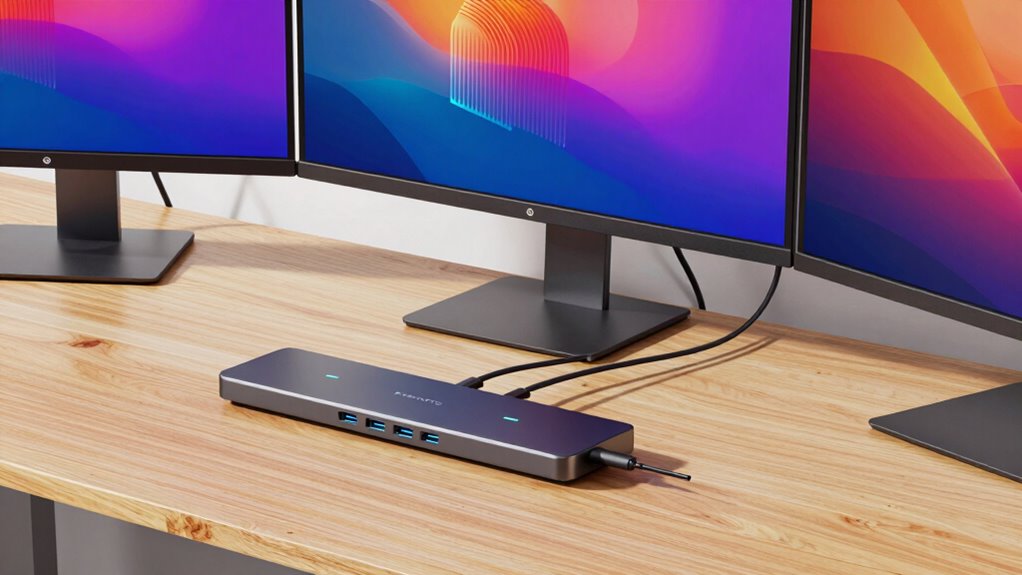
Finding a reliable USBC docking station that supports three monitors can transform your workspace, whether for productivity or entertainment. The best models offer seamless multi-display support, fast data transfer, and robust power delivery, but they vary widely in features and price. The Selore USB C Docking Station stands out for its extensive connectivity, while the Plugable 13-in-1 Dock offers a balanced mix of performance and affordability. However, tradeoffs often include size, compatibility, or port options, making it essential to choose carefully. Continue reading to explore the top choices and find the perfect triple monitor dock for your setup.

Get privacy and security gear delivered free with Prime
- Fast, free delivery on millions of items
- Prime Video, Amazon Music and more included
- Member-only deals all year
Key Takeaways
- The best docking stations balance multi-monitor support with reliable power delivery and a broad port selection.
- Models with higher resolution support (like 4K@60Hz) tend to be more expensive but provide sharper visuals.
- Compatibility across operating systems (Windows, Mac, Chrome OS) varies; check before purchasing.
- Size and design matter—compact options save desk space but may sacrifice port variety.
- Price ranges reflect features, build quality, and brand reputation; investing more often means better longevity and support.
| Selore USB C Docking Station with 3 Monitors and 13-in-1 Laptop Hub |  | Best Overall for Windows Users Needing Versatile Connectivity | Hardware Interface: Ethernet, HDMI, MicroSD, USB 2.0, USB 3.0 | Additional Features: Fast Data Transfer, Plug and Play, Portable | Compatible Devices: Windows Laptop | VIEW ON AMAZON | See Our Full Breakdown |
| Plugable 13-in-1 USB-C Docking Station with 4K Triple Monitor Support and 100W Power Delivery |  | Best for Wide Compatibility and Extended Connectivity | Hardware Interface: USB Type C | Compatible Devices: Windows 10 / 11, macOS 10.15+ (DisplayLink required), ChromeOS 100+ | Total USB Ports: 5 | VIEW ON AMAZON | See Our Full Breakdown |
| Baseus Spacemate Docking Station 11-in-1 with Triple Display for Windows |  | Best Compact Design for Windows Multitasking | Number of HDMI ports: 2 | Number of DisplayPort ports: 2 | USB-C ports: 2 | VIEW ON AMAZON | See Our Full Breakdown |
| Plugable USB-C Triple Display Docking Station with 100W Power Delivery, 3 HDMI Ports, and 6 USB 3.0 Ports |  | Best Enterprise-Grade Connectivity for Professionals | Power Delivery: 100W | Display Outputs: 3 HDMI (30Hz 4K, 1080p 60Hz) | USB Ports: 6x USB 3.0 | VIEW ON AMAZON | See Our Full Breakdown |
| WAVLINK USB C Docking Station with Triple 4K@60Hz Monitors, 100W PD Charging, 6 USB Ports, Ethernet, Audio for Mac and Windows |  | Best for High-Refresh-Rate Visuals and Versatile Connectivity | Monitor Support: Triple 4K@60Hz | Power Delivery: 100W | USB Ports: 6 USB 3.0 | VIEW ON AMAZON | See Our Full Breakdown |
| Acer 11-in-1 USB-C Docking Station for Laptops with 3 Monitors, 8K DP, 4K HDMI, 10Gbps Data, 1Gbps Ethernet, 100W Power Delivery, SD/TF Card Slots, Multiport Hub |  | Best Overall for High-Resolution Triple Monitor Setup | Hardware Interface: Ethernet, HDMI, USB 3.0, USB Type C | Additional Features: 1000Mbps Ethernet, 10Gbps Data Transfer, 8K Display, Plug and Play, Triple Display | Total USB Ports: 11 | VIEW ON AMAZON | See Our Full Breakdown |
| Anker 14-in-1 USB-C Hub with Triple Display for Laptops |  | Best Value for Versatile Triple 4K Monitor Support | Connectivity options: 14-in-1 | Monitor support: Triple 4K HDMI and 1080p VGA | USB ports: Five USB-A, one USB-C | VIEW ON AMAZON | See Our Full Breakdown |
| Anker 13-in-1 USB C Docking Station with Triple Display and 85W Charging |  | Best for High-Powered Productivity with Multiple Monitors | Ports: 2 HDMI, 1 DisplayPort, 3 USB-C, 3 USB-A, Ethernet, SD/TF, Audio, DC-IN | Power Delivery: 85W | Display support: Up to 3 monitors at 1080p@60Hz or 1 at 4K@60Hz | VIEW ON AMAZON | See Our Full Breakdown |
| USB-C Docking Station Dual and Triple Monitor, 4K Display with 2 HDMI, DisplayPort, Ethernet, 100W PD Charging, USB 3.0 Ports |  | Best for Flexible Dual and Triple Monitor Expansion | DisplayPort: Yes | HDMI Ports: 2 | USB Ports: 3 | VIEW ON AMAZON | See Our Full Breakdown |
| Plugable USB-C Triple Monitor Docking Station: 13-in-1 Laptop Dock with 100W Charging for Mac, Windows, Chrome |  | Best for Compatibility and Power in Enterprise Environments | HDMI Ports: 3 | USB Ports: 4 | Ethernet: Gigabit | VIEW ON AMAZON | See Our Full Breakdown |
| TobenONE 18-in-1 USB C Docking Station with Triple 4K HDMI, 9 USB Ports, Ethernet, and 100W Power Delivery for Windows/Laptop |  | Best for Professional Multitasking and High-Quality Displays | Ports: 9 USB ports, 3 HDMI, Ethernet, SD/microSD, audio jack | Display Support: Triple 4K@60Hz or dual 4K@60Hz | Power Delivery: 100W | VIEW ON AMAZON | See Our Full Breakdown |
| usbc docking station triple monitor | Power Delivery |
|---|---|
| Selore USB C Docking Station w | — |
| Plugable 13-in-1 USB-C Docking | — |
| Baseus Spacemate Docking Stati | 100W |
| Plugable USB-C Triple Display | 100W |
| WAVLINK USB C Docking Station | 100W |
| Acer 11-in-1 USB-C Docking Sta | — |
| Anker 14-in-1 USB-C Hub with T | — |
| Anker 13-in-1 USB C Docking St | 85W |
| USB-C Docking Station Dual and | 100W |
| Plugable USB-C Triple Monitor | 100W |
| TobenONE 18-in-1 USB C Docking | 100W |
More Details on Our Top Picks
Selore USB C Docking Station with 3 Monitors and 13-in-1 Laptop Hub
This docking station stands out for its robust support of three independent 4K monitors, making it ideal for users who need extensive screen real estate on Windows laptops. Unlike the Plugable 13-in-1, which offers more ports but supports only mirror mode on macOS, the Selore excels with seamless extend mode on Windows, ensuring a smooth multitasking experience. However, it doesn’t support triple monitor extend mode on macOS, which limits its versatility for Mac users. Its high-speed 10Gbps data transfer, gigabit Ethernet, and 100W charging make it a comprehensive choice for productivity. The primary tradeoff is its limited compatibility with non-Windows systems, which could hinder users with Mac or Linux devices.
Pros:- Supports triple 4K monitor setup with independent displays
- High-speed 10Gbps data transfer via USB 3.1 ports
- Includes gigabit Ethernet and 100W power delivery for complete connectivity
Cons:- Triple monitor extend mode not supported on macOS
- Requires laptop’s USB-C port to support DisplayPort Alt Mode or Thunderbolt 3/4
- Limited compatibility with non-Windows devices
Best for: Windows professionals who require multiple 4K displays and high-speed data transfer
Not ideal for: Mac users seeking native triple monitor support without driver installation or compatibility issues
- Hardware Interface:Ethernet, HDMI, MicroSD, USB 2.0, USB 3.0
- Additional Features:Fast Data Transfer, Plug and Play, Portable
- Compatible Devices:Windows Laptop
- Total USB Ports:5
- Data Transfer Rate:10 gigabits per second
- Number of Ports:12
Our verdict“This option is best suited for Windows users who need a reliable, feature-rich triple monitor docking station with fast data transfer and comprehensive ports.”
Plugable 13-in-1 USB-C Docking Station with 4K Triple Monitor Support and 100W Power Delivery
Compared to the Selore, the Plugable UD-ULTC4K offers broader system support, including macOS and ChromeOS, thanks to DisplayLink technology. It supports three 4K monitors, providing ample screen space for multitasking, with the added benefit of multiple USB ports, SD card slots, and Ethernet. The key advantage over the Baseus Spacemate is its compatibility with a wider range of laptops and operating systems, making it versatile for mixed environments. However, requiring DisplayLink drivers on macOS introduces setup complexity, and HDCP limitations may restrict streaming protected content. While it offers extensive connectivity, users should weigh the driver dependency for macOS and potential driver updates for stability.
Pros:- Supports triple 4K monitors for maximum productivity
- Provides 100W power delivery to charge laptops
- Multiple connectivity options including HDMI, DisplayPort, Ethernet, and SD slots
Cons:- Requires DisplayLink drivers on macOS, adding setup steps
- Driver installation needed for full functionality
- No HDCP support, limiting protected content streaming
Best for: Professionals using mixed operating systems who need a reliable, multi-display setup with extensive ports
Not ideal for: Users seeking a simple, driver-free plug-and-play solution on macOS and Linux systems
- Hardware Interface:USB Type C
- Compatible Devices:Windows 10 / 11, macOS 10.15+ (DisplayLink required), ChromeOS 100+
- Total USB Ports:5
- Number of HDMI Ports:3
- Wattage:100 watts
- Supports:Full-featured USB-C, USB4, Thunderbolt 3/4/5 systems
Our verdict“Best suited for users who need broad device compatibility and extensive peripheral support, accepting driver installation for full features.”
Baseus Spacemate Docking Station 11-in-1 with Triple Display for Windows
The Baseus Spacemate stands out with its compact vertical design and support for three 4K displays on Windows, offering a sleek, space-saving solution. Its aluminum finish adds a premium look, and the LED display provides clear connection status. Compared to the Plugable 13-in-1, it’s more portable and takes up less desk space, making it ideal for small workstations. However, its limited support on macOS—only single extended display—reduces its appeal for Mac users. The need for a separate 100W power adapter and missing input cable are additional inconveniences. If you prioritize a tidy, dedicated Windows setup, this dock offers a compelling balance of features and design, but it’s less flexible for users with macOS or Linux.
Pros:- Supports triple 4K displays for multitasking
- Fast data transfer speeds up to 10Gbps
- Sleek, vertical aluminum design saves desk space
Cons:- Limited to single extended display on macOS
- Power adapter not included, requires additional purchase
- Charger and input cable are not included in the package
Best for: Windows users seeking a compact, stylish dock to run three 4K monitors without taking up much space
Not ideal for: Mac users who want triple monitor support or a plug-and-play experience without driver complications
- Number of HDMI ports:2
- Number of DisplayPort ports:2
- USB-C ports:2
- USB-A ports:3
- Ethernet:Gigabit Ethernet
- Power Delivery:100W
Our verdict“Ideal for Windows users with limited space who want a stylish, multi-4K monitor setup, accepting some additional accessories needed.”
Plugable USB-C Triple Display Docking Station with 100W Power Delivery, 3 HDMI Ports, and 6 USB 3.0 Ports
This station offers a balanced mix of performance and reliability, supporting three HDMI outputs—although at 30Hz for 4K—making it suitable for general productivity rather than high-end visuals. The six USB 3.0 ports and gigabit Ethernet provide ample peripheral support, while 100W charging keeps laptops powered without needing separate chargers. Compared to the WAVLINK, which supports triple 4K@60Hz, this model prioritizes stability and enterprise-level support, including lifetime support options. The main tradeoff is the HDMI 4K refresh rate—limited to 30Hz—which might be noticeable when working with fast-moving visuals or video editing. Nonetheless, it’s a dependable choice for professional environments needing multi-monitor support with minimal fuss.
Pros:- Supports three HDMI monitors for enhanced multitasking
- 100W Power Delivery for continuous laptop charging
- Enterprise-grade reliability with lifetime support
Cons:- Limited to HDMI 30Hz for 4K, which may affect smooth motion
- Requires driver installation for full macOS functionality
- Not compatible with Linux systems
Best for: Enterprise and corporate users who value stability, multiple peripherals, and consistent performance
Not ideal for: Creative professionals requiring high-refresh-rate 4K visuals or gaming applications
- Power Delivery:100W
- Display Outputs:3 HDMI (30Hz 4K, 1080p 60Hz)
- USB Ports:6x USB 3.0
- Compatibility:Windows, macOS 11+, ChromeOS
Our verdict“A solid choice for business environments needing reliable multi-monitor support and peripheral connectivity, accepting lower 4K refresh rates.”
WAVLINK USB C Docking Station with Triple 4K@60Hz Monitors, 100W PD Charging, 6 USB Ports, Ethernet, Audio for Mac and Windows
The WAVLINK station is engineered for users demanding high-quality visuals at 60Hz on all three monitors, making it ideal for creative work or media consumption. Its support for triple 4K@60Hz surpasses many competitors like the Plugable with only 30Hz, providing smoother motion. The 100W power delivery and six USB ports ensure full device compatibility and charging, while Ethernet and audio support round out its comprehensive feature set. Compared with the Baseus Spacemate, it offers more robust display support at the expense of a larger footprint. The main limitation stems from some compatibility issues with macOS, where external displays may be restricted, and HDMI ports depend on laptop support for video output. Still, this dock excels where high refresh rates and high-quality visuals are priorities.
Pros:- Supports triple 4K@60Hz monitors for smooth visuals
- Powerful 100W charging for laptops
- Multiple USB ports and Ethernet for versatile connectivity
Cons:- HDMI ports depend on laptop support for video output
- Limited support for Unix/Linux systems
- macOS may restrict external display extension
Best for: Creative professionals and media enthusiasts needing triple 4K@60Hz support with high refresh rates
Not ideal for: Users with limited laptop support for high-refresh-rate HDMI output or seeking a lightweight, compact dock
- Monitor Support:Triple 4K@60Hz
- Power Delivery:100W
- USB Ports:6 USB 3.0
- Ethernet:1Gbps
Our verdict“Best suited for multimedia professionals needing high-refresh-rate triple 4K support with comprehensive connectivity options.”
Acer 11-in-1 USB-C Docking Station for Laptops with 3 Monitors, 8K DP, 4K HDMI, 10Gbps Data, 1Gbps Ethernet, 100W Power Delivery, SD/TF Card Slots, Multiport Hub
This Acer docking station stands out for supporting triple monitor configurations with stunning resolutions up to 8K via DisplayPort and 4K HDMI, making it ideal for professionals who need crisp visuals. Compared with the Plugable USB-C Triple Monitor Dock, it offers higher resolution support but requires devices that support USB-C DisplayPort Alt Mode, which isn’t universal. Its fast 10Gbps data transfer and reliable 100W charging make it a versatile hub for both work and entertainment. However, the plastic enclosure and need for specific cable compatibility may feel less premium and limit ease of use. Overall, this option is best suited for users with compatible devices seeking top-tier display quality and robust connectivity.
Pros:- Supports triple monitor setup with 8K and 4K resolution support
- Fast data transfer speeds up to 10Gbps
- Reliable 100W power delivery for charging laptops
- Multiple ports including Ethernet and SD card slots
Cons:- Requires device with USB-C DisplayPort Alt Mode support
- Plastic enclosure may feel less durable
Best for: Power users and creative professionals with high-resolution display needs and compatible laptops
Not ideal for: Users with budget constraints or older laptops lacking USB-C DisplayPort Alt Mode support
- Hardware Interface:Ethernet, HDMI, USB 3.0, USB Type C
- Additional Features:1000Mbps Ethernet, 10Gbps Data Transfer, 8K Display, Plug and Play, Triple Display
- Total USB Ports:11
- Data Transfer Rate:10 Gbps
- Supported Operating Systems:Windows, macOS, Linux, Chrome OS
- Color:Grey
Our verdict“This dock is perfect for professionals who prioritize high-resolution displays and have compatible devices, despite some compatibility and build limitations.”
Anker 14-in-1 USB-C Hub with Triple Display for Laptops
This Anker hub offers a comprehensive 14-in-1 setup, supporting triple 4K displays and a variety of connectivity options that make multitasking seamless. Unlike the Anker 13-in-1 USB C Dock, it provides an extra USB-A port and an additional SD card reader, but it’s slightly larger and potentially more complex for first-time users. Its 80W pass-through charging keeps your workflow uninterrupted, and the multiple ports help connect peripherals easily. However, the lack of included charger and limited compatibility with Linux systems might be drawbacks for some. This pick makes the most sense for users who need extensive connectivity with multiple high-resolution displays on a compatible system.
Pros:- Supports triple 4K monitor setup
- Multiple USB-A and SD card ports for versatile connectivity
- 80W pass-through charging for uninterrupted power
Cons:- Charger not included, additional purchase needed
- Limited Linux compatibility
- External monitor display may mirror on macOS
Best for: Professional multitaskers needing multiple 4K monitors and extensive peripheral support
Not ideal for: Linux users or those seeking a more compact, simplified dock
- Connectivity options:14-in-1
- Monitor support:Triple 4K HDMI and 1080p VGA
- USB ports:Five USB-A, one USB-C
- Ethernet:1 Gbps
- Charging:80W pass-through PD
- Compatibility:USB-C, USB4, Thunderbolt, MacBook, Windows, ChromeOS
Our verdict“Ideal for users who require extensive port options and triple 4K monitor support without sacrificing charging capacity, though Linux support is limited.”
Anker 13-in-1 USB C Docking Station with Triple Display and 85W Charging
This 13-in-1 docking station provides robust support for up to three monitors, supporting 4K at 60Hz on one display and dual 1080p on others, making it well-suited for professional workloads. Compared to the Plugable USB-C Triple Monitor Dock, it offers a higher power delivery of 85W and includes a 135W power adapter, ensuring reliable laptop charging. Its mix of HDMI, DisplayPort, and multiple USB ports supports a wide array of peripherals. The design is compact, but setup complexity may challenge less technical users, and some macOS configurations may mirror displays rather than extend. Overall, this model fits best for users who need a powerful all-in-one solution for multi-monitor setups and high data throughput.
Pros:- Supports triple monitor setup with 4K@60Hz
- High 85W charging capacity for laptops
- Multiple ports including HDMI, DisplayPort, and USB-A
Cons:- Setup may be complex for non-technical users
- macOS may only mirror displays, not extend
Best for: Power users and professionals seeking reliable, multi-display support with high charging power
Not ideal for: Casual users or those with Linux systems due to potential setup hurdles
- Ports:2 HDMI, 1 DisplayPort, 3 USB-C, 3 USB-A, Ethernet, SD/TF, Audio, DC-IN
- Power Delivery:85W
- Display support:Up to 3 monitors at 1080p@60Hz or 1 at 4K@60Hz
- Data transfer speed:10Gbps via USB-C
- SD card read speed:104 MB/s
- Dimensions:4.9 x 3.5 x 1.6 inches
Our verdict“Best suited for demanding professionals who need powerful multi-monitor support and fast data transfer, though setup complexity and macOS limitations are considerations.”
USB-C Docking Station Dual and Triple Monitor, 4K Display with 2 HDMI, DisplayPort, Ethernet, 100W PD Charging, USB 3.0 Ports
This versatile docking station supports both dual and triple monitor arrangements with 4K resolution on multiple screens, making it suitable for users who need adaptable setups. Unlike the Plugable B01FKTZLBS, it offers the flexibility of dual or triple displays at 4K, but only supports 30Hz refresh rate on 4K, which might affect smoothness for fast-moving content. Its gigabit Ethernet and 100W charging make it a solid choice for office environments. The limited support on macOS and the need for Thunderbolt or USB-C ports for full functionality are potential drawbacks. This station works best for users prioritizing flexible monitor configurations over high refresh rates.
Pros:- Supports 4K resolution on multiple monitors
- Gigabit Ethernet and 100W charging for productivity
- Supports dual and triple monitor configurations
Cons:- Limited to 30Hz refresh rate at 4K resolution
- No support for HDCP-protected streaming content
- Requires Thunderbolt 3/4 or USB-C for full features
Best for: Office workers who need flexible monitor configurations with reliable Ethernet and charging
Not ideal for: Gamers or video editors requiring high refresh rates or high-performance graphics
- DisplayPort:Yes
- HDMI Ports:2
- USB Ports:3
- Ethernet:Gigabit
- Power Delivery:100W
- Supported Display Resolution:Up to 4K @30Hz
Our verdict“A flexible dock suited for office multitasking where high refresh rate isn’t critical, with some limitations on macOS and streaming content.”
Plugable USB-C Triple Monitor Docking Station: 13-in-1 Laptop Dock with 100W Charging for Mac, Windows, Chrome
This Plugable dock offers a solid 13-in-1 array supporting triple HDMI displays at 4K 30Hz, providing ample connectivity for enterprise or office setups. Compared with the Anker 13-in-1, it emphasizes broad device compatibility with Windows, macOS, and ChromeOS, making it a versatile choice for mixed-device environments. The 100W charging and gigabit Ethernet support boost productivity, but the 30Hz refresh rate at 4K could limit visual smoothness, especially for fast-paced tasks. Driver installation on Mac may be necessary, which can add complexity. This dock is best for users who need a reliable, multi-platform solution with comprehensive port options but can accept lower refresh rates.
Pros:- Supports triple 4K HDMI monitors at 30Hz
- Powerful 100W charging for laptops
- Multiple ports including gigabit Ethernet and audio
Cons:- Limited to 30Hz at 4K resolution
- Driver installation required for macOS to enable multi-display
- Limited support for HDCP protected content
Best for: Enterprise users and IT managers managing mixed-device fleets needing reliable multi-monitor support
Not ideal for: Gamers or video editors demanding higher refresh rates or HDCP support
- HDMI Ports:3
- USB Ports:4
- Ethernet:Gigabit
- Power Delivery:100W
- Display support:Triple 4K @30Hz
- Additional features:Gigabit Ethernet, audio in/out
Our verdict“A dependable multi-platform dock for enterprise environments prioritizing connectivity over high refresh rates, with some setup considerations.”
TobenONE 18-in-1 USB C Docking Station with Triple 4K HDMI, 9 USB Ports, Ethernet, and 100W Power Delivery for Windows/Laptop
The TobenONE 18-in-1 stands out for its impressive support for triple 4K@60Hz displays, making it ideal for users who need crisp visuals across multiple screens. Compared with the Plugable 13-in-1, which offers similar display support, the TobenONE excels with a higher number of USB ports, giving more flexibility for peripherals. However, the absence of an included power adapter can be inconvenient for users seeking an all-in-one solution; you’ll need a compatible external supply. Its robust 100W power delivery supports long work sessions without needing a separate charger, unlike some compact options that offer less wattage. Designed primarily for Windows and Chrome OS, it misses Mac compatibility, which limits its audience. Overall, this dock is best suited for professionals who prioritize multiple high-res displays and extensive peripheral connectivity.
Pros:- Supports triple 4K@60Hz displays for crisp visuals
- Nine USB ports for extensive peripheral connection
- 100W power delivery keeps laptops charged during intensive tasks
- Compatible with Windows and Chrome OS
Cons:- Power adapter not included, requiring an external power supply
- Designed specifically for Windows and Chrome OS, not Mac
- Requires a compatible USB-C port for full functionality
Best for: IT professionals and remote workers who need reliable triple 4K display support and multiple peripherals without multiple adapters
Not ideal for: Mac users or those with limited desk space who prefer a more compact docking solution
- Ports:9 USB ports, 3 HDMI, Ethernet, SD/microSD, audio jack
- Display Support:Triple 4K@60Hz or dual 4K@60Hz
- Power Delivery:100W
- Compatibility:Windows, Chrome OS
- Power Adapter Included:No
- Dimensions:Approx. 12 x 4 x 1.5 inches
- Weight:2.2 lbs
- Material:Aluminum alloy
- Color:Space gray
Our verdict“This dock makes the most sense for professionals needing high-quality visuals and extensive connectivity on Windows or Chrome OS laptops.”

How We Picked
The products in this roundup were evaluated based on their ability to support three monitors via a single USB-C connection, ensuring reliable video output at high resolutions such as 4K@60Hz. We prioritized models offering strong power delivery (at least 85W) to power laptops while connected. Build quality, port variety, and compatibility with different operating systems also played key roles, as did user-friendly features like ease of setup and durability. Products were ranked to reflect a mix of performance, value, and versatility, helping different types of users find suitable options—from casual users to professionals needing robust setups.Factors to Consider When Choosing Usbc Docking Station Triple Monitor
Choosing the right USBC docking station for triple monitor support requires balancing several factors. Beyond just the number of ports, it’s important to consider video quality, power delivery, compatibility, and the physical size of the dock. Making an informed decision involves understanding your specific needs—whether for high-resolution visuals, fast data transfer, or portability—and recognizing potential tradeoffs like cost or compatibility limitations. Here are key considerations to guide your selection.Video Output Support and Resolution
Not all docking stations support high-resolution displays at 60Hz, which can impact visual clarity and smoothness. Look for models that explicitly support 4K@60Hz or higher if you need crisp visuals, especially for creative work or detailed spreadsheets. Some models may only support lower resolutions or refresh rates, which could be limiting for high-end use cases. Be sure to verify the video output specifications to match your monitor capabilities and avoid performance bottlenecks.
Power Delivery and Charging
Power delivery (PD) is essential if you want your dock to charge your laptop while connected. Many docks support 85W or more, but some budget options provide only 60W or less, which might not suffice for more power-hungry devices. Overestimating your power needs prevents the hassle of additional adapters and keeps your workspace tidy. Remember, the right PD support ensures your laptop stays charged during intensive tasks, but higher wattage docks tend to cost more.
Port Variety and Connectivity
A versatile port array accommodates various peripherals, from external drives to audio devices. Consider whether you need multiple USB-A, USB-C, Ethernet, SD card readers, or audio jacks. Some docks sacrifice port variety for a sleeker design, which could limit expandability. Think about your current and future accessory needs to select a dock that offers enough connectivity for your workflow without overcrowding your desk.
Compatibility and Ease of Use
Check compatibility with your operating system and ensure the dock’s drivers are reliable. Some docks work seamlessly with Windows but have limited support for Mac or Chrome OS. User experience varies, with some models offering plug-and-play setup, while others require software installations. Read user reviews to gauge real-world compatibility issues, especially if your setup involves multiple device types or older hardware.
Size, Design, and Build Quality
The physical footprint influences desk space and portability. Compact docks are easier to carry but might have fewer ports, while larger models often include more connectivity options. Material quality also affects durability, especially if you plan to move or travel with your dock. Consider your workspace and usage habits to choose a design that balances convenience with functionality.
Frequently Asked Questions
Can I connect three 4K monitors to a USB-C docking station?
Yes, but only if the docking station explicitly supports triple 4K@60Hz outputs. Not all docks can handle this resolution and refresh rate simultaneously, so verifying the specifications is crucial. Even if a dock claims triple monitor support, check if it supports high resolutions on all three screens at the same time, as some may limit one or more outputs to lower resolutions or refresh rates. Compatibility with your GPU and monitor inputs also affects performance.
Will a USBC docking station support my MacBook Pro for three monitors?
Many USBC docks are compatible with MacBook Pro, but support for triple monitors can vary. Ensure the dock explicitly states compatibility with macOS and supports multiple high-resolution displays at 60Hz. Some docks may require specific drivers or have limitations on the number of external displays supported by macOS. Always verify the manufacturer’s compatibility list before purchasing if you’re a Mac user.
Is it necessary to buy a more expensive dock for better performance?
Higher-priced docks often feature better build quality, more reliable video output, and higher wattage power delivery. They tend to support higher resolutions, more ports, and longer warranties. However, for basic needs like dual 1080p monitors with occasional use, a mid-range dock may suffice. Evaluate your specific requirements—such as resolution, peripheral needs, and portability—to determine whether investing in a premium model is justified.
Can I use a triple monitor dock with a non-USB-C laptop?
Most docks designed for USB-C connectivity won’t work directly with non-USB-C laptops unless they have compatible adapters or ports. Some docks support USB-A connections via adapters, but this often limits video output capabilities and bandwidth. Always check the dock’s compatibility with your device’s ports and whether it supports alternate connection methods. For non-USB-C laptops, consider docks specifically designed for legacy connections.
What should I do if my monitors flicker or don’t display correctly?
This issue often relates to insufficient bandwidth, incompatible cables, or outdated drivers. First, verify that your dock supports the monitor resolutions and refresh rates you’re using. Using certified high-quality HDMI or DisplayPort cables can prevent signal issues. Updating graphics drivers and the dock’s firmware can also resolve display problems. If problems persist, testing monitors with different ports or replacing cables may be necessary to identify the cause.
Conclusion
For users seeking the best overall experience, the Plugable 13-in-1 USB-C Docking Station offers a balanced mix of features, performance, and value. If budget-conscious buyers want reliable triple monitor support without sacrificing too much quality, the Baseus Spacemate Docking Station is a strong contender. Professionals who need premium build and maximum resolution should consider the WAVLINK USB C Docking Station or the TobenONE 18-in-1 Dock. Beginners or casual users will find the Anker 13-in-1 USB C Dock straightforward and effective, while those with specific compatibility needs can focus on models tailored for Mac or Windows. Your choice depends on your monitor resolution needs, portability, and budget—use this guide to match your setup precisely.
As an affiliate, we earn on qualifying purchases.Halloween Picks
halloween