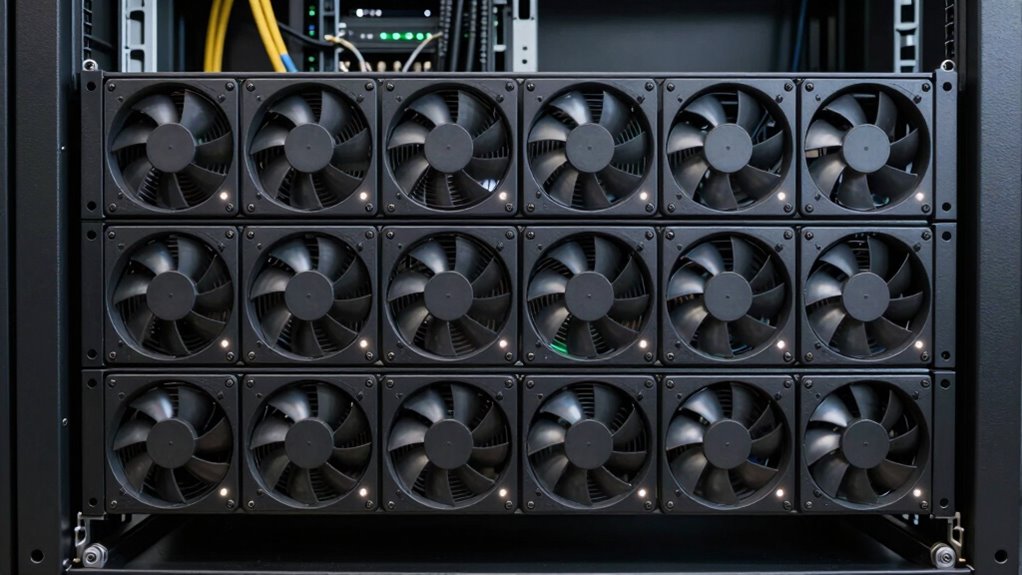
Looking for the best rackmount fan tray to keep your server equipment cool? The top choice this year is the Tripp Lite Rack Enclosure Server Cabinet 1U Cooling Fan Tray for its high performance and reliability. The Rack Solutions 1U Horizontal Fan Tray offers excellent airflow for those prioritizing efficiency, while the Tecmojo 1U Rack Mount Cooling Fans stands out with advanced temperature control features. Many options balance between performance, noise levels, and ease of installation, but tradeoffs often include size, noise, or price. Continue reading for a detailed comparison to find the perfect fit for your setup.

Get privacy and security gear delivered free with Prime
- Fast, free delivery on millions of items
- Prime Video, Amazon Music and more included
- Member-only deals all year
Key Takeaways
- The top-ranked options excel in airflow and build quality, making them suitable for high-density server racks.
- Adjustable temperature and digital monitoring features significantly improve control but often come with higher costs.
- Size and compatibility are crucial; not all fans fit every 1U or 2U rack space equally well.
- Noise levels vary widely; quieter fans tend to cost more but improve working environments.
- Ease of installation and maintenance is often overlooked but impacts long-term usability.


More Details on Our Top Picks
Rack Mount Fan – 3 Fans 1U 19″ with Adjustable Temperature & Digital Display
This fan system stands out for its combination of adjustable temperature control and quiet operation, making it ideal for managing thermal environments in sensitive server setups. Compared with the V7 Rack Mount 4 Fan Tray, it offers programmable thermostat features that allow for more precise temperature regulation, which is especially useful in environments with fluctuating loads. Its noise-controlled ball bearing fans mitigate operational noise, a key benefit over less refined fans. However, the reliance on a 12V power supply limits versatility, and the lack of remote monitoring may be a drawback for larger, remote managed racks. This pick makes the most sense for users who need customizable cooling without sacrificing silence or precision control in a standard 19-inch rack.
Pros:- Adjustable temperature control for precise cooling management
- Quiet operation with noise-controlled ball bearing fans
- Compact 1U design fits standard rack spaces
- Programmable thermostat enhances thermal regulation
Cons:- Limited to 12V power supply, requiring specific setup
- No remote monitoring or advanced control features
- Potentially noisy if fans run at maximum speed
Best for: IT professionals managing sensitive, temperature-critical equipment in standard 19″ racks
Not ideal for: Users seeking plug-and-play, high-volume cooling solutions with minimal setup, or those needing remote monitoring features
- Power Connector Type:AC Power Cord with Plug
- Voltage:12 volts
- Wattage:5.64 watts
- Cooling Method:Air
- Maximum Rotational Speed:1800 rpm
- Air Flow Capacity:225 cfm
- Item Dimensions:19″L x 8″W x 1.75″H
- Material Type:Aluminum
Our verdict“Ideal for users who prioritize customizable, quiet cooling with precise temperature management in a standard 19-inch rack.”
Tripp Lite Rack Enclosure Server Cabinet 1U Cooling Fan Tray with 3 High-Performance Fans
This fan tray excels at boosting airflow within enclosed server cabinets, especially compared to the V7 Rack Mount 4 Fan Tray, which is more limited in scope. Its three 120V fans deliver robust cooling power at 210 CFM, making it suitable for densely packed environments where high airflow is essential. The heavy-duty cold-rolled steel construction ensures durability for demanding settings. However, the lack of temperature control features means it offers no thermal regulation beyond basic airflow, which could lead to inefficiencies or noise at higher speeds. This product makes the most sense for those who need reliable, high-volume ventilation in 1U racks and are willing to operate at fixed speeds without fine-tuning.
Pros:- High airflow capacity of 210 CFM for effective cooling
- Durable cold-rolled steel construction enhances longevity
- Three high-performance fans improve ventilation efficiency
- Designed specifically for 1U rack enclosures
Cons:- No adjustable fan speeds or temperature controls
- Requires 120V power supply, limiting installation flexibility
- No integrated monitoring or smart features
Best for: Data center technicians or large-scale server room managers needing durable, high-capacity airflow
Not ideal for: Small office setups or users who prefer adjustable or quiet cooling solutions with thermal management features
- Number of Fans:3
- Fan Size:4 inches
- Voltage:120V
- Airflow:210 CFM
- Material:Cold-rolled steel
- Power Cord:6 ft. AC power cord with 5-15P plug
Our verdict“Best suited for environments demanding heavy-duty airflow without the need for fan speed or temperature customization.”
V7 Rack Mount 4 Fan Tray – RM4FANTRAY-1N
This tray offers four quiet ball bearing fans, making it ideal for extending equipment lifespan while maintaining low operational noise, especially when compared to the noisier Fan Tray for Server Rack. Its solid steel construction ensures durability in demanding environments. The main tradeoff is the absence of adjustable fan speeds or temperature regulation, which limits customization. It is designed exclusively for the V7 RMEC42U rack, so compatibility is restricted. This choice is best for users wanting straightforward, reliable cooling that minimizes noise in standard rack setups.
Pros:- Quiet ball bearing fans operate smoothly and reduce noise
- Durable steel construction ensures long-term reliability
- Easy installation compatible with V7 RMEC42U racks
- Provides effective airflow to extend equipment lifespan
Cons:- No fan speed or temperature adjustments available
- Limited to specific rack models
- No detailed hardware or warranty info provided
Best for: Small to medium IT setups requiring reliable cooling with minimal noise in V7-compatible racks
Not ideal for: Large data centers or environments needing adjustable thermal control or smart monitoring features
- Number of Fans:4
- Material:Solid steel
- Power:AC
Our verdict“Best for users seeking a durable, quiet cooling solution tailored for V7 racks without the need for customization.”
Fan Tray for Server Rack
This basic fan tray, designed for the RACK-151 model, offers six exhaust fans that boost ventilation with straightforward installation, which makes it a reliable choice for simple cooling needs. Compared with the more sophisticated Rack Mount Fan – 3 Fans 1U, its six fans provide higher airflow, but it lacks detailed specs on noise levels or speed controls. The requirement of 110V power makes it less flexible in certain environments, especially where 220V systems dominate. This product makes sense for users needing quick, effective cooling without advanced features or fine-tuning in compatible racks.
Pros:- Six fans deliver strong ventilation for racks
- Simple, secure mounting on top of the rack
- Easy to install with standard hardware
Cons:- Limited info on noise levels or fan speeds
- Requires 110V power, restricting placement in some regions
- No warranty or durability details provided
Best for: Small server racks or network cabinets requiring high airflow with minimal complexity
Not ideal for: Environments demanding precise temperature regulation or quieter operation
- Brand:Innovation First
- Model Number:RACK-151-FANTRAY-6
- UPC:807648009279
- Unit Count:1
- Power:110V
Our verdict“Ideal for straightforward, high-volume cooling needs in small to medium racks without advanced controls.”
Rack Mount Fan – 4 Fans 1U 19″ with Adjustable Temperature & Digital Display
This model combines four fans with adjustable temperature control and a digital LCD display, making it a flexible choice for diverse rack environments. Compared to the Rack Mount Fan – 3 Fans 1U, it offers more fans and a clearer interface for monitoring and adjusting thermal parameters, which benefits users with variable cooling needs. Its quiet operation suits office or mixed-use settings. However, the lack of detailed fan speed controls and the requirement for standard 19″ rack space may limit its appeal to those seeking highly customizable or ultra-quiet solutions. This pick is ideal for users who want a balance of flexibility and quiet operation in standard server or network cabinets.
Pros:- Adjustable temperature control allows for tailored cooling
- Quiet operation minimizes disruption in office settings
- Compact 1U design fits standard racks
- Clear digital LCD display for easy monitoring
Cons:- No detailed fan speed adjustment options
- Requires standard 19″ rack space, limiting flexibility
- No integrated smart or remote features
Best for: IT managers needing adaptable, quiet cooling in 19-inch racks for servers, networks, or AV gear
Not ideal for: Environments requiring advanced remote management or highly specific fan speed controls
- Number of Fans:4
- Mounting Size:1U 19″
- Control:Adjustable temperature
- Display:Digital LCD
- Application:Server, network, AV cabinets
Our verdict“Best suited for users who value flexible thermal management and quiet operation in standard rack environments.”
Tecmojo 1U Rack Mount Cooling Fans with Thermostat and Digital Heat Monitor
This Tecmojo model excels in environments where managing heat intelligently is critical. Its digital heat monitor and thermostat allow for precise temperature regulation, making it ideal for sensitive server or network setups that demand stable conditions. Compared to the simpler RackSolutions fan tray, which offers straightforward airflow without temperature controls, the Tecmojo provides more tailored cooling, though it comes with a more complex setup process. Its quiet fans are a notable advantage in office or noise-sensitive environments. However, its reliance on a digital display and thermostat means it’s limited to standard 19-inch racks and may be less user-friendly for those unfamiliar with digital controls. It’s best suited for users who prioritize fine-tuned thermal management over plug-and-play simplicity.
Pros:- Compact 1U design fits standard rack cabinets
- Adjustable temperature control enhances thermal management
- Quiet operation minimizes noise disruption
- Digital display simplifies real-time monitoring
Cons:- Limited to 19-inch rack systems, reducing versatility
- Setup can be complex for non-technical users
- Higher price point compared to simpler fans
Best for: IT professionals or facilities managers needing precise temperature regulation in standard 19-inch rack systems
Not ideal for: Casual home lab users or those seeking a plug-and-play solution without digital controls
- Design:1U rack mount
- Number of Fans:4
- Display:Digital heat monitor
- Features:Thermostat, overheat alarm, adjustable temperature control, quiet fans
- Adjustable Depth:15.8 to 29.5 inches
- Compatibility:Standard 19-inch rack
Our verdict“This model suits those who need precise, monitored cooling in a standard rack environment and are comfortable with digital controls.”
RackSolutions 1U Horizontal Fan Tray – 4 Fans, 96 CFM Airflow, Rack-Mountable
Compared with the Tecmojo option, the RackSolutions fan tray emphasizes high airflow with its four 120mm fans, making it ideal for users who need to rapidly dissipate heat in densely packed racks. Its straightforward design lacks digital controls but offers a simple on/off switch, giving users quick control over operation. This makes it more accessible for those who prefer minimal setup and maintenance, especially in environments where constant monitoring isn’t essential. The tradeoff is that it doesn’t provide temperature regulation or noise reduction features, which could be a concern in quieter office spaces or sensitive environments. Its compact 1U form factor and high airflow capacity make it perfect for users prioritizing raw cooling power and ease of use over digital precision.
Pros:- High airflow capacity of 96 CFM for effective cooling
- Simple installation with a standard 1U design
- Easy to control with a dedicated power switch
- Versatile mounting options for flexible setup
Cons:- Lacks digital temperature control or monitoring
- Requires external power source and manual operation
- No noise reduction features, which could be disruptive
Best for: System administrators or DIY enthusiasts seeking high airflow with minimal fuss in standard 19-inch racks
Not ideal for: Users requiring temperature monitoring or noise-sensitive environments
- Number of Fans:4
- Fan Size:120mm
- Airflow:96 CFM
- Mounting Height:1U
- Compatibility:19-inch racks
Our verdict“This tray makes the most sense for users who need quick, powerful airflow and prefer straightforward operation without digital controls.”

How We Picked
Each product was evaluated based on performance, airflow capacity, build quality, and ease of installation. We prioritized models with robust construction and reliable cooling output, especially for high-density racks. Usability features like adjustable temperature controls and digital displays were also key factors, as they help maintain optimal operating conditions. Price and value were considered, but higher cost was justified when features significantly enhanced performance or usability. Our ranking reflects a balance between these factors, aiming to recommend options suitable for different needs and budgets.Factors to Consider When Choosing Rackmount Fan Tray
Choosing the right rackmount fan tray involves balancing performance, compatibility, and features. Beyond basic airflow, consider how the fan’s size, noise, and control options fit your specific rack setup and operational environment. Proper airflow management prevents overheating, but overspending on unnecessary features can inflate costs. Understanding these factors helps avoid common pitfalls and ensures you select a model that provides reliable cooling over the long term.Airflow Capacity and Performance
Airflow, measured in CFM (cubic feet per minute), directly impacts cooling effectiveness. Higher airflow fans can handle denser equipment but may generate more noise. Determine your rack’s heat load to select an appropriate CFM rating. Overestimating airflow can lead to unnecessary expense, while underestimating risks overheating components. Always match the fan’s capacity to your specific cooling needs for efficient operation.
Size and Compatibility
Rackmount fans typically fit standard 1U or 2U slots, but variations exist. Measure your rack space carefully before purchasing. Some models may be slightly larger or designed for specific rack brands, affecting ease of installation. Compatibility issues can lead to additional costs or the need for adapters. Select a fan that fits seamlessly into your existing rack architecture to avoid installation headaches.
Adjustability and Monitoring
Features like adjustable temperature controls and digital displays allow for precise cooling management, reducing noise and energy consumption. Fans with thermostats automatically adjust speed based on temperature, which prolongs fan life and maintains optimal conditions. However, these advanced features usually come with a higher price tag. Decide if your setup benefits from automated control or if manual adjustments suffice.
Noise Levels
Fans differ significantly in noise output, which impacts working environments, especially in offices or data centers with noise-sensitive staff. Quieter fans often incorporate better bearings or lower RPMs but may cost more. Consider your environment’s noise tolerance and whether the cooling benefits justify the additional expense for quieter operation.
Ease of Installation and Maintenance
Opt for fans that feature tool-less installation or straightforward mounting to reduce setup time. Ease of access for cleaning or replacing filters and fans is another practical consideration. Some units include quick-connect wiring or modular components that simplify ongoing maintenance. Skipping these features can lead to increased downtime and difficulty in long-term upkeep.
Frequently Asked Questions
How do I know if a rackmount fan tray will fit my server rack?
Measuring your rack’s available space is essential. Most rackmount fans are designed for standard 19-inch racks and fit within 1U or 2U height specifications. Check the product dimensions and compare them with your rack’s dimensions to ensure compatibility. Some models are adjustable or modular, offering more flexibility, but verifying size beforehand prevents installation issues.
Is it worth paying extra for a fan tray with digital temperature monitoring?
Investing in a fan tray with digital monitoring provides real-time temperature readings and automatic speed adjustments, which can significantly improve cooling efficiency. For high-density or critical systems where overheating could cause damage, these features justify the higher cost. However, for smaller setups or less sensitive equipment, manual control may suffice, making simpler models more cost-effective.
How noisy are these fan trays, and should I worry about noise levels?
Noise varies widely among rackmount fans, with some designed for quiet operation and others prioritizing maximum airflow. If your environment is noise-sensitive, look for models that specify decibel ratings or feature noise-reduction technologies. Higher-performance fans tend to be louder, so balancing cooling needs with noise constraints is key to selecting the right product.
Can I install multiple fan trays in a single rack for better cooling?
Yes, stacking or installing multiple fans can enhance airflow and cooling capacity, especially in high-density setups. However, ensure your rack has enough space and proper airflow pathways to prevent turbulence or hotspots. Overloading a single rack with too many fans can cause unnecessary noise and energy use, so plan your setup based on your heat load and space constraints.
What maintenance should I expect with a rackmount fan tray?
Regular cleaning of dust filters and fan blades helps maintain optimal airflow and prolongs fan lifespan. Fans with modular or quick-release features make maintenance easier. Monitoring features can also alert you to failing fans or overheating issues, preventing downtime. Proper maintenance routines ensure your cooling system remains effective and reliable over time.
Conclusion
For users prioritizing overall reliability and performance, the Tripp Lite Rack Enclosure Server Cabinet 1U Cooling Fan Tray offers an excellent balance of airflow and control. Those seeking the best value should consider the Rack Solutions 1U Horizontal Fan Tray, which delivers solid performance at a lower price point. For high-end, feature-rich solutions, the Tecmojo 1U Rack Mount Cooling Fans with digital monitoring excel in automated control. Beginners or smaller setups will find straightforward models more practical, while high-density racks benefit from high airflow capacity and advanced features. Carefully match your specific needs with these options to ensure optimal cooling and system longevity.
As an affiliate, we earn on qualifying purchases.Halloween Picks
halloween