Encrypted network attached storage can keep shared files on your own network while adding protection for stored data, but encryption features and setup vary widely. My best overall pick is the Synology DS425+, a four-bay option that balances expandable storage with a mature management platform. The UGREEN NASync DXP2800 stands out for a two-bay personal setup, while the Synology BeeStation Plus suits buyers who want a simpler, preconfigured personal cloud. The central tradeoff is between easy setup and control: diskless NAS units offer more choice but require drive selection and configuration, while compact personal-cloud devices reduce setup work but offer less flexibility. Read on for how all 13 options differ and what to prioritize before choosing.

Get privacy and security gear delivered free with Prime
- Fast, free delivery on millions of items
- Prime Video, Amazon Music and more included
- Member-only deals all year
Key Takeaways
- The Synology DS425+ leads for balanced expansion: its four drive bays offer more room to grow than the two-bay and single-bay models, though it requires separate drives and more setup.
- Two-bay NAS units are the practical middle ground: the Synology DS225+ and UGREEN NASync DXP2800 provide room for a mirrored drive arrangement without the footprint of a larger server.
- Preconfigured personal-cloud products trade flexibility for convenience: the BeeStation Plus and KingSpec N100 include storage, while diskless models let buyers choose capacity and drives.
- More bays do not automatically mean stronger data protection: RAID can help maintain availability after a drive failure, but it does not replace a separate backup or protect against every form of data loss.
- The high-capacity and high-performance picks suit narrower needs: the UGREEN DXP8800 Ultra and MINISFORUM N5 Pro offer larger, more capable platforms, but most home users may not need their scale or complexity.
| BUFFALO LinkStation 210 2TB 1-Bay NAS with HDD |  | Best Ready-to-Use Pick | Model: LS210D0201 | Storage capacity: 2TB | Drive bays: 1 | VIEW LATEST PRICE | See Our Full Breakdown |
| Synology DiskStation DS223j 2-Bay NAS Enclosure (Diskless) |  | Best for a Flexible Private Cloud | Model: DS223j | Drive bays: 2 | Drive configuration: Diskless | VIEW LATEST PRICE | See Our Full Breakdown |
| UGREEN NAS DH2300 2-Bay Network Attached Storage for Personal Backup |  | Best for Encrypted Personal Backups | Drive bays: 2 | Maximum storage capacity: 64TB with compatible drives | Memory: 4GB | VIEW LATEST PRICE | See Our Full Breakdown |
| Synology BeeStation Plus 8TB Personal Cloud Storage Device |  | Best Guided Home Cloud | Model: BST170-8T | Storage capacity: 8TB | Processor: Intel Celeron J4125 | VIEW LATEST PRICE | See Our Full Breakdown |
| KingSpec N100 4TB Personal Cloud NAS with Pre-Installed SSD |  | Best Compact, Quiet Pick | Storage capacity: 4TB | Storage type: Pre-installed 2.5-inch SATA SSD | Hard disk interface: Serial ATA-600 | VIEW LATEST PRICE | See Our Full Breakdown |
| UGREEN NASync DXP2800 2-Bay Desktop NAS, Diskless, with 3 ft Cat 8 Ethernet Cable |  | Best for Straightforward Encrypted Home Storage | Drive bays: 2 | Drive configuration: Diskless | Maximum storage capacity: 80 TB | VIEW LATEST PRICE | See Our Full Breakdown |
| Synology DS124 1-Bay Diskless NAS for Backup, File Sharing, and Home Surveillance |  | Best for Compact Private-Cloud Backups | Drive bays: 1 | Drive included: No | Operating system: Synology DiskStation Manager | VIEW LATEST PRICE | See Our Full Breakdown |
| UGREEN DXP2800 GT 2-Bay NAS, Diskless |  | Best for Encrypted Self-Hosting | Drive bays: 2 | Processor: AMD Ryzen Embedded R2514, 4 cores, 8 threads, up to 3.70 GHz | Memory: 8GB DDR4, expandable to 64GB | VIEW LATEST PRICE | See Our Full Breakdown |
| UGREEN NAS DXP8800 Ultra 8-Bay Network Attached Storage Server |  | Best Premium Encrypted-Storage Platform | Drive bays: 8 SATA bays | Maximum storage capacity: 272 TB | Processor: Intel 150U, up to 5.4 GHz | VIEW LATEST PRICE | See Our Full Breakdown |
| AMBER X Personal Cloud Storage Device with 512GB SSD |  | Best Compact, Ready-to-Use Personal Cloud | Built-in storage: 512GB SSD | Storage expansion: USB storage | Connectivity: Ethernet, Wi-Fi, USB 3.0 | VIEW LATEST PRICE | See Our Full Breakdown |
| Synology DS425+ 4-Bay Diskless NAS Private Cloud Media Server |  | Best Overall for Synology-Based Encrypted Storage | Drive bays: 4 | Drive configuration: Diskless | Networking: Built-in 2.5GbE | VIEW LATEST PRICE | See Our Full Breakdown |
| MINISFORUM N5 Pro 5-Bay NAS with AMD Ryzen AI 9 HX Pro 370 |  | Best Premium for High-Speed, Expandable Storage | Processor: AMD Ryzen AI 9 HX Pro 370, 12 cores / 24 threads, up to 5.1 GHz | Drive bays: 5 | Maximum storage capacity: 188 TB | VIEW LATEST PRICE | See Our Full Breakdown |
| Synology DS225+ 2-Bay Diskless NAS Media Server | 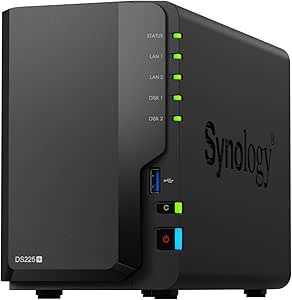 | Best Compact Pick for Two-Drive Synology Storage | Drive bays: 2 | Drive configuration: Diskless | Maximum storage volume: 40 TB | VIEW LATEST PRICE | See Our Full Breakdown |
| encrypted network attached storage | Drive bays | Warranty | Dimensions |
|---|---|---|---|
| BUFFALO LinkStation 210 2TB 1- | 1 | 2 years, including hard drive | — |
| Synology DiskStation DS223j 2- | 2 | 2 years | 6.5 x 3.94 x 8.9 in (D x W x H) |
| UGREEN NAS DH2300 2-Bay Networ | 2 | — | — |
| Synology BeeStation Plus 8TB P | — | 3 years | 7.73 x 2.46 x 5.83 in (D x W x H) |
| KingSpec N100 4TB Personal Clo | — | 3 years | 5.12 x 3.78 x 0.91 in |
| UGREEN NASync DXP2800 2-Bay De | 2 | — | — |
| Synology DS124 1-Bay Diskless | 1 | 2 years | 2.8 × 6.54 × 8.82 in (D × W × H) |
| UGREEN DXP2800 GT 2-Bay NAS | 2 | — | — |
| UGREEN NAS DXP8800 Ultra 8-Bay | 8 SATA bays | — | — |
| AMBER X Personal Cloud Storage | — | One-year limited warranty | 4.9 × 4.9 × 1.5 in |
| Synology DS425+ 4-Bay Diskless | 4 | 3 years | 8.78 x 7.83 x 6.54 in |
| MINISFORUM N5 Pro 5-Bay NAS wi | 5 | — | — |
| Synology DS225+ 2-Bay Diskless | 2 | 3 years | 9.14 x 4.25 x 6.5 in (D x W x H) |
More Details on Our Top Picks
BUFFALO LinkStation 210 2TB 1-Bay NAS with HDD
I’d choose the LinkStation 210 for a buyer who wants a basic encrypted network drive without sourcing disks or configuring a multi-bay system. Its included 2TB hard drive and SSL encryption give it a straightforward role for shared folders and automated backups across multiple computers. Folder access restrictions add a useful layer of control over who can reach shared files. Compared with the diskless Synology DS223j, setup starts with storage already installed, but the Buffalo gives up the flexibility of a second bay. That single-bay design also means there’s no second internal drive for redundancy. I’d keep it on a trusted home network and treat separate backups as necessary; encryption and access controls do not replace a backup plan. Buyers using macOS newer than version 15 should also check compatibility before choosing it.
Pros:- Includes a 2TB hard drive, so no separate drive purchase is needed to get started
- SSL encryption and folder access restrictions support more controlled file sharing
- Automated backups can cover multiple computers
- Two-year warranty includes the hard drive, with 24/7 US-based support
Cons:- One drive bay limits expansion and offers no second-drive redundancy
- Compatibility is listed for macOS 15 and earlier, which may rule out newer systems
Best for: Households seeking an included 2TB drive for encrypted shared folders and automated computer backups without buying drives separately
Not ideal for: Buyers who need two-drive redundancy, room to expand internally, or support for macOS versions later than 15
- Model:LS210D0201
- Storage capacity:2TB
- Drive bays:1
- Hard drive included:Yes
- Connectivity:Ethernet
- Security:Closed system and SSL encryption
- Compatibility:Windows and macOS 15 and earlier
- Warranty:2 years, including hard drive
Our verdict“Choose the LinkStation 210 for a simple encrypted home backup target with storage included, but skip it if you need multi-drive resilience or broader macOS compatibility.”
Synology DiskStation DS223j 2-Bay NAS Enclosure (Diskless)
The DS223j is the more adaptable choice for buyers building an encrypted private cloud around their own drive selection. Its two bays give it a path to more storage or a mirrored setup, depending on the drives and configuration used, while automated backups can include computers and mobile devices. Remote file access and compatible IP-camera support make it broader than a simple shared backup folder. Unlike the BUFFALO LinkStation 210, though, it arrives diskless, so the initial setup involves choosing and installing drives. The product details supplied here don’t specify encryption protocols or modes, so I wouldn’t assume a particular encryption-at-rest feature from the private-cloud description alone. Its compact, quiet design suits a home workspace, but buyers who want an immediately usable, drive-included package may prefer the Buffalo.
Pros:- Two drive bays offer more flexibility than a single-bay NAS
- Automated backup support covers computers and mobile devices
- Remote file access and compatible IP-camera support serve several home-network uses
- Compact, quiet, energy-efficient tabletop design
Cons:- Diskless configuration requires separate drive purchases and installation
- Supplied product details do not state encryption protocols or encryption-at-rest support
Best for: Home users who want a two-bay private-cloud platform, choose their own drives, and back up computers and mobile devices
Not ideal for: Buyers who want storage included, need a setup ready without sourcing drives, or require clearly specified encryption-at-rest details
- Model:DS223j
- Drive bays:2
- Drive configuration:Diskless
- Dimensions:6.5 x 3.94 x 8.9 in (D x W x H)
- Weight:0.87 kg
- Mounting type:Tabletop
- Compatible devices:Android, desktop, laptop, iPhone
- Warranty:2 years
Our verdict“Pick the DS223j if you want a flexible two-bay private cloud and are comfortable supplying drives, but verify its encryption features against your requirements before buying.”
UGREEN NAS DH2300 2-Bay Network Attached Storage for Personal Backup
For buyers who put transfer protection and account security near the top of the list, the UGREEN DH2300 has the clearest stated security feature set here: encrypted transfers and two-factor authentication, alongside RAID modes. Those features make it a stronger fit for moving personal files across devices than a product whose supplied details do not name specific encryption protections, such as the Synology DS223j. Its two bays and stated support for up to 64TB with compatible drives also leave room for a growing photo and video library. The tradeoff is a deliberately limited platform: it lacks Docker, virtual machines, and server applications, and it requires wired Ethernet rather than built-in Wi-Fi. At 1GbE, the stated transfer ceiling is up to 125MB/s, so this is aimed at personal storage and backups, not a high-performance home server.
Pros:- Encrypted transfers and two-factor authentication are explicitly listed security features
- Two bays and support for up to 64TB with compatible drives provide room for a large personal library
- Automatic backup support spans multiple operating systems and device types
- AI photo tagging and duplicate detection can help organize a growing image collection
Cons:- Drives are sold separately
- Requires wired Ethernet; Wi-Fi needs an external USB adapter
- Does not support Docker, virtual machines, or server applications
Best for: Security-conscious households backing up photos, videos, and files from phones and computers over a wired home network
Not ideal for: Homelab users who need Docker, virtual machines, or server applications, and anyone who requires built-in Wi-Fi
- Drive bays:2
- Maximum storage capacity:64TB with compatible drives
- Memory:4GB
- Ethernet:1GbE
- Maximum transfer speed:Up to 125MB/s
- Connectivity:Ethernet, HDMI, SATA, USB
- Wireless connectivity:Not supported; external USB adapter required for Wi-Fi
- Drive inclusion:Drives not included
- Listed limitations:No Docker, virtual machines, or SAN Manager
Our verdict“Choose the DH2300 for clearly stated transfer encryption and personal backups, but look elsewhere for a Wi-Fi-first setup or a capable home-server platform.”
Synology BeeStation Plus 8TB Personal Cloud Storage Device
The BeeStation Plus is aimed at people who want a personal cloud with less setup work than a traditional NAS. Its installed 8TB capacity, guided setup, file snapshots, and local AI photo recognition make everyday backup and retrieval more approachable than building a system from diskless components such as the Synology DS223j. It also adds Plex streaming, Time Machine support, and software for Mac or Windows, so it can serve as more than a file repository. For an encrypted-NAS roundup, however, I’d be cautious: the supplied product information does not specify encryption protocols or encryption at rest. I wouldn’t treat the private-cloud label as proof of a particular encryption capability. The fixed storage also lacks the drive-bay flexibility of a conventional NAS, and Time Machine allocation is capped at 4TB on this 8TB model.
Pros:- Installed 8TB storage and guided setup lower the work involved in starting a home cloud
- Automated snapshots can help recover earlier file versions
- Local AI photo recognition helps sort and search a personal image library
- Includes Mac Time Machine support and a three-year Acronis backup software license
Cons:- Supplied product details do not specify encryption protocols or encryption at rest
- Time Machine backup allocation is limited to 4TB on the 8TB model
- Surveillance support is limited to up to four Synology cameras
Best for: Families who want an easy-to-set-up home cloud for photos, files, Mac backups, and media streaming without assembling a diskless NAS
Not ideal for: Buyers who need upgradeable multi-bay storage or require explicitly documented encryption-at-rest and network-encryption specifications
- Model:BST170-8T
- Storage capacity:8TB
- Processor:Intel Celeron J4125
- Memory:4GB DDR4
- Mac Time Machine backup allocation:Up to 4TB
- Surveillance camera support:Up to 4 Synology cameras
- Dimensions:7.73 x 2.46 x 5.83 in (D x W x H)
- Weight:2.7 lb
- Warranty:3 years
Our verdict“Choose BeeStation Plus for guided, ready-to-use home storage and backup features, but not when documented encryption controls or expandable drive bays are requirements.”
KingSpec N100 4TB Personal Cloud NAS with Pre-Installed SSD
The KingSpec N100 stands apart from the larger, drive-bay-based options by pairing a pre-installed 4TB SATA SSD with a compact, fanless aluminum enclosure. That combination should appeal to buyers who want a quiet personal storage device without adding or fitting a hard drive. Its stated integrations with Google Drive, OneDrive, and Dropbox can also help connect local storage to existing cloud workflows. Compared with the BUFFALO LinkStation 210, the KingSpec uses solid-state storage rather than an included hard disk, but both rely on Ethernet and offer fixed installed capacity rather than multi-bay expansion. The supplied details describe remote access and syncing, but don’t state encryption protocols, encryption at rest, or account-security controls. I’d verify those details before storing sensitive files; compactness and SSD hardware alone do not establish encryption protection.
Pros:- Pre-installed 4TB SSD avoids drive installation
- Fanless aluminum construction avoids fan noise and mechanical-drive vibration
- Remote access and listed Google Drive, OneDrive, and Dropbox integrations connect local storage with cloud services
- Compact dimensions and stated low power consumption suit a small home or desk setup
Cons:- Supplied details do not specify encryption protocols, encryption at rest, or two-factor authentication
- Ethernet-only connectivity requires a wired network connection
- Single installed 2.5-inch SATA SSD offers no stated multi-bay expansion or drive redundancy
Best for: People who need compact, quiet 4TB network storage for syncing files with existing cloud services and can verify the security controls they require
Not ideal for: Buyers who need documented encryption features, multi-drive redundancy, Wi-Fi, or future capacity expansion through additional bays
- Storage capacity:4TB
- Storage type:Pre-installed 2.5-inch SATA SSD
- Hard disk interface:Serial ATA-600
- Connectivity:Ethernet
- Data transfer rate:6 gigabits per second
- Cooling design:Fanless
- Dimensions:5.12 x 3.78 x 0.91 in
- Standby power:Less than 3W
- Warranty:3 years
Our verdict“Pick the N100 for quiet, compact SSD-based personal storage, but verify its encryption protections before relying on it for sensitive data.”
UGREEN NASync DXP2800 2-Bay Desktop NAS, Diskless, with 3 ft Cat 8 Ethernet Cable
The UGREEN NASync DXP2800 suits buyers who want a conventional two-drive NAS for shared files and backups, with enough capacity headroom for a growing photo or video library. Its stated maximum is 80 TB, and automatic photo organization and duplicate removal can help keep personal archives manageable. Those features address convenience, but the supplied details do not specify encryption methods, so I would verify the current software’s encryption options before choosing it specifically for sensitive data. Compared with the more advanced UGREEN DXP2800 GT, this model has no listed 10GbE, Docker, or virtual-machine capabilities; it is a simpler file-storage choice rather than a self-hosting platform. The diskless setup means buying drives separately, and its two bays provide less room to expand than the eight-bay DXP8800 Ultra.
Pros:- Two bays and a stated capacity of up to 80 TB support a substantial shared archive.
- Centralizes files for access across computers, mobile devices, browsers, and smart TVs.
- Automatic photo organization and duplicate removal can reduce manual library cleanup.
- Includes a braided 3 ft Cat 8 Ethernet cable.
Cons:- Diskless configuration requires a separate drive purchase.
- Two bays limit expansion compared with the UGREEN DXP8800 Ultra.
- The supplied product details do not identify encryption protocols or settings.
Best for: Households and solo creators who want shared backups and photo organization in a two-bay system, and who will confirm encryption support in the NAS software.
Not ideal for: Buyers who need documented encryption standards, extensive drive expansion, or high-speed 10GbE networking.
- Drive bays:2
- Drive configuration:Diskless
- Maximum storage capacity:80 TB
- Mounting type:Tabletop
- Compatible devices:Desktop, laptop, server
- Included cable:3 ft braided Cat 8 Ethernet cable
Our verdict“Choose this for an expandable home file hub if its software’s encryption controls meet your needs; skip it if you require clearly documented encryption or more than two bays.”
Synology DS124 1-Bay Diskless NAS for Backup, File Sharing, and Home Surveillance
The Synology DS124 is the compact pick for someone who values Synology’s file-sharing and backup software more than drive redundancy. DiskStation Manager supports remote private-cloud access, device backups, and home surveillance, while the described services do not require a monthly subscription. That gives it a clearer software-led case than the UGREEN NASync DXP2800, which offers two bays and photo organization but is described with fewer security details. For an encrypted-storage decision, though, the provided information does not name specific encryption protocols, so I would check the available encryption settings and remote-access protections before storing confidential files. The main compromise is structural: this is a single-bay, diskless NAS, so it offers neither a second drive for RAID 1 nor much room to grow. It makes sense for modest backups, not a resilient multi-drive archive.
Pros:- Supports automatic backups from iPhone, Android, Mac, and Windows devices.
- DiskStation Manager provides private-cloud access and file sharing.
- Home-surveillance features include person and vehicle detection with alerts.
- Described services provide central storage without a required monthly subscription.
Cons:- One drive bay leaves no second-disk option for RAID 1 redundancy.
- Diskless setup requires a separately purchased drive.
- The supplied details do not specify encryption standards or protocols.
Best for: Individuals or couples seeking a small Synology-based backup and remote file-access device for phones and computers.
Not ideal for: Buyers who need drive redundancy, larger multi-drive growth, or confirmed encryption specifications before purchase.
- Drive bays:1
- Drive included:No
- Operating system:Synology DiskStation Manager
- Dimensions:2.8 × 6.54 × 8.82 in (D × W × H)
- Weight:1247 g
- Enclosure material:Alloy steel
- Warranty:2 years
Our verdict“Pick the DS124 for compact Synology backups and remote access, but choose a multi-bay model if redundancy or clearly documented encryption is a requirement.”
UGREEN DXP2800 GT 2-Bay NAS, Diskless
Among these five, the UGREEN DXP2800 GT makes the most explicit encryption case: its listed protections include TLS/SSL, RSA, AES, and SHA-512. Those names give security-minded buyers more to evaluate than the encryption details supplied for the standard NASync DXP2800 or Synology DS124. It also pairs that security feature set with 10GbE, expandable memory, Docker, and virtual-machine support, making it a better fit for self-hosted services and demanding transfers than a basic backup appliance. The tradeoff is extra setup: drives are not included, Plex requires manual Docker installation, and the included RAM is non-ECC. Two bays and RAID 1 can help maintain a mirrored copy, but RAID is not a substitute for a separate backup. Buyers wanting a ready-to-use, low-maintenance cloud device may prefer the AMBER X.
Pros:- Lists TLS/SSL, RSA, AES, and SHA-512 security features.
- 10GbE networking supports high-bandwidth transfers and editing workflows.
- Docker and virtual-machine support enable self-hosted services.
- Expandable memory and SATA, U.2 NVMe, and M.2 drive support offer configuration flexibility.
Cons:- Drives are not included, so storage requires a separate purchase and setup.
- Included 8GB RAM is non-ECC; ECC requires a compatible upgrade.
- Plex setup requires manual installation through Docker.
Best for: Technically confident home-lab users and small creative teams who want listed encryption features, 10GbE, and room to run self-hosted applications.
Not ideal for: Beginners seeking turnkey setup, users who require ECC memory without an upgrade, or buyers who want included drives.
- Drive bays:2
- Processor:AMD Ryzen Embedded R2514, 4 cores, 8 threads, up to 3.70 GHz
- Memory:8GB DDR4, expandable to 64GB
- Networking:10GbE
- Drive support:SATA drives, U.2 NVMe SSDs in compatible bays, and 2 M.2 SSDs
- Maximum capacity:Up to 80TB total
- RAID support:RAID 1
- Security:TLS/SSL, RSA, AES, and SHA-512 encryption
Our verdict“Choose the DXP2800 GT for an encryption-featured, high-speed home lab, but expect to configure drives and services yourself.”
UGREEN NAS DXP8800 Ultra 8-Bay Network Attached Storage Server
The UGREEN DXP8800 Ultra is the capacity and connectivity choice for a business, production team, or advanced home lab that needs one system to serve many users and workloads. Its eight SATA bays support up to 272TB, while dual 10GbE and two Thunderbolt 4 ports provide several routes for moving large files. Expandable DDR5 memory and support for virtual machines add flexibility beyond the two-bay DXP2800 GT, which is a more compact self-hosting option. The encryption details supplied for the GT are not listed here, however, so buyers focused on encrypted storage should confirm the DXP8800 Ultra’s available encryption functions rather than assume equivalent protections. It also arrives with just 8GB of memory and no included drives. This is a substantial platform, not the simplest route to private backups.
Pros:- Eight SATA bays support up to 272TB of listed storage capacity.
- Dual 10GbE and two Thunderbolt 4 ports support high-bandwidth workflows.
- DDR5 memory can be expanded from the included 8GB up to 96GB.
- Multiple RAID modes and two NVMe slots give administrators storage-layout options.
Cons:- Drives are not included, adding a separate configuration step.
- The included 8GB memory is well below the stated 96GB expansion ceiling.
- The supplied product details do not identify encryption protocols or settings.
Best for: Small businesses, production teams, and advanced home labs managing large shared datasets and multiple workloads.
Not ideal for: Individuals with modest storage needs, buyers seeking a compact turnkey device, or security-focused purchasers who require confirmed encryption specifications.
- Drive bays:8 SATA bays
- Maximum storage capacity:272 TB
- Processor:Intel 150U, up to 5.4 GHz
- Memory:8 GB DDR5, expandable up to 96 GB
- Networking:2 × 10GbE
- Ports:2 × Thunderbolt 4; USB 3.2 Gen 2
- M.2 slots:2 NVMe slots
- Supported RAID modes:JBOD, Basic, RAID 0, RAID 1, RAID 5, RAID 6, RAID 10
Our verdict“Choose the DXP8800 Ultra for large, high-throughput shared storage, but verify its encryption controls and plan for drives and memory upgrades.”
AMBER X Personal Cloud Storage Device with 512GB SSD
The AMBER X takes a different approach from the diskless NAS units here: it includes a 512GB SSD and supports access over Ethernet or Wi-Fi, so there is no drive to select before getting started. Its small, light enclosure and multi-user access suit a personal cloud for a few devices, while smart transcoding and one-click Plex and Home Assistant installation add media and home-automation uses. That simplicity comes at the expense of scale. The Synology DS124 can be configured with a separately purchased drive, while the UGREEN two-bay models offer a path to much larger storage; the AMBER X starts at 512GB and expands through USB storage. The product description does not specify encryption protocols, so I would confirm its protections before relying on it for sensitive files. It is the most approachable compact option, not the strongest documented encryption choice.
Pros:- Includes a 512GB SSD, avoiding a separate initial drive purchase.
- Supports Ethernet, Wi-Fi, and USB 3.0 connectivity.
- Multi-user access and smart transcoding suit shared personal media.
- Offers one-click Plex and Home Assistant installation.
Cons:- 512GB of built-in storage is limited for large photo or video libraries.
- Expansion relies on USB storage rather than multiple internal drive bays.
- The supplied details do not specify encryption protocols or settings.
Best for: Individuals or small households who want a compact personal cloud with included storage, wireless connectivity, and simple media-server setup.
Not ideal for: Users with large archives, multi-drive redundancy needs, or a requirement for explicitly documented encryption protocols.
- Built-in storage:512GB SSD
- Storage expansion:USB storage
- Connectivity:Ethernet, Wi-Fi, USB 3.0
- Media speed:500–600 MB/s
- Compatible devices:Android, iPhone, Mac, Windows PC
- Dimensions:4.9 × 4.9 × 1.5 in
- Weight:300 g
- Warranty:One-year limited warranty
Our verdict“Pick the AMBER X for compact, included-storage personal cloud access, but choose a multi-bay NAS for scale or confirm encryption before storing sensitive data.”
Synology DS425+ 4-Bay Diskless NAS Private Cloud Media Server
The DS425+ is my balanced pick for households or small teams that want a private storage hub with room to grow. Its four bays allow more flexible storage and RAID arrangements than the two-bay Synology DS225+, while built-in 2.5GbE offers a faster local network connection than standard gigabit networking. DiskStation Manager adds access controls, snapshots, and backup tools that support a more protective setup, though encryption practices depend on how owners configure accounts, shared folders, and remote access. The tradeoff is that this is a diskless tabletop unit: drives are a separate purchase, and it is less compact than a two-bay model. I’d choose it over the far more powerful MINISFORUM N5 Pro when straightforward Synology software matters more than high-end processing and 10GbE.
Pros:- Four bays provide more room for storage and RAID flexibility than the DS225+
- Built-in 2.5GbE supports faster local transfers than standard gigabit networking
- DiskStation Manager offers snapshots, access controls, and backup functions
- Supports file sharing, media streaming, synchronization, and surveillance
Cons:- Diskless setup requires buying compatible drives separately
- 2.5GbE is less suited to high-throughput workflows than the MINISFORUM N5 Pro’s 10GbE
- Tabletop-only placement may not suit buyers seeking a rack or wall-mounted enclosure
Best for: Home offices and families seeking a four-drive Synology system for shared files, snapshots, backups, and media
Not ideal for: Buyers who want storage included, a wall-mounted or portable unit, or 10GbE networking and high-performance expansion
- Drive bays:4
- Drive configuration:Diskless
- Networking:Built-in 2.5GbE
- Data transfer speed:Up to 278 MB/s
- Maximum storage volume:80 TB
- Surveillance support:Up to 30 IP cameras
- Dimensions:8.78 x 7.83 x 6.54 in
- Warranty:3 years
Our verdict“Choose the DS425+ for a four-bay Synology private-storage setup with strong access and backup tools, but skip it if you need included drives or 10GbE.”
MINISFORUM N5 Pro 5-Bay NAS with AMD Ryzen AI 9 HX Pro 370
The MINISFORUM N5 Pro is the performance-led choice here: its five drive bays, multiple storage interfaces, and 10GbE plus 5GbE networking suit large media libraries, demanding transfers, and users who want expansion options. Compared with the Synology DS425+, it offers faster networking and more potential storage, but asks the owner to take on more hardware and software decisions. MinisCloud OS comes preinstalled on a 128GB system disk, which occupies one of the three M.2 slots; using all three means removing that disk and giving up its preinstalled OS features. Drive-free setup also means additional purchases before it can store data. I’d pick it over the DS225+ for a high-throughput workstation or growing multi-drive archive, not for someone who values Synology’s more established, guided NAS environment.
Pros:- Five bays plus SATA, M.2, and U.2 interfaces provide broad storage options
- 10GbE and 5GbE ports support high-speed networking and link aggregation
- PCIe 4.0 expansion and standard RAM design offer upgrade flexibility
- USB4 and 8K HDMI add options for connected devices and display output
Cons:- Storage drives are not included
- The preinstalled 128GB system disk uses one of the three M.2 slots
- Using all three M.2 slots requires removing the system disk and losing MinisCloud OS features
Best for: Power users and creative teams building a high-capacity NAS for fast local transfers, multiple drive types, and future hardware upgrades
Not ideal for: NAS beginners who want a guided Synology-style experience, buyers seeking included storage drives, or users who do not need advanced networking
- Processor:AMD Ryzen AI 9 HX Pro 370, 12 cores / 24 threads, up to 5.1 GHz
- Drive bays:5
- Maximum storage capacity:188 TB
- Drive interfaces:SATA, 3 M.2 slots, 2 U.2 interfaces
- Networking:1 × 10GbE and 1 × 5GbE; link aggregation supported
- System disk:128GB, preinstalled with MinisCloud OS; occupies one M.2 slot
- Expansion:1 × PCIe 4.0 slot
- Video outputs:8K HDMI and 2 × USB4
Our verdict“Pick the N5 Pro for expandable, high-speed storage and hands-on hardware flexibility, but choose a Synology model for a simpler software-led setup.”
Synology DS225+ 2-Bay Diskless NAS Media Server
The DS225+ suits buyers who want Synology’s backup and snapshot tools without the footprint or capacity needs of a four-bay system. It supports RAID and snapshots, plus automated backup options, so a two-drive setup can add safeguards for personal files and media. Hardware transcoding also makes it a more capable media choice than a basic file-storage box. Compared with the DS425+, the DS225+ is smaller and lighter, but its two bays leave less room for capacity and RAID choices as a library grows. Its stated maximum volume is 40 TB, half the DS425+’s 80 TB. The diskless configuration keeps drive choice in the buyer’s hands, but also adds setup work and cost. I’d favor it for a compact home setup, not for teams expecting their storage needs to expand substantially.
Pros:- Compact, lightweight enclosure compared with the four-bay DS425+
- RAID, snapshots, and automated backup options support layered file protection
- Hardware transcoding supports media streaming, including 4K content
- Supports smart surveillance for up to 30 IP cameras
Cons:- Two bays limit storage growth and RAID flexibility compared with the DS425+
- Diskless configuration requires separate drive purchases
- Maximum stated storage volume is 40 TB
Best for: Individuals and small households wanting a compact Synology NAS for backups, shared files, and transcoded media
Not ideal for: Growing media libraries, small teams needing more than two drive bays, or buyers who want a ready-to-use system with drives included
- Drive bays:2
- Drive configuration:Diskless
- Maximum storage volume:40 TB
- Transfer speed:Up to 282 MB/s
- Surveillance support:Up to 30 IP cameras
- Dimensions:9.14 x 4.25 x 6.5 in (D x W x H)
- Item weight:1300 g
- Warranty:3 years
Our verdict“Choose the DS225+ for a compact two-drive Synology setup with backup and media features, but move to the DS425+ if you need more bays and capacity headroom.”
How We Picked
I ranked these devices by how well their stated form and configuration support a private, encrypted storage setup—not by bay count alone. I weighed encryption and security management, storage flexibility, backup and file-sharing suitability, ease of setup, and the maintenance work a buyer takes on. Because product listings do not establish identical encryption implementations or security defaults, I avoid treating the word “encrypted” as proof that every device protects data in the same way; buyers should verify supported encryption modes and recovery procedures before storing sensitive files.
The Synology DS425+ ranks first for its four-bay balance of expansion and home-server versatility. The Synology DS225+ and UGREEN NASync DXP2800 follow as more compact two-bay choices, while preconfigured devices rank higher for simplicity but lower for upgrade freedom. Single-bay units, entry-level models, and specialized high-capacity systems sit further down because they serve narrower needs or involve clearer compromises in redundancy, flexibility, or scale.
Factors to Consider When Choosing Encrypted Network Attached Storage
Choosing encrypted NAS is not only a capacity decision. I would match the device to the sensitivity of the files, the number of people and devices that need access, and the amount of setup and maintenance I am willing to handle.
Confirm What “Encryption” Means on the Device
NAS encryption can refer to encrypted volumes, encrypted shared folders, encrypted backups, or protected connections between devices, and those are not interchangeable. Before buying, check which data is encrypted at rest and whether the feature applies to every storage area or only selected folders. Find out where encryption keys live, how recovery works if an administrator account or device is lost, and whether remote access uses secure connections. A forgotten key can make protected files inaccessible, so recovery planning belongs in the setup process. Do not assume that a NAS encrypts everything by default just because encryption is listed as a feature.
Separate Drive Redundancy From Backup
Two drives configured to mirror one another can keep a system available after a single drive failure, but that arrangement is not a complete backup. It will not necessarily save files deleted by mistake, protect against malware, or cover theft, fire, and device failure. Buyers should plan at least one separate copy, such as an external drive stored elsewhere or a trusted cloud backup. A one-bay NAS can still serve as a network storage target, but it has no second internal drive to maintain a mirrored copy. More bays create options; they do not remove the need for an independent recovery plan.
Choose Bay Count Around Growth and Failure Tolerance
Estimate the storage you need now, then allow for the way photos, video, and shared projects tend to accumulate. A two-bay unit can support a straightforward mirror or a capacity-focused configuration, but those choices affect usable space and drive-failure tolerance. Four- and five-bay models provide more configuration room, though they also call for more drives, power, and ongoing attention. Large multi-bay systems make sense when several people or workloads will use them, not just because a bigger number sounds future-proof. Match the layout to the recovery outcome you actually want, rather than buying bays without a storage plan.
Decide How Much Setup You Want to Own
Diskless enclosures let buyers select compatible drives and add capacity over time, but they also require drive installation, volume setup, and decisions about redundancy. Preconfigured personal-cloud products can shorten the path to basic file access, yet they may offer fewer choices for upgrades and storage layout. Before choosing, check whether drives are included, whether the system supports the services you need, and how updates and account recovery are handled. A simple setup is useful only if it still supports your backup and security habits. Buyers who enjoy managing a home server may value control; those who want a household appliance may prefer fewer decisions.
Plan for Remote Access and Account Security
Remote access can make private storage useful away from home, but it also expands the ways someone might try to reach your files. Check how the manufacturer handles remote connections, account protection, software updates, and multi-factor authentication rather than relying on a port-forwarding guide alone. Use unique credentials and limit access to the people and services that need it. A NAS that stays on the local network may suit sensitive archives better than one exposed for convenience. Decide whether remote access is a genuine requirement before enabling it, and review permissions periodically.
Budget for Drives, Power, and Ongoing Care
A diskless NAS is only part of the system: compatible drives, a backup destination, and possibly network upgrades add to the total commitment. Hard drives also need monitoring and eventual replacement, so consider how comfortable you are with health alerts and maintenance. Higher-performance processors and larger bay counts can help with demanding workloads, but they may add complexity that a basic file archive does not need. For media libraries, check that the NAS and client devices support the formats and playback workflow you use. Choose the simplest platform that meets your real workload while leaving a clear path to restore important data.
Frequently Asked Questions
Does encrypted NAS protect my files if someone steals the device?
It can help, but the answer depends on whether the files or storage volumes are encrypted at rest and how the encryption keys are protected. Confirm that encryption covers the data you plan to store, not only network traffic or selected folders. Also check whether the NAS requires a key or administrator authentication after a restart, and how recovery works if the key is unavailable. Encryption does not protect a device that is already unlocked and accessible to an intruder. For sensitive data, combine encryption with strong account security and a separate backup.
Should I buy a diskless NAS or a model with storage already installed?
A diskless model is a better fit if you want to choose drive capacity, replace drives independently, or build a specific redundancy plan. It also means you must check compatibility, install the drives, and configure the system before relying on it. A preconfigured unit reduces those steps and can suit straightforward personal backups, but may limit drive choices or future upgrades. Compare the included storage with your actual needs and check what happens when that storage reaches capacity. Whichever route you choose, plan a separate copy of important files.
Is a two-bay NAS enough for a family photo and document archive?
For many households, two bays can provide a useful balance of space and a mirrored configuration, but the usable capacity in a mirror is limited by the smaller drive. It may be enough when the archive is modest and growth is predictable. If you keep large video libraries or several years of device backups, estimate future storage before settling on capacity. A mirror can help with a single drive failure, but it is not protection against accidental deletion or a disaster at home. Add an independent backup and choose a larger-bay model if frequent expansion is likely.
Can I use an encrypted NAS as my only backup?
I would not rely on a single NAS as the only copy of important data. A NAS can centralize backups from computers and phones, but it remains vulnerable to hardware failure, theft, fire, user error, and some malware. Keep another copy on a separate device or in a remote backup service, and check that you can restore files rather than assuming a completed backup is usable. Encryption on the NAS does not address those other failure modes. A practical plan names where the second copy lives and how often it is updated.
Which matters more for private storage: more drive bays or stronger security controls?
For sensitive files, I would first confirm the device’s encryption, account protection, update support, and recovery process. Extra bays help with capacity and storage layouts, but they do not automatically make data more secure. Once the security features fit your needs, choose enough bays for your planned capacity and failure tolerance. A large system with weak account practices can be a poorer fit than a smaller NAS configured carefully. The right balance depends on whether your main constraint is confidential data, growing storage, or uninterrupted access.
Conclusion
For most buyers who want a flexible private storage hub, I recommend the Synology DS425+ as the best overall pick because its four bays leave room to grow without moving to the largest systems in this group. The Synology DS225+ is my best value-style choice for a compact two-bay setup, while the Synology BeeStation Plus is the best fit for beginners who prefer an included-storage personal cloud over a diskless build. For premium capacity and performance, look at the UGREEN DXP8800 Ultra or MINISFORUM N5 Pro only if your workload can use their scale. The BUFFALO LinkStation 210 or Synology DS124 may suit a basic single-bay role, but buyers who need internal drive redundancy should choose a multi-bay device. Whichever model you select, verify its encryption behavior and pair it with an independent backup.