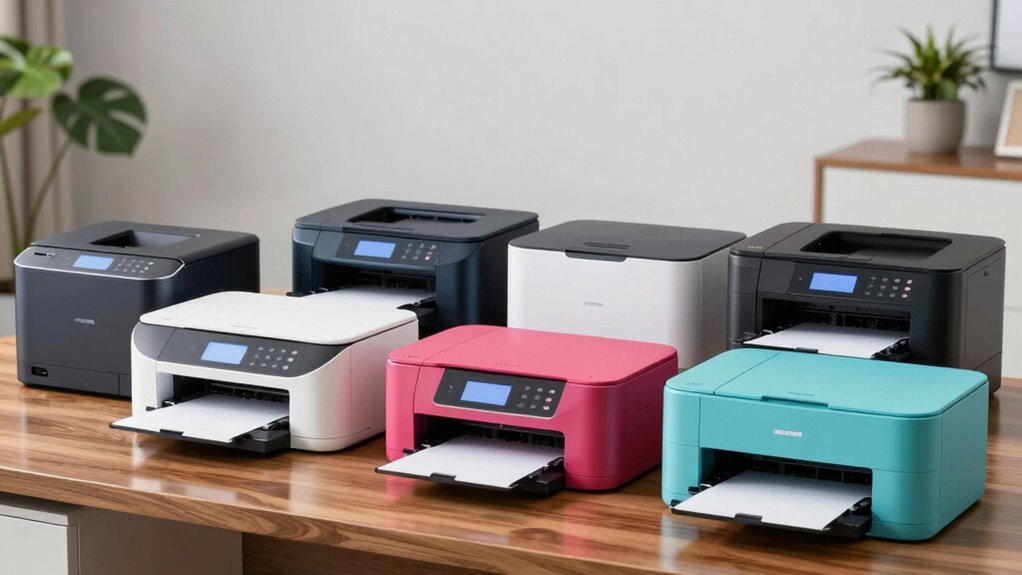

Finding the right color laser printer for a small business involves balancing print quality, speed, cost, and ease of use. The Canon Color imageCLASS LBP646Cdw stands out as the best overall due to its reliable performance and crisp color output. For those prioritizing multifunction capabilities, the Brother MFC-L8930CDW offers comprehensive features like fax, scan, and security, making it a strong all-in-one choice. Meanwhile, budget-conscious buyers should consider the HP Color LaserJet Pro 3201dw for its affordability and wireless convenience. Each option presents tradeoffs, such as higher upfront costs versus ongoing toner expenses or multifunctionality versus simplicity. Continue reading for a detailed breakdown to help identify the best fit for your small business needs.
Key Takeaways
- The top-ranking models balance print quality, speed, and cost-efficiency, with the Canon LBP646Cdw leading for overall performance.
- All-in-one features like scanning and faxing are more common in higher-tier models such as the Brother MFC-L8930CDW, but they can add to the cost and complexity.
- Wireless connectivity is standard across most options, yet the ease of setup and security features vary significantly.
- Print speed, measured in pages per minute, is crucial for busy environments, with premium models often offering the fastest output.
- Initial purchase price often differs from ongoing costs, so toner yield and replacement expenses should influence the decision.
| Canon Color imageCLASS LBP646Cdw Wireless Laser Printer – White |  | Best Overall for Small Offices Needing Speed and Simplicity | Print Speed: 26 PPM | Color: Yes | Wireless: Yes | VIEW ON AMAZON | See Our Full Breakdown |
| Brother MFC-L8930CDW Business Color Laser All-in-One Printer with Duplex Print, Scan, Copy, Security, and Wireless Connectivity |  | Best for High-Demand Small Business Environments | Print Speed: up to 33 ppm | Scan Speed: up to 104 ipm | Auto Document Feeder: 80 pages | VIEW ON AMAZON | See Our Full Breakdown |
| HP Color LaserJet Pro MFP 3301sdw Wireless All-in-One Color Laser Printer |  | Best for Small Teams Needing All-in-One Functionality | Printer Type: Laser | Print Speed: 30 pages per minute | Resolution: 1200 x 1200 dpi | VIEW ON AMAZON | See Our Full Breakdown |
| Brother MFC-L3720CDW Wireless Color Laser Printer with Scanner, Copier, and Fax |  | Best for Small Business with Multi-Function Needs on a Budget | Print Speed: up to 19 ppm | Paper Capacity: 250 sheets | Auto Document Feeder: 50 sheets | VIEW ON AMAZON | See Our Full Breakdown |
| HP Color LaserJet Pro 3201dw Wireless Color Laser Printer |  | Best for Small Teams Focused on Speed and Paper Capacity | Printer Type: Laser | Print Speed: 26 pages per minute | Color Output: Yes | VIEW ON AMAZON | See Our Full Breakdown |
| Brother HL-L3220CDW Color Laser Printer with Wireless Printing and Duplex |  | Best Value for Small Businesses Needing Reliable Color Output | Print Speed: 19 PPM | Paper Capacity: 250 sheets | Duplex Printing: Automatic | VIEW ON AMAZON | See Our Full Breakdown |
| Canon Color imageCLASS MF753Cdw II – All-in-One Color Duplex Laser Printer, Wireless, Scanner, Copier, Fax, Auto Document Feeder, 35 PPM |  | Best for Small Business That Need All-in-One Functionality and Fast Speeds | Color: Color | Wireless: Yes | Duplex: Yes | VIEW ON AMAZON | See Our Full Breakdown |
| color laser printer for small business | Print Speed |
|---|---|
| Canon Color imageCLASS LBP646C | 26 PPM |
| Brother MFC-L8930CDW Business | up to 33 ppm |
| HP Color LaserJet Pro MFP 3301 | 30 pages per minute |
| Brother MFC-L3720CDW Wireless | up to 19 ppm |
| HP Color LaserJet Pro 3201dw W | 26 pages per minute |
| Brother HL-L3220CDW Color Lase | 19 PPM |
| Canon Color imageCLASS MF753Cd | 35 PPM |
More Details on Our Top Picks
Canon Color imageCLASS LBP646Cdw Wireless Laser Printer – White
This Canon model shines for small businesses that prioritize fast, high-quality color prints in a straightforward package. Its 26 ppm speed surpasses many basic printers, and the wireless support with mobile printing makes it easy to integrate into a busy workflow. Compared with the HP Color LaserJet Pro 3201dw, it offers similar speed but lacks multifunction features like scanning or copying, making it less versatile but simpler to operate. The absence of a scanner or fax means it’s best for print-only needs, but this focus ensures reliability and ease of use. The high-capacity toner reduces downtime, but the device’s limited features come with the tradeoff of no scanning or copying. This pick makes the most sense for small offices that need quick, quality color prints without complex multifunction requirements.
Pros:- Fast print speeds of 26 ppm for both color and monochrome
- Wireless connectivity and mobile device printing support
- Automatic duplex printing saves paper
Cons:- Print-only device; no scanning or copying functions
- Limited to basic printing features without advanced office functions
Best for: Small businesses that need reliable, fast color printing with minimal fuss
Not ideal for: Businesses requiring scanning, copying, or faxing in a single device
- Print Speed:26 PPM
- Color:Yes
- Wireless:Yes
- Duplex Printing:Yes
- Paper Capacity:250 sheets
- Toner:Canon Genuine Toner 075 / 075 high-capacity
- Display:5-inch LCD
- Auto 2-sided Printing:Yes
- Warranty:1 Year Limited
Our verdict“This printer suits small offices focused on quick, high-quality color printing with straightforward operation.”
Brother MFC-L8930CDW Business Color Laser All-in-One Printer with Duplex Print, Scan, Copy, Security, and Wireless Connectivity
This Brother all-in-one stands out for small businesses that need a robust, multi-function device capable of handling high-volume tasks. Its impressive 33 ppm print speed and 104 ipm scan rate support busy workflows better than the HP Color LaserJet Pro 3301sdw, which is primarily a print-focused model. The 80-page auto document feeder and 7-inch touchscreen add to its productivity appeal, though setup can be complex for less tech-savvy users. Its security features, including NFC card access, are ideal for businesses needing data protection. However, the larger size and higher price point make it less suited for tight spaces or budget-conscious shops. This model makes sense for small offices seeking an all-in-one machine that balances speed, security, and multifunctionality.
Pros:- Fast print and scan speeds maximize productivity
- Advanced security features including NFC and triple-layer security
- High-capacity toner options reduce running costs
Cons:- Complex setup process requiring technical knowledge
- Large footprint may not fit small spaces
- Some features depend on internet connectivity and app use
Best for: Small businesses with high-volume printing, scanning, and security needs
Not ideal for: Very small offices or startups with limited space and simple print needs
- Print Speed:up to 33 ppm
- Scan Speed:up to 104 ipm
- Auto Document Feeder:80 pages
- Touchscreen:7-inch color
- Connectivity:Wireless dual-band, Gigabit Ethernet
- Security Features:Triple Layer Security, NFC card reader
- Toner Yield:High yield: 7,500 black / 6,500 color pages
- Size:25% smaller than previous model
Our verdict“Ideal for small offices that need a secure, high-volume multifunction device with excellent speed and security features.”
HP Color LaserJet Pro MFP 3301sdw Wireless All-in-One Color Laser Printer
This HP model is tailored for small teams that need versatile, quick color printing, scanning, and copying in a single device. Its 30 ppm speed supports typical small office workflows, and the automatic document feeder with duplex printing boosts efficiency. Unlike the Brother MFC-L8930CDW, it’s lighter at 37.7 pounds, making it easier to move if needed, but it lacks the touchscreen interface and advanced security features. Compared to the Canon LBP646Cdw, it offers more multifunctionality, but at a slightly higher cost and complexity. The device emphasizes a balanced combination of speed and ease of use, but its limited media handling options restrict larger media types. It’s well-suited for small teams that need a reliable, all-in-one color laser solution for regular office tasks.
Pros:- Fast print, scan, and copy speeds for busy environments
- Wireless connectivity with mobile device support
- Automatic duplex printing and document feeder improve workflow
Cons:- Relatively heavy at 37.7 pounds, less portable
- Limited media handling options and no touchscreen interface
Best for: Small teams needing a fast, reliable all-in-one for daily printing, copying, and scanning
Not ideal for: Single-user setups or offices needing advanced security features
- Printer Type:Laser
- Print Speed:30 pages per minute
- Resolution:1200 x 1200 dpi
- Input Tray Capacity:2 trays, 250 sheets
- Functions:Print, Scan, Copy, Fax
- Connectivity:Wireless, Ethernet, USB
- Control Method:App
- Weight:37.7 pounds
Our verdict“Best suited for small teams that want a dependable, fast all-in-one laser printer for daily office tasks.”
Brother MFC-L3720CDW Wireless Color Laser Printer with Scanner, Copier, and Fax
This Brother model offers a well-rounded package for small businesses that need a multifunction device without breaking the bank. Its 19 ppm print speed is slower than the others here, but it compensates with a 50-sheet auto document feeder and a 3.5-inch color touchscreen, making daily workflows more manageable. Compared to the HP Color LaserJet Pro 3301sdw, it provides the added benefits of fax and cloud integration, making it more suitable for multi-tasking. The device’s larger size and higher toner costs are tradeoffs that small offices should consider; it’s more expensive upfront and for consumables, but the added functionality might justify the expense. This makes sense for small businesses prioritizing multifunctionality over raw speed and compactness.
Pros:- Versatile functions including print, scan, copy, and fax
- Intuitive 3.5-inch color touchscreen and cloud support
- Wireless and USB connectivity options
Cons:- Slower print speed at 19 ppm compared to competitors
- Larger footprint and higher toner costs
Best for: Small offices needing a multifunction laser printer with easy interface and cloud access
Not ideal for: Very space-constrained environments or budget-sensitive startups
- Print Speed:up to 19 ppm
- Paper Capacity:250 sheets
- Auto Document Feeder:50 sheets
- Functions:Print, Scan, Copy, Fax
- Connectivity:Wi-Fi, Wi-Fi Direct, USB 2.0
- Control Method:Color touchscreen
- Toner Cost:Higher than some competitors
- Size:Larger footprint
Our verdict“This printer fits small offices that want multifunction capabilities with easy cloud integration, even if it means slower speeds and larger size.”
HP Color LaserJet Pro 3201dw Wireless Color Laser Printer
This HP model is tailored for small teams that value quick output and straightforward operation. Its 26 ppm speed matches the Canon LBP646Cdw, but it stands out with a larger 250-sheet input tray, ideal for teams with high-volume needs. The device’s auto duplex feature helps save paper, and its wireless connectivity simplifies setup. Compared with the Canon, it offers similar print quality but with a slightly larger input capacity, making it more suitable for busy environments. However, it’s limited to original HP cartridges with chips, which can increase ongoing costs. Its weight at 33 pounds is manageable but not portable. This printer makes sense for small teams wanting reliable speed and capacity with minimal fuss.
Pros:- Fast print speeds of 26 ppm suitable for busy offices
- Wireless connectivity with auto-reconnect feature
- High-capacity input tray reduces refilling frequency
Cons:- Limited to HP cartridges with chips, potentially increasing costs
- Only one input tray limits media flexibility
Best for: Small team environments requiring fast, high-capacity color printing with easy wireless setup
Not ideal for: Single users or small offices with space constraints
- Printer Type:Laser
- Print Speed:26 pages per minute
- Color Output:Yes
- Auto Duplex:Yes
- Input Tray Capacity:250 sheets
- Supported Media:Envelopes, Glossy photo paper, Plain paper
- Control Method:App
- Weight:33 pounds
Our verdict“This printer is well-suited for small teams demanding quick, high-volume color printing with simple wireless operation.”
Brother HL-L3220CDW Color Laser Printer with Wireless Printing and Duplex
This Brother model stands out for providing high-quality, vibrant color printing at a competitive price point compared to the Canon imageCLASS MF753Cdw II, which offers more multifunction options but at a higher initial cost. The HL-L3220CDW excels in delivering crisp text and bright graphics with a 19 PPM speed, making it suitable for small offices that prioritize color quality and speed without the need for scanning or faxing. Its large 250-sheet paper capacity reduces downtime, and wireless connectivity simplifies device setup. However, it lacks detailed print resolution specs, which could be a concern for precise color work, and toner replacements may add ongoing costs. Its limited functionality to laser printing makes it less ideal for those needing scanning or copying features. This pick makes the most sense for small teams focused on straightforward, high-quality color printing without extra multifunction needs.Pros:- Vibrant, professional-quality color output
- Fast print speed of 19 pages per minute
- Large 250-sheet paper capacity reduces refilling frequency
- Wireless and mobile device compatible
Cons:- Lacks detailed print resolution information, which may limit color accuracy for certain tasks
- Potentially higher ongoing toner costs
- Limited to laser printing only, no scanning or copying
Best for: Small business owners who primarily need fast, reliable color printing with minimal additional functions
Not ideal for: Businesses that require scanning, copying, or faxing regularly, as this model does not include these features
- Print Speed:19 PPM
- Paper Capacity:250 sheets
- Duplex Printing:Automatic
- Wireless Connectivity:Yes
- Mobile Compatibility:Yes
- Print Resolution:Not specified
Our verdict“Ideal for small offices that need straightforward, high-quality color printing without multifunction features.”
Canon Color imageCLASS MF753Cdw II – All-in-One Color Duplex Laser Printer, Wireless, Scanner, Copier, Fax, Auto Document Feeder, 35 PPM
The Canon MF753Cdw II stands out for combining multiple functions—print, scan, copy, and fax—in a single device, making it a better fit for offices that need versatility compared to the Brother HL-L3220CDW. Its faster speed of 35 PPM supports higher output demands, and the auto document feeder streamlines multi-page tasks. Wireless connectivity ensures easy access from multiple devices, and the fax feature adds extra utility for small businesses with legacy communication needs. The main tradeoff is its higher initial price, which could be prohibitive for very tight budgets, and the lack of clear warranty details raises questions about long-term support. Limited price transparency might also make it less appealing for cost-conscious buyers. This model suits businesses that need an all-in-one device with speed and multifunctionality, rather than just basic color printing.Pros:- All-in-one functionality including print, scan, copy, and fax
- Fast print speed of 35 pages per minute
- Wireless connectivity for multiple device access
- Auto document feeder for efficient multi-page scanning and copying
Cons:- High initial purchase cost may be a barrier for small budgets
- Limited warranty information makes long-term support unclear
- Potentially higher ongoing toner and maintenance expenses
Best for: Small businesses that require a fast, multi-purpose device handling printing, scanning, copying, and faxing
Not ideal for: Startups or very small offices with limited budgets that only need simple color printing, as this model is more expensive and multifunctional
- Color:Color
- Wireless:Yes
- Duplex:Yes
- Functions:Print, scan, copy, fax
- Auto Document Feeder:Yes
- Print Speed:35 PPM
Our verdict“Best suited for small offices that need a versatile, fast device capable of handling multiple document tasks efficiently.”

How We Picked
These printers were evaluated based on performance, print quality, ease of use, and overall value for small businesses. We prioritized models that offer reliable color output, fast printing speeds, and good connectivity options. Durability and maintenance costs also played a key role, as small businesses need equipment that minimizes downtime and ongoing expenses. The ranking reflects a balance between features and affordability, with top picks excelling in core business needs while also considering user-friendliness and security features that are vital in small office environments.Factors to Consider When Choosing Color Laser Printer For Small Business
Choosing the right color laser printer for your small business requires weighing several critical factors. Beyond initial price, consider how the printer’s speed, print quality, and multifunction capabilities align with your daily workflows. Security features are also essential if sensitive information is involved. Understanding toner costs and maintenance requirements can prevent surprises down the line. This guide highlights key considerations to help you select a model that offers the best balance of performance and value for your specific needs.Print Speed and Volume
For a small business, print speed directly impacts productivity, especially during busy periods. Look for models with a pages-per-minute rate that matches your expected workload—models with at least 20-30 ppm are generally suitable. Additionally, consider the toner yield; higher-capacity cartridges reduce replacement frequency, lowering ongoing costs and downtime. Balancing speed with print quality is also essential, as faster printers sometimes compromise on color accuracy or sharpness.
Multifunction Features
Multifunction capabilities such as scanning, copying, and faxing add versatility but can increase both upfront costs and complexity. For small teams that regularly need to digitize documents or send faxes, a model like the Brother MFC-L8930CDW offers a full suite of features. However, if your needs are limited to printing, a simpler single-function printer may save money and reduce user error. Consider your workflow and whether multifunction features genuinely add value or just extra expense.
Connectivity and Security
Wireless connectivity simplifies setup and allows multiple users to print from various devices, which is vital in small offices. Check if the printer supports modern standards like Wi-Fi 6 or Ethernet for faster, more reliable connections. Security features such as encrypted printing, user authentication, and secure data storage help protect sensitive information, especially if your business handles confidential data. The availability of mobile printing options like AirPrint or Google Cloud Print also enhances convenience.
Cost of Ownership
Initial price is just part of the total cost of ownership. Toner cartridges, drum units, and maintenance supplies can significantly add up, sometimes exceeding the purchase price over the machine’s lifespan. Opt for models with high-yield cartridges if you print frequently. Additionally, check the availability and cost of replacement supplies, as some brands offer more economical options. A lower upfront cost may be tempting, but understanding long-term expenses helps avoid budget overruns.
Ease of Use and Maintenance
Ease of setup and operation can save time and reduce frustration, especially if your team isn’t highly technical. Look for intuitive control panels, simple paper loading, and straightforward maintenance routines. Features like automatic duplexing and paper handling can further streamline daily tasks. Consider the availability of customer support and warranty coverage, which can be crucial if issues arise. A user-friendly design minimizes downtime and keeps your office running smoothly.
Frequently Asked Questions
How do I determine the right print speed for my small business?
Print speed, measured in pages per minute, should match your typical workload. If your business produces a high volume of color documents daily, selecting a model with at least 30 ppm ensures efficiency. For less frequent printing, a slower but more affordable option may suffice. Remember that faster printers often have higher initial costs and toner expenses, so balance speed with overall budget and ongoing costs to find the best fit.
Are multifunction printers worth the extra cost for a small business?
Multifunction printers can provide significant value by consolidating printing, scanning, copying, and sometimes faxing into one device. This reduces the need for multiple machines, saving space and money. However, they are typically more complex and may have higher maintenance costs. For small teams with frequent document handling needs, the convenience often outweighs the additional expense. For minimal use, a dedicated printer might be more cost-effective.
What security features should I look for in a business color laser printer?
Security features like encrypted printing, user authentication, and secure storage prevent unauthorized access to sensitive data. Some models support PIN or password protections, while others offer secure boot and firmware updates. If your business handles confidential information, these features become critical to prevent data breaches. Additionally, network security protocols and compatibility with your existing security infrastructure should be verified before purchase.
How much should I budget for toner replacements annually?
Annual toner costs depend on your print volume and cartridge yields. High-yield cartridges can lower the frequency and cost of replacements, especially for busy offices. On average, small businesses might spend between $200 to $600 per year on toner, but this can vary widely. Estimating your monthly print volume and comparing toner prices across models can help you plan your budget more accurately, preventing unexpected expenses.
Is wireless connectivity reliable enough for small business environments?
When set up properly, wireless connectivity offers a flexible and efficient printing environment. Modern wireless standards like Wi-Fi 6 provide faster, more stable connections, suitable for small business needs. However, network congestion, interference, or poor placement can cause issues. Ensuring your router and printer are compatible and correctly configured minimizes disruptions. Wired options or dual connectivity can serve as backup if wireless reliability becomes a concern.