A network attached backup device keeps files available to multiple devices on your home or office network, but the right choice depends on how much protection and control you need. I rank the UGREEN NAS DH4300 Plus as the best overall for buyers who want four drive bays and room to grow. The Synology DS223 is a strong fit for people who value a mature software platform, while the BUFFALO LinkStation 220 8TB offers a simpler route to a ready-to-use two-drive setup. The central tradeoff is between included drives and simpler setup on one side, and diskless flexibility, expansion, and backup control on the other. Read on for the full comparison, buying advice, and recommendations by buyer type.

Get privacy and security gear delivered free with Prime
- Fast, free delivery on millions of items
- Prime Video, Amazon Music and more included
- Member-only deals all year
Key Takeaways
Four bays change the growth path: The UGREEN NAS DH4300 Plus is the only four-bay option here, giving it more room for storage expansion than the two-bay models.
Included drives favor a quicker start: The Buffalo LinkStation 210 and 220 models ship with storage, while diskless picks such as the Synology DS223 and UGREEN DXP2800 require a separate drive purchase and setup.
One bay is a simplicity tradeoff: Buffalo‘s LinkStation 210 variants bundle storage in a compact setup, but a single drive does not provide the drive redundancy available in a multi-drive configuration.
Software can matter as much as capacity: Synology‘s DS223 and DS225+ suit buyers who want a broader NAS platform, while simpler LinkStation models are more focused on network storage and backups.
Diskless models put more decisions on the buyer: They allow drive selection and replacement, but buyers need to budget for compatible drives and plan their storage and backup setup before use.
| UGREEN NAS DH4300 Plus 4-Bay Network Attached Storage |  | Best for Expandable Home Backups | Drive bays: 4 | Maximum advertised capacity: 128TB | Memory: 8GB LPDDR4X RAM | VIEW ON AMAZON | See Our Full Breakdown |
| BUFFALO LinkStation 220 8TB 2-Bay NAS with Hard Drives |  | Best Ready-to-Use Redundant Backup | Model: LS220D0802 | Drive bays: 2 | Total capacity: 8TB | VIEW ON AMAZON | See Our Full Breakdown |
| Buffalo LinkStation 210 2TB 1-Bay NAS with Included Hard Drive |  | Best Simple Single-Drive Backup | Drive bays: 1 | Storage capacity: 2TB | Hard drive: Included | VIEW ON AMAZON | See Our Full Breakdown |
| UGREEN DH2300 2-Bay NAS for Personal Storage and Backups |  | Best for Beginner Photo Backups | Drive bays: 2 | Maximum capacity: 64TB | Memory: 4GB | VIEW ON AMAZON | See Our Full Breakdown |
| Synology DS223 2-Bay Diskless NAS for Home and Office | 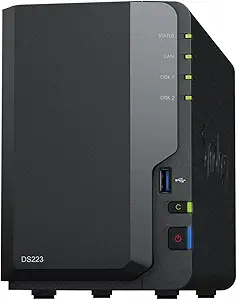 | Best for Versioned Work and Home Backups | Model: DS223 | Drive bays: 2 | Disk status: Diskless; drives not included | VIEW ON AMAZON | See Our Full Breakdown |
| BUFFALO LinkStation 210 4TB 1-Bay NAS with Included Hard Drive |  | Best for Simple, Ready-to-Use Backups | Model: LS210D0401 | Storage capacity: 4TB | Drive bays: 1 | VIEW ON AMAZON | See Our Full Breakdown |
| BUFFALO LinkStation 210 6TB 1-Bay NAS with Hard Drive | | Best for Higher-Capacity Single-Drive Storage | Model: LS210D0601 | Storage capacity: 6TB | Drive bays: 1 | VIEW ON AMAZON | See Our Full Breakdown |
| Buffalo LinkStation 220 4TB 2-Bay NAS with Hard Drives | | Best for Included Drive Redundancy | Storage capacity: 4TB total | Drive bays: 2 | Hard drives: Included | VIEW ON AMAZON | See Our Full Breakdown |
| Synology DS225+ 2-Bay Diskless NAS Media Server |  | Best Premium Media and Backup Hub | Model: DS225+ | Drive bays: 2 | Drive configuration: Diskless | VIEW ON AMAZON | See Our Full Breakdown |
| Synology DiskStation DS223j 2-Bay NAS Enclosure (Diskless) |  | Best for a Quiet, Low-Power Starter NAS | Brand: Synology | Model: DS223j | Drive bays: 2 | VIEW ON AMAZON | See Our Full Breakdown |
| Yxk Zero1 2-Bay Desktop NAS for Home and Personal Storage (Diskless) |  | Best for Beginner-Friendly Private Backups | Drive bays: 2 | Drive configuration: Diskless; hard drives sold separately | Memory: 4GB | VIEW ON AMAZON | See Our Full Breakdown |
| UGREEN DXP2800 2-Bay NAS Network Storage Device |  | Best for Apps and Expansion | Drive bays: 2 HDD bays | Maximum storage: Up to 80TB | M.2 slots: 2 NVMe slots | VIEW ON AMAZON | See Our Full Breakdown |
| ASUSTOR Drivestor 2 Gen 2 AS1202T 2-Bay Diskless NAS |  | Best for Straightforward 4K Media Serving | Model: AS1202T | Drive bays: 2 | Drive configuration: Diskless | VIEW ON AMAZON | See Our Full Breakdown |
| network attached backup device | Drive bays | Warranty | Model |
|---|---|---|---|
| UGREEN NAS DH4300 Plus 4-Bay N | 4 | — | — |
| BUFFALO LinkStation 220 8TB 2- | 2 | 2 years, including hard drives | LS220D0802 |
| Buffalo LinkStation 210 2TB 1- | 1 | 2 years, including hard drive | — |
| UGREEN DH2300 2-Bay NAS for Pe | 2 | — | — |
| Synology DS223 2-Bay Diskless | 2 | 2 years | DS223 |
| BUFFALO LinkStation 210 4TB 1- | 1 | 2 years, including hard drive | LS210D0401 |
| BUFFALO LinkStation 210 6TB 1- | 1 | 2 years, including hard drive | LS210D0601 |
| Buffalo LinkStation 220 4TB 2- | 2 | 2 years, including hard drives | — |
| Synology DS225+ 2-Bay Diskless | 2 | 3 years | DS225+ |
| Synology DiskStation DS223j 2- | 2 | 2 years | DS223j |
| Yxk Zero1 2-Bay Desktop NAS fo | 2 | 2 years | — |
| UGREEN DXP2800 2-Bay NAS Netwo | 2 HDD bays | 2 years | — |
| ASUSTOR Drivestor 2 Gen 2 AS12 | 2 | — | AS1202T |
More Details on Our Top Picks
UGREEN NAS DH4300 Plus 4-Bay Network Attached Storage
The four drive bays give the DH4300 Plus room to build a larger backup pool than the two-bay Synology DS223 or the prefilled BUFFALO LinkStation 220. Its 2.5GbE connection and 8GB of memory suit households that move large files across a wired network and want to run several apps; Docker support adds flexibility, though it does not support virtual machines. For photo libraries, AI search and duplicate removal can make a growing archive easier to manage. The tradeoff is that drives are sold separately, so setup requires a separate drive choice and purchase. It also needs Ethernet, and actual transfer rates depend on the drives, network, and file sizes. I’d pick it for capacity and app flexibility, not for a ready-to-use kit.
Pros:- Four bays allow more room to expand storage than the two-bay models in this group.
- 2.5GbE and 8GB RAM support faster wired transfers and multiple apps.
- Automatic backups and remote access help centralize files across devices.
- AI photo search and duplicate removal help manage large image libraries.
Cons:- Storage drives are sold separately, adding setup decisions and cost.
- Requires wired Ethernet and does not support virtual machines.
- Real transfer speeds vary with network conditions, drives, and file sizes.
Best for: Households building a large photo and computer backup library that want four bays, faster-than-gigabit networking, and Docker support.
Not ideal for: Buyers who want included drives, Wi-Fi, or virtual-machine support, or who only need a simple ready-to-use backup appliance.
- Drive bays:4
- Maximum advertised capacity:128TB
- Memory:8GB LPDDR4X RAM
- Network:2.5GbE wired Ethernet; no Wi-Fi
- Video output:4K HDMI
- Applications:Docker supported; virtual machines not supported
- Storage drives:Not included
Our verdict“Choose the DH4300 Plus if you want a roomy, app-capable NAS for wired household backups and are prepared to supply your own drives.”
BUFFALO LinkStation 220 8TB 2-Bay NAS with Hard Drives
The LinkStation 220 is the most straightforward route in this group to a two-drive backup setup: it includes 8TB of drives, so there is no separate drive selection before getting started. In RAID 1, the drives mirror each other and leave 4TB usable, trading capacity for protection if one drive fails. RAID 0 exposes all 8TB but gives up that redundancy, so it is a poor fit if the central purpose is backup resilience. Compared with the single-bay LinkStation 210 2TB, this model offers a mirrored-drive option and more included capacity; unlike the diskless Synology DS223, it arrives with storage. Its simpler, included-drive approach limits room for tailoring the system, and listed Mac compatibility stops at macOS 15.
Pros:- Includes 8TB of total drive capacity, avoiding a separate drive purchase.
- RAID 1 mirrors data and provides 4TB usable capacity.
- Subscription-free personal cloud access and encrypted file transfers support remote sharing.
- Two-year warranty includes the hard drives.
Cons:- RAID 1 reduces the included 8TB to 4TB usable capacity.
- RAID 0 uses all capacity but lacks the drive-failure protection relevant to backups.
- Listed macOS compatibility is limited to macOS 15 and earlier.
Best for: Home users who want included drives and a simple network backup target with the option to mirror data across two disks.
Not ideal for: Buyers who need more than 4TB usable in mirrored mode, newer Mac compatibility beyond macOS 15, or a configurable diskless system.
- Model:LS220D0802
- Drive bays:2
- Total capacity:8TB
- RAID modes:RAID 1 or RAID 0
- Usable capacity:4TB in RAID 1; 8TB in RAID 0
- Compatibility:Windows and macOS 15 and earlier
- Warranty:2 years, including hard drives
Our verdict“Pick the LinkStation 220 if included drives and a mirrored 4TB backup pool matter more than customization or maximum usable capacity.”
Buffalo LinkStation 210 2TB 1-Bay NAS with Included Hard Drive
The LinkStation 210 keeps the setup simple: its 2TB drive is included, and backup software, folder controls, and SSL-encrypted transfers provide the basics for a shared home archive. Subscription-free personal cloud access can also make files available away from home. Compared with the two-bay LinkStation 220 8TB, though, this model has no second drive for mirroring; a drive failure can take the stored files with it. The Synology DS223 also needs drives purchased separately, but its two bays and broader file-management tools suit buyers planning a more expandable system. This Buffalo makes more sense for a modest, uncomplicated backup target than for a growing archive. Its listed Mac compatibility ends at macOS 15, and 2TB leaves limited headroom for large photo or video collections.
Pros:- Includes a 2TB hard drive for a simpler initial setup.
- Backup software supports automated backups from connected computers.
- Subscription-free personal cloud access and folder controls support remote and shared use.
- Two-year warranty covers the included hard drive, with 24/7 US-based support.
Cons:- One drive bay offers no internal drive mirroring.
- The 2TB capacity may constrain growing photo and video archives.
- Listed macOS compatibility is limited to macOS 15 and earlier.
Best for: Individuals or small households who want an included-drive network backup target for a modest set of documents and photos.
Not ideal for: Buyers who need drive redundancy, substantial capacity for media libraries, or listed Mac compatibility beyond macOS 15.
- Drive bays:1
- Storage capacity:2TB
- Hard drive:Included
- Compatibility:Windows and macOS 15 and earlier
- Security:SSL-encrypted file transfers and folder access controls
- Support:24/7 US-based support
- Warranty:2 years, including hard drive
Our verdict“Choose the LinkStation 210 2TB for basic centralized backups when simplicity matters more than redundancy or expansion.”
UGREEN DH2300 2-Bay NAS for Personal Storage and Backups
The DH2300 is aimed at people who want automatic backups and photo organization without turning a home NAS into an app server. AI tagging and duplicate detection help keep phone and computer libraries manageable, while two bays offer more room to grow than the one-bay Buffalo LinkStation 210 2TB. Its 1GbE port is suited to ordinary home backup traffic, but it lacks the DH4300 Plus’s 2.5GbE connection and Docker support. The drives are separate purchases, and the wired Ethernet connection means it needs a router or switch nearby; an external USB adapter is required for wireless networking. With no Docker or virtual-machine support, this is a focused storage appliance rather than a platform for running extra services.
Pros:- Automatic backups support multiple operating systems and device types.
- AI photo tagging and duplicate detection can reduce manual library cleanup.
- Two drive bays and up to 64TB capacity allow room for a larger archive.
- Two-factor authentication and encrypted transfers add account and data protections.
Cons:- Storage drives are sold separately.
- 1GbE is slower than the DH4300 Plus’s 2.5GbE connection.
- No Docker or virtual-machine support; Wi-Fi requires an external USB adapter.
Best for: First-time NAS buyers who want phone and computer backups with photo tagging and duplicate detection, and who are comfortable installing their own drives.
Not ideal for: Users seeking included drives, Wi-Fi out of the box, faster-than-gigabit networking, Docker, or virtual machines.
- Drive bays:2
- Maximum capacity:64TB
- Memory:4GB
- Ethernet:1GbE
- Maximum transfer speed:Up to 125 MB/s
- Drive format and interface:3.5-inch Serial ATA
- Drive inclusion:Storage drives sold separately
- Unsupported features:Docker, virtual machines, and SAN Manager
Our verdict“Pick the DH2300 for guided home photo and file backups if you value organization features over app flexibility and faster networking.”
Synology DS223 2-Bay Diskless NAS for Home and Office
The DS223 is a strong fit when a network backup device needs to do more than hold a second copy: its file syncing, sharing, and version history can help a household or small office recover earlier document versions and keep projects accessible across devices. Automated backups cover Macs, PCs, and mobile devices, and IP camera tools add scheduled recording, motion alerts, and remote viewing. Compared with the preloaded BUFFALO LinkStation 220 8TB, the DS223 gives buyers a diskless platform to configure, but that means buying and installing drives separately. It has two bays, while the four-bay UGREEN DH4300 Plus offers more capacity headroom and 2.5GbE; the DS223’s listed details do not specify comparable memory or network figures. Its appeal is the backup and file-management toolset, with setup effort as the tradeoff.
Pros:- Automated backup supports Macs, PCs, and mobile devices.
- File sharing, syncing, and version history support collaborative work and recovery of earlier documents.
- IP camera features include motion alerts, scheduled recording, and remote viewing.
- Two-year warranty is included.
Cons:- Diskless configuration requires a separate drive purchase and installation.
- Two bays provide less expansion room than the four-bay UGREEN DH4300 Plus.
Best for: Households and small offices that need automated multi-device backups, shared documents, and version history, and can supply their own drives.
Not ideal for: Buyers who want a ready-to-use NAS with included drives or need more than two bays for a large expanding archive.
- Model:DS223
- Drive bays:2
- Disk status:Diskless; drives not included
- Warranty:2 years
- Backup support:Automated backup for Macs, PCs, and mobile devices
- File tools:Sharing, syncing, and version history
- IP camera features:Motion alerts, scheduled recording, and remote viewing
Our verdict“Choose the DS223 if versioned files and multi-device backup tools matter more to your household or office than included drives or four-bay expansion.”
BUFFALO LinkStation 210 4TB 1-Bay NAS with Included Hard Drive
The LinkStation 210 4TB suits households that want a straightforward place to gather computer backups and shared files without buying a drive separately. Its included 4TB disk and automated backup software make setup simpler than the Synology DS223j, which is diskless and requires separate drives. Folder access controls and SSL-encrypted transfers add useful safeguards for shared or remote access, while its personal cloud avoids a monthly subscription.
The main compromise is its single drive bay: there is no second disk for RAID redundancy or an easy capacity expansion path, so a drive failure can put the stored copy at risk. Its stated macOS support also ends at version 15. I’d choose it for uncomplicated backup needs, but would favor a two-bay model when protecting the NAS data itself matters.
Pros:- Includes a 4TB hard drive, so no separate drive purchase is needed
- Automated backups and centralized storage simplify household file organization
- Folder access controls and SSL-encrypted file transfers support safer sharing
- Personal cloud access has no monthly subscription fee
Cons:- One drive bay offers no RAID redundancy if the disk fails
- Compatibility is specified only for Windows and macOS 15 and earlier
Best for: Windows or macOS 15-and-earlier households seeking a ready-to-use 4TB network backup and shared-file location
Not ideal for: Buyers who need RAID redundancy, room to add a second drive, or compatibility with macOS versions later than 15
- Model:LS210D0401
- Storage capacity:4TB
- Drive bays:1
- Hard drive:Included
- Compatibility:Windows and macOS 15 and earlier
- Warranty:2 years, including hard drive
- Support:24/7 US-based support
- Country of manufacture:Japan
Our verdict“Choose the LinkStation 210 4TB for simple, subscription-free backups when an included drive matters more than redundancy.”
BUFFALO LinkStation 210 6TB 1-Bay NAS with Hard Drive
When a household needs more room for backups but still wants an all-in-one appliance, the LinkStation 210 6TB offers more included storage than the 4TB LinkStation 210. Automated computer backups, private folders, encrypted transfers, and subscription-free personal cloud access cover the basics without requiring a separate drive purchase. Both LinkStation 210 models share the same one-bay design, so this version’s advantage is capacity rather than added protection or flexibility.
That distinction matters: a single disk does not provide RAID redundancy, and there is no second bay for expansion. The LinkStation 220 4TB can mirror its disks in RAID 1, though that leaves 2TB usable. I’d pick this 6TB model for larger backup collections that can tolerate single-drive risk; users seeking a protected copy should look at a two-bay NAS instead.
Pros:- Includes a 6TB drive for more storage than the 4TB LinkStation 210
- Supports centralized files and automated computer backups
- Private folder access and encrypted file transfers support controlled sharing
- Personal cloud access carries no monthly subscription fee
Cons:- Single drive bay provides no RAID redundancy or second-drive expansion
- Specified macOS compatibility ends at version 15
Best for: Households with larger photo, video, and computer backup collections that want an included 6TB drive and simple network access
Not ideal for: People who need RAID protection, future drive expansion, or support beyond macOS 15
- Model:LS210D0601
- Storage capacity:6TB
- Drive bays:1
- Hard drive:Included
- Compatibility:Windows and macOS 15 and earlier
- Warranty:2 years, including hard drive
- Support:24/7 US-based support
- Included items:AC adapter, Ethernet cable, quick setup guide, setup CD-ROM, warranty statement
Our verdict“Choose this LinkStation when you need more ready-to-use capacity than the 4TB model and accept single-drive risk.”
Buffalo LinkStation 220 4TB 2-Bay NAS with Hard Drives
The LinkStation 220 4TB is the included-drive option here for buyers who want a choice between usable capacity and disk mirroring. In RAID 1, its two drives mirror data and leave 2TB usable, giving backup files protection against the failure of one drive. RAID 0 uses the full 4TB but does not offer that redundancy. By comparison, the one-bay LinkStation 210 6TB provides more space in a single disk, but cannot mirror its contents.
That flexibility makes the LS220 a better fit for safeguarding a modest collection than maximizing capacity. Its automated backups, folder controls, SSL encryption, and subscription-free personal cloud cover common home NAS needs. The tradeoff is that RAID 1 cuts usable capacity in half, and the stated macOS support ends at version 15. I’d favor it when disk failure protection matters more than keeping all 4TB available.
Pros:- Two included drives support RAID 1 mirroring
- Automated backups and centralized storage help consolidate files
- Folder access controls and SSL encryption support managed sharing
- Personal cloud access does not require a monthly subscription
Cons:- RAID 1 leaves 2TB usable from the 4TB total
- macOS compatibility is limited to version 15 and earlier
Best for: Home users who want an included two-drive NAS and prefer mirrored backup storage over maximum usable capacity
Not ideal for: Buyers who need all 4TB usable, newer-than-macOS-15 compatibility, or a more expandable platform
- Storage capacity:4TB total
- Drive bays:2
- Hard drives:Included
- RAID 1:2TB usable
- RAID 0:4TB usable
- Compatibility:Windows and macOS 15 and earlier
- Warranty:2 years, including hard drives
- Support:24/7 US-based support
- Made in:Japan
Our verdict“Choose the LinkStation 220 if you want included drives with a mirroring option and can work within 2TB usable capacity.”
Synology DS225+ 2-Bay Diskless NAS Media Server
The Synology DS225+ is the most capable media-and-backup focused choice in this set. It combines automated backups, RAID redundancy, snapshots, remote access, and media streaming, so it can serve as a shared library as well as a destination for computer files. Its listed transfer speed of 282 MB/s and support for up to 30 IP cameras also give it broader home-server duties than the simpler BUFFALO LinkStation 210.
That range comes with more setup responsibility: the DS225+ is diskless, so buyers must choose and install drives before storing anything. Two bays allow a RAID arrangement, but usable capacity depends on the drives and configuration selected. Surveillance support may be unnecessary for households that only want a backup target. I’d choose this model for a media-heavy home that wants room to grow its NAS use, not for someone seeking an inexpensive plug-in storage appliance.
Pros:- Supports automated backups, snapshots, and RAID redundancy
- Streams movies, shows, photos, and music across devices
- Remote file access supports use away from home
- Supports surveillance for up to 30 IP cameras
Cons:- Diskless configuration requires separate drive selection and installation
- Two drive bays limit expansion compared with multi-bay NAS options
Best for: Media-heavy households and home-office users willing to select drives for backups, streaming, snapshots, and camera storage
Not ideal for: Buyers who want a ready-to-use NAS with drives included or only need basic network file backup
- Model:DS225+
- Drive bays:2
- Drive configuration:Diskless
- Transfer speed:282 MB/s
- Surveillance support:Up to 30 IP cameras
- Warranty:3 years
Our verdict“Choose the DS225+ for a configurable media and backup hub if you are prepared to supply the drives.”
Synology DiskStation DS223j 2-Bay NAS Enclosure (Diskless)
The Synology DS223j is a compact, quiet two-bay enclosure for buyers who want to build a private backup and file-sharing setup around drives they select themselves. It supports automated computer and mobile-device backups, file syncing, and remote monitoring with compatible IP cameras. Compared with the more media-oriented Synology DS225+, the DS223j is positioned around quieter, energy-conscious everyday storage rather than stated high transfer speeds and support for as many as 30 cameras.
Its two bays also give it a path to a mirrored setup that the one-bay LinkStation 210 lacks, though actual capacity depends on the drives chosen. The catch is the diskless purchase: buyers must budget for and configure drives separately, and camera monitoring requires compatible cameras. I’d pick it for a small home or office wanting a modest, unobtrusive NAS; those seeking a ready-to-run backup appliance should consider a drive-included LinkStation.
Pros:- Two drive bays support a private cloud and shared storage setup
- Automated backups cover computers and mobile devices
- File syncing helps keep files available across devices
- Compact, quiet, and energy-efficient design
Cons:- Hard drives are not included and must be sourced separately
- Remote camera monitoring depends on compatible IP cameras
Best for: Small households or home offices seeking a quiet, energy-efficient two-bay NAS for backups and file syncing
Not ideal for: Buyers who want storage included, higher specified transfer performance, or a turnkey setup
- Brand:Synology
- Model:DS223j
- Drive bays:2
- Drive included:No
- Warranty:2 years
- UPC:846504004768
Our verdict“Choose the DS223j for a quiet starter NAS when you are comfortable supplying and configuring the drives.”
Yxk Zero1 2-Bay Desktop NAS for Home and Personal Storage (Diskless)
The Yxk Zero1 brings a useful mix of guided home storage features and room to experiment: automated backups, snapshots, encryption, and user permissions cover everyday file protection, while Docker support opens the door to running additional services. Its 2.5GbE connection can speed up transfers on a compatible network compared with basic gigabit connections, and remote access makes files available across computers and phones. Compared with the more expandable UGREEN DXP2800, the Zero1 lists fewer hardware details and does not specify M.2 slots, so it is harder to judge as a platform for heavier apps. The tradeoff is that it is diskless, and its 4K HDMI output and Docker support may take some setup to use. It suits buyers who want backup and private cloud features in one two-drive unit.
Pros:- Snapshots and automated backups provide recovery options for personal files
- 2.5GbE supports faster transfers on a compatible network
- Encryption and user permissions help manage access to private files
- Docker support adds flexibility beyond basic storage and sharing
Cons:- Hard drives must be purchased separately
- The provided specifications do not detail processor, storage expansion, or app performance
- Docker and remote access may require configuration
Best for: Home users who want snapshots, remote file access, and automated backups across phones and computers, with the flexibility to add Docker services.
Not ideal for: Buyers who want a ready-to-use system with drives included or need clearly specified expansion options for demanding apps.
- Drive bays:2
- Drive configuration:Diskless; hard drives sold separately
- Memory:4GB
- Network:2.5GbE
- Video output:4K HDMI
- Supported platforms:Windows, macOS, iOS, Android, and web browsers
- Features:Docker, RAID modes, automated backups, snapshots, encryption, remote access, and file sharing
- Warranty:2 years
Our verdict“Choose the diskless Zero1 for approachable home backups with snapshots and remote access, provided you are prepared to select and install drives.”
UGREEN DXP2800 2-Bay NAS Network Storage Device
The UGREEN DXP2800 is the strongest fit here for buyers who want their backup device to do more than hold copies of files. Its Intel N100 processor, 8GB DDR5 RAM, and two M.2 NVMe slots give it a more clearly equipped base for Docker, virtual machines, media servers, and compatible network cameras than the Yxk Zero1, whose listed specs are less detailed. Two HDD bays and support for up to 80TB allow a large shared library, while 2.5GbE helps move files faster when the rest of the network supports it. Those capabilities bring extra setup and drive decisions: HDDs and SSDs are sold separately, and camera or virtualization features are aimed at owners willing to configure apps. For simple backups, the leaner ASUSTOR Drivestor 2 Gen 2 may be easier to match to the job.
Pros:- Intel N100 and 8GB DDR5 provide a capable foundation for added services
- Two NVMe slots add storage and app flexibility alongside the HDD bays
- Supports up to 80TB across the two HDD bays
- 2.5GbE and broad device support aid shared access on a compatible network
Cons:- HDDs and SSDs are sold separately
- Virtual machine and surveillance features can require setup and compatible equipment
- Its broader app feature set may be unnecessary for basic backup needs
Best for: Technically comfortable home users who want centralized backups plus room for Docker, virtual machines, media serving, or compatible camera recording.
Not ideal for: People seeking a simple, ready-to-use backup appliance or buyers who do not want to source and configure separate HDDs and SSDs.
- Drive bays:2 HDD bays
- Maximum storage:Up to 80TB
- M.2 slots:2 NVMe slots
- Processor:Intel N100 quad-core
- Memory:8GB DDR5 RAM
- Networking:2.5GbE
- Drive status:Diskless; HDDs and SSDs sold separately
- Warranty:2 years
Our verdict“Pick the DXP2800 if you want a two-bay backup hub with stronger app and expansion options and are comfortable setting it up.”
ASUSTOR Drivestor 2 Gen 2 AS1202T 2-Bay Diskless NAS
The ASUSTOR Drivestor 2 Gen 2 keeps the brief focused: it offers two drive bays, backup and personal cloud functions, and 4K media serving in a compact enclosure with tool-free drive installation. The tool-free design makes adding the separately purchased drives less involved than on models that require more installation steps. It also includes 2.5GbE, matching the faster network link offered by the Yxk Zero1 and UGREEN DXP2800. Its main limitation is the 1GB of DDR4 memory, with no stated upgrade capacity; that makes it a more restrained choice for running extra services than the DXP2800, which lists 8GB DDR5 and virtual machine support. For a household backup and media library, that simpler specification may be enough, but buyers wanting room to expand workloads should look elsewhere.
Pros:- Tool-free drive installation simplifies adding disks
- 2.5GbE supports faster transfers on a compatible network
- Designed for backups and personal cloud access
- Supports 4K media serving in a compact enclosure
Cons:- Only 1GB of DDR4 memory is specified
- No memory upgrade capacity is stated
- Diskless configuration requires a separate drive purchase
Best for: Households building a compact two-drive backup and 4K media library who value straightforward, tool-free drive installation.
Not ideal for: NAS owners who plan to run several apps, containers, or virtual machines, or want memory headroom for expanding workloads.
- Model:AS1202T
- Drive bays:2
- Drive configuration:Diskless
- Processor:Realtek RTD1619B quad-core, 1.7 GHz
- Memory:1GB DDR4; maximum 1GB
- Network:2.5GbE
- USB ports:3
- Installation:Tool-free
- Dimensions:3.94 x 3.94 x 3.94 inches
Our verdict“Choose the AS1202T for a compact backup and 4K media role with easy drive installation, but avoid it for memory-heavy add-on services.”

How We Picked
I compared these devices as network attached backup options, weighing storage layout, included drives, setup demands, flexibility, and the likely needs of home and small office buyers. I gave more weight to the ability to protect and grow a useful shared backup library than to a large bundled capacity alone: one drive can store files, but it cannot provide drive-level redundancy. I also considered whether each device suits buyers who want a ready-made appliance or those willing to choose drives and configure a fuller NAS platform.
The ranking reflects those tradeoffs. The UGREEN NAS DH4300 Plus leads for its four-bay design and room to grow; two-bay diskless picks follow where their software flexibility or balance of features suits a wider range of backup needs. Buffalo’s drive-included LinkStations earn places for convenience, though their simpler or one-drive configurations limit flexibility. The remaining options serve more specific priorities, such as a lower-complexity entry point, media use, or a compact personal setup. Exact backup features can vary by software version, so buyers should confirm compatibility with their computers and backup applications before choosing.
Factors to Consider When Choosing Network Attached Backup Device
Choosing a network attached backup device means planning how files will be protected, reached, and restored over time. Capacity is only one part of that decision; drive layout, backup habits, network conditions, and maintenance all shape whether the device will be useful when a computer fails.
Decide What Kind of Protection You Need
A NAS can keep a separate copy of files, and a multi-drive setup can often maintain access after a drive failure when configured with redundancy. Those are different protections: redundancy helps with a failed drive, while a backup protects against accidental deletion, malware, theft, or damage affecting the whole device. Avoid treating mirrored drives as a complete backup plan. Keep another copy on an external drive or a separate location, and decide how often each copy should update. For irreplaceable files, plan how you would restore them before the first problem occurs.
Estimate Capacity With Room for Growth
Start with the amount of data you need to store today, then account for future photos, video, and computer backups. Usable space can be lower than the combined capacity of installed drives when a multi-drive protection scheme reserves capacity for redundancy. A single large drive may offer plenty of room at first, but leaves fewer ways to recover from drive failure. Two bays offer a compromise between simplicity and drive-level protection; four bays give more room to expand or configure storage. Avoid buying only for your current file count if replacing the device soon would be disruptive.
Choose Between Bundled and Diskless Storage
A device with drives included reduces the number of parts to source and can make setup more straightforward. The tradeoff is less control over the drive choice and the storage arrangement. Diskless NAS models let you select drive capacity and replace drives individually, but you must check the manufacturer’s compatibility guidance and include drive setup in your plan. Confirm whether the quoted capacity refers to the total installed storage or the usable space after configuration. Also check whether replacement drives are easy to obtain where you live.
Match Setup Complexity to Your Household
Some buyers want a shared folder and automatic computer backups with minimal configuration; others want apps, user permissions, media services, and more control over backup schedules. Extra software features can improve flexibility, but they also bring more settings to manage and update. Before buying, check that the device supports the computers and operating systems in your home or office. Consider who will handle account setup, updates, and drive alerts after installation. A simpler device can be the better choice if nobody wants to maintain a small server.
Check Network Speed and Placement
A NAS depends on the network connecting it to your computers, so large backups can take longer over a slow or congested connection. Wired Ethernet is usually a better fit for the device itself than relying on a wireless connection, especially when storing large media libraries. Think about where it will sit: it needs power, a network connection, ventilation, and a spot where drive noise is acceptable. If the device is near a router but computers are far away, test the network path before expecting fast transfers. A faster NAS cannot compensate for a weak network.
Plan for Recovery, Maintenance, and Off-Site Copies
Backup devices need occasional attention: drives age, software receives updates, and backup jobs can stop without being noticed. Turn on alerts where available and check periodically that recent files are actually present. Keep a separate copy away from the NAS, since theft, electrical damage, or ransomware can affect connected equipment together. If restoring files quickly matters, practice recovering a small folder and note the steps. The best setup is one someone in the household can maintain and use during a stressful moment.
Frequently Asked Questions
Is a one-bay NAS enough for a network attached backup device?
A one-bay NAS can work as a shared destination for backups, especially when simplicity and an included drive are priorities. Its limitation is that there is no second internal drive to provide drive-level redundancy. If the drive fails, you will need another copy elsewhere to restore the files. Treat the NAS as one part of a backup plan and keep a separate external or off-site copy. Buyers storing important data may prefer a multi-bay model.
Should I choose a NAS with drives included or buy a diskless model?
Choose a model with drives included if you want fewer compatibility and setup decisions at the start. A diskless model makes more sense if you want to choose the drive capacity yourself or replace drives independently later. Check supported drive models and the setup process before buying, since drive installation is part of the work. Compare total usable capacity, not just the number printed on the drive packaging. Either way, plan a second copy of important files outside the NAS.
Does RAID or drive mirroring replace a separate backup?
No. A mirrored or redundant multi-drive arrangement can help keep data available after a drive failure, depending on how the NAS is configured. It may not protect against accidental deletion, malware, theft, or damage to the whole device. A separate backup should be disconnected or stored elsewhere when possible. Check that backup jobs include the folders you care about and run on a schedule you can maintain. Test a restore before relying on the setup.
How many bays should I choose if I am backing up several computers?
The right number depends on both the data volume and the way you want to handle drive failure and future growth. Two bays can serve a household with moderate storage needs and allow a redundant configuration, though redundancy reduces usable capacity. A four-bay model offers more options for expansion and storage layouts, but involves more drives and setup decisions. Count the data on every computer and allow for future growth before choosing. If all copies live on one device, bay count alone does not make the backups safe.
Can a NAS back up computers when they are away from home?
That depends on the NAS software, backup application, and how you configure remote access. A device that works well for backups on a home network may not automatically provide secure off-site backup for traveling laptops. Check whether the manufacturer’s software supports remote backup and what setup it requires. Avoid exposing the NAS directly to the internet without understanding the security settings and update process. A separate cloud or remote backup destination can cover laptops that rarely connect to the home network.
Conclusion
For most buyers who want space to grow, I recommend the UGREEN NAS DH4300 Plus as the best overall pick, thanks to its four-bay layout. The BUFFALO LinkStation 220 4TB is a practical value choice for someone who wants a two-bay device with drives already included, while the Synology DS225+ is the premium fit for buyers who prioritize a more capable NAS platform and are comfortable supplying drives. For beginners who want bundled storage and a straightforward shared backup target, the BUFFALO LinkStation 210 is a simpler starting point, with the understanding that its one-drive design calls for another backup copy. Choose the Synology DS223 if you want a flexible two-bay diskless setup, or the UGREEN DXP2800 if you prefer a two-bay UGREEN alternative; either way, budget for drives and plan a separate copy of important data.